Microsoft Entra CBA Overview - Microsoft Entra ID (original) (raw)
Your organization can use Microsoft Entra certificate-based authentication (CBA) to allow or require users to authenticate directly by using X.509 certificates authenticated in Microsoft Entra ID for application and browser sign-in.
Use the feature to adopt a phishing-resistant authentication and to authenticate by using X.509 certificates against your public key infrastructure (PKI).
What is Microsoft Entra CBA?
Before cloud-managed support for CBA to Microsoft Entra ID was available, an organization had to implement federated CBA for users to authenticate by using X.509 certificates against Microsoft Entra ID. It included deploying Active Directory Federation Services (AD FS). With Microsoft Entra CBA, you can authenticate directly against Microsoft Entra ID and eliminate the need for federated AD FS, for a simplified environment and cost reduction.
The next figures show how Microsoft Entra CBA simplifies your environment by eliminating federated AD FS.
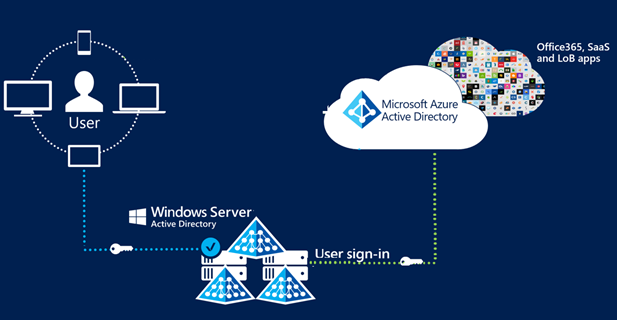
Microsoft Entra CBA
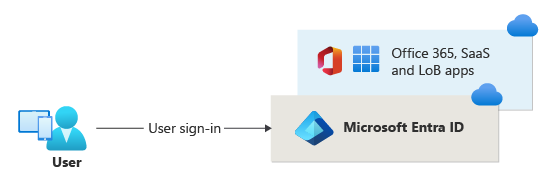
Key benefits of using Microsoft Entra CBA
| Benefit | Description |
|---|---|
| Improved user experience | - Users who need CBA can now directly authenticate against Microsoft Entra ID and not have to invest in federated AD FS.- You can use the admin center to easily map certificate fields to user object attributes to look up the user in the tenant (certificate username bindings)- Use the admin center to configure authentication policies to help determine which certificates are single-factor versus multifactor. |
| Easy to deploy and administer | - Microsoft Entra CBA is a free feature. You don't need any paid editions of Microsoft Entra ID to use it. - No need for complex on-premises deployments or network configuration.- Directly authenticate against Microsoft Entra ID. |
| Secure | - On-premises passwords don't need to be stored in the cloud in any form.- Protects your user accounts by working seamlessly with Microsoft Entra Conditional Access policies, including phishing-resistant multifactor authentication (MFA). MFA requires a licensed edition and blocking legacy authentication.- Strong authentication support. Admins can define authentication policies through the certificate fields, such as issuer or policy object identifier (policy OID), to determine which certificates qualify as single-factor versus multifactor.- The feature works seamlessly with Conditional Access features and authentication strength capability to enforce MFA to help secure your users. |
Supported scenarios
The following scenarios are supported:
- User sign-ins to web browser-based applications on all platforms
- User sign-ins to Office mobile apps on iOS and Android platforms, and Office native apps in Windows, including Outlook and OneDrive
- User sign-ins on mobile native browsers
- Granular authentication rules for MFA by using the certificate issuer subject and Policy OID
- Certificate-to-user account bindings by using any of the certificate fields:
SubjectAlternativeName(SAN),PrincipalName, andRFC822NameSubjectKeyIdentifier(SKI) andSHA1PublicKeyIssuerAndSubjectandIssuerAndSerialNumber
- Certificate-to-user account bindings by using any of the user object attributes:
userPrincipalNameonPremisesUserPrincipalNamecertificateUserIds
Unsupported scenarios
The following scenarios aren't supported:
- CBA is not supported in Web-sign in option at windows login (on the lock/sign-in screen).
- Only one CRL distribution point (CDP) for a trusted CA is supported.
- The CDP can be only HTTP URLs. We don't support Online Certificate Status Protocol (OCSP) or Lightweight Directory Access Protocol (LDAP) URLs.
- Password as an authentication method can't be turned off. The option to sign in by using a password appears, even when the Microsoft Entra CBA method is available to the user.
Known limitation with Windows Hello for Business certificates
Although Windows Hello for Business can be used for MFA in Microsoft Entra ID, Windows Hello for Business isn't supported for fresh MFA. You can choose to enroll certificates for your users by using the Windows Hello for Business key/pair. When properly configured, Windows Hello for Business certificates can be used for MFA in Microsoft Entra ID.
Windows Hello for Business certificates are compatible with Microsoft Entra CBA in Microsoft Edge and Chrome browsers. Currently, Windows Hello for Business certificates aren't compatible with Microsoft Entra CBA in nonbrowser scenarios, such as in Office 365 applications. A resolution is to use the Sign in Windows Hello or security key option to sign in (when it's available). This option doesn't use certificates for authentication and avoids the issue with Microsoft Entra CBA. The option might not be available in some earlier applications.
Out of scope
The following scenarios are out of scope for Microsoft Entra CBA:
- Creating or providing a public key infrastructure (PKI) for creating client certificates. You must configure your own PKI and provision certificates to your users and devices.