Sane C++ Libraries: File System (original) (raw)
🟩 File System operations { exists, copy, delete } for { files and directories }
SaneCppFileSystem.h is a library enabling manipulation of files and directories.
Quick Sheet
Dependencies
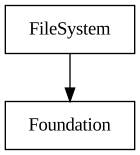
- Dependencies: Foundation
- All dependencies: Foundation
Features
| SC::FileSystem | Execute fs operations { exists, copy, delete } for { files and directories }. |
|---|---|
| Copy Files | |
| SC::FileSystem::copyFile | Copy a single file. |
| Delete Files | |
| SC::FileSystem::removeFile | Remove a single file. |
| SC::FileSystem::removeFileIfExists | Remove a single file, giving no error if it doesn't exist. |
| Copy Directories | |
| SC::FileSystem::copyDirectory | Copy a single directory. |
| Delete Directories | |
| SC::FileSystem::removeEmptyDirectory | Removes an empty directory. |
| SC::FileSystem::removeDirectoryRecursive | Remove single directory with its entire content (like posix rm -rf) |
| Create Directories | |
| SC::FileSystem::makeDirectory | Creates a new directory that does not already exist. |
| SC::FileSystem::makeDirectoryIfNotExists | Creates a new directory, if it doesn't already exists at the given path. |
| SC::FileSystem::makeDirectoryRecursive | Create a new directory, creating also intermediate non existing directories (like posix mkdir -p) |
| Check Existence | |
| SC::FileSystem::exists | Check if a file or directory exists at a given path. |
| SC::FileSystem::existsAndIsFile | Check if a file exists at given path. |
| SC::FileSystem::existsAndIsDirectory | Check if a directory exists at given path. |
| Rename files or directories | |
| SC::FileSystem::rename | Rename a file or directory. |
| Read / Change modification time | |
| SC::FileSystem::getFileStat | Obtains stats (size, modified time) about a file. |
| SC::FileSystem::setLastModifiedTime | Change last modified time of a given file. |
| Miscellaneous Classes | |
|---|---|
| SC::FileSystem::Operations | Low level filesystem API, requiring paths in native encoding (UTF-16 on Windows, UTF-8 elsewhere) |
| Get Executable / Application Path | |
| SC::FileSystem::Operations::getExecutablePath | |
| SC::FileSystem::Operations::getApplicationRootDirectory |
Status
🟩 Usable
The library contains commonly used function but it's missing some notable ones like stat. SC::FileSystem::getFileTime and SC::FileSystem::setLastModifiedTime will probably be refactored in a future dedicated class for handling stat based operations.
Blog
Some relevant blog posts are:
Description
SC::FileSystem allows all typical file operations ( exists | copy | delete | make files or directory). Some less used functions are SC::FileSystem::getFileTime and SC::FileSystem::setLastModifiedTime . The library doesn't allow reading or writing seeking inside a file, as that is domain of the File library. SC::FileSystem::init needs an absolute path to a directory and makes it a the base directory. All paths passed later on as arguments to all methods can be either absolute paths or relative. If they are relative, they will be interpreted as relative to the base directory and NOT current directory of the process. The class wants explicitly to make sure its behavior doesn't implicitly depend on current directory of process (unless it's passed explicitly to SC::FileSystem::init of course).
Use SC::Path from Strings library to parse and compose paths.
FileSystem
copyFile
Copy a single file.
Parameters
| source | Source file path |
|---|---|
| destination | Destination file path |
| copyFlags | Copy flags (overwrite, use clone api etc.) |
Returns
Valid Result if copy succeeded
Example:
StringView contentSource = "this is some content";
String content = StringEncoding::Ascii;
copyDirectory
Copy a single directory.
Parameters
| source | Source directory path |
|---|---|
| destination | Destination directory path |
| copyFlags | Copy flags (overwrite, use clone api etc.) |
Returns
Valid Result if copy succeeded
Example:
removeDirectoryRecursive
Remove single directory with its entire content (like posix rm -rf)
Parameters
| directory | Directory to remove |
|---|
Returns
Valid Result if directory contents has been successfully deleted
Example:
makeDirectoryRecursive
Create a new directory, creating also intermediate non existing directories (like posix mkdir -p)
Parameters
| directory | Path where to create such directory |
|---|
Returns
Invalid Result in case of I/O or access error
existsAndIsFile
Check if a file exists at given path.
Parameters
Returns
true if a file exists at the given path
Example:
StringView contentSource = "this is some content";
String content = StringEncoding::Ascii;
existsAndIsDirectory
Check if a directory exists at given path.
Parameters
| directory | Directory path to check |
|---|
Returns
true if a directory exists at the given path
rename
Rename a file or directory.
Parameters
| path | The path to the file or directory to rename |
|---|---|
| newPath | The new path to the file or directory |
Returns
Valid Result if the file or directory was renamed
Example:
write
Writes a block of memory to a file.
Parameters
| file | Path to the file that is meant to be written |
|---|---|
| data | Block of memory to write |
Returns
Valid Result if the memory was successfully written
Example:
String newString = StringEncoding::Ascii;
read
Read contents of a file into a String or Buffer.
Parameters
| [in] | file | Path to the file to read |
|---|---|---|
| [out] | data | Destination String or Buffer that will receive file contents |
Returns
Valid Result if the entire file has been read successfully
See also
write (for an usage example)
Roadmap
🟦 Complete Features:
accesschmodchownfchmodfchownfdatasyncfstatfsyncftruncateftruncatelchownlink(hardlink)lstatreadlinksendfilestatstatfs
Statistics
| Type | Lines Of Code | Comments | Sum |
|---|---|---|---|
| Headers | 117 | 232 | 349 |
| Sources | 1408 | 230 | 1638 |
| Sum | 1525 | 462 | 1987 |