jMonkeyEngine Docs (original) (raw)
Polygon Meshes
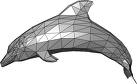
All visible game elements in a scene, whether it is a Model or a Shape, are made up of polygon meshes. JME3 has a com.jme3.scene.Mesh class that represents all meshes.
Meshes are made up of triangles:
getTriangleCount(…)andgetTriangle(…)Each mesh has a unique ID:
getId()Meshes have transformations: Location (local translation), rotation, scale.
Meshes have a bounding volume. jME3 can detect intersections (that is, non-physical collisions) between meshes, or between meshes and 2D elements such as rays:
collideWith().Meshes are locked with
setStatic()and unlocked withsetDynamic().- Static Meshes cannot be modified, but are more optimized and faster (they can be precalculated).
- Dynamic Meshes can be modified live, but are not optimized and slower.
Use built-in Shapes as meshes;
Load 3D models (that is, meshes created in external applications); or
Create free-form custom meshes programmatically.
Vertex Buffer
The VertexBuffer contains a particular type of geometry data used by Meshes. Every VertexBuffer set on a Mesh is sent as an attribute to the vertex shader to be processed.
Mesh Vertex Buffers
| Vertex Buffer Type | Description |
|---|---|
| Type.Position | Position of the vertex (3 floats) |
| Type.Index | Specifies the index buffer, must contain integer data. |
| Type.TexCoord | Texture coordinate |
| Type.TexCoord2 | Texture coordinate #2 |
| Type.Normal | Normal vector, normalized. |
| Type.Tangent | Tangent vector, normalized. |
| Type.Binormal | Binormal vector, normalized. |
| Type.Color | Color and Alpha (4 floats) |
| Type.Size | The size of the point when using point buffers. |
| Type.InterleavedData | Specifies the source data for various vertex buffers when interleaving is used. |
| Type.BindPosePosition | Initial vertex position, used with animation. |
| Type.BindPoseNormal | Initial vertex normals, used with animation |
| Type.BoneWeight | Bone weights, used with animation |
| Type.BoneIndex | Bone indices, used with animation |
Mesh Properties
Some Mesh properties from the Mesh class.
| Mesh method | Description |
|---|---|
| setBound(boundingVolume) | if you need to specify a custom optimized bounding volume |
| setStatic() | Locks the mesh so you cannot modify it anymore, thus optimizing its data (faster). |
| setDynamic() | Unlocks the mesh so you can modified it, but this will un-optimize the data (slower). |
| setMode(Mesh.Mode.Points) | Used to set mesh rendering modes, see below. |
| getId() | returns the Mesh ID, default value is -1 |
| getTriangle(int,tri) | returns data of triangle number int into variable tri |
| scaleTextureCoordinates(Vector2f) | How the texture will be stretched over the whole mesh. |
Mesh Rendering Modes
| Mesh Mode | Description |
|---|---|
| Mesh.Mode.Points | Show only corner points (vertices) of mesh |
| Mesh.Mode.Lines | Show lines (edges) of mesh |
| Mesh.Mode.LineLoop | ? |
| Mesh.Mode.LineStrip | ? |
| Mesh.Mode.Triangles | ? |
| Mesh.Mode.TriangleStrip | ? |
| Mesh.Mode.TriangleFan | ? |
| Mesh.Mode.Hybrid | ? |
Level of Detail
Optionally, custom meshes can have a LOD (level of detail optimization) that renders more or less detail, depending on the distance of the mesh from the camera. You have to specify several vertex buffers, one for each level of detail you want (very far away with few details, close up with all details, and something in the middle). Use setLodLevels(VertexBuffer[] lodLevels).