LBitmap::UserFilter (original) (raw)
Summary
Filters the bitmap based on a user-defined filter / mask. This function is similar to the spatial and binary filter functions.
Syntax
#include "ltwrappr.h"
virtual L_INT LBitmap::UserFilter(pFilter, uFlags = 0)
Parameters
pUSERFLT pFilter
Pointer to an LPUSERFLT structure that contains information about the mask to be applied.
L_UINT32 uFlags
Reserved for future use. Must be 0.
Returns
| Value | Meaning |
|---|---|
| SUCCESS | The function was successful. |
| < 1 | An error occurred. Refer to Return Codes. |
Comments
With this function you can create a user-defined filter and apply it to the image. The selected filter is passed as a parameter to this function. The filter has a rectangular form (matrix) where the values are user-defined. It allows the creation of simple customized filters, where each value found in matrix is multiplied by the corresponding pixel, and then the specified operation is performed on the results.
Support for 12 and 16-bit grayscale and 48 and 64-bit color images is available only in the Document/Medical toolkits.
When the filter is applied to pixels from the edge and you choose the sum operation, the edge rows and columns are duplicated. For example, if the pixel (-1, 5) is needed, the pixel (0, 5) is used instead.
This function does not support 32-bit grayscale images. It returns the error code ERROR_GRAY32_UNSUPPORTED if a 32-bit grayscale image is passed to this function.
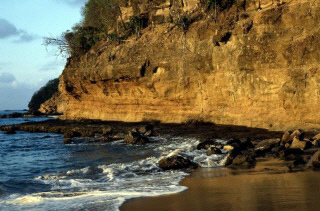
User Filter Function - Before
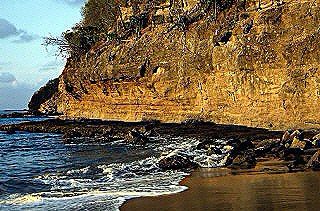
User Filter Function - After
View additional platform support for this User Filter function.
Required DLLs and Libraries
- LTIMGEFX
- For a listing of the exact DLLs and Libraries needed, based on the toolkit version, refer to Files To Be Included With Your Application.
Platforms
Win32, x64.
See Also
Functions
- LBitmap::HighPassFilter
- LBitmap::MaxFilter
- LBitmap::MinFilter
- LBitmap::AddNoise
- LBitmap::Sharpen
- LBitmap::Posterize
- LBitmap::Mosaic
- LBitmap::Emboss
- LBitmap::AverageFilter
- LBitmap::MedianFilter
- LBitmap::IntensityDetect
- LBitmap::SpatialFilter
- LBitmap::BinaryFilter
- LBitmap::MinFilter
- LBitmap::Oilify
- LBitmap::Solarize
- LBitmap::WindowLevel
- LBitmap::WindowLevelExt
- LBitmap::AddShadow
- LBitmap::AllocFTArray
- LBitmap::ChangeHueSatInt
- LBitmap::ColorReplace
- LBitmap::ColorThreshold
- LBitmap::DFT
- LBitmap::DirectionEdgeStatistical
- LBitmap::FFT
- LBitmap::FreeFTArray
- LBitmap::FrqFilter
- LBitmap::FrqFilterMask
- LBitmap::FTDisplay
- LBitmap::GetStatisticsInfo
- LBitmap::GetFeretsDiameter
- LBitmap::GetObjectInfo
- LBitmap::GetRgnContourPoints
- LBitmap::GetRgnPerimeterLength
- LBitmap::MathFunction
- LBitmap::RevEffect
- LBitmap::Segment
- LBitmap::SubtractBackground
- LBitmap::DirectionEdgeStatistical2
Topics
Example
L_INT LBitmap__UserFilterExample(LBitmap *pLeadBitmap)
{
L_INT nRet;
/*In this example the high pass filter will be applied using user defined matrix*/
pUSERFLT pFilter;
L_INT i, j;
/* Allocate the user filter structure. And also we need a (3x3) matrix with 9 elements. */
pFilter = (pUSERFLT)malloc(sizeof(USERFLT) + 9 * sizeof(L_INT));
/* Initialize the array with factor used to apply the high pass filter */
for(i = 0; i < 3; i++)
{
for(j = 0; j < 3; j++)
{
if(j == 1 || i == 1)
{
if(j == 1 && i == 1)
pFilter->ufltMatrix[i * 3 + j] = 5;
else
pFilter->ufltMatrix[i * 3 + j] = -1;
}
else pFilter->ufltMatrix[i * 3 + j] = 0;
}
}
pFilter->uStructSize = sizeof(USERFLT);
pFilter->ufltWidth = 3;
pFilter->ufltHeight = 3;
pFilter->ufltCenter.x = 1;
pFilter->ufltCenter.y = 1;
pFilter->ufltDivisor = 1;
pFilter->nfltOffset = 0;
pFilter->ufltFlag = UD_SUM;
/* Apply the high pass custom filter */
nRet =pLeadBitmap->UserFilter (pFilter);
if(nRet !=SUCCESS)
return nRet;
/* Free the filter */
free(pFilter);
return SUCCESS;
}
LEADTOOLS Raster Imaging C++ Class Library Help