2024 Guide to Mastering Executive Calendar Management (original) (raw)
Professional DevelopmentSnackNation Office
🗓️ The Effective Guide for Mastering Executive Calendar Management in 2026
Does this sound like you?
- You’re tired of constantly playing catch-up with your executive’s calendar because of competing priorities, overlapping appointments, and unrelenting schedule changes.
- Despite your best efforts, 30 minutes of deep breathing, and lots of caffeine, you still feel underequipped and overwhelmed by the chaos of your executive’s daily schedule.
- Do you wish there was a better way to take charge of executive calendar management like the indispensable superstar Executive Assistant you want to become?
The good news is that executive calendar management is an executive assistant skill that can be mastered. Like all EA skills, it simply requires organization, time management, and a can-do attitude, all of which can be picked up by even complete newbies.

A meticulously managed calendar forms the critical backbone of your executive’s professional existence.
After all, executives are busy! A study conducted by Harvard Business Review found,
On average, the leaders in our study had 37 meetings of assorted lengths in any given week and spent 72% of their total work time in meetings.
Maintaining a busy schedule while working with multiple levels of their organization means executives need to have a calendar that is in tip-top shape.
It helps them allocate their time and resources optimally, so they’re at peak efficiency and productivity. Effective calendar management can help team leaders stay focused on their tasks and have adequate time to prepare for all types of scenarios.
Your executive’s performance is the barometer by which you can judge your organization’s health and growth prospects. If you can get your executive’s calendar running like a well-oiled machine, you’ve got a big chunk of the EA competency framework and your executive’s work life sorted!
In this article, we’ll explore the best strategies for slaying the calendar management monster, along with tools, tips, and answers for some common calendar management challenges!
Strategies for Effective Executive Calendar Management
1. Prioritize Tasks and Appointments

One of your most important roles as an EA is gatekeeping. Gatekeeping comes into play when it comes time to figure out what tasks to prioritize and which to flat-out say “no” to.
- Have that initial conversation with your executive to identify what constitutes a “priority” for your executive. A task/meeting can be a priority if it involves more senior executives (like board meetings), revolves around a significant business opportunity, or is a big project. However, this can vary depending on your executive’s input.
- If your boss is the type who can’t say no, gently but firmly explain the importance of gatekeeping—it prevents stress, burnout, and completely avoidable meetings. Have them pass off the meeting requests to you to decline politely despite them being non-essential or irrelevant.
- Decide on pre-formatted responses to dispensable external meeting requests. Ensure internal team members know they shouldn’t stop by randomly but should schedule important meetings ahead of time. Your executive’s time is precious and limited.
- As an organized EA, ensure you schedule at least a 10-minute 1-to-1 daily. You need this time to schedule meetings optimally and check in with your boss if you have any concerns.
2. Time Blocking for Key Activities

Time blocking is when you pre-slot set times to help your executives catch up with their own tasks, prepare for upcoming calendar events, or carry out other critical administrative to-dos (emails, phone calls, etc.). As a general guideline, you should not schedule meetings or ‘other people’ during these times.
Here are some tips to time block effectively:
- Block the first few hours of the first day of the week. This will help your executive fully catch up and dive into the new week. Assign it a name, say, ‘weekly prep hours.’ Also, see the bullet point for color coding in this section.
- Block either half an hour or one hour based on your executive’s preference for reading emails, managing callbacks, and more. You may occasionally need to block time for specific requirements, like important reports and presentations, visa applications, and the like.
- Block weekly slots for internal recurring meetings that your executive will need for team catch-ups and 1-to-1s with direct reports, a little less frequently, say once a month.
- Block a few hours in your executive’s schedule at the end of the work week (before they’re due to sign off) to prevent last-minute and wholly unnecessary crisis-style situations.
3. Use Color Coding

Color coding is simply assigning colors to time slots. It’s an easy way to visually distinguish between types of meetings and appointments. For example, you can have yellow for the time blocks, blue for meetings with team members, orange for external team meetings, green for events, etc. The specific color doesn’t matter; the emphasis is on consistency.
Aside from color coding, you also want to ensure the visible parts of the block time slots show a brief overview of the meeting. So, for an external meeting with KYC, you’ll have a timeslot in orange labeled “External—Meeting with KYC.” Also, look at color coding for the duration of any travel and off-site (vs. on-site) meetings.
In terms of the meetings themselves, when your executive opens up a meeting slot, they should have all of the following information included in the contents:
- The agenda/purpose of the meeting.
- Who is in attendance from both/all sides?
- Meeting venue (complete address and location) for offsite events with a link to an online map.
- Supporting documentation and files.
4. Delegate and Outsource

Consider ways to delegate and outsource to free up your executives’ time for high-priority tasks that need their attention.
- Not all external meeting requests need to be managed by your executive. More relevant requests should be made to direct reports or other team members responsible for the function.
- Outsource specific tasks that are important for your executive but don’t require in-person involvement. For example, if the boss wants to arrange flowers for his spouse, have the florist deliver them directly with a note.
- Your executive may even want you to manage their social media accounts and text messages because these are major time-wasters. By organizing their text messages and routing them to the right people, you can help save them countless hours.
5. Implement a ‘No Meeting’ Day

As the name suggests, a ‘no meeting’ day is a day for avoiding meetings altogether. It’s worth looking into as a calendar management strategy, especially while brainstorming the scheduling process to see what works best for your executive. Having a ‘no meeting’ day also frees up space for your executive if he has projects and tasks that require extra time over and beyond the scheduled time blocks.
6. Limit Meeting Duration

Most meetings are standardized at one hour. But before you block an hour, your first response should be to find out if the meeting is really necessary.
- Do you really need to meet? Sometimes, full-blown meetings are not necessary. A quick conversation on the phone may be all that’s needed to address talking points. Find out if it’s something that can be delegated to your executive’s subordinates. In short, look at whether your boss absolutely needs to be a part of the meeting. If not, don’t schedule it.
- Does it really need an hour? A scheduled one-hour meeting can often go on for longer. Sometimes, what’s slated for an hour can be over and done within 20 minutes. Your role as a gatekeeper is to cut down time slots for meetings wherever feasible. Also, regardless of the meeting length, remember to add a buffer time slot if the meeting extends beyond the expected close time.
7. Utilize Technology for Scheduling
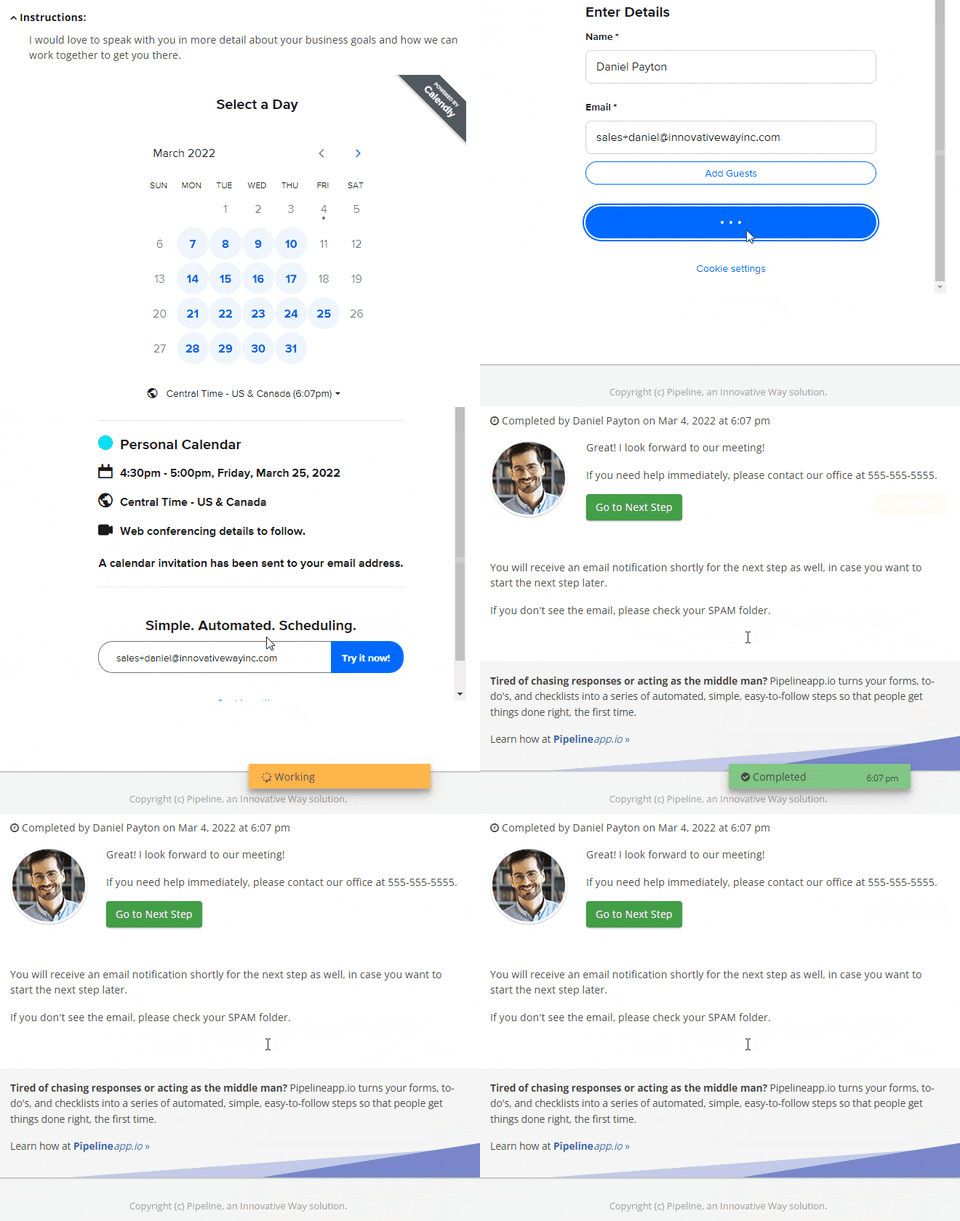
Managing one-on-one meetings can get complicated, but what if there are a large number of attendees in multiple time zones, and you need to match everyone’s calendar with your executives?
That’s where technology comes in handy. Try these three tools for starters:
- Calendly – for general calendar management and shared appointment scheduling.
- Office Tracker – for getting everyone in your company on a shared calendar so your executive can see who’s doing what and when. Also, it’s great to see who’s doing which projects and using which meeting rooms.
8. Set Aside Time for Email and Communication

This goes side-by-side with the time-blocking system we mentioned earlier. It’s easier to batch-process emails in one go if you have a designated time and space for them, free from other distractions. Make sure you field visitors, phone calls, and other distractions so your executive can wholly focus on the task at hand.
9. Regular Review and Adjustment

When you first start working with your executive, there’s a period of adjustment as you both get used to each other’s working styles and find common ground. Your aim is to make your executive’s schedule as smooth and seamless as possible, giving them adequate time for rest and preparation so they’re not unduly stressed or overwhelmed.
In the beginning, you may have to review methods as you figure out what your executives like and what they don’t. Some strategies you propose may not be met with much enthusiasm—don’t give up. Always come to the table determined to solve problems. If one strategy doesn’t work, look for something better.
Once you’ve established a mutually acceptable system, you won’t need as many reviews and adjustments going forward.
10. Respect Personal Time

If your executive has a tendency to fill his calendar with work and little else, as an efficient EA, you want to remind him of the importance of me-time and the need to schedule it to avoid burnout.
When organizing the calendar, always ensure they have adequate time for rest before a slew of engagements—this applies to travel as well. Buffer extra time for rest between flights and drives so your executive can maintain a healthy work-life balance.
11. Plan for Buffer Time
 We described some scenarios where buffer time is important already.
Here are some more tips:
- Check in with your boss to find out his preferences regarding the maximum number of meetings on any given day. It can be exhausting and draining to have to attend multiple meetings one after the other.
- In addition to buffering time for external/team meetings in case they run longer than expected, schedule extra time for breaks and refreshments between consecutive meetings.
- Travel schedules must be carefully accounted for. Allow buffer time for travel to and from the airport/hotel and meeting or event venue, as well as buffer time for checking in and checking out and possible traffic delays in busy destinations.
12. Learn Your Leader’s Preferences
 While we’ve covered several executive calendar management strategies from a practical perspective, perhaps the most important aspect to take into account is your leader’s preferences. While you’re taking control of their mailbox, you also want to make sure they’re happy and fully onboard with the changes.
When working with a new executive, take time to understand preferences before you start organizing the calendar. Here are some basic questions that you can ask to gauge this:
- When is your best time to work on emails, meetings, etc.? This will help you determine the best and most productive times to block them.
- How many meetings maximum would they take in a day?
- Who among their immediate team would they prioritize as a must-meet?
- Any specific points to keep in mind, for example, no meetings after 14:00 hours, slot time for signing off, calls only during a slotted time, etc?
For more resources on becoming a highly effective Executive Assistant, check out the following links:
- The Experts Guide to Becoming an Exceptional Executive Assistant
- 12 Executive Assistant Blogs to Help You Hone Your Knowledge
- The Most Important Responsibilities of an Executive Assistant to Know
- The Art of Effective Goal Setting for Executive Assistants
- Top Professional Development Newsletters You Can’t Miss!
Helpful Tools for Executive Calendar Management
1. Scheduling Software
 Scheduling software is one of the key software you’ll be using as an Executive Assistant. You’ll need a robust platform to set up meetings and appointments with internal and external stakeholders. The software should be user-friendly, customizable, and flexible.
Try these scheduling software: Calendly, Google Calendar, Microsoft Outlook, Doodle.
2. Task Management Tools
 These are beneficial for you and your executive to create tasks, assign them, track them, and get notifications on their progress. The tools are also useful to automate mundane, repetitive tasks and they often come with additional helpful features like document management, productivity tracking, customizable templates and workflows, team collaboration tools, reporting, and so on.
Try these task management tools: monday.com, ClickUp, BambooHR, Asana.
3. Email Management Apps (SaneBox, Spark)
 Email management apps go the extra mile by offering a whole host of features designed to improve efficiency. Advanced tagging and filtering options allow you to more seamlessly organize and prioritize your emails.
Email management apps often come with ready-made email templates you can rinse and repeat. They provide features for collaborating with your team members in a visible and transparent way. They’re also usually accessible from mobile devices, which means you can access them anytime, anywhere.
Also, check out this resource for more must-have tools for Executive Assistants.
Challenges in Executive Calendar Management and How to Overcome Them
In this section, we’ll look at some of the most common executive calendar management challenges and what you can do to overcome them:
❗️Overbooking and Time Conflicts
Overbooking and time conflicts are easy to recognize. Your executive’s calendar is filled to the brim with meetings and no breaks or discernable stop gaps. Your executive looks constantly harried and stressed, often missing appointments or getting delayed for others.
- 👉 How to overcome it: Set up a system of prioritizing meetings (scroll up further in this article for more information on how to do this). At the time of a meeting request, find out if it can be quickly reviewed first or delegated to avoid a meeting altogether. Reduce the meeting time (say from one hour to maybe 30 minutes) wherever feasible. Ensure you add buffer times between meetings to avoid run-throughs. Block time weekly for important tasks like emails and project reviews.
❗️Unplanned Interruptions
Unplanned interruptions are never welcome. They are unnecessary distractions, such as abrupt phone calls, impromptu meetings, and sudden team walk-ins, that prevent your executive from focusing on the important tasks they have.
- 👉 How to overcome it: Set up a gatekeeping system to field incoming visitors and phone calls. Look for ways to address questions and concerns through emails and phone calls instead of meetings. Time-block the executive’s calendar daily for email management, phone calls, and other tasks — these should not be carried out at any other part of the day. Ensure team members and direct reports understand that meetings should be scheduled only if necessary and in advance.
❗️Difficulty in Prioritizing
If you don’t correctly prioritize meeting requests, your executive can spend a lot of precious time dealing with low-value matters that shouldn’t concern them in the first place.
- 👉 How to overcome it: Have a one-to-one session with your executive to understand how he defined priority meetings and people and what he would rather delegate and not deal with. When you receive meeting requests, try to source more information, such as the context and the need, to see if it can be handed over to a direct report or another functional expert in the team. The idea here is only to book meetings your boss has deemed a priority.
❗️Maintaining Work-Life Balance
Executives typically have highly stressful and exhausting work schedules, which drain their energy and overall sense of well-being. As a high-impact executive assistant, part of your responsibility is to ensure they have adequate work-life balance to prevent burnout.
- 👉 How to overcome it: Audit schedules regularly to ensure your executive has enough rest/break time between tasks and meetings. If your boss hates to say NO, emphasize the value of boundaries and offer support in declining meetings on their behalf with pre-agreed scripts and templates. Attempt to shorten meeting times at the booking stage or delegate unnecessary meetings to reduce time wastage for your executive. Add enough buffer time, especially during travel, so they get adequate rest. Last but not least, insist on shutting down time before leaving for the day to give your executive enough time to wind down.