How to build a simple Calculator app using Android Studio? (original) (raw)
Last Updated : 12 Jul, 2025
Create a simple calculator which can perform basic arithmetic operations like addition, subtraction, multiplication, or division depending upon the user input. A sample video is given below to get an idea about what we are going to do in this article.
Note that we are going to implement this project using the **Java language.
**Pre-requisites:
- Android App Development Fundamentals for Beginners
- Guide to Install and Set up Android Studio
- Android | Starting with the first app/android project
- Android | Running your first Android app
**Step-by-Step Implementation
Building a calculator app is a great starting project for Android beginners.
**Step 1: Create a New Project
To Create a new project in Android Studio please refer to How to Create/Start a New Project in Android Studio.
Note that select **Java as the programming language.
Directory Structure of the application is attached below:

**Step 2: Working with the activity_main.xml file
Navigate to the **app > res > layout > activity_main.xml and add the below code to that file.
**Below is the code for the activity_main.xml file:
acitivity_main.xml `
<EditText
    android:id="@+id/editText2"
    android:layout_width="wrap_content"
    android:layout_height="wrap_content"
    android:layout_gravity="center_horizontal"
    android:textAlignment="center"
    android:focusable="false"
    android:focusableInTouchMode="false"
    android:layout_marginTop="40sp"
    android:textSize="30dp"
    android:hint="Enter the Value" />

<LinearLayout
    android:layout_width="wrap_content"
    android:layout_height="wrap_content"
    android:layout_gravity="center_horizontal"
    android:layout_marginTop="16dp"
    android:orientation="horizontal">

    <TextView
        android:id="@+id/result"
        android:layout_width="wrap_content"
        android:layout_height="wrap_content"
        android:textSize="20sp"
        android:text="Result: " />

    <TextView
        android:id="@+id/resultText"
        android:layout_width="wrap_content"
        android:layout_height="wrap_content"
        android:textSize="20sp"
        android:text="0" />
</LinearLayout>

<TableLayout
    android:layout_width="match_parent"
    android:layout_height="wrap_content"
    android:layout_marginTop="16dp">

    <TableRow
        android:layout_width="match_parent"
        android:layout_height="wrap_content"
        android:gravity="center">

        <Button
            android:id="@+id/num1"
            android:layout_width="wrap_content"
            android:layout_height="wrap_content"
            android:backgroundTint="@color/yellow"
            android:textSize="15sp"
            android:textColor="@color/black"
            android:text="1" />

        <Button
            android:id="@+id/num2"
            android:layout_width="wrap_content"
            android:layout_height="wrap_content"
            android:backgroundTint="@color/yellow"
            android:textSize="15sp"
            android:textColor="@color/black"
            android:text="2" />

        <Button
            android:id="@+id/num3"
            android:layout_width="wrap_content"
            android:layout_height="wrap_content"
            android:backgroundTint="@color/yellow"
            android:textSize="15sp"
            android:textColor="@color/black"
            android:text="3" />

        <Button
            android:id="@+id/add"
            android:layout_width="wrap_content"
            android:layout_height="wrap_content"
            android:backgroundTint="@color/light_grey"
            android:textSize="15sp"
            android:textColor="@color/black"
            android:text="+" />
    </TableRow>

    <TableRow
        android:layout_width="match_parent"
        android:layout_height="wrap_content"
        android:gravity="center">

        <Button
            android:id="@+id/num4"
            android:layout_width="wrap_content"
            android:layout_height="wrap_content"
            android:backgroundTint="@color/yellow"
            android:textSize="15sp"
            android:textColor="@color/black"
            android:text="4" />

        <Button
            android:id="@+id/num5"
            android:layout_width="wrap_content"
            android:layout_height="wrap_content"
            android:backgroundTint="@color/yellow"
            android:textSize="15sp"
            android:textColor="@color/black"
            android:text="5" />

        <Button
            android:id="@+id/num6"
            android:layout_width="wrap_content"
            android:layout_height="wrap_content"
            android:backgroundTint="@color/yellow"
            android:textSize="15sp"
            android:textColor="@color/black"
            android:text="6" />

        <Button
            android:id="@+id/sub"
            android:layout_width="wrap_content"
            android:layout_height="wrap_content"
            android:backgroundTint="@color/light_grey"
            android:textSize="15sp"
            android:textColor="@color/black"
            android:text="-" />
    </TableRow>

    <TableRow
        android:layout_width="match_parent"
        android:layout_height="wrap_content"
        android:gravity="center">

        <Button
            android:id="@+id/num7"
            android:layout_width="wrap_content"
            android:layout_height="wrap_content"
            android:backgroundTint="@color/yellow"
            android:textSize="15sp"
            android:textColor="@color/black"
            android:text="7" />

        <Button
            android:id="@+id/num8"
            android:layout_width="wrap_content"
            android:layout_height="wrap_content"
            android:backgroundTint="@color/yellow"
            android:textSize="15sp"
            android:textColor="@color/black"
            android:text="8" />

        <Button
            android:id="@+id/num9"
            android:layout_width="wrap_content"
            android:layout_height="wrap_content"
            android:backgroundTint="@color/yellow"
            android:textSize="15sp"
            android:textColor="@color/black"
            android:text="9" />

        <Button
            android:id="@+id/mul"
            android:layout_width="wrap_content"
            android:layout_height="wrap_content"
            android:backgroundTint="@color/light_grey"
            android:textSize="15sp"
            android:textColor="@color/black"
            android:text="X" />
    </TableRow>

    <TableRow
        android:layout_width="match_parent"
        android:layout_height="wrap_content"
        android:gravity="center">

        <Button
            android:id="@+id/dot"
            android:layout_width="wrap_content"
            android:layout_height="wrap_content"
            android:backgroundTint="@color/light_grey"
            android:textSize="15sp"
            android:textColor="@color/black"
            android:text="." />

        <Button
            android:id="@+id/zero"
            android:layout_width="wrap_content"
            android:layout_height="wrap_content"
            android:backgroundTint="@color/yellow"
            android:textSize="15sp"
            android:textColor="@color/black"
            android:text="0" />

        <Button
            android:id="@+id/clear_text"
            android:layout_width="wrap_content"
            android:layout_height="wrap_content"
            android:backgroundTint="@color/light_grey"
            android:textSize="15sp"
            android:textColor="@color/black"
            android:text="CE" />

        <Button
            android:id="@+id/div"
            android:layout_width="wrap_content"
            android:layout_height="wrap_content"
            android:backgroundTint="@color/light_grey"
            android:textSize="15sp"
            android:textColor="@color/black"
            android:text="/" />
    </TableRow>

</TableLayout>


<Button
    android:id="@+id/submit"
    android:layout_width="wrap_content"
    android:layout_height="wrap_content"
    android:layout_gravity="center"
    android:layout_marginTop="40dp"
    android:backgroundTint="@color/yellow"
    android:textSize="15sp"
    android:textColor="@color/black"
    android:text="Submit" />
`
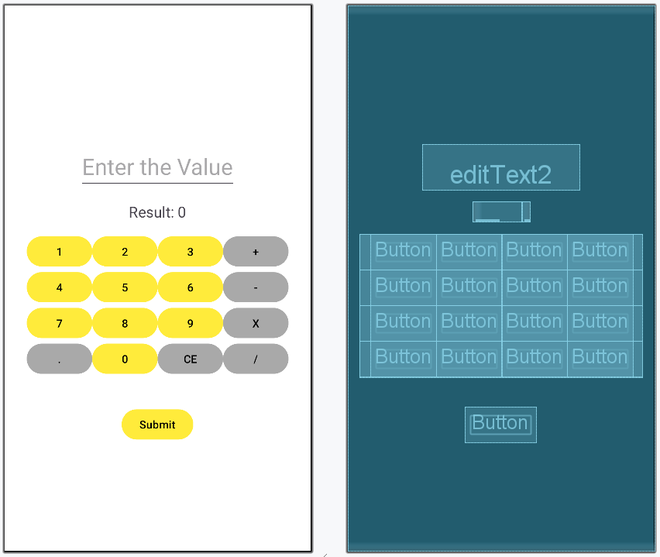
After using this code the UI will be like as follows:
**Step 3: Working with the **MainActivity.java file
Below is the code for the **MainActivity.java file.
**MainActivity.java:
MainActivity.java `
package com.gfg.calculator_java;
import android.os.Bundle; import android.view.View; import android.widget.Button; import android.widget.EditText; import android.widget.TextView; import androidx.appcompat.app.AppCompatActivity;
public class MainActivity extends AppCompatActivity {
private EditText editText;
private TextView resultText;
private Button addButton, subtractButton, multiplyButton, divideButton, equalButton, clearButton;
private Button num1Button, num2Button, num3Button, num4Button;
private Button num5Button, num6Button, num7Button, num8Button, num9Button, zeroButton, dotButton;
private double num1, num2;
private boolean isAddition, isSubtraction, isMultiplication, isDivision;


@Override
protected void onCreate(Bundle savedInstanceState) {
    super.onCreate(savedInstanceState);
    setContentView(R.layout.activity_main);

    editText = findViewById(R.id.editText2);
    resultText = findViewById(R.id.resultText);
    clearButton = findViewById(R.id.clear_text);


    addButton = findViewById(R.id.add);
    subtractButton = findViewById(R.id.sub);
    multiplyButton = findViewById(R.id.mul);
    divideButton = findViewById(R.id.div);
    equalButton = findViewById(R.id.submit);

    num1Button = findViewById(R.id.num1);
    num2Button = findViewById(R.id.num2);
    num3Button = findViewById(R.id.num3);
    num4Button = findViewById(R.id.num4);
    num5Button = findViewById(R.id.num5);
    num6Button = findViewById(R.id.num6);
    num7Button = findViewById(R.id.num7);
    num8Button = findViewById(R.id.num8);
    num9Button = findViewById(R.id.num9);
    zeroButton = findViewById(R.id.zero);
    dotButton = findViewById(R.id.dot);

    addButton.setOnClickListener(new View.OnClickListener() {
        @Override
        public void onClick(View v) {
            if (editText.getText().length() > 0) {
                num1 = Double.parseDouble(editText.getText().toString());
                isAddition = true;

                // Clear the EditText for the next number
                editText.setText("");
            }
        }
    });

    subtractButton.setOnClickListener(new View.OnClickListener() {
        @Override
        public void onClick(View v) {
            if (editText.getText().length() > 0) {
                num1 = Double.parseDouble(editText.getText().toString());
                isSubtraction = true;

                // Clear the EditText for the next number
                editText.setText("");
            }
        }
    });

    multiplyButton.setOnClickListener(new View.OnClickListener() {
        @Override
        public void onClick(View v) {
            if (editText.getText().length() > 0) {
                num1 = Double.parseDouble(editText.getText().toString());
                isMultiplication = true;

                // Clear the EditText for the next number
                editText.setText("");
            }
        }
    });

    divideButton.setOnClickListener(new View.OnClickListener() {
        @Override
        public void onClick(View v) {
            if (editText.getText().length() > 0) {
                num1 = Double.parseDouble(editText.getText().toString());
                isDivision = true;

                // Clear the EditText for the next number
                editText.setText("");
            }
        }
    });

    clearButton.setOnClickListener(new View.OnClickListener() {
        @Override
        public void onClick(View v) {
            editText.setText("");
            resultText.setText("0");
            // Reset all flags
            isAddition = false;
            isSubtraction = false;
            isMultiplication = false;
            isDivision = false;
        }
    });

    equalButton.setOnClickListener(new View.OnClickListener() {
        @Override
        public void onClick(View v) {
            if (editText.getText().length() > 0) {
                num2 = Double.parseDouble(editText.getText().toString());
                if (isAddition) {
                    resultText.setText(String.valueOf(num1 + num2));
                } else if (isSubtraction) {
                    resultText.setText(String.valueOf(num1 - num2));
                } else if (isMultiplication) {
                    resultText.setText(String.valueOf(num1 * num2));
                } else if (isDivision) {
                    if (num2 != 0) {
                        resultText.setText(String.valueOf(num1 / num2));
                    } else {
                        resultText.setText("Error");
                    }
                }
                // Reset all flags
                isAddition = false;
                isSubtraction = false;
                isMultiplication = false;
                isDivision = false;
            }
        }
    });

    num1Button.setOnClickListener(new View.OnClickListener() {
        @Override
        public void onClick(View v) {
            editText.setText(editText.getText().toString() + "1");
        }
    });

    num2Button.setOnClickListener(new View.OnClickListener() {
        @Override
        public void onClick(View v) {
            editText.setText(editText.getText().toString() + "2");
        }
    });

    num3Button.setOnClickListener(new View.OnClickListener() {
        @Override
        public void onClick(View v) {
            editText.setText(editText.getText().toString() + "3");
        }
    });

    num4Button.setOnClickListener(new View.OnClickListener() {
        @Override
        public void onClick(View v) {
            editText.setText(editText.getText().toString() + "4");
        }
    });

    num5Button.setOnClickListener(new View.OnClickListener() {
        @Override
        public void onClick(View v) {
            editText.setText(editText.getText().toString() + "5");
        }
    });

    num6Button.setOnClickListener(new View.OnClickListener() {
        @Override
        public void onClick(View v) {
            editText.setText(editText.getText().toString() + "6");
        }
    });

    num7Button.setOnClickListener(new View.OnClickListener() {
        @Override
        public void onClick(View v) {
            editText.setText(editText.getText().toString() + "7");
        }
    });

    num8Button.setOnClickListener(new View.OnClickListener() {
        @Override
        public void onClick(View v) {
            editText.setText(editText.getText().toString() + "8");
        }
    });

    num9Button.setOnClickListener(new View.OnClickListener() {
        @Override
        public void onClick(View v) {
            editText.setText(editText.getText().toString() + "9");
        }
    });

    zeroButton.setOnClickListener(new View.OnClickListener() {
        @Override
        public void onClick(View v) {
            editText.setText(editText.getText().toString() + "0");
        }
    });

    dotButton.setOnClickListener(new View.OnClickListener() {
        @Override
        public void onClick(View v) {
            if (!editText.getText().toString().contains(".")) {
                editText.setText(editText.getText().toString() + ".");
            }
        }
    });
}
}
`
Explanation of the above Program:
- The app initializes buttons for numbers (0-9), operations (add, subtract, multiply, divide), clear, equal, and dot.
- Number buttons append their value to the EditText for user input.
- Operation buttons store the first number (num1), set the corresponding operation flag, and clear EditText.
- The dot button adds a decimal point if it doesn’t already exist in the input.
- The equal button performs the operation with the second number (num2) and displays the result in TextView.
- The clear button resets the EditText and result, clearing operation flags.
- The app handles basic arithmetic operations and division by zero errors.