Building an AI application with LlamaIndex (original) (raw)
Last Updated : 14 Apr, 2026
LlamaIndex is an open source library that helps build AI applications by integrating agents with various data sources, offering a modular approach for tasks like chatbots, document analysis and NLP. Here we will build a movie recommendation bot using LlamaIndex, where a user query is processed, relevant data is retrieved and recommendations are generated.
- **Query Input: The user enters a query like “Show me some action movies.”
- **Document Retrieval: The retriever searches indexed movie data (VectorStoreIndex) to find relevant results.
- **Response Generation: The model combines the query and retrieved data to generate recommendations.
**Step 1: Installing Required Packages
- **llama-index****:** Used for indexing and querying large datasets.
- **transformers****:** Provides access to pre-trained models.
- **torch****:** Deep learning framework for running models.
- **accelerate, bitsandbytes: Optimize performance and memory for large models. Python `
!pip install --upgrade llama-index llama-index-embeddings-huggingface llama-index-llms-huggingface transformers torch accelerate bitsandbytes
`
**Step 2: Importing Required Libraries
Python `
from llama_index.core import Settings, VectorStoreIndex, Document from llama_index.embeddings.huggingface import HuggingFaceEmbedding from llama_index.llms.huggingface import HuggingFaceLLM import torch import pandas as pd import os
`
**Step 3: Setting Up Models and Embeddings
- Use a Hugging Face embedding model (all-MiniLM-L6-v2) to convert movie data into vector representations.
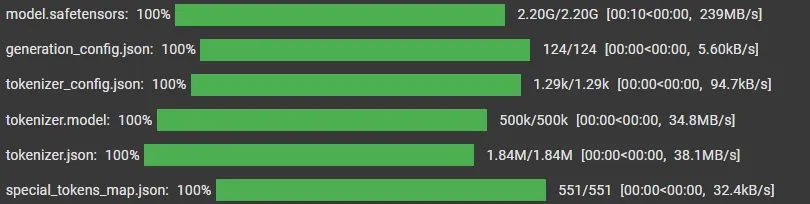
- Set up a language model (TinyLlama-1.1B-Chat-v1.0) for generating responses to user queries.
- Configure parameters like tokenization, context window and token limits for efficient performance. Python `
Settings.embed_model = HuggingFaceEmbedding( model_name="sentence-transformers/all-MiniLM-L6-v2" )
Settings.llm = HuggingFaceLLM( model_name="TinyLlama/TinyLlama-1.1B-Chat-v1.0", tokenizer_name="TinyLlama/TinyLlama-1.1B-Chat-v1.0", context_window=2048, max_new_tokens=256, device_map="auto", model_kwargs={"torch_dtype": torch.float32} )
`
Training
**Step 4 Loading Data from CSV
- Load the dataset and convert each row into Document objects for indexing.
- Extract fields like ID, title, genre and rating from each row.
- Create Document objects using this data for further processing.
You can download dataset from here.
Python `
csv_file_path = "/content/movie_recommendations_with_names.csv"
df = pd.read_csv(csv_file_path)
`
**Step 5: Document Creation and Indexing
- Build a VectorStoreIndex from the movie documents to enable efficient search and retrieval.
- Create a query engine to interact with the index and handle user queries. Python `
movies_data = [ Document( text=f"Title: {row['title']}, Genre: {row['genre']}, Rating: {row['rating']}", metadata={ "title": row['title'], "genre": row['genre'], "rating": row['rating'] } ) for _, row in df.iterrows() ] index = VectorStoreIndex.from_documents(movies_data) query_engine = index.as_query_engine()
`
**Step 6: Querying and Displaying Recommendations
- The user provides a movie genre as input through the loop.
- A structured prompt is created to guide the model to return movie titles with ratings in a specific format.
- The query is passed to the query engine, which retrieves relevant documents and generates recommendations.
- The response is printed directly using response.response, ensuring clean and readable output. Python `
print("Welcome to MovieRecBot!") print("Type 'exit' to quit.\n")
while True: query_string = input("What type of movie are you in the mood for?\n> ")
if query_string.lower() == "exit":
    print("Thanks for using MovieRecBot!")
    break

prompt = f"""
Recommend top 5 movies for genre: {query_string}.
Only return:
Title - Rating

Do NOT return numbers alone.
"""

response = query_engine.query(prompt)

print("\nRecommended Movies:\n")
print(response.response)
`
**Output:
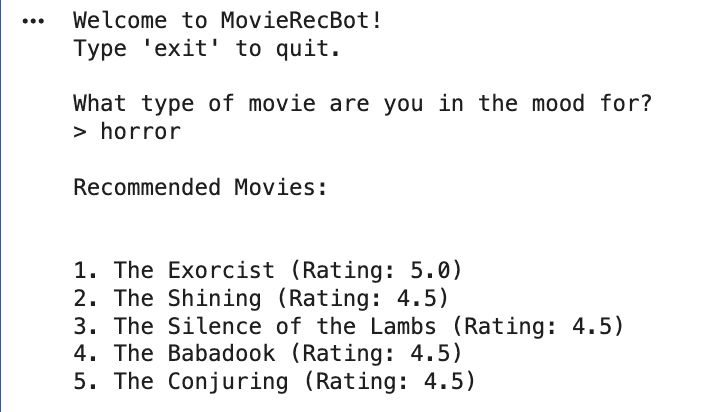
Output
You can download source code from here.
Applications
- LlamaIndex can recommend products, movies or content by matching user preferences with indexed data.
- Helps build search systems for large datasets like company documents or FAQs using natural language queries.
- Enables chatbots and virtual assistants to understand user queries and provide intelligent responses using indexed knowledge.
- Can be used to analyze reviews or social media data to understand public sentiment about products or services.
- Supports retrieval across multiple languages, making it useful for global applications.