Creating Custom Tools for CrewAI (original) (raw)
Last Updated : 14 Apr, 2026
CrewAI is a framework that allows multiple AI agents to work together to complete tasks. One useful feature is the ability to create custom tools that agents can use to perform specific functions. Custom tools allow agents to perform tasks beyond built-in capabilities, such as calculations, API access, or data processing, without hardcoding logic inside the agent.
By creating a tool, we give an agent the ability to handle these tasks automatically, instead of hard-coding everything in the agent’s logic.
1. Setting Up the Environment
Before creating custom tools, we need to set up the environment.
Installing the CrewAI Package
We will use pip to install the CrewAI package:
!pip install crewai
Setting the API Key
We need to set the API key since some tools require external services like OpenAI.
To know how to extract OpenAI API key refer to: How to find and Use API Key of OpenAI.
Python `
import os os.environ["OPENAI_API_KEY"] = "your-api-key-here"
`
2. Creating a Custom Tool
We will be making a custom tool in CrewAI using the @tool decorator. This decorator marks a function as a tool that can be used by agents. As an example, we will be making a calculator tool:
- ****@tool("calculator"):** Registers the function as a CrewAI tool named "calculator".
- **query: str: Input string that contains the math expression.
- **eval(query): Computes the mathematical result.
**Note: eval is unsafe for untrusted input. In production, a safer parser should be used.
Python `
from crewai.tools import tool
@tool("calculator") def calculator(query: str) -> str: """A simple calculator tool that evaluates math expressions.""" try: result = eval(query) return f"The result of {query} is {result}" except Exception as e: return f"Error: {str(e)}"
`
Agents are the entities that perform tasks. We can give them access to custom tools to expand their functionality.
- **role: Defines the agent’s function.
- **goal: Explains what the agent is trying to achieve.
- **backstory: Provides context or skills of the agent.
- **tools: List of tools the agent can use.
- **verbose: If True, the agent provides detailed reasoning during execution. Python `
from crewai import Agent
researcher = Agent( role="Researcher", goal="Perform research and compute results using tools.", backstory="Handles calculations and prepares data for reporting.", tools=[calculator], verbose=True )
writer = Agent( role="Writer", goal="Summarize the research into a readable article.", backstory="Takes calculation results and writes summaries for users.", verbose=True )
`
4. Assigning Tasks
Tasks tell agents what to do. Each task is linked to an agent and specifies the expected output.
- **description: Explains the task clearly.
- **agent: Assigns which agent will perform the task.
- **expected_output: Specifies what the agent should return.
- **context: Allows the agent to access previous task outputs. Python `
from crewai import Task
task1 = Task( description="Calculate '12 * (5 + 3)' using the calculator tool.", agent=researcher, expected_output="The numeric result of the expression." )
task2 = Task( description="Summarize the researcher's calculation in a short article.", agent=writer, expected_output="A summary article including the calculation result.", context=[task1] # Provides the output of task1 as context )
`
5. Creating and Running a Crew
A Crew groups agents and tasks so they can work together on a goal.
- **agents: List of agents participating in the Crew.
- **tasks: List of tasks assigned to the Crew.
- **process: Determines execution order (sequential or parallel).
- **kickoff(): Starts the Crew and executes the tasks. Python `
from crewai import Crew, Process
crew = Crew( agents=[researcher, writer], tasks=[task1, task2], process=Process.sequential, # Executes tasks in order verbose=True )
result = crew.kickoff() print("\nFinal Result:\n", result)
`
**Output:
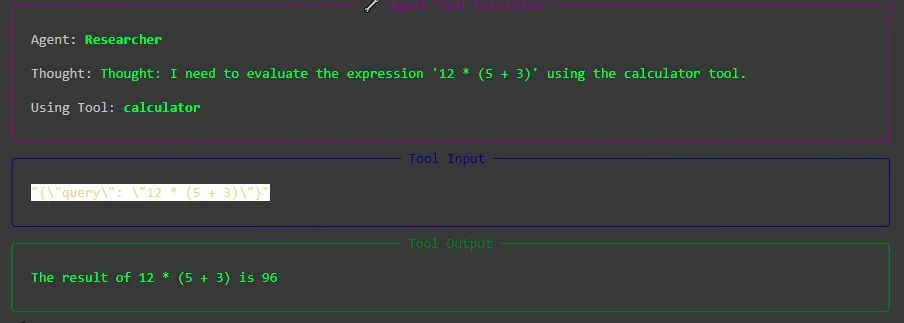
calculator tool
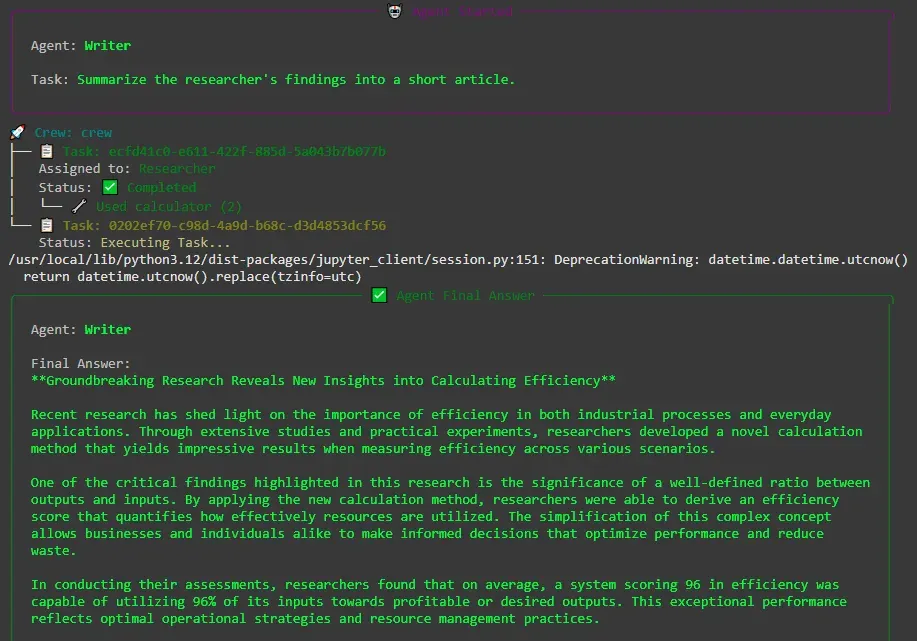
Writer's Output based on Researcher's Output
As we can see, our agent used the calculator tool to solve the given expression and provided the result for the next agent to use.
Creating custom tools allows agents to handle tasks that require specialized logic. Some examples are:
- **Education: Calculators, quiz generators or summarizers.
- **Research: Data collection, analysis and calculations.
- **Content Creation: Summaries, reports or structured text outputs.
- **Business: Finance calculations, market research or workflow automation.