Introduction to LangChain (original) (raw)
Last Updated : 11 Jun, 2026
LangChain is an open-source framework that simplifies building applications using large language models. It helps developers connect LLMs with external data, tools and workflows and is available in both Python and JavaScript.
- Simplifies chaining LLMs together for reusable and efficient workflows.
- Offers tools for effective prompt engineering and memory handling.
- Streamlines the process of building LLM-powered applications.
Key Components
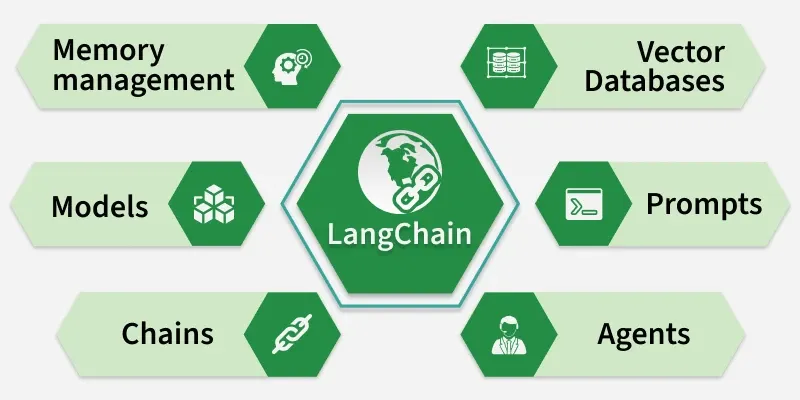
Main components of LangChain
- **Chains: Define a sequence of steps where each step can use an LLM, process data or call tools. Simple chains use one step, while multi step chains combine multiple actions.
- **Prompt Management: Helps design and manage prompts using templates, making it easier to control input, output format and model behavior.
- **Agents: Agents are LLM driven components that decide which actions to take, such as calling tools or APIs, based on input and predefined capabilities.
- **Vector Database: Stores data as vectors to enable similarity search, helping retrieve relevant information for tasks like document search and RAG.
- **Models: Supports multiple LLMs like OpenAI, Hugging Face and others, allowing flexibility in choosing the best model.
- **Memory Management: Maintains context from past interactions, enabling better responses in conversations and multi step tasks.
Working of LangChain
LangChain enables Retrieval-Augmented Generation (RAG) by combining document processing, vector storage and LLMs to generate accurate, context aware responses. It connects embeddings, vector databases and models into a smooth workflow.

RAG pipeline using LangChain
**1. Document Processing: Documents (e.g., PDFs) are split into smaller chunks so they can be processed efficiently.
**2. Embeddings Creation: Each chunk is converted into embeddings that capture its semantic meaning.
**3. Vector Store: These embeddings are stored in a vector database, creating a searchable knowledge base.
**4. User Query: The process starts when a user submits a question or request as input.
For example, a user might ask, _“What’s the weather like today?” This query serves as the input to the LangChain pipeline.
**5. Vector Representation: Once the query is received, LangChain converts it into a vector representation using embeddings. This vector captures the semantic meaning of the query.
**6. Similarity Search: This vector is compared with vectors stored in a database to find the most relevant matches based on meaning.
**7. Fetching Relevant Information: The system retrieves the most relevant data or context from the vector database to support the response.
**8. Generating a Response: The retrieved context is passed to a language model, which processes it and generates a meaningful answer.
For example, if the query is about the weather, the LLM might generate a response like, _“Today’s weather is sunny with a high of 75°F.”
Implementation
Let's implement a model using LangChain
Step 1: Install the dependencies
We will install all the required dependencies for our model.
- **langchain: The core LangChain framework (chains, prompts, tools, memory, etc.).
- **langchain-google-genai: LangChain integration for accessing Google Gemini models through the Gemini API. Python `
!pip install langchain langchain-google-genai
`
Step 2: Import Libraries
We will import all the required libraries.
- **ChatGoogleGenerativeAI: Enables interaction with Google Gemini models through LangChain.
- **PromptTemplate: define structured prompts with placeholders.
- **StrOutputParser: ensures model response is returned as clean string text. Python `
from langchain_google_genai import ChatGoogleGenerativeAI from langchain_core.prompts import PromptTemplate from langchain_core.output_parsers import StrOutputParser
`
Step 3: Configure API Key
We need to provide the Gemini API key to authenticate and access Google's Gemini models. In this example, the API key is added directly in the code and passed while initializing the model.
.env `
api_key = "YOUR_GEMINI_API_KEY"
`
Step 4: Initialize the Gemini Model
- **model: Specifies which Gemini model to use.
- **temperature=0.7: temperature Controls creativity (0 = more deterministic, 1 = more creative).
- **google_api_key=api_key: Authenticates access to Gemini. Python `
llm = ChatGoogleGenerativeAI( model = "gemini-2.5-flash", temperature=0.7, google_api_key = api_key )
`
Step 5: Run a Simple Prompt
We will check by running a simple prompt.
- ****.invoke():** sends prompt to LLM and returns text output. Python `
prompt = "Suggest me a skill that is in demand?" response = llm.invoke(prompt) print(" Suggested Skill:\n", response)
`
**Output:

Output
Step 6: Create a Prompt Template
We create a dynamic prompt where {year} can be replaced with input values.
Python `
template = "Give me 3 career skills that are in high demand in {year}." prompt_template = PromptTemplate.from_template(template)
`
Step 7: Create a Parser object
Python `
parser = StrOutputParser()
`
Step 8: Build a Chain
**LCEL (LangChain Expression Language): It’s a new way to compose LLM workflows using a simple, chainable syntax with the | (pipe) operator.
**1. prompt_template
- Fills placeholders (like {year}) with actual inputs.
- Example: "Give me 3 career skills in 2026."
**2. llm
- Sends the formatted prompt to the Gemini model.
- Example input: "Give me 3 career skills in 2026."
- Example output: "1. Data Analytics\n2. AI/ML\n3. Cybersecurity"
**3. StrOutputParser()
- Cleans up and ensures the LLM’s response is returned as a string. Python `
chain = prompt_template | llm | parser
`
Step 9: Run the Chain
We run the chain to fetch results.
- ****.invoke({"year": "2026"})** replaces {year} with 2026 in the prompt.
- **Final formatted prompt: "Give me 3 career skills that are in high demand in 2026." Python `
response = chain.invoke({"year": "2026"}) print("\n Career Skills in 2026:\n", response)
`
**Output:
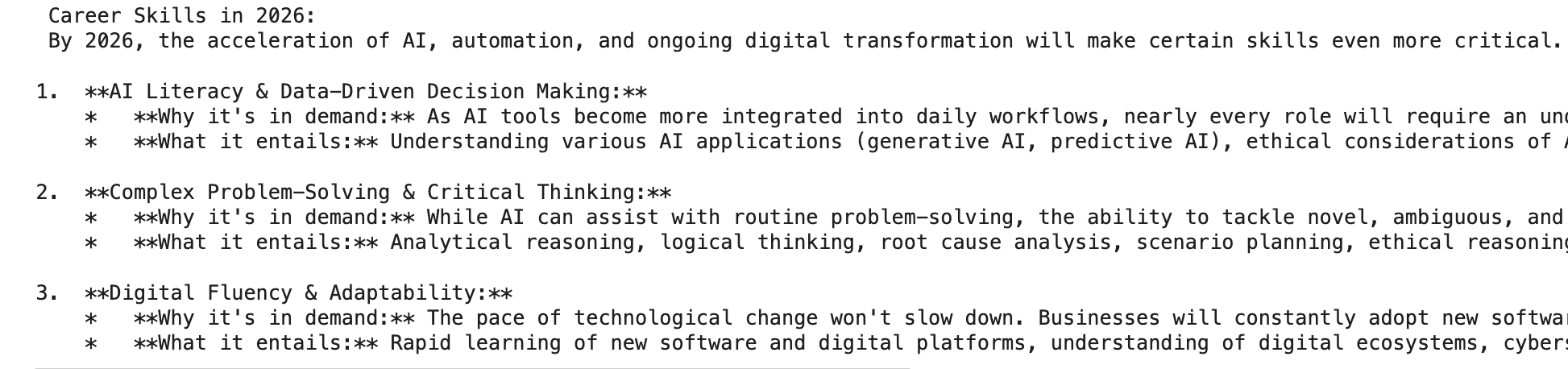
Output
Download full code from here
Applications
- Enables chatbots and virtual assistants that remember past interactions, connect with APIs and provide context aware responses.
- Allows users to query documents like PDFs, research papers or contracts and get precise answers quickly.
- Supports knowledge management by organizing and retrieving data from multiple sources.
- Automates multi step workflows such as customer support, report generation and CRM updates.
- Converts natural language queries into insights, SQL queries and business reports for data analysis.