Langflow (original) (raw)
Last Updated : 11 Jun, 2026
Langflow is an open-source, Python-based low-code platform that enables users to visually build, prototype, and deploy AI workflows, agents, and applications. Its drag-and-drop interface simplifies the process of connecting large language models, data sources, vector databases, APIs and custom logic.
- Provides a visual interface for building AI workflows
- Simplifies integration of LLMs, APIs and data sources
- Supports rapid prototyping and deployment
- Suitable for both beginners and advanced users
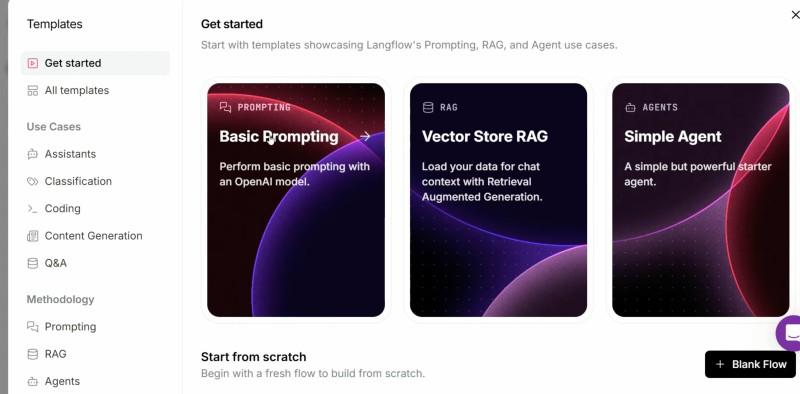
LangFlow
Whether you want to create Retrieval-Augmented Generation (RAG) pipelines, build chatbots, design multi-agent systems or orchestrate API-driven automations, Langflow offers a unified environment that dramatically accelerates iteration and deployment.
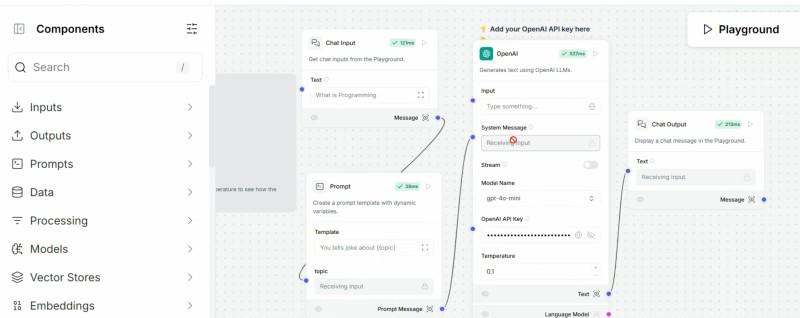
LangFlow Structure
Key Features
- **Visual Builder: Design AI workflows, chains and agents using a drag and drop GUI, reducing manual coding.
- **Flow-Based Programming: Connect modular components (nodes) to process data, call models, manage memory or handle inputs/outputs. Each “flow” forms a Directed Acyclic Graph (DAG) representing the sequence of tasks.
- **Multi-Agent Support: Easily create, manage and coordinate multiple AI agents with specific skills or data access.
- **RAG and Data Integration: Seamlessly link LLMs, embedding models, vector databases (e.g., Pinecone, AstraDB, ChromaDB) and your own document stores for RAG workflows.
- **Collaborative Tools: Share, export and iterate on flows with teammates through cloud or desktop environments.
- **Extensive Integrations: Supports all major AI frameworks, LLMs and tool APIs. LangChain, LlamaIndex, OpenAI, HuggingFace, Google and more are natively compatible.
Working of LangFlow
1. Flow in Langflow
A flow in Langflow is a workflow made up of connected components (nodes), where each node performs a specific function such as running an LLM, retrieving data, or handling inputs and outputs. These flows are visually designed and executed based on how the components are connected.
- Combines multiple components into a structured workflow
- Each node performs a specific task such as processing, retrieval or generation
- Execution follows the connections between nodes
**Example Components
- LLM (e.g., GPT, Gemini, Claude)
- Vector store search
- Data loader (PDF, SQL, Web)
- Prompt handler
- Memory manager
- API connectors
- Input/output UIs
2. Drag and Drop Workflow Design
Users build flows by dragging components from a sidebar into a workspace and connecting them with arrows. Each node’s properties can be configured from the UI and advanced users can inspect or edit the underlying Python code directly.
- Workflows can range from simple (single prompt to LLM) to highly complex (multi step processes, agent orchestration, conditional branching).
- Each node’s output can be fed as input to downstream nodes, defining the data and process dependencies.
3. Example Use Cases
- **Chatbots: Link chat input, LLM and chat output components for customer support or tutoring.
- **Multi-Agent Systems: Route tasks between specialized agents, with global memory, shared prompt libraries and tool access.
- **Retrieval-Augmented Generation (RAG): Combine document loaders, embedding components and vector search with LLMs for data grounded Q/A or summarization.
- **Automated Workflows: Chain together APIs (email, calendar, database) with AI logic to automate business or research tasks.
Projects and MCP Integration
- **Projects: Langflow organizes flows into Projects a space for modular workflows that encapsulate reusable logic, configurations and assets for a specific application or domain.
- **MCP Support: Projects can be exposed as MCP (Model Context Protocol) servers, enabling seamless interoperability with other LLM apps, tools and external APIs. Each flow inside a project can be registered as a callable “tool” or “action” for outside agents and platforms.
Advanced Features
| Feature | Description |
|---|---|
| Global Variables | Set and share variables across multiple components in a flow |
| Observability | Deep integration with LangSmith/LangFuse for tracing, logs, versioning and debugging |
| GUI | Full-featured, drag-and-drop web interface |
| Custom Components | Write Python functions or classes as nodes that plug into visual flows |
| Flow as API | Deploy and call flows as HTTP endpoints, integrating with any software stack or serving as microservices |
| Secure Deployment | Role-based access, secrets management and environment variable configs for safe multi-user use |
| Asynchronous Exec | Langflow can process long-running or resource-intensive tasks asynchronously for efficient scaling |
Getting Started: Installation and Usage
1. Installation
You can install Langflow via pip
Python `
pip install langflow
`
or via Anaconda with a new environment
Python `
conda create -n langflow-env python=3.10 -y conda activate langflow-env pip install langflow
`
2. Running Langflow
Start the app locally
Python `
langflow run
`
The platform runs at http://localhost:7860 by default, providing the full visual interface in your browser.
3. Building Your First Flow
- Drag nodes (e.g., Input, LLM, Output) onto the canvas.
- Connect them in your desired sequence.
- Configure each node (e.g., add API keys, prompt templates).
- Click “Run” to test and iterate.
4. Deployment
- Export and share flows as JSON or reusable templates.
- Deploy locally, on your own servers or use Langflow Cloud for instant production, scaling and collaboration.
Applications
- **Enterprise AI Assistants: Customer support bots, process automation, internal Q&A
- **Data-Centric Apps: Information extraction, document analysis and summarization
- **Conversational Interfaces: Language tutors, creative writing tools, translation
- **RAG Pipelines: Real-time chat with private data, knowledge management, legal or financial research