Multimodal Retrieval Augmented Generation (Multimodal RAG) (original) (raw)
Last Updated : 8 Apr, 2026
Multimodal Retrieval-Augmented Generation combines text, images, audio and video with retrieval to enhance generative models, enabling more accurate, context aware and informative responses beyond single modality systems.
- Uses multiple data types for richer understanding and context.
- Combines retrieval mechanisms with generative models.
- Improves accuracy and relevance of responses.
- Supports complex tasks where single data type is insufficient.
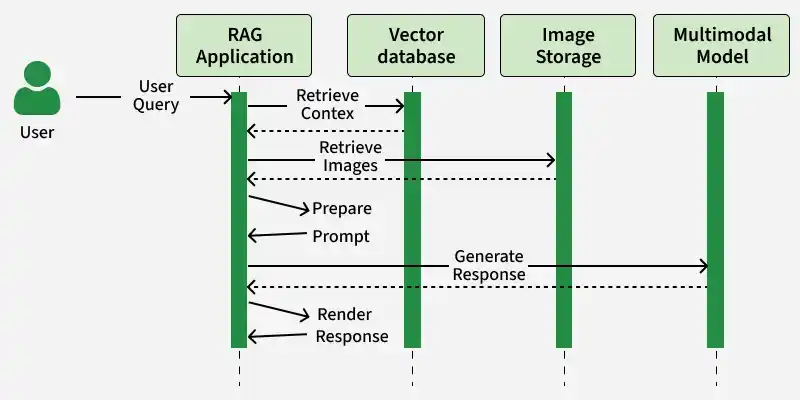
Flow of MM-RAG model
Multimodal RAG improves performance by using diverse data sources, enabling better understanding and more accurate responses.
- Enhances contextual understanding by combining textual and non textual data.
- Improves content generation with richer, more relevant and engaging outputs.
- Increases accuracy by retrieving and using information from multiple sources.
Architecture
Multimodal RAG follows a structured pipeline that processes multiple data types and converts them into embeddings for efficient retrieval and generation.
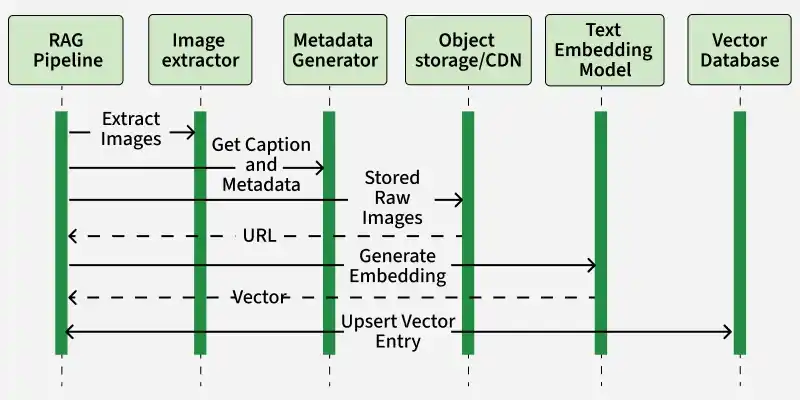
Components of Multimodal-RAG
- **RAG Pipeline: controls the workflow. It pulls source documents (or user uploads) and hands off any embedded images to the next component.
- **Image Extractor: receives raw inputs, isolates each image and forwards them to the Metadata Generator.
- **Metadata Generator: creates a natural‑language caption and any other metadata for each image. It pushes the raw image files into an Object Storage or CDN then retrieves their public URLs.
- **Object Storage / CDN : stores the original images and returns stable URLs which the pipeline uses for downstream embedding.
- **Text Embedding Model: takes the captions or image URLs plus prompts and converts them into fixed‑size vectors.
- **Vector Database: inserts the embeddings with associated metadata and URLs into FAISS, ChromaDB, etc making them instantly searchable for later retrieval.
Implementation
1. Install Required Libraries
- First we will install the necessary libraries like transformers, faiss-cpu, torch, sentence-transformers, PIL and OpenCv.
- Run the following command in your command prompt Python `
pip install transformers faiss-cpu torch sentence-transformers pillow opencv-python
`
2. Import Required Libraries
Import the required libraries for working with images, text and embeddings.
Python `
import torch import faiss import cv2 from PIL import Image from transformers import BlipProcessor, BlipForConditionalGeneration, AutoModel, AutoTokenizer from sentence_transformers import SentenceTransformer
`
3. Load Image and Text Models
- Load the BLIP model to generate captions from images.
- Load a SentenceTransformer model to convert captions or text into embeddings for retrieval tasks. Python `
processor = BlipProcessor.from_pretrained("Salesforce/blip-image-captioning-large") image_model = BlipForConditionalGeneration.from_pretrained("Salesforce/blip-image-captioning-large")
text_model = SentenceTransformer("all-MiniLM-L6-v2")
`
**Output:
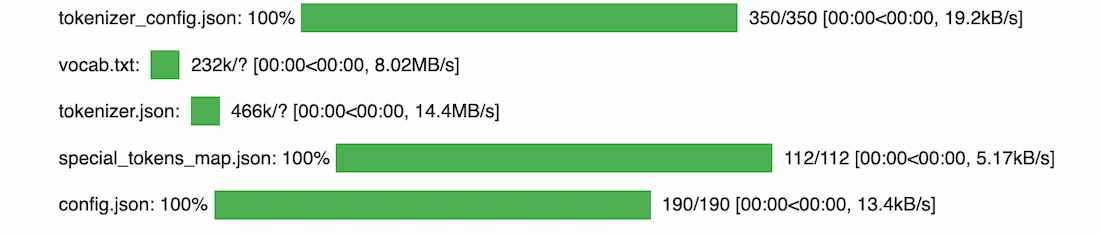
Output
4. Prepare Multimodal Dataset
- Define a dataset with text descriptions and corresponding image paths.
- Generate text embeddings directly from descriptions.
- Convert images into captions using the BLIP model.
- Encode these captions into embeddings for further processing. Python `
dataset_texts = [ "A cat sitting on a table", "A dog playing in the park", "A red sports car", "A bowl of fresh fruit" ]
dataset_images = [ "/content/cat2.jpg", "/content/dog2.jpg", "/content/car2.jpg", "/content/fruits2.jpg" ]
text_embeddings = text_model.encode(dataset_texts, convert_to_tensor=True)
captions = [] for img_path in dataset_images: image = Image.open(img_path).convert("RGB") inputs = processor(image, return_tensors="pt")
output = image_model.generate(**inputs)
caption = processor.decode(output[0], skip_special_tokens=True)

captions.append(caption)
image_embeddings = text_model.encode(captions, convert_to_tensor=True)
`
5. Build FAISS Index for Efficient Retrieval
- Use FAISS to store embeddings for efficient similarity search.
- Enables fast retrieval of both text and image embeddings. Python `
data_embeddings = torch.cat((text_embeddings, image_embeddings)).detach().numpy()
index = faiss.IndexFlatL2(data_embeddings.shape[1]) index.add(data_embeddings)
`
6. Perform Query Search
- Provide a text query to the system.
- Retrieve the most relevant multimodal results (text and images) based on similarity. Python `
query_text = "A cute kitten" query_embedding = text_model.encode([query_text], convert_to_tensor=True).detach().numpy()
distances, indices = index.search(query_embedding, k=3)
print("Top 3 nearest MultiModal results:", indices)
`
**Output:
Top 3 nearest MultiModal results: [[0 4 2]]
Indices [0, 4, 2] correspond to the most relevant results from Multimodal dataset based on the input query. Each index represents a combination of text and image data retrieved from the dataset.
Download full code from here.
Applications
- Enhances healthcare by analyzing both medical reports and images for accurate diagnosis.
- Improves e-commerce search using text queries and visual inputs like images.
- Supports education with interactive learning using text, diagrams and videos.
- Strengthens legal and financial analysis by combining documents, reports and visual data.
Limitations
- Requires higher computational resources for processing and storing multimodal data.
- Complex to design and integrate different modalities like text, images and audio.
- Data alignment issues can occur when different modalities are not properly synchronized.
- Depends on availability and quality of multimodal datasets for accurate results.