Use of MCP for Agent Workflow (original) (raw)
Last Updated : 30 Apr, 2026
AI agents face challenges like tool integration, context handling, and memory persistence. Model Context Protocol (MCP) addresses these by providing a standardized, vendor-neutral interface that enables dynamic tool discovery, memory access, and reusable workflows.
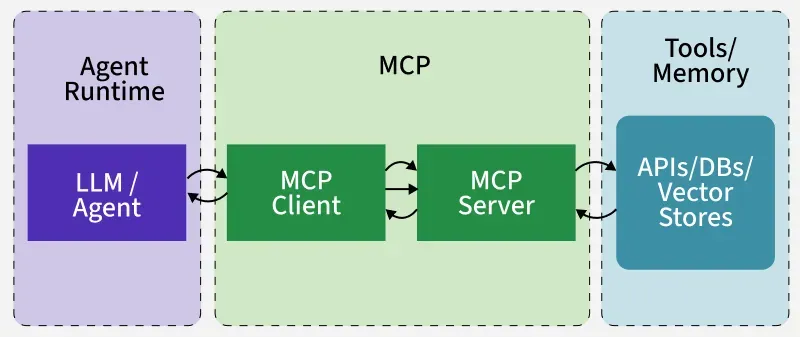
Interaction between MCP and Agents
Working of MCP at Frontend (Agent Side)
Let's see what the agent runtime (e.g., Claude Desktop, OpenAI Agent or a custom LangChain app) experiences.
**1. Discovery Phase
- When agent connects to an MCP server, it asks: “What tools/resources/prompts do you provide?”
- MCP server responds with a structured list (list_tools, list_resources, list_prompts).
- **Example: it might say “I support memory.put memory.search and a resource profile.json.”
- This allows the agent to dynamically learn capabilities without hardcoding adapters.
**2. Invocation phase
- Once the agent knows what exists, it can call a tool.
- **Example: the model might decide “I need to look up user’s project memory” and issue a call_tool for memory.search.
- Client runtime automatically handles the JSON-RPC call under the hood.
**3. Context assembly
- Tool results such as facts, profile data, and embeddings are returned to agent
- Results are integrated into working context (prompt)
- Final prompt includes user query along with memory, preferences, history, and task state
From the agent’s perspective, MCP memory tools behave like built-in functions that enrich its working memory on demand.
Working of MCP at Backend (Server Side)
Let's see what happens behind the scenes inside the MCP server.
**1. Server start / Registration
- MCP server starts up and registers all available tools/resources.
- **Example: it tells the client “I have memory.put, memory.search and resource:/memory/profile.json available.”
- These are exposed as JSON schemas which making them self-describing and language-agnostic.
**2. Request handling
- When the client calls a tool (memory.search), the server receives a JSON-RPC request.
- Request payload includes parameters (e.g., { query: "project 42", limit: 5 }).
- Server routes this to right handler function (memory_search in Python or TS).
**3. Persistence layer / Backend logic
a. The handler function connects to the underlying datastore.
b. Depending on design this could be:
- SQL/NoSQL database for structured facts.
- Vector index (FAISS, pgvector, Pinecone, ChromaDB) for semantic recall.
- Blob/File store for large documents or artifacts.
**Example: memory.search runs a SQL query or a vector similarity search.
**4. Response back to client
a. Server packages the results into structured JSON.
**Example:
JSON `
{ "results": [ {"subject": "proj-42", "content": "Paper X shows Y", "createdAt": 1724230042} ] }
`
This returned to the agent, which injects it into the LLM prompt.
Maintaining User Context Across MCP Sessions
One of the key challenges in AI agents is ensuring that context doesn’t disappear between sessions. For example, if a user tells an assistant their preferences today, they expect the assistant to remember them tomorrow without starting from scratch. MCP addresses this by exposing memory services as tools and resources.
Here’s how context persistence works:
**1. Ephemeral (Turn-Level Context)
- Only lasts for the duration of a single request/response cycle.
- Example: The current question a user asks (“Summarize this email”).
- Managed by the agent runtime, not stored permanently.
**2. Session or Task Context
- Maintains continuity across a multi-step workflow.
- Example: While generating a project report, the assistant remembers earlier steps like “data sources already processed” or “sections drafted.”
- MCP servers can store this state in temporary storage or pass it along between tool calls.
**3. Long-Term Memory
- Durable, persisted across sessions.
- Example: A user’s profile (profile.json), past interactions or embeddings stored in a vector DB (ChromaDB, FAISS, Pinecone, etc.).
- Exposed via tools like memory.put, memory.search or resources like /memory/profile.json.
**4. Shared Memory Across Agents
- When multiple agents collaborate, MCP allows them to access shared memory resources.
- Example: A “team of agents” working on a project can all read/write to the same task state in the MCP server.
How It Works in Practice
- Agent runtime asks the MCP server what memory tools/resources exist (list_resources, list_tools).
- MCP server exposes memory endpoints with well-defined JSON schemas.
- Agent can then call tools like memory.search to recall facts or memory.put to update the memory.
- This means context isn’t lost when the model’s token window resets—the memory service provides durable recall.
**Example: A user tells their AI assistant: “My project name is Orion.”
- **Without MCP: This fact disappears once the conversation ends.
- **With MCP: The agent calls memory.put to store { project_name: "Orion" }. Later, even in a new session, memory.search retrieves this fact, allowing the assistant to continue naturally.