AWS CloudTrail (original) (raw)
Last Updated : 4 Feb, 2026
AWS CloudTrail records and tracks all activities within your AWS account, providing a complete history of user, service, and resource actions. It helps improve security, compliance, auditing, and troubleshooting without requiring manual setup.
- Automatically records events each time an action occurs in your AWS account.
- Archives event logs for auditing and operational analysis.
- Assists with security monitoring and compliance reporting.
- Provides a detailed history of user, service, and resource activities.
AWS CloudTrail
AWS CloudTrail enables governance, compliance, and security auditing by recording all API calls made in an AWS account. It logs details such as the caller identity, time, source IP, request parameters, and responses. This detailed tracking helps monitor activity, analyze security events, troubleshoot issues, and meet compliance requirements across your AWS infrastructure.
CloudTrail provides three ways to record events:
- **Event History: AWS CloudTrail is enabled by default and provides immediate access to event history. It stores an immutable, searchable record of the last 90 days of management events performed via the AWS Console, CLI, or SDKs. Event history is region-specific and available for free in CloudTrail.
- **Cloud Trail Lake: AWS CloudTrail Lake is a managed data lake used to store, access, and analyze AWS user and API activity for security and auditing. It converts JSON logs into the efficient Apache ORC columnar format for faster querying. Events are stored in immutable event data stores for up to seven years and can span single or multiple AWS accounts. CloudTrail Lake also supports importing existing logs from S3 and provides dashboards to visualize event trends..
- **Trails: In addition to delivering and storing events in an Amazon S3 bucket, Trails can also deliver events to Amazon Cloud Watch Logs and the Amazon Event Bridge. These occurrences can be entered into your security monitoring programs.
**AWS CloudTrail Architecture
- A new AWS account automatically activates CloudTrail, which begins logging activities immediately.
- Every operation in the account—such as signing in, creating/deleting EC2 instances, or managing S3 buckets—triggers an API call on the backend.
- AWS activities can be performed using the Management Console, AWS CLI, or SDKs, all of which generate backend API requests.
- Each API request creates an event that is recorded as an immutable log in CloudTrail.
- CloudTrail only logs events when actions are performed in the AWS account, capturing all relevant operational activity.
The AWS account activity we perform lasts for 90 days in the same place. It is possible to keep event logs in an S3 bucket for longer than 90 days. SNS notification (Simple Notification Service) configuration is also possible in Cloud Trail.
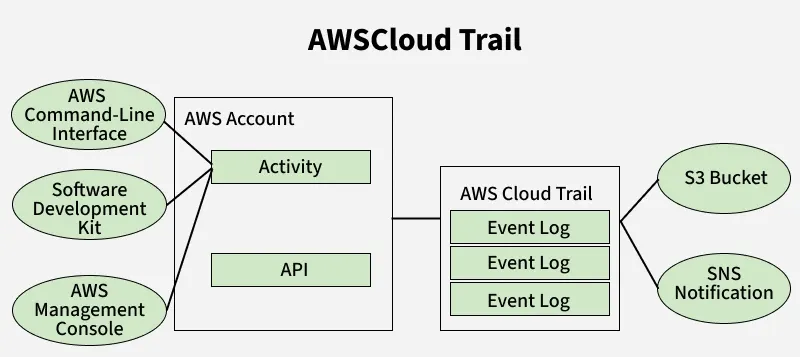
AWS Cloud trail
**Benefits of using AWS CloudTrail in AWS
- **CloudTrail log file: The log file integrity validation is a tool you may use to help with IT security and auditing procedures.
- **Security and Compliance: Meeting security and compliance standards is made easier with CloudTrail. It supports security incident investigation and compliance audits by assisting enterprises in identifying illegal or suspicious activity through the monitoring of AWS actions.
- **Resource Change Tracking: AWS resource changes over time can be tracked with CloudTrail. This helps with resource management and troubleshooting by helping to spot configuration changes, authorization changes, and resource removals.
- **Alerting and Notifications: Businesses can configure alerts and notifications for a variety of events that are logged in CloudTrail logs. The prompt response to urgent situations is made possible by this proactive monitoring.
- **Cross-Account and Multi-Region Support: Multi-account logging is supported by CloudTrail, enabling businesses to centralize logging for numerous AWS accounts. Additionally, it offers multi-region logging, which consolidates logs from various AWS regions in one place for centralized analysis.
**AWS CloudTrail Working
Your Amazon Web Services (AWS) account's activity is tracked and recorded by the AWS CloudTrail service. It offers thorough logs of all API calls and operations made on your AWS resources. This is how AWS CloudTrail functions:
- **Data Collection: Activity in your AWS account is regularly monitored by CloudTrail. An API call is created whenever an AWS service or resource is used or updated.
- **Log Storage: You can define an Amazon S3 bucket where these log entries will be gathered and stored. For your CloudTrail logs, you may set the bucket's location and retention time.
- Access Control: Policies set forth by AWS Identity and Access Management (IAM) govern who has access to CloudTrail logs. Who is permitted to read, write, or administer CloudTrail logs can be specified.
- **Alerting and Notifications: You can configure in-the-moment alerts based on particular occurrences or trends in your CloudTrail logs using CloudWatch Alarms. This enables you to react rapidly to operational or security incidents.
- Log Generation: Each time an API is called, CloudTrail creates a log entry with information on the caller, the action taken, the resource used, and the timestamp.
AWS CloudTrail features
- **Comprehensive Logging: Captures detailed logs of API calls and activities across AWS services, providing visibility into actions taken by users, applications, or AWS services.
- **Audit and Compliance: Facilitates compliance auditing by tracking changes to resources and enabling forensic analysis of security incidents through comprehensive logging.
- **Integration with AWS Services: Integrates seamlessly with other AWS services like AWS Lambda, S3, CloudWatch Logs, and CloudWatch Events for advanced monitoring and automated responses to events.
- **Multi-Account and Multi-Region Support: Supports logging and centralized management across multiple AWS accounts and regions, providing a unified view of activity across complex AWS environments.
- **Event History and Insights: Provides event history timelines and insights into API activity trends, enabling operational troubleshooting, security analysis, and operational intelligence.
**Steps to set up AWS CloudTrail
**Step 1: Login to AWS Console
- Visit AWS Academy and login to your account.
**Step 2: **Access AWS Academy Learner Lab
- Navigate to AWS Academy Learner Lab [52156] -> Modules.
**Step 3: Launch AWS Academy Learner Lab
- Start the lab session and proceed to AWSgreen dot.
- Then click on AWSgreen dot.

**Step 4: Open CloudTrail Service
- Click on Services and search for "CloudTrail".

**Step 5: **Create CloudTrail
- Select "Create CloudTrail", name it as "MyTrail".

**Step 6: **Edit Storage Location
- Click on the created "MyTrail" and edit the storage location. Choose "Create new S3 bucket" and save changes.

**Step 7: **Save Changes
- Confirm and save changes to finalize the S3 bucket configuration.

**Step 8: **Confirm Settings
- Ensure data events are configured to deliver to the AWS CloudTrail console, Amazon S3 buckets, and optionally Amazon CloudWatch Logs.
 **Step 9: **Monitor Data Events
- Data events are automatically stored in the designated S3 bucket.


**Step 10: Access and Review Event Data
- Navigate to the S3 bucket, locate the first file, download it, and review the JSON formatted data events.
Accessing CloudTrail
Accessing AWS CloudTrail Using These Methods:
- **AWS Management Console: Access via web browser, navigate to CloudTrail service, configure trails, view logs, and perform basic analysis.
- **AWS CLI: Use commands like AWS cloudtrail create-trail, AWS cloudtrail describe-trails, and AWS cloudtrail lookup-events to manage trails, retrieve event history, and perform automated tasks.
- **AWS SDKs: Integrate CloudTrail into your applications using SDK functions to programmatically manage trails, retrieve and process event data, and incorporate CloudTrail insights into application logic.
- **AWS CloudTrail API: Develop custom applications or scripts that interact directly with CloudTrail API endpoints to automate tasks, perform complex queries, and integrate CloudTrail data into external systems or reporting tools.
AWS CloudTrail Use cases
- **Security and Compliance Monitoring: Monitor API calls and actions across AWS services to detect unauthorized access, changes to resources, and potential security breaches. CloudTrail logs provide detailed visibility for compliance audits and regulatory requirements.
- **Operational Troubleshooting: Investigate operational issues by reviewing CloudTrail logs to understand the sequence of events leading to errors or unexpected behavior in your AWS environment. Helps in identifying root causes and improving system reliability.
- **Change Management and Auditing: Track changes made to AWS resources over time, including configuration changes, deployments, and updates. CloudTrail logs enable auditing of resource history, aiding in change management and maintaining configuration integrity.
- **Incident Response and Forensics: Use CloudTrail logs during incident response to reconstruct events, analyze the scope of an incident, and identify impacted resources. Facilitates forensic investigation and timely resolution of security or operational incidents.
- **Governance and Accountability: Establish accountability by logging actions performed by users, applications, or AWS services. CloudTrail provides a trail of actions taken, helping organizations enforce governance policies and maintain accountability across AWS accounts.