What Is AWS VPC Route Table? (original) (raw)
Last Updated : 23 Jul, 2025
An **AWS VPC Route Table is a set of rules that determine where the network traffic from your subnet or gateway is directed. Each subnet (range of IP addresses in your VPC) is associated with a route table that controls the traffic flow between subnets. A route table has a destination address which determines where the network is directed. Route tables are essential when dealing with IPv4/IPv6 CIDR blocks, private or public subnets, network gateways, VPC endpoints, etc.
**Components of a Route Table
- **Entries: Each route entry specifies a destination CIDR Block and a target.
- **Route Table ID: A unique identifier used to manage the route table through API calls, CLI commands, and the Management console.
- **Associations: Associations specify which subnet uses the route present in the route table for the traffic.
- **Target: Specifies where a network should be directed. For example, internet gateway, virtual private gateway, NAT gateway, etc.
- **Destination CIDR Blocks: Range of IP addresses where you want your traffic to go to a particular destination which is represented in CIDR Block (eg. 192.0.0.0/16).
Creation of a Route table
- Click on 'Create Route Table' under the VPC dashboard.
- Click on the main route table which AWS by default creates for your VPC. You can also create a custom route table as well.
- You can then associate the subnets in the route table under Subnet Associations.
Default Route Table vs. Custom Route Table
**Default Route Table: When you create a VPC, AWS automatically creates a default route table for that VPC. The main or default route table can have both implicit and explicit subnet associations. Subnets are automatically associated with the default table. It controls the routing for all subnets. It is pre-configured with a local route for VPC communication.
A default route table will be automatically used by any subnet that has not been specifically assigned to a Route Table. Though it is always recommended subnet should be explicitly assigned to a route table in order to avoid any problems the choice depends entirely on the user.
**Use case: The default route tables allow resources to interact with the Internet within the VPC.
**Custom Route Table: As the name suggests, it is a customized route table created by the user in addition to the default ones. A custom route table is empty until routes are added by you. It offers great flexibility compared to the default route table as you can configure it as per your need. You can also create multiple custom route tables. Here the sole responsibility is of the user to manually associate subnets and update roots as per the requirements.
Custom route tables have only explicit associations. It is ideal for complex networking. For example, when you need different routes for subsets of subnets you prefer a custom route table as your networking will be more complex.
**Steps To Create and Configure Route Table
Route tables are used for the creation of different routes between subnets and gateways. There are a number of examples like routing traffic between AWS resources and on-premises networks via VPN or Direct connect, route tables with internet access, custom route table for public/private subnets with NAT gateway. We'll be discussing the step-by-step creation and configuration of route tables for different use cases :
**1. Creation of a custom route table for Private Subnet with NAT Gateway
**Step 1: After signing-in into your Management console, head towards your VPC dashboard.
**Step 2: Under the Route tables section, click on "Create Route Table". (You can enter a name or description for your route table)
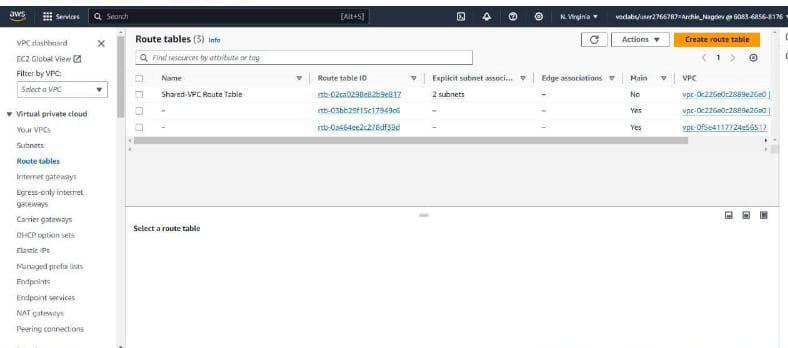
**Step 3: Once your route table is created, head towards the Routes tab and click on Edit routes.
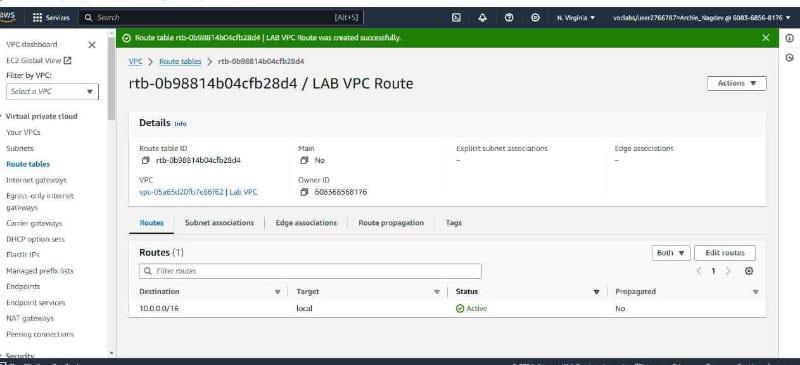
Click on edit routes
**Step 4: Add a route with destination 0.0.0.0/0 and set the target as NAT Gateway.
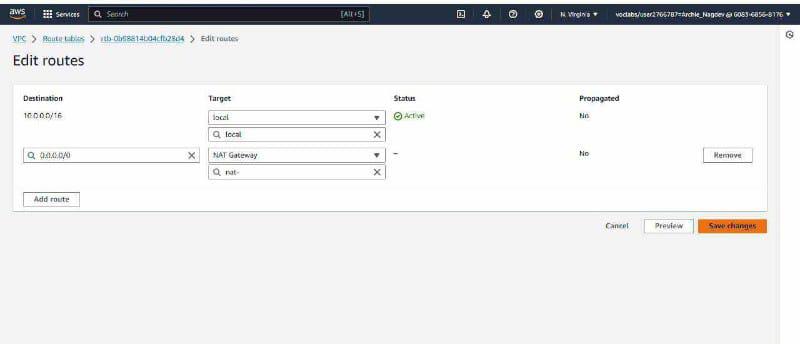
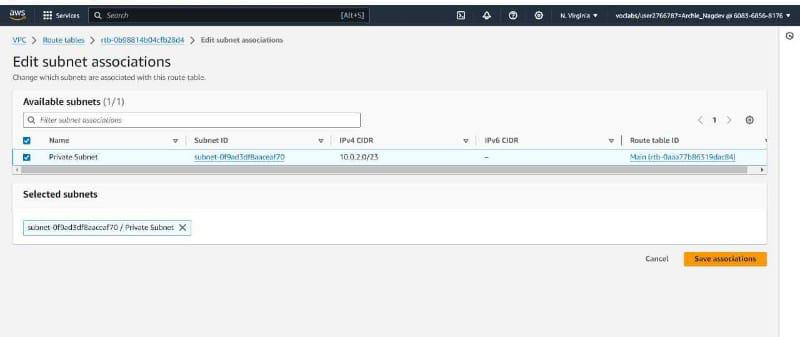
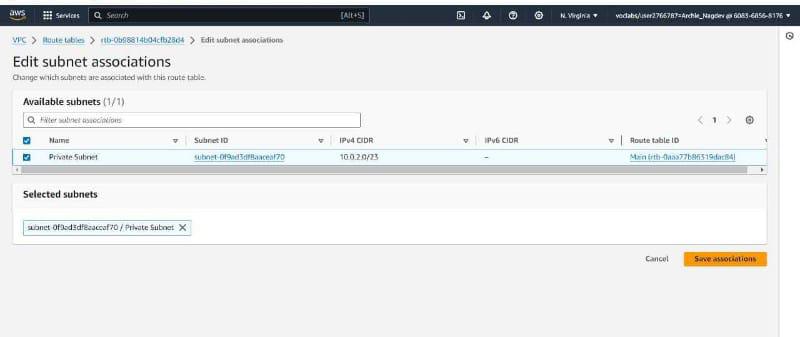
**Step 5: After saving the routes, edit your subnet associations under Subnet Associations and associate private subnet with the route table.
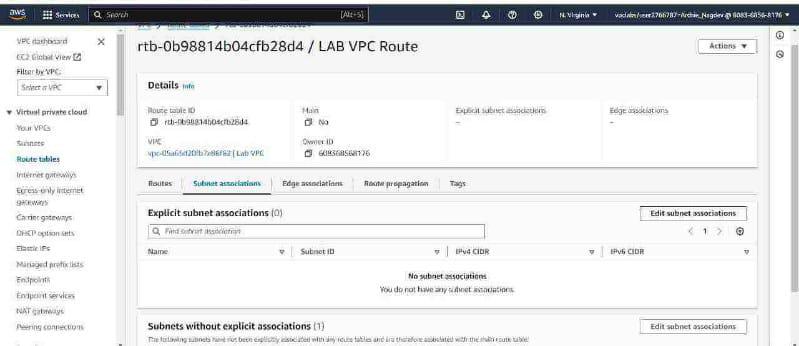
**Step 6: Click on Save and you're all set.
**2. Creation of Custom Route Table for Direct Connect or VPN to On-Premises Network
**Step 1: After signing-in into your Management console, head towards your VPC dashboard.
**Step 2: Under the Route tables section, click on "Create Route Table". (You can enter a name or description for your route table)
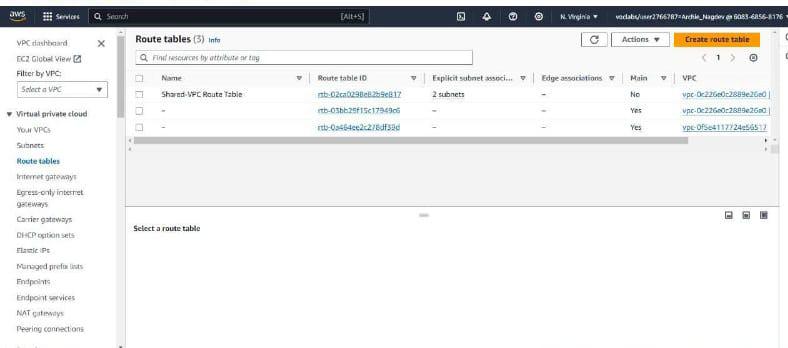
**Step 3: Once your route table is created, head towards the Routes tab and click on Edit routes.
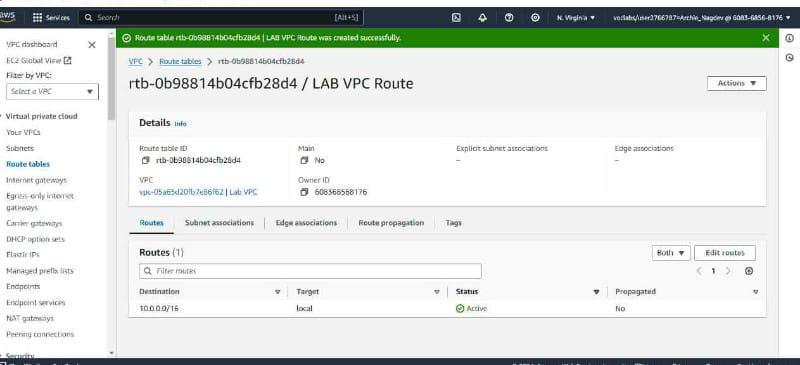
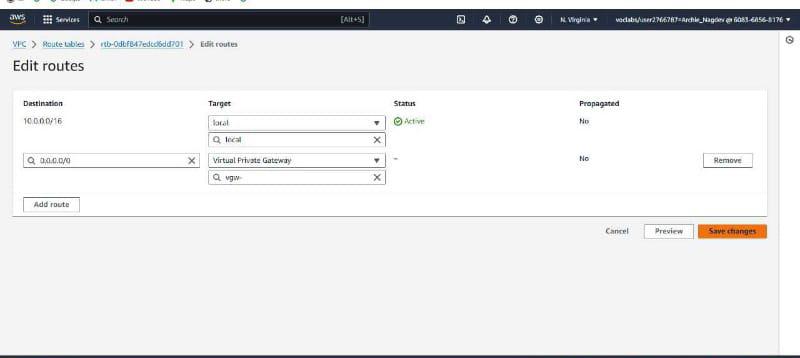
**Step 4: Add a route with the destination CIDR Block of your on-premises network and set the target as VGW (Virtual Private Gateway) associated with the VPN connection or Direct Connect.
**Step 5: After saving the routes, edit your subnet associations under Subnet Associations and associate private subnet with the route table.
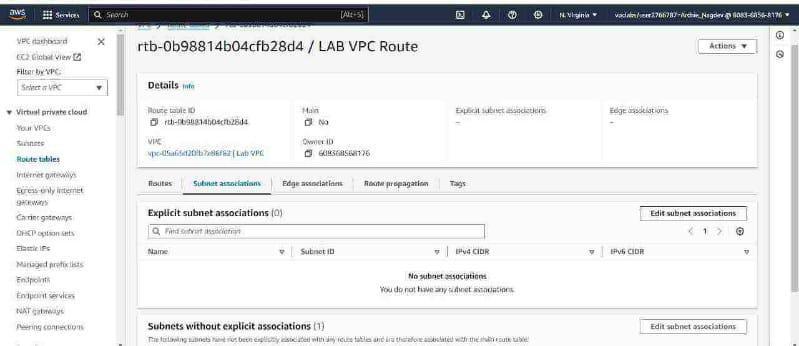
**Step 6: Click on Save and you're all set!
Routing Decision Example
The example given below demonstrates how a route table defines the routing decisions within a VPC.
**Route Table ID - rtd-02781s182+
| DESTINATION | TARGET | STATUS | PROPAGATED |
|---|---|---|---|
| 10.0.0.0/16 | local | Active | No |
| 0.0.0.0/16 | igw-12345w | Active | Yes |
| 173.168.3/0 | local | Inactive | Yes |
| 192.0.0.0/0 | pcx-12342we | Active | No |
Full Form Of IGW,PCX and VGW
- **Local - Indicates local traffic (traffic within the same VPC).
- **IGW - Allows instances in the VPC to access the internet through the Internet Gateway.
- **PCX - Indicates peering connection allowing communication with another VPC through VPC peering.
- **VGW - Provides connectivity to an on-premises network via a VPN connection through the virtual private gateway.
**Understanding Subnet Routing
- **Subnet Association: Each subnet can only be associated with one route table at a time.
- **Route Priority: Ensures routes are evaluated in priority order. Order is set by you.
- **Default Route: Handles unknown destinations.
- **Security: Implements security using security groups and network ACLs.
- **Route Table Limits: A limited number of route table can be only be created per VPC.
- **Route Propagation: Enables automatic propagation of routes from a gateway to a route table.
**Conclusion
The VPC route tables serves a crucial role of networking between the VPC as it directs the flow of traffic between subnets and gateways. While dealing with AWS VPC, having a knowledge of the components and creation of route table is important for managing network traffic within the AWS environments.