Building Data Pipelines with Google Cloud Dataflow: ETL Processing (original) (raw)
Last Updated : 23 Jul, 2025
In today's fast fast-moving world, businesses face the challenge of efficiently processing and transforming massive quantities of data into meaningful insights. Extract, Transform, Load (ETL) tactics play a vital function in this journey, enabling corporations to transform raw data into a structured and actionable format. Google Cloud gives a powerful solution for ETL processing called Dataflow, a completely managed and serverless data processing service. In this article, we will explore the key capabilities and advantages of ETL processing on Google Cloud and the use of Dataflow.
What is Google Cloud Dataflow?
Google Cloud Dataflow is a fully managed, serverless data processing carrier that enables the development and execution of parallelized and distributed data processing pipelines. It is built on Apache Beam, an open-source unified model for both batch and circulate processing. Dataflow simplifies the ETL method by offering a scalable and flexible platform for designing, executing, and tracking data processing workflows.
Key Features of Dataflow for ETL Processing
- **Serverless Architecture: Dataflow's serverless architecture eliminates the need for infrastructure provisioning and control, allowing developers to be focused on building data processing logic in place of demanding approximately underlying resources. This results in extended agility and cost-effectiveness.
- **Unified Batch and Stream Processing: Dataflow helps both batch and circulate processing within the identical pipeline, presenting a unified model for processing diverse data types. This flexibility is important in data architectures wherein real-time data processing is mostly a requirement.
- **Scalability: With Dataflow, processing competencies may be without difficulty scaled up or down primarily based on the volume of data. This scalability ensures that ETL procedures can deal with growing datasets and varying workloads without compromising overall performance.
- **Ease of Development with Apache Beam: Apache Beam presents an effective and expressive programming version for building ETL pipelines. Developers can use Java, Python, or other supported languages to write code that defines the information processing good judgment. The equal codebase can be used for both batch and circulation processing.
- **Integration with Google Cloud Services: Dataflow seamlessly integrates with different Google Cloud services, such as BigQuery, Cloud Storage, and Pub/Sub. This integration simplifies statistics ingestion, storage, and analysis, growing a cohesive atmosphere for end-to-end data processing.
What is ETL pipeline in GCP?
An ETL (Extract, Transform, Load) pipeline in Google Cloud Platform (GCP) refers to a series of methods and workflows designed to extract data from source systems, remodel it into a desired format, and load it into a destination for further analysis, reporting, or storage. Google Cloud offers quite a variety of tools and services to build strong ETL pipelines, and one prominent service for this purpose is Google Cloud Dataflow.
Role of Google Cloud Dataflow in constructing ETL pipelines
1. Extract
- The first step entails extracting data from various source structures, that may consist of databases, on-premises systems, third-party application, or external APIs.
- Google Cloud offers services like Cloud Storage, Cloud SQL, BigQuery, and Pub/Sub, which could act as source systems for data extraction.
2. Transform
- Once the data is extracted, it regularly needs to undergo transformation to clean, enrich, or reshape it in according to business necessities. Transformations can consist of filtering, aggregating,joining, and making use of numerous business logic guidelines.
- Google Cloud Dataflow, constructed at the Apache Beam model, is a powerful tool for imposing transformation in a scalable and parallelized way. It permits developer to define complicated data processing logic using of programming languages like Java or Python.
3. Load
- After the data has been extracted and transformed, the subsequent step is to load it into a destination for storage or in further analysis. Common destination consist of BigQuery for data warehousing, Cloud Storage for object storage, or other GCP services relying on the specific use case.
- Google Cloud Dataflow seamlessly integrates with different GCP services, making it easy to load the processed data into diverse storage or analytical systems.
4. Orchestration and Monitoring
- The entire ETL process needs to be orchestrated and managed to make sure it runs efficaciously and reliably. Google Cloud offers tools like Cloud Composer (based totally on Apache Airflow) for workflow orchestration, permitting you to schedule and monitor ETL jobs.
- Stackdriver Logging and Monitoring are also crucial for monitoring the overall performance and health of ETL pipelines, presenting insights into resource usage, error handling , and job completion status.
Steps to Implement ETL Processing with Dataflow
Step 1 : Enable Dataflow API
To enable "**Dataflow API" firstly you have to create project in Google cloud Console and then search "**API and Services" and click on enable API and Services.
.png)
Search "**Dataflow API" in search bar then click on enable.

Step 2: Run given set of commands
Run the given set of commands in cloud shell to get dataflow
gsutil -m cp -R gs://spls/gsp290/dataflow-python-examples .

Set a variable in Cloud Shell equal to your project id now.
export PROJECT=
gcloud config set project $PROJECT

Step 3: Create Cloud Storage Bucket
Use these given set of commands to Create Cloud Storage Bucket
gsutil mb -c regional -l gs://$PROJECT

Step 4: Copy files in your bucket
Use these given set of commands to Copy files in your bucket
gsutil cp gs://spls/gsp290/data_files/usa_names.csv gs://$PROJECT/data_files/ gsutil cp gs://spls/gsp290/data_files/head_usa_names.csv gs://$PROJECT/data_files/

Step 5: Create the BigQuery 'lake' dataset
Construct a BigQuery dataset named "lake" using the Cloud Shell. Every table that you have in BigQuery will be loaded here:
bq mk lake

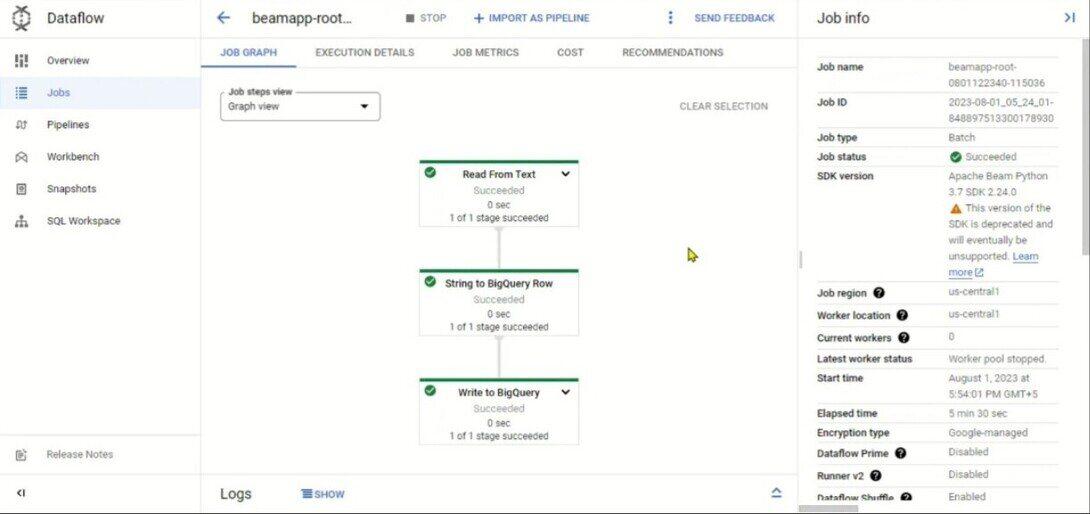
Step 6: Build a Dataflow pipeline
This is our final step to ingest data into the BigQuery table, you will establish an append-only Dataflow in this step.
Benefits of Using Dataflow for ETL Processing
- **Cost Efficiency: Dataflow's serverless structure make sure that resources are dynamically allotted according to their workload, which leads to optimal resource usage and cost efficiency .
- **Unified Development Model: With a unified model for both batch and stream processing, developers can use a single codebase to deal with different type of data processing , which minimize or reduce development effort and complexity.
- **Integration with Google Cloud Ecosystem: It can be integrated with different Google Cloud services which permits it for a cohesive and streamlined data processing pipeline, simplifying data movement, storage, and evaluation.
- **Real-time Insights: It support for stream processing enables various organizations to get advantage of real-time insights from their data, which make it ideal for use cases where timely decision-making is vital.
Conclusion
Google Cloud Dataflow offers a robust and flexible platform for ETL processing, which provides us a serverless, scalable, and also unified solution for dealing with both batch and stream data . It also empowers businesses to effectively remodel raw data into valuable insights. As businesses wants to retain they can use embrace data-driven strategies, ETL processing with Dataflow emerges as a key enabler in the journey toward deriving cost from numerous and evolving datasets.