How To Open Port In GCP VM ? (original) (raw)
Last Updated : 23 Jul, 2025
Virtual machines (VMs) on the Google Cloud Platform simulate powerful desktop computers in the cloud. They are essential because they allow it to be easy-to use apps and software without having to pay for hardware. This common use involves things like hosting websites, maintaining databases, and organizing information analysis work.
Networking in GCP
**Virtual Private Cloud (VPC):
- **Create a VPC: Use the Google Cloud Console, or Google Cloud CLI, to set up your own private network area with accurate IP address ranges.
- **Configure Subnets: Break your VPC into easier-to-manage subnetworks for better resource management.
- **Customize Routing: Create routes under your VPC for controlling traffic flow between external networks and subnets that are.
**Firewall Rules:
- **Access Control: Configure firewall rules according to IP ranges, protocols, and ports to allow or restrict incoming and outgoing traffic.
- **Apply Rules: For controlling network traffic at an appropriate scale, firewall rules can be associated with subnets, virtual machines, or tags.
**Network Tags:
- **Label VM Instances: Virtual machine instances can be categorized by assigning network tags based on their purpose, setting, or employment.
- **Rule Assignment: Utilize the network tags to apply firewall or routing rules to specific groups of virtual machine instances simplifies network management.
Understanding Firewall Rules
Administrators consider firewall rules for Google Cloud Platform (GCP) as a means of protecting their virtual machines (VMs). They decide which traffic can be allowed to the enter or exit your virtual machine instances based on established requirements. By imposing firewall rules that control who may use your virtual machines (VMs) and the kinds of data that can travel through them, users can prevent malicious attempts and unauthorized access to your applications.
Types of Firewall Rules
- **Predefined Rules: These are the basic firewall rules for the GCP, supporting common use cases such as allowing HTTP and HTTPS traffic. They are functional and provide your virtual machines (VMs) with some simple protection rules.
- **Custom Rules: Users can make these user-defined firewall rules to satisfy the particular needs that are not addressed by existing regulations. You may generate them based on protocols, ports, IP ranges, and other factors to control traffic flow more precisely.
- **Ingress vs. Egress Rules: Users can design these user-defined firewall rules to meet specific needs not addressed by the rules as they stand. You can build them based on protocols, ports, IP ranges, and other parameters to accurately regulate traffic flow.
Step-by-step instructions on how to open ports in GCP VM
**Step 1: Open GCP console and click on VPC network and click on firewall

**Step 2: Click on create firewall rule

**Step 3: Provid the firewall rule details like priority, Target tags, Source IP and protocol with ports. Below image I have opened 8080, 8070 ports with TCP protocols using the jenkins tag.

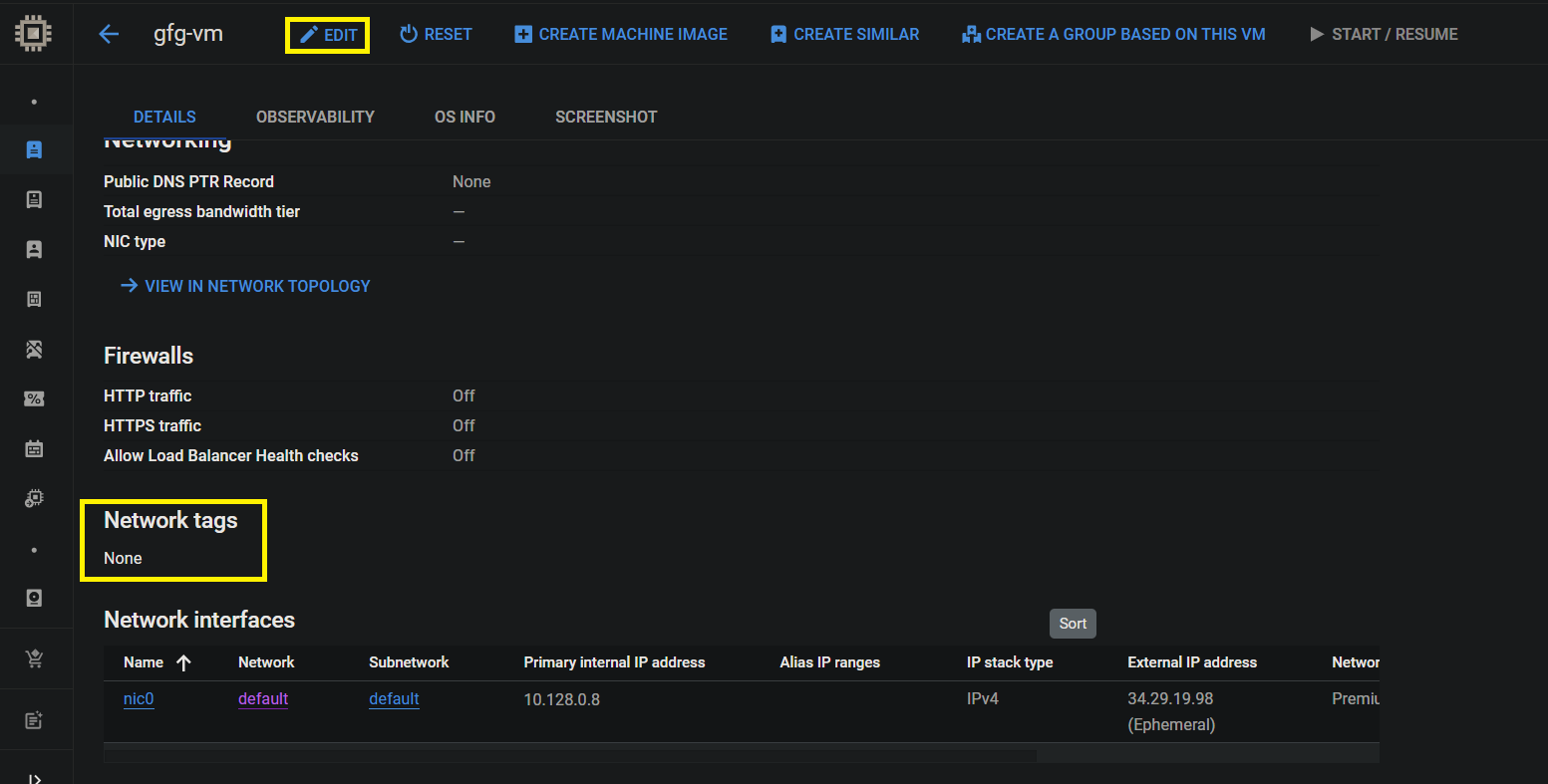
**Step 4: I have GCP VM with the name gfg-vm edit that VM and verify the which tags is available on network tags section. Below image shows no tags available.
**Step 5: Enter the tags which you have created on firewall rule enter the tag under the network tag section. After that click on save.

**Step 6: Verify the tags is attached on not. Below image shows tags successfully atached.

Conclusion
In addition to networking features like VPCs, firewall rules, and network tags that offer essential control and security, GCP virtual machines (VMs) offer adaptable computing resources for a range of workloads. Users may improve the performance, scalability, and reliability of their cloud infrastructure by understanding and using these components with effectiveness.