IPv4 Datagram Fragmentation and Delays (original) (raw)
Last Updated : 21 Aug, 2025
In IPv4, when a packet is larger than the Maximum Transmission Unit (MTU) of the network link then it is traversed and fragmented into smaller packets. Each of these fragments contains a portion of the original packet, along with additional information that identifies the fragment's position in the original packet and how it fits into the sequence of fragments.
**Need for IPv4 Datagram Fragmentation
- IPv4 Datagram Fragmentation is required because networks have size limits (MTU), and to ensure that large packets can still reach their destination even if parts of the path only support smaller packets.
- Different Networks may have different maximum transmission unit (MTU), for example due to differences in LAN technology.
- When one network wants to transmit datagrams to a network with a smaller MTU, the routers on path may fragment and reassemble datagrams.
- In IPv4, when a packet is larger than the Maximum Transmission Unit (MTU) of the network link it needs to traverse, it is fragmented into smaller packets.
- Each of these fragments contains a portion of the original packet, along with additional information that identifies the fragment's position in the original packet and how it fits into the sequence of fragments.

Fragmentation
**Mechanism of Packet Fragmentation
Each fragment is converted to a packet and the following changes happen in the datagram header:
- The total length field is changed to the size of the fragment.
- The More Fragment bit (MF bit) is set for all the fragment packets except the last one.
- The fragment offset field is set, based on the number of fragment that is being set and the MTU.
- Header Checksum is re-calculated.
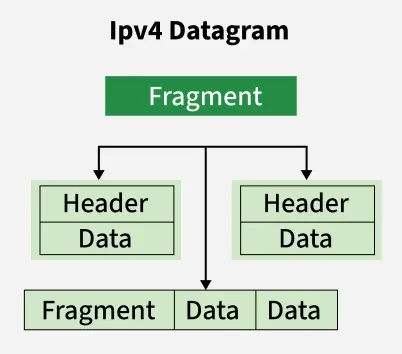
Format of fragments
**Example
For a data packet of 4000 bytes and MTU of 1500 bytes, we have actual data of 3980 bytes that is to be transmitted and 1480 bytes is the maximum data size that is permissible to be sent. So, there would be 3 fragments:
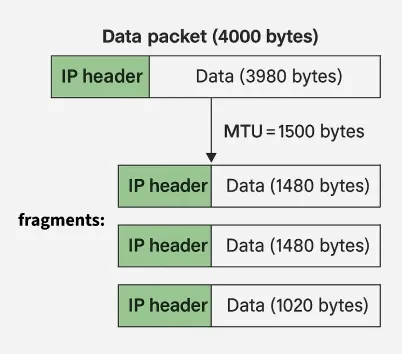
Fragmentation example
For the first fragment, data size = 1480 bytes, offset = 0 and MF flag = 1
For the second fragment, data size = 1480 bytes, offset = 185(1480/ 8) and MF flag = 1
For the third fragment, data size = 1020 bytes, offset = 370 (2960/8) and MF flag = 0
An important point to be noted here is that all fragments would be having same identification number, thus indicating that all the fragments belong to the same parent data packet.
**Issues Due To Fragmentation
- **Increased processing overhead: Fragmentation requires additional processing and memory resources from the network devices involved in the transmission. This can increase the processing overhead and introduce additional delays into the network.
- **Increased likelihood of packet loss: Since each fragment is transmitted separately, there is an increased likelihood of packet loss or corruption during transmission. If any of the fragments are lost or corrupted, the entire packet must be retransmitted, which can introduce additional delays and increase network congestion.
- **Reassembly delays: The receiver of the fragmented packets must reassemble the original packet before it can be processed. This process can introduce additional delays, particularly if there are delays in receiving all of the fragments or if the fragments arrive out of order.
**To minimize these issues
It is generally recommended to avoid fragmentation whenever possible by ensuring that packets are appropriately sized for the network links they will traverse. This can be accomplished through the use of Path MTU Discovery, which allows devices to determine the maximum packet size that can be transmitted without fragmentation on a given network path.
Additionally, network administrators can implement Quality of Service (QoS) mechanisms to prioritize traffic and reduce delays caused by congestion.
IPv4 Datagram Delay
IPv4 Datagram Delay refers to the total time taken for a datagram to travel from the source to the destination in an IPv4 network. It includes processing, queuing, transmission, and propagation latencies, but does not account for packet loss or retransmissions.
**Processing Delay
**Processing delay is the time it takes for a router or switch to examine the packet’s header, check for bit level errors, and decide the next hop for the packet.
This occurs at each intermediate device in the network and is influenced by the device’s processing speed and the complexity of any routing or filtering algorithms in use.
It also doesn’t have any formula since it depends upon the speed of the processor and the speed of the processor varies from computer to computer.
**Queuing Delay
**Queuing delay refers to the time a packet spends waiting in a queue before it can be transmitted through the network. This delay occurs in buffers at routers or switches, especially when the device is handling multiple packets at once.
It varies depending on the current network traffic, the size of the queue, and the queuing algorithm used (such as First-In-First-Out or priority queuing).
Under high traffic conditions or congestion, queuing delay can increase significantly and introduce jitter in real-time applications like video conferencing or online gaming.
In general, we can’t calculate queueing delay because we don’t have any formula for that. This delay depends upon the following factors:
- If the size of the queue is large, the queuing delay will be huge. If the queue is empty there will be less or no delay.
- If more packets are arriving in a short or no time interval, queuing delay will be large.
- The less the number of servers/links, the greater is the queuing delay.
**Transmission Delay
**Transmission delay is the time needed to push all the bits of a packet onto the communication link. It depends on the size of the packet (measured in bits) and the bandwidth of the link (measured in bits per second). The formula to calculate transmission delay is the number of bits divided by the transmission rate.
**Formula: Td
= L / B ,where **L = Number of bits, **B = Transmission rate.
- **Example: A 1 Mb file over a 10 Mbps link will take :
L = 1Mb = 106 bits , B = 10 Mbps = 10 x 106 bits per second
Td = L/B = 106 bits / 10 x 106 bits per second
Td = 0.1 sec
This delay depends upon the following factors:
- If there are multiple active sessions, the delay will become significant.
- Increasing bandwidth decreases transmission delay.
- MAC protocol largely influences the delay if the link is shared among multiple devices.
- Sending and receiving a packet involves a context switch in the operating system, which takes a finite time.
**Propagation Delay
**Propagation delay is the time it takes for a signal to physically travel from the sender to the receiver. It depends on the distance between the two devices and the propagation speed of the medium (such as copper cable, fiber optics, or wireless).
The delay is calculated by dividing the distance by the propagation speed, which is generally close to the speed of light but slower depending on the medium.
Pd = Distance / Velocity
Velocity =3 X 10⁸ m/s (for air)
Velocity= 2.1 X 10⁸ m/s (for optical fibre)
Propagation delay becomes particularly noticeable in long-distance links like undersea cables or satellite communications, even when high-speed links are used.
Read more about Delays in Computer Network
**There are several other delays which may occur are :
- **Serialization Delay: It is the time to convert a packet into a bitstream before transmission. It depends on packet size and link speed. It is more noticeable on slower links.
- **Buffer Delay: It is the time for which a packet waits in a queue when the output port is busy. It happens due to temporary congestion. It may cause jitter in real-time traffic.
- **Store and Forward Delay: The time taken to receive the full packet, check for errors, and forward the packet. It is common in store-and-forward devices It increases with packet size.
- **Retransmission Delay: The time required to resend a packet lost or corrupted in transit. It is triggered by timeouts or NACKs. It affects performance in unreliable networks.
- **Congestion Control Delay: The delay caused by protocols slowing transmission to manage traffic. It helps avoid overload but may reduce throughput temporarily.
Terms related to above
- **Latency: The time it takes for a packet to travel from the sender to the receiver.
- **Jitter: The variation in the arrival time of packets, causing a delay between when a packet was expected and when it was actually received.
Below questions have been asked in previous GATE exam on above topics.
- GATE CS 2012 | Question 42
- GATE-CS-2013 | Question 65
- GATE-CS-2014 Set 3 | Question 65