What is DFS (Distributed File System)? (original) (raw)
Last Updated : 17 Sep, 2025
A distributed file system (DFS) is a networked architecture that allows multiple users and applications to access and manage files across various machines as if they were on a local storage device. Instead of storing data on a single server, a DFS spreads files across multiple locations, enhancing redundancy and reliability.
- This setup not only improves performance by enabling parallel access but also simplifies data sharing and collaboration among users.
- By abstracting the complexities of the underlying hardware, a distributed file system provides a seamless experience for file operations, making it easier to manage large volumes of data in a scalable manner.
Components of DFS
- **Location Transparency: Location Transparency achieves through the namespace component.
- **Redundancy: Redundancy is done through a file replication component.
In the case of failure and heavy load, these components together improve data availability by allowing the sharing of data in different locations to be logically grouped under one folder, which is known as the "DFS root". It is not necessary to use both the two components of DFS together, it is possible to use the namespace component without using the file replication component and it is perfectly possible to use the file replication component without using the namespace component between servers.
**Distributed File System Replication
Early iterations of DFS made use of Microsoft's File Replication Service (FRS), which allowed for straightforward file replication between servers. The most recent iterations of the whole file are distributed to all servers by FRS, which recognises new or updated files. "DFS Replication" was developed by Windows Server 2003 R2 (DFSR). By only copying the portions of files that have changed and minimising network traffic with data compression, it helps to improve FRS. Also, it provides users with flexible configuration options to manage network traffic on a configurable schedule.
Features of DFS
- **Transparency
- **Structure transparency: There is no need for the client to know about the number or locations of file servers and the storage devices. Multiple file servers should be provided for performance, adaptability, and dependability.
- **Access transparency: Both local and remote files should be accessible in the same manner. The file system should be automatically located on the accessed file and send it to the client’s side.
- **Naming transparency: There should not be any hint in the name of the file to the location of the file. Once a name is given to the file, it should not be changed during transferring from one node to another.
- **Replication transparency: If a file is copied on multiple nodes, both the copies of the file and their locations should be hidden from one node to another.
- **User mobility: It will automatically bring the user's home directory to the node where the user logs in.
- **Performance: Performance is based on the average amount of time needed to convince the client requests. This time covers the CPU time + time taken to access secondary storage + network access time. It is advisable that the performance of the Distributed File System be similar to that of a centralized file system.
- **Simplicity and ease of use: The user interface of a file system should be simple and the number of commands in the file should be small.
- **High availability: A Distributed File System should be able to continue in case of any partial failures like a link failure, a node failure, or a storage drive crash.
A high authentic and adaptable distributed file system should have different and independent file servers for controlling different and independent storage devices. - **Scalability****:** Since growing the network by adding new machines or joining two networks together is routine, the distributed system will inevitably grow over time. As a result, a good distributed file system should be built to scale quickly as the number of nodes and users in the system grows. Service should not be substantially disrupted as the number of nodes and users grows.
- **Data integrity: Multiple users frequently share a file system. The integrity of data saved in a shared file must be guaranteed by the file system. That is, concurrent access requests from many users who are competing for access to the same file must be correctly synchronized using a concurrency control method. Atomic transactions are a high-level concurrency management mechanism for data integrity that is frequently offered to users by a file system.
- **Security: A distributed file system should be secure so that its users may trust that their data will be kept private. To safeguard the information contained in the file system from unwanted & unauthorized access, security mechanisms must be implemented.
History of DFS
The server component of the Distributed File System was initially introduced as an add-on feature. It was added to Windows NT 4.0 Server and was known as "DFS 4.1". Then later on it was included as a standard component for all editions of Windows 2000 Server. Client-side support has been included in Windows NT 4.0 and also in later on version of Windows. Linux kernels 2.6.14 and versions after it come with an SMB client VFS known as "cifs" which supports DFS. Mac OS X 10.7 (lion) and onwards supports Mac OS X DFS.
Working of DFS
There are two ways in which DFS can be implemented:
- **Standalone DFS namespace allows only for those DFS roots that exist on the local computer and are not using Active Directory. A Standalone DFS can only be acquired on those computers on which it is created. It does not provide any fault liberation and cannot be linked to any other DFS. Standalone DFS roots are rarely come across because of their limited advantage.
- **Domain-based DFS namespace stores the configuration of DFS in Active Directory, creating the DFS namespace root accessible at **\\\ or **\\\
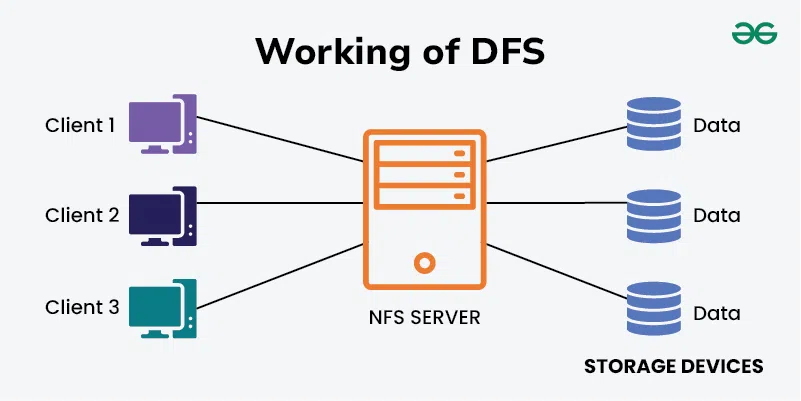
Distributed File System (DFS)
Applications of DFS
- NFS: NFS stands for Network File System. It is a client-server architecture that allows a computer user to view, store, and update files remotely. The protocol of NFS is one of the several distributed file system standards for Network-Attached Storage (NAS).
- CIFS stands for Common Internet File System. CIFS is an accent of SMB. That is, CIFS is an application of SIMB protocol, designed by Microsoft.
- SMB stands for Server Message Block. It is a protocol for sharing a file and was invented by IBM. The SMB protocol was created to allow computers to perform read and write operations on files to a remote host over a Local Area Network (LAN). The directories present in the remote host can be accessed via SMB and are called as "shares".
- Hadoop is a group of open-source software services. It gives a software framework for distributed storage and operating of big data using the MapReduce programming model. The core of Hadoop contains a storage part, known as Hadoop Distributed File System (HDFS), and an operating part which is a MapReduce programming model.
- **NetWare is an abandon computer network operating system developed by Novell, Inc. It primarily used combined multitasking to run different services on a personal computer, using the IPX network protocol.