Introduction to SolidState Drive (SSD) (original) (raw)
Introduction to Solid-State Drive (SSD)
Last Updated : 13 Sep, 2025
A Solid-State Drive (SSD) is a non-volatile storage device that stores data without using any moving parts, unlike traditional Hard Disk Drives (HDDs), which have spinning disks and mechanical read/write heads. Because of this, SSDs are much faster, more durable and quieter than HDDs. They load files, programs and operating systems quickly, making computers more responsive.
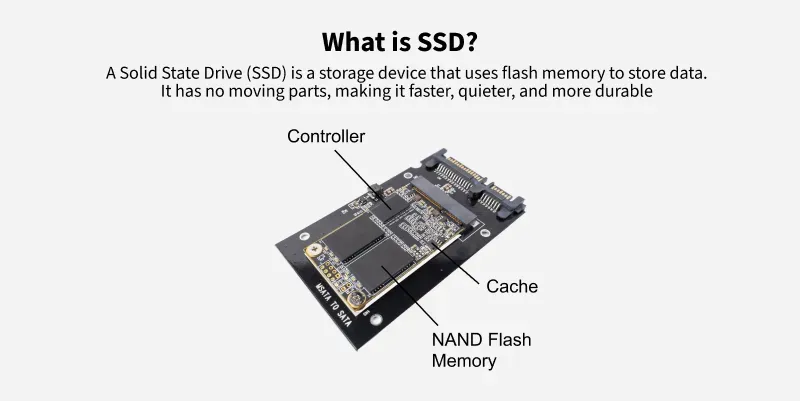
SSD
**Note: Since there are no moving parts, SSDs are also less likely to get damaged from drops or shocks. Additionally, they use less power, which helps extend battery life in laptops.
How do SSDs work
Solid state drives (SSDs) use a combination of NAND flash memory technology and advanced controller algorithms. NAND flash memory is the primary storage component, divided into blocks and pages.
- An SSD contains a controller chip that manages data storage, retrieval and optimization.
- The controller's major duties are wear leveling, which evenly distributes write and erase cycles to extend the SSD's lifespan which consolidates empty blocks to maintain optimal performance.
- SSDs also use features like the TRIM command to increase efficiency by telling the drive about wasted data blocks.
- Furthermore, data compression and error correction techniques are used to increase storage capacity while maintaining data integrity.
Features of SSD
- **Start-up Time: SSDs do not use any mechanical component hence it takes almost negligible startup time.
- **Random Access Times: Accessing data directly from the Flash memory creates a lag-free experience for its users.
- **Read Latency time: Accessing data from Flash memory also reduces the read latency time to very low.
- **Data transfer rates: Higher Data Transfer rates of about 100-600 Mb/sec.
- **Fragmentation: There is no such concept of Fragmentation in SSDs.
- **Noise: As they have no mechanical part they create zero noise.
- **Reliability: SSDs are reliable as there are no moving parts that can wear over time.
- **Operating Temperature Range: SSDs can operate effectively in a wider temperature range compared to HDDs.
- **Shock and Vibration Resistance: They are highly resistant to shock and vibration, making them ideal for use in portable devices like laptops, tablets and rugged environments.
- **Boot Time and Application Load Times: SSDs reduce boot time of Operating systems and other applications.
- **Security features: SSDs offer advanced security features like hardware encryption and secure erase functions to protect data from unauthorized access.
Types of non-volatile memory in SSD
SSDs use non-volatile memory (NVM) to store data permanently, even without power. The main types of NVM used in SSDs are:
- **Single-Level Cell (SLC): Stores 1 bit per cell, offering the fastest speed, longest lifespan and highest reliability, but is expensive.
- **Multi-Level Cell (MLC): Stores 2 bits per cell, balancing speed, cost and durability. Commonly used in consumer and enterprise SSDs.
- **Triple-Level Cell (TLC) – Stores 3 bits per cell, making it more affordable but with slower speeds and a shorter lifespan than SLC and MLC.
- **Quad-Level Cell (QLC): Stores 4 bits per cell, offering the highest storage capacity at a lower cost but with reduced performance and endurance.
- **3D NAND (V-NAND): A technology that stacks memory cells vertically to increase storage density, improve speed and extend lifespan.
History of SSD
- SSDs were offered in the late 1980s by Zitel as a family of DRAM-based products, under the name “RAMDisk”, for use on systems like UNIVAC and Perkin-Elmer.
- In 1999, several introductions and announcements were made by BiTMICRO, about flash-based SSDs, including a 3.5-inch, 18GB SSD. In 2007, a PCIe-based Solid state drive was announced by Fusion-io.
- It had a capacity of doing about 100, 000 I/O operations per second (IOPS) of performance in a single card, with storage capacities up to 320 GB.
Types of Solid-State Drives
- **PCIe-based Flash SSDs: These SSDs use the PCI Express (PCIe) connection, which allows for high-speed data transfer. They have very fast read and write speeds, shorter delays (latency) and handle multiple tasks efficiently.
- **NVMe SSDs: These SSDs use the Non-Volatile Memory Express (NVMe) protocol, designed for super-fast performance. They work with PCIe to achieve speeds over 3000 MB/s, making them perfect for gamers and high-performance tasks. Many come with heatsinks to prevent overheating.
- **Flash DIMMs: These SSDs are designed as memory modules (DIMMs) instead of traditional storage drives. They are even faster than PCIe SSDs because they avoid PCIe bus conflicts, but they require special drivers and motherboard modifications.
- **Hybrid DRAM-Flash Storage: These combine flash storage with server DRAM (Dynamic Random Access Memory) for improved performance. This setup helps balance speed and storage capacity efficiently.
Difference Between SSD and HDD
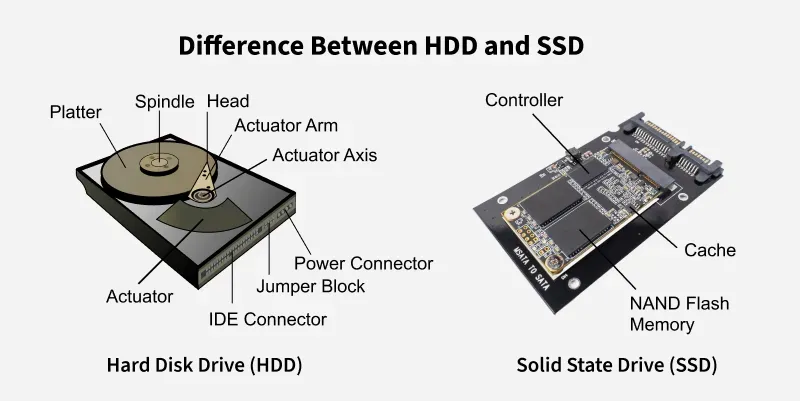
HDD v/s SSD
| Parameter | HDD | SSD |
|---|---|---|
| Long term storage | HDDs are more reliable for long-term storage. | SSDs are comparatively less reliable for long-term storage due to data leaks that can occur if kept unpowered for more than a year. |
| Access speed | The data accessing speed is slower as compared to SSD. | The data accessing speed is much higher as compared to HDD. |
| Performance | The performance suffers because of fragmentation. | The performance does not suffer because of fragmentation. |
| Suitable for | Extensive storageLong-term storage | Fast data retrieval Laptop or desktop because of low power consumption and size. |