Memory Mapped I/O and Isolated I/O (original) (raw)
Last Updated : 7 Nov, 2025
CPU needs to communicate with the various memory and input-output devices (I/O). Data between the processor and these devices flow with the help of the system bus. There are three ways in which system bus can be allotted to them:
- Separate set of address, control and data bus to I/O and memory.
- Have common bus (data and address) for I/O and memory but separate control lines.
- Have common bus (data, address, and control) for I/O and memory.
In first case it is simple because both have different set of address space and instruction but it require more buses.
Isolated I/O
In Isolated I/O, the CPU uses the same buses (wires) to talk to both memory and I/O devices, but it has separate control signals to tell whether it’s dealing with memory or an I/O device.
I/O devices have special addresses called ports.
When the CPU wants to communicate with an I/O device:
- It puts the port address on the address bus.
- It uses special control lines like I/O Read or I/O Write.
- Then data is sent or received using the data bus.
As memory and I/O have separate address spaces, it’s called Isolated I/O. Also, the CPU uses different instructions for memory and I/O (like IN and OUT for I/O).
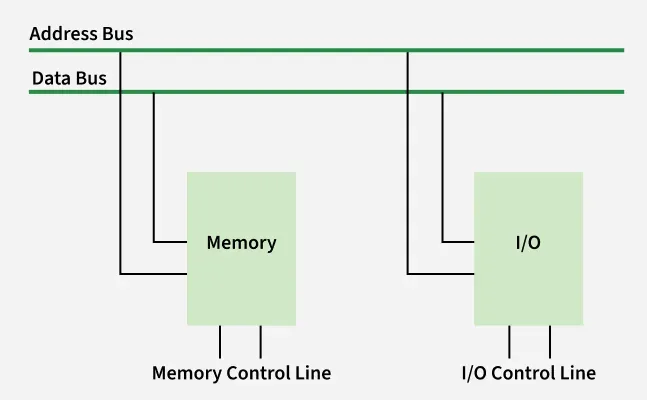
Isolated I/O
**Applications of Isolated I/O
- **Embedded Systems: Isolated I/O is widely used in embedded systems where strict separation between the CPU and peripherals is essential. This includes applications like industrial control systems, robotics, and automotive electronics. Isolation helps ensure that faults or malfunctions in peripheral devices do not compromise the stability of the entire system.
- **Microcontrollers: Microcontrollers often use isolated I/O to interface with various peripherals such as sensors, actuators, and displays. Each device is assigned a unique I/O port, allowing the microcontroller to communicate with multiple peripherals independently and efficiently.
- **Real-Time Systems: In real-time systems, where precise timing and predictable behavior are critical, isolated I/O is preferred. It allows for strict control over timing and synchronization of external events, helping the system maintain reliable and deterministic performance.
**Advantages of Isolated I/O
- **Large I/O Address Space: Isolated I/O allows for a larger I/O address space because I/O devices have their own separate address space, independent of the system memory.
- **Greater Flexibility: It offers greater flexibility, as I/O devices can be added or removed without affecting the memory address space.
- **Improved Reliability: Since I/O devices do not share the same address space as memory, failures in I/O devices are less likely to affect the memory or other devices, improving system reliability.
**Disadvantages of Isolated I/O
- **Slower I/O Operations: I/O operations may be slower because isolated I/O requires special instructions, which add extra processing steps.
- **More Complex Programming: Programming becomes more complex due to the need for dedicated I/O instructions, such as
INandOUT, which are separate from standard memory instructions.
**Memory Mapped I/O
In a memory-mapped I/O system, there are no special input or output instructions. Instead, the CPU uses the same instructions it uses for memory (like LOAD and STORE) to access I/O devices.
- Each I/O device is assigned a specific address in the regular memory address space.
- Devices are connected through interface registers, which act like memory locations.
- When the CPU wants to read from or write to an I/O device, it accesses the corresponding address, just like it would access a memory word.
- These interface registers respond to normal read/write operations as if they were memory cells.
This design allows I/O and memory to be treated uniformly, simplifying programming and hardware design.
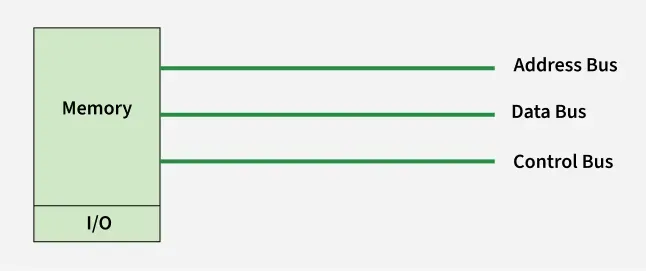
memory-mapped I/O system
**Applications of Memory-Mapped I/O
- **Graphics Processing: Memory-mapped I/O is widely used in graphics cards to provide fast access to frame buffers and control registers. Graphics data is mapped directly to memory, allowing the CPU to interact with the graphics hardware as if it were accessing normal memory. This enables efficient rendering and display operations.
- **Network Communication: Network Interface Cards (NICs) often use memory-mapped I/O to manage data transfer between the system memory and the network. The NIC’s control and status registers are mapped to specific memory addresses, allowing the CPU to efficiently control and monitor network operations.
- **Direct Memory Access (DMA): DMA controllers use memory-mapped I/O to enable high-speed data transfers between I/O devices and system memory without involving the CPU. By mapping DMA control registers to memory, devices can transfer data directly, improving system performance and reducing CPU load.
**Advantages of Memory-Mapped I/O
- **Faster I/O Operations: Memory-mapped I/O allows the CPU to access I/O devices using the same mechanism and speed as regular memory access. This results in faster I/O operations compared to isolated I/O.
- **Simplified Programming: Since the same instructions are used for both memory and I/O operations, programming becomes easier. Developers do not need to learn or use special I/O instructions, reducing complexity.
- **Efficient Use of Address Space: Memory-mapped I/O enables I/O devices to share the same address space as memory. This can make the system more efficient, especially in systems with a unified memory model.
**Disadvantages of Memory-Mapped I/O
- **Limited I/O Address Space: Because memory and I/O devices share the same address space, the number of available addresses for I/O devices is limited. This can be a problem in systems with many peripherals.
- **Potential Performance Issues: If an I/O device responds slowly, it may delay the CPU when accessing that memory-mapped region. This can affect overall system performance, especially in time-sensitive tasks.
**Differences between memory mapped I/O and isolated I/O
Let us see the difference between the memory mapped I/O and isolated I/O in the below table:
| **Aspect | **Isolated I/O | **Memory-Mapped I/O |
|---|---|---|
| **Address Space | Memory and I/O have separate address spaces | Memory and I/O share the same address space |
| **Memory Usage | All addresses can be used for memory | Some address space is used for I/O, reducing memory space |
| **Instruction Set | Separate instructions for I/O and memory read/write operations | Same instructions are used for both I/O and memory |
| **I/O Addressing | I/O addresses are called ports | Regular memory addresses are used for both memory and I/O |
| **Efficiency | More efficient due to separate control lines and buses | Slightly less efficient due to shared resources |
| **Hardware Size | Larger hardware due to additional buses and logic | Smaller hardware as fewer buses are needed |
| **Design Complexity | More complex requires separate logic for I/O and memory | Simpler design I/O is handled like memory |