Computer Memory (original) (raw)
Last Updated : 28 Apr, 2026
Memory is the electronic storage space where a computer keeps the instructions and data it needs to access quickly. It's the place where information is stored for immediate use. Memory is an important component of a computer, as without it, the system wouldn’t operate correctly. The computer’s operating system (OS), hardware, and software all rely on memory to function properly.
Communication Between Memory and the CPU
Computer memory communicates with the CPU through a structured system of electronic pathways and controllers, enabling the CPU to fetch and store data rapidly and efficiently. Here’s a detailed breakdown:
- **System Bus Structure: The main channel for communication between the CPU and memory is the system bus, which is a collection of three types of buses:
- **Data Bus: Transfers the actual data between CPU and memory.
- **Address Bus: Carries the memory address that specifies where data should be read from or written to.
- **Control Bus: Sends signals that coordinate and control the activity, such as indicating read or write operations.
- **Memory Controller: Communication is orchestrated by a memory controller, which manages the flow of data and ensures that signals between the CPU and memory are synchronized. In older systems, this controller was located on the motherboard; in modern computers, it’s typically integrated into the CPU for greater speed and efficiency
**Communication Process
- When the CPU needs to access data or instructions in memory, it places the address of the required memory location on the address bus.
- The CPU sends a control signal (read or write command) on the control bus.
- If reading, the memory controller retrieves the data from the specified address and sends it back to the CPU via the data bus. If writing, the CPU sends data over the data bus to be stored at the designated memory location.
- This process is repeated billions of times per second during computing operations, forming the backbone of the fetch-decode-execute cycle used to run programs
Types of Computer Memory
Computer memory is categorized into different types based on how data is stored, accessed, and used during processing.
1. Primary Memory
Also known as the main memory of the computer system, is used to store data and programs, or instructions during computer operations. It uses semiconductor technology and hence is commonly called semiconductor memory. Primary memory is of two types:
RAM
Also known as Random Access Memory is a volatile memory. Volatile memory stores information based on the power supply. If the power supply fails/ interrupted/stopped, all the data and information on this memory will be lost. RAM is used for booting up or starting the computer. It temporarily stores programs/data which has to be executed by the processor. RAM is of two types:
- **S RAM (Static RAM):S RAM uses transistors and the circuits of this memory are capable of retaining their state as long as the power is applied. This memory consists of the number of flip flops with each flip flop storing 1 bit. It has less access time and hence, it is faster.
- **D RAM (Dynamic RAM):D RAM uses capacitors and transistors and stores the data as a charge on the capacitors. They contain thousands of memory cells. It needs refreshing of charge on capacitor after a few milliseconds. This memory is slower than S RAM.
ROM
A type of non-volatile memory stores data permanently, even when the power is off, known as Read Only Memory (ROM). It is used to hold essential instructions required to start and operate the system, and its data can only be read, not modified. ROM is also called permanent memory and stores information in binary form. It is of four main types.
- **MROM(Masked ROM): Hard-wired devices with a pre-programmed collection of data or instructions were the first ROMs. Masked ROMs are a type of low-cost ROM that works in this way.
- **PROM (Programmable Read Only Memory): This read-only memory is modifiable once by the user. The user purchases a blank PROM and uses a PROM program to put the required contents into the PROM. Its content can't be erased once written.
- **EPROM (Erasable Programmable Read Only Memory):EPROM is an extension to PROM where you can erase the content of ROM by exposing it to Ultraviolet rays for nearly 40 minutes.
- **EEPROM (Electrically Erasable Programmable Read Only Memory): Here the written contents can be erased electrically. You can delete and reprogram EEPROM up to 10,000 times. Erasing and programming take very little time, i.e., nearly 4 -10 ms(milliseconds). Any area in an EEPROM can be wiped and programmed selectively.
2. Secondary Memory
Also known as auxiliary memory and backup memory, is a non-volatile memory and used to store a large amount of data or information. The data or information stored in secondary memory is permanent, and it is slower than primary memory. A CPU cannot access secondary memory directly. The data/information from the auxiliary memory is first transferred to the main memory, and then the CPU can access it. Its features are:
- Non-volatile memory that stores data permanently (even without power)
- Provides large storage capacity for files and applications
- Slower than primary memory but more cost-effective
- Used for long-term data storage and backup
**Types of Secondary Memory
**1. Magnetic Tapes: Storage medium uses a long, narrow plastic strip coated with magnetic material to record data as magnetic patches along multiple tracks, known as **Magnetic Tapes. Data is read and written sequentially, and the tape can be moved forward, backward, or rewound, making it suitable for backup and archival storage.
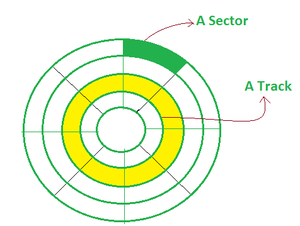
**2. Magnetic Disks: Type of storage device uses circular plates coated with magnetic material to store data on both sides, known as **Magnetic Disks. Data is organized into concentric tracks and divided into sectors, allowing faster and more direct access compared to tapes.
**3. Optical Disks: It's a laser-based storage medium that can be written to and read. It is reasonably priced and has a long lifespan. The **Optical Disks can be taken out of the computer by occasional users.
**Types of Optical Disks
1. CD - ROM: An optical storage device used in secondary memory reads data using a laser beam and stores it permanently as microscopic pits on a reflective (usually aluminum) surface. This device, known as a Compact Disc (**CD - ROM), is non-volatile and read-only. It typically has a capacity of around 600 MB, with data organized into tracks and sectors, and offers moderate data transfer speed with relatively higher access time compared to primary memory.
**2. WORM-(WRITE ONCE READ MANY): Optical storage method allows data to be written only once using a laser beam and read multiple times without modification. This type of storage, known as WORM (Write Once Read Many), is non-volatile and suitable for maintaining permanent records. It offers moderate storage capacity but has higher access time, and while new data can be added to unused areas, previously written data cannot be altered.
**3. DVDs: An optical storage format offers higher capacity than CDs and is used for storing video, data, and software. Known as DVD(Digital Versatile Disc), it includes types like DVD-ROM (read-only), DVD-R (write once), and DVD-RW (rewritable). Itcan store large amounts of data (typically 4.7 GB to 17 GB), use a polycarbonate layer for durability, and allow data to be read using laser technology, with some formats supporting writing or rewriting.
3. Cache Memory
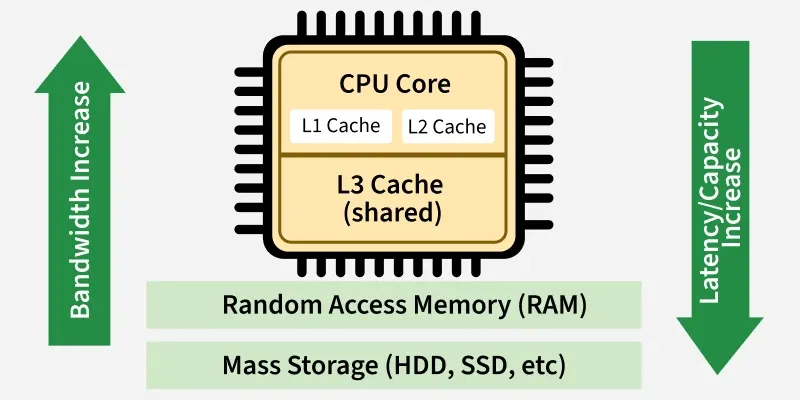
Type of high-speed semiconductor memory helps improve CPU performance by storing frequently used data and instructions, known as Cache Memory. Acting as a buffer between the CPU and main memory, it reduces access time and speeds up processing.
**Advantages
- It is faster than the main memory.
- When compared to the main memory, it takes less time to access it.
- It keeps the programs that can be run in a short amount of time.
- It stores data for temporary use.
**Disadvantages
- Because of the semiconductors used, it is very expensive.
- The size of the cache (amount of data it can store) is usually small.