What is a Keyboard? (original) (raw)
Last Updated : 23 Jul, 2025
A **keyboard is an input device used to type letters, numbers, and symbols into a computer or electronic device. It consists of a set of keys or buttons that allow the user to interact with the system. It lets you write stories, search for homework answers, or even play games by pressing keys that tell the computer what to do. Keyboards have been around for ages, starting from old-school typewriters to the cool, colourful ones we see now. They’re super important for schoolwork and fun, helping you put your ideas into words on the screen. Let’s check out what makes keyboards so awesome and how they work!
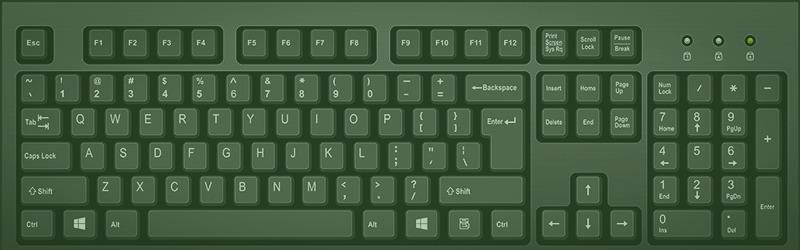
A keyboard is an input device used to type text and commands into a device.
In the world of computing, devices are generally categorised into two main types: **Input devices and **Output devices.
- **Input devices are used to send data and instructions to a computer. They act as the medium through which users interact with the system, providing essential input for processing.
- **Output devices, on the other hand, are responsible for displaying or presenting the processed results of the computer's operations. These devices provide the final output to the user.
As stated earlier, the Keyboard is a major input device used with computers and other electronic devices. It takes input from the user in the form of text, numbers, and several other commands. If we look at the structure of a keyboard consists of various buttons. These buttons are called keys, and every keyboard has a variety of keys with unique functions.
How Many Buttons on a Keyboard?
1. **Standard Full-Sized Keyboard:
- Typically has **104-105 keys (US and European layouts).
- Includes alphanumeric keys, function keys (F1-F12), control keys (Ctrl, Alt), navigation keys (arrow keys, Home, End), and a numeric keypad.
2. **Tenkeyless (Compact) Keyboards:
- These have **87-88 keys as they omit the numeric keypad, making them more compact.
3. **Laptop Keyboards:
- Usually have **80-90 keys, with a smaller layout and no numeric keypad in most cases.
4. **Specialised Keyboards:
- **Gaming Keyboards: May have extra keys for macros or media control, sometimes **104-120 keys.
- **Ergonomic Keyboards: Usually have **100-104 keys, designed for comfort.
- **Mac Keyboards: Typically follow the standard layout with some differences in special keys.
5. **Virtual Keyboards:
- Found on smartphones or tablets, the number of keys can vary, but they usually include basic letters, numbers, and special characters.
History of Keyboards
The story of keyboards begins in the 1860s with the invention of mechanical typewriters, from which the modern layout of keyboard layout is inherited. A major development was the invention of the teletype machine, which was used for the sending and receiving of telegraphs. Early computers, like ENIAC and BINAC, used keypunch and electric typewriter technology in their keyboards. In 1984, the IBM Model M keyboard was introduced, which had improved keys and inspired modern keyboard design. Gradually, there was an increased demand for personal computers, which led to the popularisation of QWERTY keyboards.
There have been various updates made to the design of keyboards, by making them customizable, wireless, etc. However, keyboards remain a fundamental input device.
Types of Keyboards
Here are some of the various types of keyboards, each designed to serve specific purposes and user preferences. Understanding these different types can help in selecting the most suitable keyboard for your needs.
QWERTY Keyboard
This is the most common and classic keyboard structure. It is named so because of its first 6 keys of the keyboard (QWERTY). Its design was inspired by the early typewriters. The keys were designed in such an order so that the letters which are frequently used are spaced out to prevent any jamming of keys. The design was made in the early 1870's by Christopher Latham Sholes and is still used to date. It consists of a variety of keys like alphanumeric keys, special keys, function and modifier keys, etc.
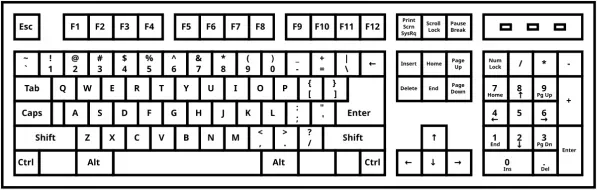
The standard keyboard layout we use every day
Dvorak Keyboard
It is an alternative to the QWERTY keyboard. In QWERTY keyboards, the typing process was slow because of the arrangement of letters. On the other hand, Dvorak keyboards are designed in a way that the user can type without much movement of fingers, hence resulting in fast and easy typing. However, this layout failed to gain popularity as users found it difficult to adapt with this layout.
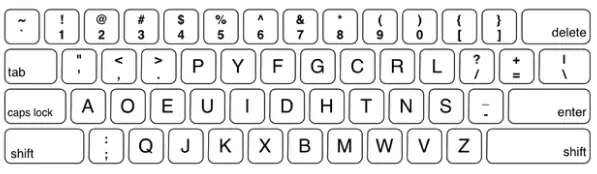
A keyboard layout designed for efficiency and speed
Ergonomic Keyboards
The term Ergonomic means designing in such a manner that it provides users with an efficient working environment. That is exactly what Ergonomic keyboards provide. These keyboards are designed in a way that they help in reducing strain and any discomfort faced by the user while typing for a long time. This is achieved by design, which allows user to rest their hand in a natural position in a comfortable way and arrange keys in the order which causes the least finger movements. A keyboard which is split into two halves to provide a better typing experiene, comes under this category.
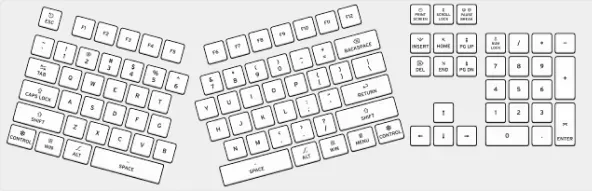
Designed for comfort to reduce strain during long typing sessions
Mechanical Keyboards
Mechanical keyboards are highly durable keyboards. They have individual mechanical switches or springs attached under each key. This makes them not only more durable but also easier to repair. They are popular for ther, unique keypress sound and responsiveness. However, they are expensive than standard keyboards.
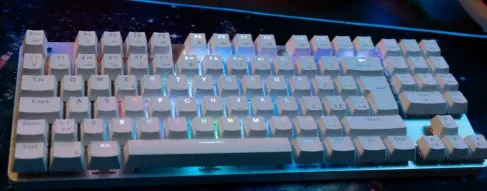
Known for tactile feedback and durability, perfect for typing and gaming.
Gaming Keyboards
Gaming keyboards are purposely made for gaming. It has features like lesser keys which are arranged in a way that it provides quick access to the gamers. It also has other features like RGB lighting, longer durability and customizable design. The most important quality of gaming keyboards is that the keys have a faster response time.
There are some keyboards with special features like– Wireless keyboard, Foldable keyboard and Backlit Keyboard.
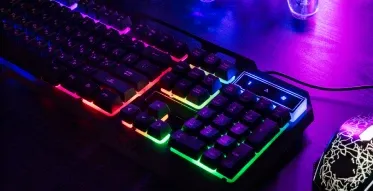
Built for gamers with customizable keys and fast response times.
Wireless keyboards
**Wireless keyboards connect to computers, tablets, or smartphones via **Bluetooth or **RF (Radio Frequency) technology, providing more flexibility and eliminating the clutter of cables. These keyboards are perfect for users who need mobility or want a cleaner workspace. Some wireless keyboards are rechargeable, while others use replaceable batteries, and many offer extended ranges for ease of use from a distance. **Wireless mechanical keyboards are also gaining popularity, offering the tactile benefits of mechanical switches with the convenience of wireless connectivity.
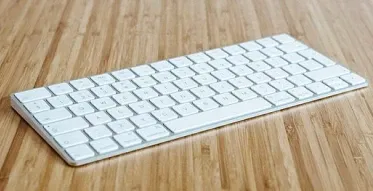
Offers convenience with no cords, providing a clean, flexible setup.
Foldable Keyboards
Foldable keyboards are designed for portability, making them ideal for on-the-go use. They are typically compact and can be folded or rolled up for easy storage. These keyboards are lightweight and often made from flexible materials like silicone, allowing users to carry them easily in a bag or pocket. They connect via Bluetooth, making them compatible with mobile devices and tablets, and are perfect for business travelers or those who need a keyboard while on the move.
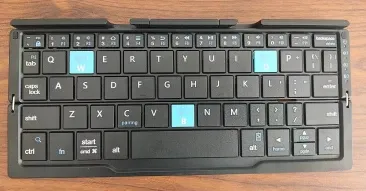
Portable and compact, perfect for on-the-go typing.
**Backlit Keyboards
**Backlit keyboards feature keys that are illuminated from underneath, making them easier to use in low-light environments. The **RGB backlighting allows for customizable color schemes, adding a personalized touch to the keyboard. Many gaming and high-end office keyboards come with this feature, which not only enhances aesthetics but also improves usability in dark settings. Some backlit keyboards offer **dynamic lighting effects that can change based on typing activity or user preference.

Illuminated keys for easy typing in low-light environments.
**Compact Keyboards
**Compact keyboards are designed to save space by removing non-essential keys such as the **number pad or reducing the overall size of the keyboard. These keyboards are perfect for users with limited desk space or those who need a lightweight, portable option. They are often used in minimalist setups, on laptops, or with devices like **smart TVs or **tablets. Some compact keyboards also feature **multimedia or **function-specific keys for additional functionality.
**Specialized Keyboards
- **Voice-Control Keyboards: Some advanced keyboards integrate **voice control technology, allowing users to give spoken commands as an alternative to typing.
- **Virtual Keyboards: Used on touchscreens, **virtual keyboards are often found on smartphones and tablets, displaying an on-screen keyboard that responds to touch input.
**Types of Keys on Keyboard
As started earlier, the structure of a keyboard consists of various buttons. These buttons are called keys and every keyboard has a variety of keys with unique functions. All input to a keyboard is given through these keys. The variety of keys present in a keyboard are listed below:
1. Alphanumeric Keys (Text and Numbers)
- These keys are called alphanumeric keys and are used to enter textual and numeric data. They consist of letters A-Z and numbers 0-9.
- The number keys also contain some special characters (like !, @, #,$,&,*) .
-300.png)
Alphanumeric key
2. Navigation and Managing Input
Navigation keys help users move through documents, webpages, and applications:
- **Arrow Keys: Used to move the cursor up, down, left, or right.
- **Page Up and **Page Down: Allow for quicker navigation through large documents or webpages, scrolling up or down a full screen at a time.
- **Home and **End: Jump the cursor to the beginning or end of a line or document.
These keys, along with the **Delete key, facilitate editing and managing the input: - **Delete Key: Removes characters to the right of the cursor.
- **Backspace Key: Deletes characters to the left of the cursor.
- **Caps Lock: Toggles between lowercase and uppercase letters without needing to hold the **Shift key.
- **Num Lock: Activates or deactivates the numeric keypad, enabling number entry or switching to alternative functions on some keys.
- **Scroll Lock: While rarely used today, Scroll Lock was once used to control how text was scrolled in early applications, though its function has become largely obsolete in most modern software.
-300.png)
Navigation and managing input keys
3. Special Function Keys
Function keys, located at the top of the keyboard, offer shortcuts for various tasks:
- **F1-F12: These 12 keys have different functions depending on the software. For example, **F1 is commonly used for help or support, **F5 often refreshes a page, and **F11 can toggle full-screen mode in some browsers.
- **Shift Key: This key is used to access the upper character of a key (such as ****@**, ****#**, ****&**) or to type in **uppercase without holding down the key for every letter.
- **Control (Ctrl) Key: This modifier key is used in combination with others to create shortcuts, such as **Ctrl + C for copy, **Ctrl + V for paste, and **Ctrl + Z for undo.
- **Alt Key: Similar to the **Ctrl key, **Alt is used for additional shortcuts. For example, pressing **Alt + Tab allows you to switch between open applications.
-300.png)
Special function keys
4. Other Important Keys
- **Enter Key: The **Enter (or **Return) key is used to submit commands, confirm selections, or start a new line of text in documents.
- **Spacebar: The largest key, it inserts a space between words or characters and is essential for text formatting.
- **Escape (Esc) Key: Used to exit or cancel operations, close dialog boxes, or return to the previous screen in many applications.
- **Tab Key: It moves the cursor to the next tab stop, often used for indenting text or navigating between fields in forms.
- **Windows (or Command) Key: On Windows, it opens the Start menu; on Mac, it activates the **Spotlight search or other system functions, depending on the keyboard configuration.
-300.png)
Other important keys
5. **Additional Keys and Features
- **Numeric Keypad: Found on the right side of some keyboards, this section is designed for quick number entry and is often used in accounting or data entry.
- **Function Lock Keys: Some keyboards include a **Fn key, often found in laptops, to access additional functions like adjusting volume, screen brightness, or turning off wireless connections.
- **Multimedia Keys: Many modern keyboards come with dedicated multimedia buttons for controlling music, videos, or volume, such as **play, **pause, **stop, and **volume up/down.
These keys collectively contribute to making the keyboard an essential tool for both everyday computing and specialized tasks. Whether you’re **typing an email,editing a document, or **playing a game, each key plays a vital role in making interactions smoother and more efficient.
Weird Keyboards
These keyboards offer unique solutions to improve typing efficiency, comfort, and accessibility. Whether it's for mobility, ergonomics, or customization, each design caters to specific user needs.
- **Virtual Projection Keyboard: Projects a keyboard image onto a surface, allowing typing via touch. Compact and portable, often used with mobile devices.
- **Maltron Single-Handed Keyboard: Designed for one-handed typing with easy-to-reach keys, ideal for people with disabilities or ergonomic needs.
- **Frogpad Keyboard: A compact one-handed keyboard with a minimalist layout, made for efficient typing with minimal hand movement.
- **Optimus Maximus Keyboard: High-end keyboard with OLED screens on each key for dynamic customization based on software.
- **ErgoDox EZ: Ergonomic, split mechanical keyboard with customizable key layouts to reduce wrist strain.
- **Chiclet Keyboard: Flat, square keys found on laptops, offering a slim profile and quiet typing experience.
- **Clevy Keyboards: Designed for children with oversized, color-coded keys for easy typing and learning.
- **Round Keyboard: A round keyboard features circular keys arranged in a unique layout, offering a modern aesthetic and potentially more ergonomic hand positioning.
- **Vertical Keyboard: A vertical keyboard is designed to reduce wrist strain by positioning the keys upright, promoting a more neutral wrist posture and improving comfort for long typing sessions.
Here are some keyboard shortcuts that help you perform tasks faster without using a mouse. Learning them can make your work easier and save time. Let’s take a look at some common keyboard shortcuts and their functions.
Conclusion
Keyboard has always been the most essential input device required in a computer. They provide users a medium through which they can communicate or enter their commands in a computer. A user-friendly layout and various other features makes keyboard a significant input device for computers and other electronic devices.