Histogram of Oriented Gradients (original) (raw)
Last Updated : 23 Jul, 2025
**HOG is a feature descriptor used in computer vision and image processing for object detection. It captures the structure or the shape of an object by analyzing the distribution (histograms) of gradient orientations in localized portions of an image. HOG is especially popular for human and vehicle detection.
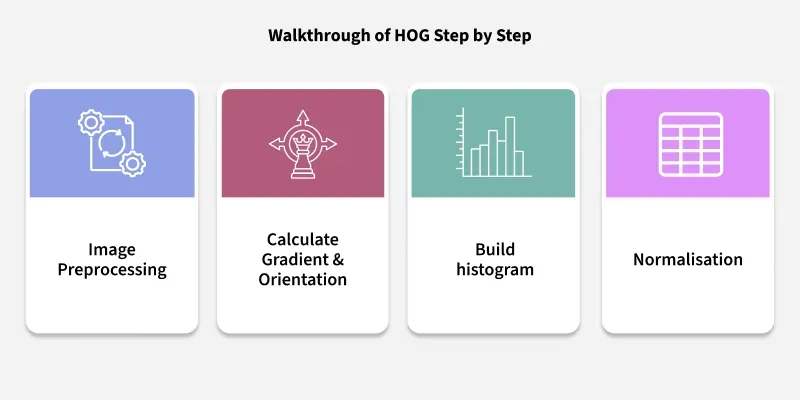
Walkthrough of HOG Step by Step
1. **Preprocessing
- **Convert the image to grayscale (if not already).
- **Resize the image to a standard size. As an initial step, we preprocess the image by resizing it to a standardized size of 32 pixels in width and 64 pixels in height. This ensures consistency across all input images, making further analysis and feature extraction more reliable.
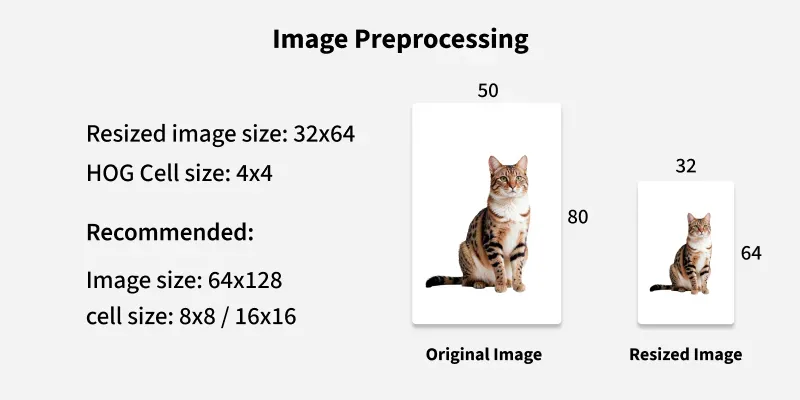
Image Preprocessing
2. **Compute Gradients
- Calculate the gradient of the image in both the X and Y directions using operators like Sobel.
- For each pixel, compute:
- **Gradient magnitude: \text{Magnitude} = \sqrt{G_x^2 + G_y^2}
- **Gradient orientation: \text{Orientation} = \operatorname{arctan2}(G_y,\, G_x)
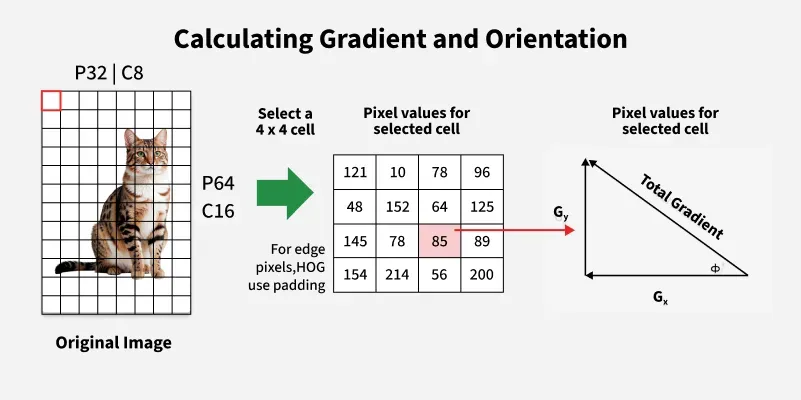
Calculating Gradient and Orientation
- Begin by dividing the image into small cells; in this example, the image is split into 4x4 pixel cells, resulting in 8 cells along the width (C8) and 16 along the height (C16).
- For a given cell (e.g., a 4x4 pixel block), examine the pixel value matrix within that cell.
- Value of Magnitude and direction
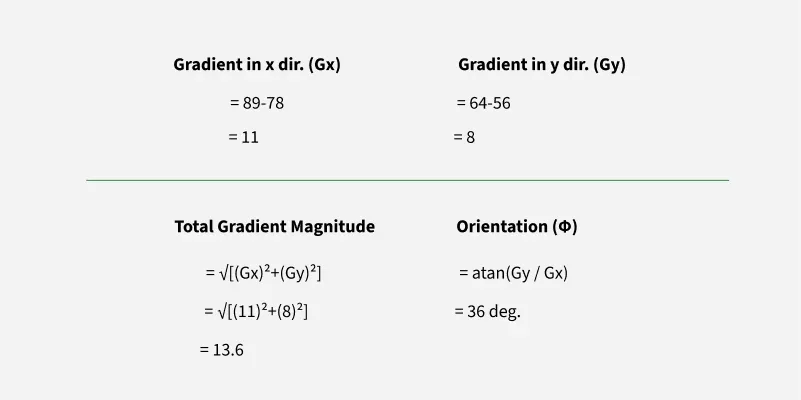
Value of Magnitude and direction
- Compute the gradient in the x direction (Gx) for a pixel as the difference between the pixel value to its right and the pixel value to its left (e.g., 89–78 = 11).
- Compute the gradient in the y direction (Gy) as the difference between the pixel value above and the pixel value below (e.g., 64–56 = 8).
- Calculate the gradient magnitude for the pixel using the Pythagorean theorem: \sqrt{Gx^2 + Gy^2}(e.g. \sqrt{11^2 + 8^2} = 13.6).
- Determine the gradient orientation as the inverse tangent of Gy divided by Gx (e.g. \arctan\left(\frac{8}{11}\right) = 36^\circ).
- Repeat this process for all pixels within each 4x4 cell to obtain gradients and orientations for the entire cell.
- For edge pixels, use padding techniques to handle boundary conditions.
**Note: Standard practice is to resize images to 64x128 pixels and use larger cell sizes (8x8 or 16x16), but smaller sizes are used here due to the small input images.
3. **Divide Image into Cells
- Split the image into small, connected regions called **cells (e.g., 8x8 pixels).
- Use padding to ensure that the cells at the edges of the image are at least half contained within the image, allowing the entire image area to be covered even if its dimensions are not exact multiples of the cell size.
4. **Create Orientation Histograms
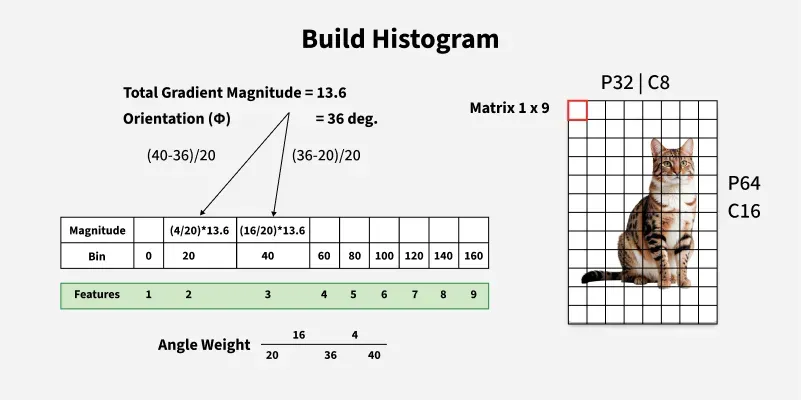
- For each pixel, calculate the gradient magnitude (e.g., 13.6) and orientation (e.g., 36 degrees).
- Orientation values range from 0 to 180 degrees.
Build Histogram
- Divide the 0–180 degree range into 9 histogram bins, each spanning 20 degrees.
- Assign each pixel’s gradient magnitude to the two nearest bins, weighted by how close the orientation is to each bin center.
- For example, if a pixel’s orientation is 36 degrees (closer to the 40-degree bin), most of its magnitude goes to the 40-degree bin (weight: 16/20), and the rest to the 20-degree bin (weight: 4/20).
- Repeat this process for all pixels in the cell, accumulating weighted magnitudes in each bin.
- The result for each cell is a 1x9 feature vector representing the distribution of edge directions.
- HOG computes such histograms for every cell in the image.
5. **Normalize Across Blocks
- Localized image gradients are sensitive to lighting variations; normalization helps reduce this effect.
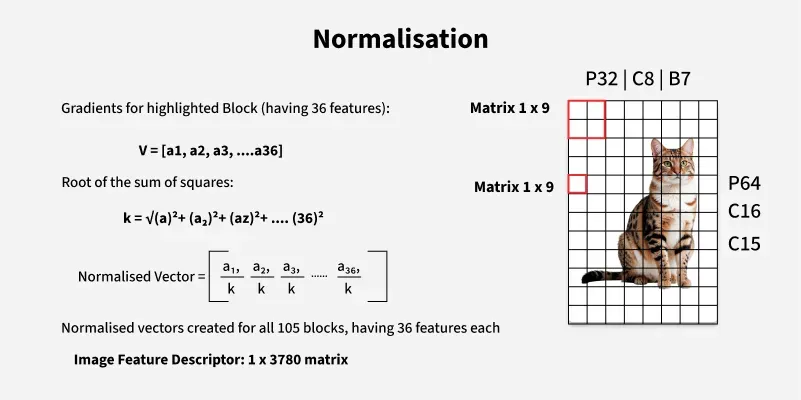
- Group neighboring cells into blocks (e.g., 4 cells per block), creating overlapping regions as the block moves one cell at a time across the image.
- For each cell, HOG creates a 1x9 feature vector (histogram of gradient orientations).
- For each block, concatenate the feature vectors of its four cells to form a 1x36 block feature vector.
- Compute the normalization factor kas the root sum of squares of all 36 block features.
Normalisation
- Divide each feature in the block by kto obtain the normalized block vector.
- Repeat this process for all blocks (e.g., 105 blocks when sliding across the image).
- Concatenate the normalized vectors from all blocks horizontally to form the final image descriptor (e.g., 1x3780 dimensional vector for the example case).
- This high-dimensional descriptor represents the image’s edge and texture structure for use in machine learning tasks.
- Due to the large number of features, dimensionality reduction techniques like Principal Component Analysis (PCA) are often used to reduce computational complexity and prevent overfitting.
6. **Concatenate Features
- The final HOG descriptor is the concatenation of all normalized histograms from all blocks, forming a single feature vector.
Below is a simple implementation using OpenCV and scikit-image
- **Import necessary libraries: matplotlib for plotting, skimage for HOG feature extraction, and exposure adjustment.
- Load a sample image (astronaut) from skimage’s data module.
- Compute HOG features and the HOG visualization image using the hog() function:
- **Set parameters: 8 orientations, 16x16 pixels per cell, 1x1 cells per block, visualize=True, and specify the color channel axis.
- Create two side-by-side subplots to display images.
- Display the original image in the first subplot with axes turned off and a title.
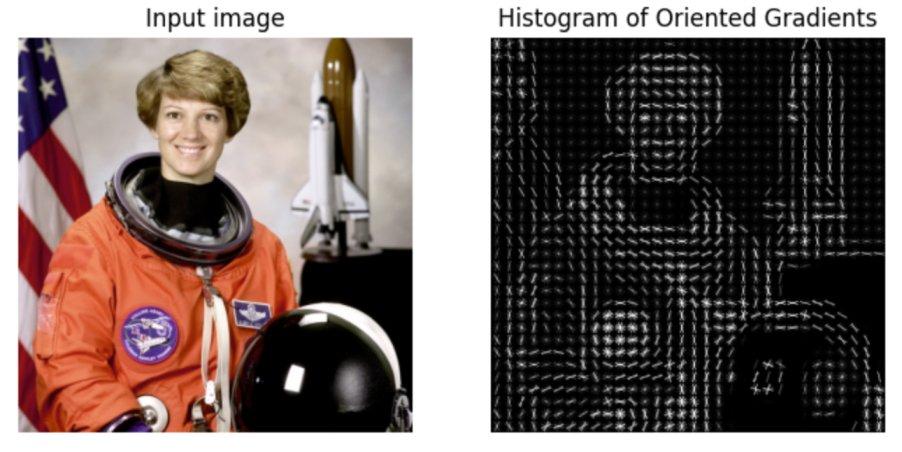
- Rescale the HOG visualization image’s intensity for better display using exposure.rescale_intensity.
- Display the rescaled HOG image in the second subplot with axes turned off and a title.
- Show the combined figure, allowing visual comparison between the original image and its HOG feature representation. Python `
import matplotlib.pyplot as plt
from skimage.feature import hog from skimage import data, exposure
image = data.astronaut()
fd, hog_image = hog( image, orientations=8, pixels_per_cell=(16, 16), cells_per_block=(1, 1), visualize=True, channel_axis=-1, )
fig, (ax1, ax2) = plt.subplots(1, 2, figsize=(8, 4), sharex=True, sharey=True)
ax1.axis('off') ax1.imshow(image, cmap=plt.cm.gray) ax1.set_title('Input image')
Rescale histogram for better display
hog_image_rescaled = exposure.rescale_intensity(hog_image, in_range=(0, 10))
ax2.axis('off') ax2.imshow(hog_image_rescaled, cmap=plt.cm.gray) ax2.set_title('Histogram of Oriented Gradients') plt.show()
`
**Output
Output Image
Above is the output features extracted from the given input image.
Why is HOG Effective?
- **Captures Edge/Shape Information: Focuses on the structure of objects, which is robust to lighting and color changes.
- **Compact Representation: Reduces the image to a feature vector, making it efficient for machine learning algorithms like SVM.
- **Scale & Illumination Invariance: Normalization across blocks helps handle variations in lighting and contrast.
Applications of HOG
- **Human Detection : Widely used in pedestrian detection (e.g., in self-driving cars, surveillance).
- **Vehicle Detection : Detecting cars, trucks, and other vehicles in traffic analysis.
- **Face Detection : Used as a pre-processing step in face recognition systems.
- **Object Recognition : General object detection tasks in robotics and automation.
- **Medical Imaging : Identifying structures in X-rays, MRIs, etc.
- **Gesture Recognition : Recognizing hand or body gestures in interactive systems.