Different Image Denoising techniques in Computer Vision (original) (raw)
Last Updated : 15 Jun, 2026
Image denoising is a fundamental step in computer vision used to enhance image quality by reducing unwanted noise while preserving important details such as edges, textures, and structures. It plays a key role in improving the reliability of image-based analysis and decision-making systems.
- Noise arises from sensors, transmission errors, or low-light conditions
- Denoising improves performance in tasks like detection, recognition, and medical analysis
**Types of Noise
Different denoising methods are designed based on the type of noise present in an image.
- **Gaussian Noise: Random variation in pixel intensity caused by sensor noise or low light, appears as grain across the image.
- **Salt-and-Pepper Noise: Random black and white pixels caused by transmission errors or data corruption.
- **Speckle Noise: Multiplicative noise seen in medical and radar images, giving a grainy texture.
- **Poisson Noise: Noise due to low photon count in imaging systems depends on signal strength.
Common Techniques
1. Gaussian Filter
Gaussian filter is a linear smoothing technique that reduces noise by replacing each pixel with a weighted average of its neighboring pixels. The weights follow a Gaussian distribution, giving more importance to closer pixels. It is mainly used to reduce Gaussian noise but may slightly blur sharp edges.
- Controlled by standard deviation (σ)
- Smaller σ preserves details, larger σ increases smoothing
**Code Implementation: A Gaussian blur is applied using OpenCV’s built-in function to reduce noise and smooth the image.
You can download the input image from here.

Python `
import cv2 import numpy as np
image = cv2.imread('noisy_image.jpg', cv2.IMREAD_GRAYSCALE)
sigma = 1.5 gaussian_denoised = cv2.GaussianBlur(image, (5, 5), sigma)
cv2.imwrite('gaussian_denoised.jpg', gaussian_denoised)
`
**Output:

Gaussian Denoised
The resulting image shows reduced Gaussian noise with a smoother appearance.
2. Median Filter
Median filter is a non-linear technique that replaces each pixel with the median value of its surrounding neighborhood. It is especially effective for removing salt-and-pepper noise, where random black and white pixels appear in the image.
- Strong against impulse noise (outliers)
- Preserves edges more effectively than Gaussian filter
**Code Implementation: A median filter is applied to reduce impulse noise using a small kernel size.
Python `
kernel_size = 3
median_denoised = cv2.medianBlur(image, kernel_size)
cv2.imwrite('median_denoised.jpg', median_denoised)
`
**Output:

The output image effectively removes salt-and-pepper noise while preserving important edges.
3. Non-Local Means (NLM)
Non-Local Means is an advanced filtering technique that reduces noise by searching for similar pixel patterns across the entire image rather than limiting to a small neighborhood. It assigns higher weights to more similar patches, resulting in better preservation of textures and fine details.
- Maintains textures better than traditional filters
- Computationally slow due to full-image search
**Code Implementation: NLM denoising is applied using OpenCV’s fast implementation.
Python `
nlm_denoised = cv2.fastNlMeansDenoising(image, h=10, templateWindowSize=7, searchWindowSize=21)
cv2.imwrite('nlm_denoised.jpg', nlm_denoised)
`
**Output:
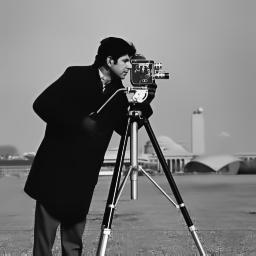
Non-local means denoised
The denoised image retains fine textures while effectively reducing noise.
4. Convolutional Neural Networks (CNNs)
CNN-based denoising models learn how noise behaves by training on pairs of noisy and clean images. Instead of manually defining filters, the network automatically learns hierarchical features that help reconstruct clean images from noisy inputs.
- Learns noise patterns from data
- Works well for real-world, mixed noise conditions
- Requires training but generalizes well
**Code Implementation: DnCNN architecture is defined using convolutional and batch normalization layers.
Python `
import tensorflow as tf from tensorflow.keras import layers, Model
def dncnn(): inputs = layers.Input(shape=(None, None, 1))
x = layers.Conv2D(64, kernel_size=(3, 3), strides=(1, 1), padding='same')(inputs)
x = layers.ReLU()(x)

for _ in range(15):
    x = layers.Conv2D(64, kernel_size=(3, 3), strides=(1, 1), padding='same')(x)
    x = layers.BatchNormalization()(x)
    x = layers.ReLU()(x)

outputs = layers.Conv2D(1, kernel_size=(3, 3), strides=(1, 1), padding='same')(x)

model = Model(inputs, outputs)
return model
import cv2 import numpy as np
image = cv2.imread('noisy_image.jpg', cv2.IMREAD_GRAYSCALE) image = image.astype('float32') / 255.0 image = np.expand_dims(image, axis=0) image = np.expand_dims(image, axis=-1)
model = dncnn()
denoised_image = model.predict(image) denoised_image = np.squeeze(denoised_image) * 255.0 denoised_image = denoised_image.astype('uint8')
cv2.imwrite('dncnn_denoised.jpg', denoised_image)
`
**Output:
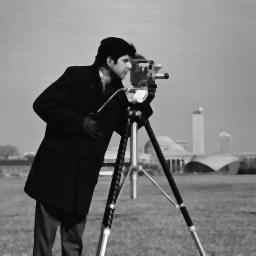
The model produces a denoised image by learning and removing complex noise patterns.
5. Generative Adversarial Networks (GANs)
GAN-based denoising uses two competing networks where the generator creates clean images and the discriminator evaluates their authenticity. Over time, this adversarial process helps generate highly realistic and visually sharp denoised images.
- Strong at reconstructing high-frequency details
- Training is complex and resource-intensive
**Code Implementation: A simple CNN-based generator is used for denoising images from a URL.
Python `
import cv2 import numpy as np import requests from io import BytesIO from PIL import Image import tensorflow as tf
def build_denoiser_model(): generator = tf.keras.models.Sequential([
    tf.keras.layers.Conv2D(64, (3, 3), strides=(1, 1), padding='same', activation='relu', input_shape=(None, None, 1)),
    tf.keras.layers.Conv2D(64, (3, 3), strides=(1, 1), padding='same', activation='relu'),
    tf.keras.layers.Conv2D(1, (3, 3), strides=(1, 1), padding='same', activation='sigmoid')
])

return generator
def gan_denoise_image(image_url, denoiser_model): response = requests.get(image_url) noisy_image = Image.open(BytesIO(response.content)) noisy_image = np.array(noisy_image) noisy_image = np.expand_dims(noisy_image, axis=-1) / 255.0
denoised_image = denoiser_model.predict(np.expand_dims(noisy_image, axis=0))
denoised_image = np.squeeze(denoised_image) * 255.0
denoised_image = denoised_image.astype(np.uint8)

return denoised_image
image_url = 'https://raw.githubusercontent.com/cszn/DnCNN/master/testsets/Set12/01.png'
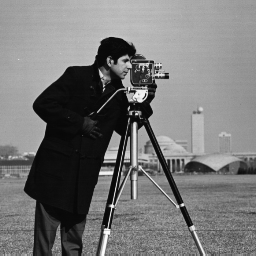
denoiser_model = build_denoiser_model()
denoised_image = gan_denoise_image(image_url, denoiser_model)
cv2.imwrite('denoised_image.jpg', denoised_image)
`
**Output:
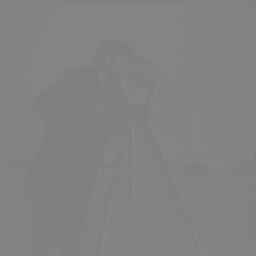
The final image is highly realistic with significantly reduced noise and preserved details.
The complete source code can be downloaded from here.