Time Series Forecasting using Pytorch (original) (raw)
Last Updated : 23 Jul, 2025
Time series forecasting plays a major role in data analysis, with applications ranging from anticipating stock market trends to forecasting weather patterns. In this article, we'll dive into the field of time series forecasting using PyTorch and LSTM (Long Short-Term Memory) neural networks. We'll uncover the critical preprocessing procedures that underpin the accuracy of our forecasts along the way.
Time Series Forecasting
Time series data is essentially a set of observations taken at regular periods of time. Time series forecasting attempts to estimate future values based on patterns and trends detected in historical data. Moving averages and traditional approaches like ARIMA have trouble capturing long-term dependencies in the data. LSTM is a type of recurrent neural network, that excels at capturing dependencies through time and able to intricate patterns.
Implementation of Time Series Forecasting
Prerequisites
- Numpy for working with arrays
- Pandas for working with relational or labeled data
- Matplotlib for data visualization
- Seaborn for data visualization
- DateTime to work with data and time
- MinMaxScaler for normalization
- PyTorch to build the neural network for training
Datasets
Here, we have used Yahoo Finance to get the share market dataset.
To install the Yahoo Finance, we can use the following command
!pip install yfinance
Step 1: Import Libraries and Set Configuration
This step involves importing various libraries essential for data processing, visualization, machine learning, and deep learning tasks.
Python `
import seaborn as sns from pylab import rcParams import matplotlib.pyplot as plt from matplotlib import rc
import pandas as pd import numpy as np from tqdm.notebook import tqdm
from sklearn.preprocessing import MinMaxScaler
import torch import torch.nn as nn import torch.optim as optim from torch.utils.data import DataLoader, TensorDataset from sklearn.metrics import mean_squared_error, r2_score from collections import defaultdict
%matplotlib inline
sns.set(style='whitegrid', palette='muted', font_scale=1.2)
Colour_Palette = ['#01BEFE', '#FF7D00', '#FFDD00', '#FF006D', '#ADFF02', '#8F00FF'] sns.set_palette(sns.color_palette(Colour_Palette))
tqdm.pandas()
`
Step 2: Load and Inspect Data
Download the historical stock price data for Apple Inc. (AAPL) from Yahoo Finance. Inspect the data using df.head() and df.info() to understand its structure and contents.
Python `
import yfinance as yf from datetime import date
end_date = date.today().strftime("%Y-%m-%d") start_date = '1990-01-01'
df = yf.download('AAPL', start=start_date, end=end_date)
df.columns = df.columns.droplevel() df.columns = ['Open', 'High', 'Low', 'Close', 'Volume']
print(df.head()) print(df.info())
`
**Output:
[100%**] 1 of 1 completed
Open High Low Close Volume Date
1990-01-02 0.261498 0.263253 0.245703 0.247458 183198400
1990-01-03 0.263253 0.266764 0.263253 0.266764 207995200
1990-01-04 0.264132 0.272029 0.261498 0.268519 221513600
1990-01-05 0.265009 0.268519 0.259744 0.265009 123312000
1990-01-08 0.266764 0.266764 0.259744 0.263253 101572800
<class 'pandas.core.frame.DataFrame'>
DatetimeIndex: 8940 entries, 1990-01-02 to 2025-07-01
Data columns (total 5 columns):
Column Non-Null Count Dtype
0 Open 8940 non-null float64
1 High 8940 non-null float64
2 Low 8940 non-null float64
3 Close 8940 non-null float64
4 Volume 8940 non-null int64
dtypes: float64(4), int64(1)
memory usage: 419.1 KB
None
Step 3: Plot Data
Define a function to plot the data using line plots for each column in the DataFrame. This helps visualize trends and patterns in the data.
Python `
import matplotlib.dates as mdates
def data_plot(df): # Plot line charts df_plot = df.copy()
ncols = 2
nrows = int(round(df_plot.shape[1] / ncols, 0))

fig, ax = plt.subplots(nrows=nrows, ncols=ncols, sharex=True, figsize=(14, 7))
for i, ax in enumerate(fig.axes):
    sns.lineplot(data=df_plot.iloc[:, i], ax=ax)
    ax.tick_params(axis="x", rotation=30, labelsize=10, length=0)
    ax.xaxis.set_major_locator(mdates.AutoDateLocator())
fig.tight_layout()
plt.show()
Plot the data
data_plot(df)
`
**Output:

Plotting Columns in Our Data
Step 4: Preprocess Data
In this step, we split the data into training and testing sets, and normalize the values using MinMaxScaler. This preprocessing is essential for preparing the data for machine learning models.
math.ceil: Used to calculate the number of training data points (80% of the total data).train_dataandtest_data: Split the DataFrame into training and testing sets.MinMaxScaler: Scales the data to a range of [0, 1]. This normalization helps the neural network to converge faster. Python `
import math from sklearn.preprocessing import MinMaxScaler
Train test split
training_data_len = math.ceil(len(df) * .8) print(training_data_len)
Splitting the dataset
train_data = df[:training_data_len].iloc[:, :1] test_data = df[training_data_len:].iloc[:, :1] print(train_data.shape, test_data.shape)
Selecting Open Price values
dataset_train = train_data.Open.values
Reshaping 1D to 2D array
dataset_train = np.reshape(dataset_train, (-1, 1)) print(dataset_train.shape)
Selecting Open Price values
dataset_test = test_data.Open.values
Reshaping 1D to 2D array
dataset_test = np.reshape(dataset_test, (-1, 1)) print(dataset_test.shape)
scaler = MinMaxScaler(feature_range=(0, 1))
Scaling dataset
scaled_train = scaler.fit_transform(dataset_train) print(scaled_train[:5])
Normalizing values between 0 and 1
scaled_test = scaler.fit_transform(dataset_test) print(scaled_test[:5])
`
**Output:
7152
(7152, 1) (1788, 1)
(7152, 1)
(1788, 1)
[[0.00367675]
[0.00371602]
[0.00373567]
[0.00375531]
[0.00379458]]
[[0.04682367]
[0.04632846]
[0.04759275]
[0.04737147]
[0.04782451]]
Step 5: Create Sequences and Labels for Training and Testing
We structure the data into sequences for the LSTM model. Each sequence contains a specified number of time steps. We then convert the data into PyTorch tensors, which are necessary for input into the PyTorch model.
sequence_length: The number of time steps the model looks back to make a prediction.X_trainandy_train: Arrays to hold the input sequences and their corresponding labels for training.X_testandy_test: Arrays for testing data.torch.tensor: Converts the numpy arrays into PyTorch tensors. Python `
Create sequences and labels for training data
sequence_length = 50 # Number of time steps to look back X_train, y_train = [], [] for i in range(len(scaled_train) - sequence_length): X_train.append(scaled_train[i:i + sequence_length]) y_train.append(scaled_train[i + sequence_length]) # Predicting the value right after the sequence X_train, y_train = np.array(X_train), np.array(y_train)
Convert data to PyTorch tensors
X_train = torch.tensor(X_train, dtype=torch.float32) y_train = torch.tensor(y_train, dtype=torch.float32) print(X_train.shape, y_train.shape)
Create sequences and labels for testing data
sequence_length = 30 # Number of time steps to look back X_test, y_test = [], [] for i in range(len(scaled_test) - sequence_length): X_test.append(scaled_test[i:i + sequence_length]) y_test.append(scaled_test[i + sequence_length]) # Predicting the value right after the sequence X_test, y_test = np.array(X_test), np.array(y_test)
Convert data to PyTorch tensors
X_test = torch.tensor(X_test, dtype=torch.float32) y_test = torch.tensor(y_test, dtype=torch.float32) print(X_test.shape, y_test.shape)
`
**Output:
torch.Size([7102, 50, 1]) torch.Size([7102, 1])
torch.Size([1758, 30, 1]) torch.Size([1758, 1])
Step 6: Define and Train the LSTM Model
Define an LSTM model for time series forecasting. The model includes an LSTM layer followed by a fully connected layer. Train the model using the training data and evaluate it on the test data.
- **LSTMModel: A PyTorch neural network class with an LSTM layer and a linear layer.
- **Device Configuration: Check if a GPU is available and use it if possible.
- **Hyperparameters: Settings like input size, hidden size, number of layers, dropout rate, batch size, learning rate, and number of epochs.
- **DataLoader: Utility to handle batching and shuffling of the dataset.
- **Training Loop: Loop over the dataset for a specified number of epochs, performing forward and backward passes and updating model weights. Python `
class LSTMModel(nn.Module): def init(self, input_size, hidden_size, num_layers, output_size, dropout=0.2): super(LSTMModel, self).init() self.lstm = nn.LSTM(input_size, hidden_size, num_layers, batch_first=True, dropout=dropout) self.linear = nn.Linear(hidden_size, output_size)
def forward(self, x):
    out, _ = self.lstm(x)
    out = self.linear(out[:, -1, :])
    return out
device = torch.device('cuda' if torch.cuda.is_available() else 'cpu') print(device)
input_size = 1 num_layers = 3 # Increased number of layers hidden_size = 128 # Increased number of hidden units output_size = 1 dropout = 0.2 # Added dropout for regularization
model = LSTMModel(input_size, hidden_size, num_layers, output_size, dropout).to(device) loss_fn = nn.MSELoss(reduction='mean') optimizer = optim.Adam(model.parameters(), lr=1e-3) # Learning rate
batch_size = 32 # Adjusted batch size train_dataset = TensorDataset(X_train, y_train) train_loader = DataLoader(train_dataset, batch_size=batch_size, shuffle=True) test_dataset = TensorDataset(X_test, y_test) test_loader = DataLoader(test_dataset, batch_size=batch_size, shuffle=False)
num_epochs = 100 # Increased number of epochs train_hist = [] test_hist = []
for epoch in range(num_epochs): total_loss = 0.0 model.train() for batch_X, batch_y in train_loader: batch_X, batch_y = batch_X.to(device), batch_y.to(device) predictions = model(batch_X) loss = loss_fn(predictions, batch_y)
    optimizer.zero_grad()
    loss.backward()
    optimizer.step()

    total_loss += loss.item()

average_loss = total_loss / len(train_loader)
train_hist.append(average_loss)

model.eval()
with torch.no_grad():
    total_test_loss = 0.0

    for batch_X_test, batch_y_test in test_loader:
        batch_X_test, batch_y_test = batch_X_test.to(device), batch_y_test.to(device)
        predictions_test = model(batch_X_test)
        test_loss = loss_fn(predictions_test, batch_y_test)

        total_test_loss += test_loss.item()

    average_test_loss = total_test_loss / len(test_loader)
    test_hist.append(average_test_loss)

if (epoch + 1) % 10 == 0:
    print(f'Epoch [{epoch + 1}/{num_epochs}] - Training Loss: {average_loss:.4f}, Test Loss: {average_test_loss:.4f}')
`
**Output:
cuda
Epoch [10/100] - Training Loss: 0.0003, Test Loss: 0.0008
Epoch [20/100] - Training Loss: 0.0002, Test Loss: 0.0005
Epoch [30/100] - Training Loss: 0.0002, Test Loss: 0.0004
Epoch [40/100] - Training Loss: 0.0001, Test Loss: 0.0003
Epoch [50/100] - Training Loss: 0.0001, Test Loss: 0.0002
Epoch [60/100] - Training Loss: 0.0001, Test Loss: 0.0005
Epoch [70/100] - Training Loss: 0.0001, Test Loss: 0.0002
Epoch [80/100] - Training Loss: 0.0001, Test Loss: 0.0002
Epoch [90/100] - Training Loss: 0.0001, Test Loss: 0.0002
Epoch [100/100] - Training Loss: 0.0001, Test Loss: 0.0002
Python `
x = np.linspace(1,num_epochs,num_epochs) plt.plot(x,train_hist,scalex=True, label="Training loss") plt.plot(x, test_hist, label="Test loss") plt.legend() plt.show()
`
**Output:
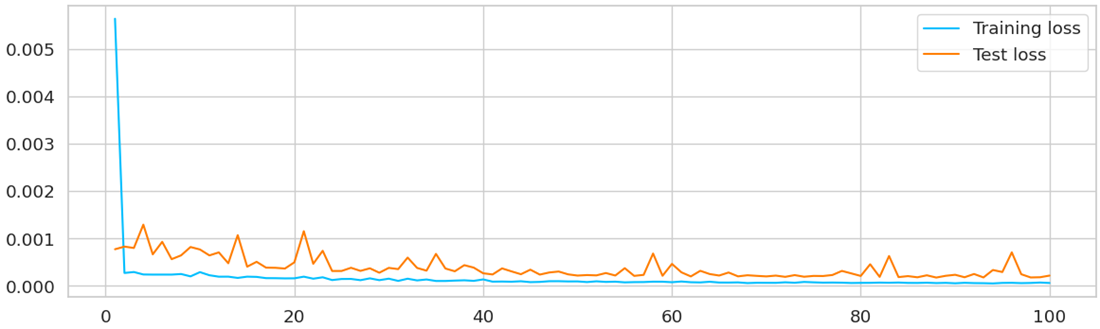
Comparing Training and Test Losses
Step 7: Forecast Future Values and Evaluate the Model
Use the trained model to forecast future values. Evaluate the model's performance using metrics like RMSE and R² score.
- **Forecasting: Generate future values using the trained model.
- **Plotting: Visualize the actual and forecasted values.
- **Evaluation: Calculate RMSE and R² score to evaluate the model's performance. Python `
num_forecast_steps = 30 sequence_to_plot = X_test.squeeze().cpu().numpy() historical_data = sequence_to_plot[-1]
forecasted_values = [] with torch.no_grad(): for _ in range(num_forecast_steps): historical_data_tensor = torch.as_tensor(historical_data).view(1, -1, 1).float().to(device) predicted_value = model(historical_data_tensor).cpu().numpy()[0, 0] forecasted_values.append(predicted_value) historical_data = np.roll(historical_data, shift=-1) historical_data[-1] = predicted_value
last_date = test_data.index[-1] future_dates = pd.date_range(start=last_date + pd.DateOffset(1), periods=30)
plt.rcParams['figure.figsize'] = [14, 4] plt.plot(test_data.index[-100:], test_data.Open[-100:], label="test_data", color="b") plt.plot(test_data.index[-30:], test_data.Open[-30:], label='actual values', color='green') plt.plot(test_data.index[-1:].append(future_dates), np.concatenate([test_data.Open[-1:], scaler.inverse_transform(np.array(forecasted_values).reshape(-1, 1)).flatten()]), label='forecasted values', color='red')
plt.xlabel('Time Step') plt.ylabel('Value') plt.legend() plt.title('Time Series Forecasting') plt.grid(True) plt.show()
Evaluate the model and calculate RMSE and R² score
model.eval() with torch.no_grad(): test_predictions = [] for batch_X_test in X_test: batch_X_test = batch_X_test.to(device).unsqueeze(0) # Add batch dimension test_predictions.append(model(batch_X_test).cpu().numpy().flatten()[0])
test_predictions = np.array(test_predictions)
Calculate RMSE and R² score
rmse = np.sqrt(mean_squared_error(y_test.cpu().numpy(), test_predictions)) r2 = r2_score(y_test.cpu().numpy(), test_predictions)
print(f'RMSE: {rmse:.4f}') print(f'R² Score: {r2:.4f}')
`
**Output:
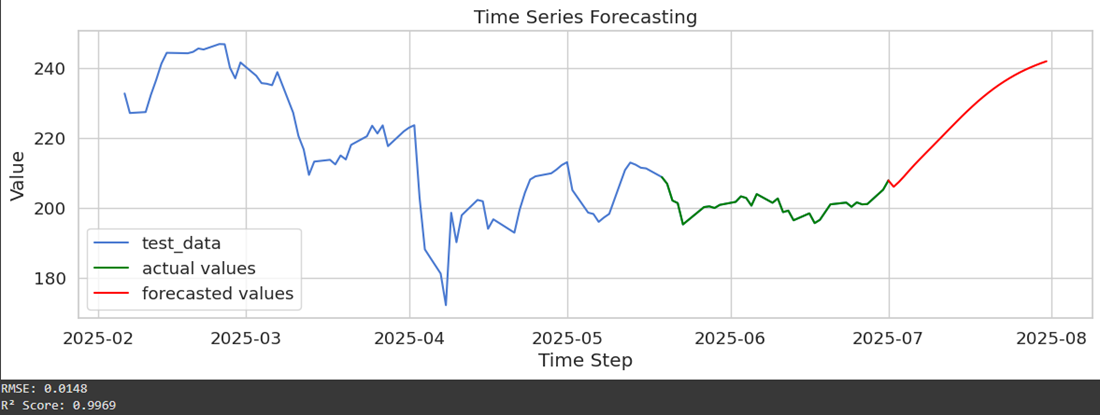
Forecasting Values
By plotting the test data, actual values and model's forecasting data. We got a clear idea of how well the forecasted values are aligning with the actual time series.
The intriguing field of time series forecasting using PyTorch and LSTM neural networks has been thoroughly examined in this paper. In order to collect historical stock market data using Yahoo Finance module, we imported the **yfinance library and started the preprocessing step. Then we applied crucial actions like data loading, train-test splitting, and data scaling to make sure our model could accurately learn from the data and make predictions.
For more accurate forecasts, additional adjustments, hyperparameter tuning, and optimization are frequently needed. To improve predicting capabilities, ensemble methods and other cutting-edge methodologies can be investigated.
We have barely begun to explore the enormous field of time series forecasting in this essay. There is a ton more to learn, from managing multi-variate time series to resolving practical problems in novel ways. With this knowledge in hand, you're prepared to use PyTorch and LSTM neural networks to go out on your own time series forecasting adventures.
Enjoy your forecasting!
Get the Complete Notebook:
**Notebook: **click here.