PDF Summarizer using RAG (original) (raw)
Last Updated : 4 May, 2026
A PDF summarizer automatically processes the text content inside PDF files and produces concise summaries or responses to queries, saving users time and effort required to read lengthy documents. This can be useful for research papers, reports, manuals or any long-form content. We can use RAG which integrates two AI concepts:
- **Retrieval: Searching a large collection of documents or text chunks to find the most relevant pieces of information for a specific query.
- **Generation: Using a language model to generate answers or summaries based on the retrieved relevant content.
This combination allows the system to provide more accurate, context-driven and up-to-date responses by grounding them in real document data rather than only relying on pre-trained model knowledge.
Workflow of PDF Summarizer
Let's build a PDF Summarizer using RAG but before that lets see its workflow:
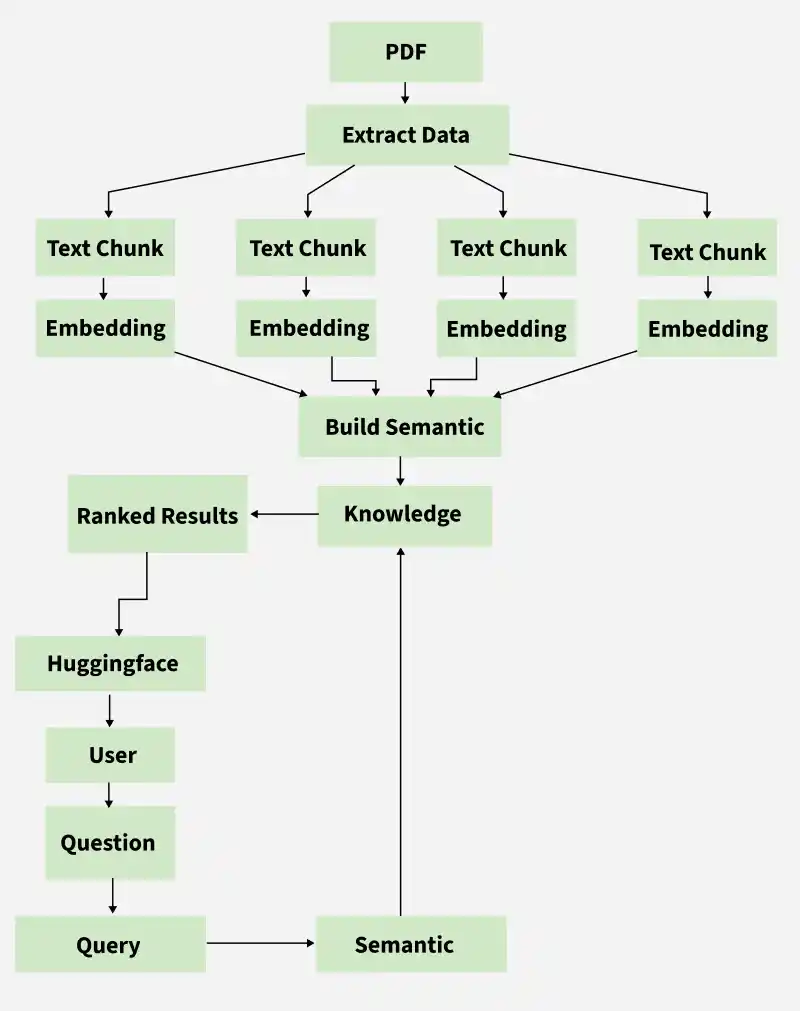
In the workflow,
- **PDF: The user uploads a PDF document.
- **Extract Data: The text content is extracted from the PDF.
- **Text Chunk & Embedding: The extracted text is split into smaller chunks and each chunk is converted into an embedding (vector) representing its semantic meaning.
- **Build Semantic & Knowledge: All embeddings form a semantic index (vector database), creating a searchable knowledge base.
- **Query & Semantic: When the user asks a question, it is converted into an embedding and used to perform semantic search in the knowledge base for relevant chunks.
- **Ranked Results: The system retrieves and ranks the most relevant chunks related to the user's question.
- **Huggingface: These chunks are provided to a Huggingface language model, which generates a specific answer or summary.
- **User: The generated answer is presented to the user.
Implementation
Step 1: Install the Dependencies
We install the required packages for our model,
- **langchain: Langchain is used for chaining language model calls and managing document-based workflows.
- **langchain-community: Community components extending LangChain functionality.
- **pypdf: For reading and extracting text from PDF files.
- **sentence-transformers: To convert text into vector embeddings.
- **faiss-cpu: A fast library for vector similarity search (vector storage).
- **transformers: Hugging Face library for pre-trained language models. Python `
!pip install langchain langchain-community pypdf sentence-transformers faiss-cpu transformers
`
Step 2: Import Required Libraries and Configure Logging
We import all the library components needed for file uploads, document loading, text splitting, embedding generation, vector-based search, language model interaction and logging.
- **files.upload(): lets users upload PDFs dynamically in Colab.
- **RecursiveCharacterTextSplitter: splits long text documents into manageable chunks.
- **PyPDFLoader: helps parse PDF text page by page.
- **HuggingFaceEmbeddings: generates semantic vectors from text chunks.
- **FAISS: wraps efficient vector search.
- **RetrievalQA: builds a retrieval-based question answering pipeline.
- **HuggingFacePipeline: integrates local transformer models for generation.
- Logging helps track the process and issues during runtime. Python `
import os import logging from google.colab import files from langchain.text_splitter import RecursiveCharacterTextSplitter from langchain_community.document_loaders import PyPDFLoader from langchain_community.embeddings import HuggingFaceEmbeddings from langchain_community.vectorstores import FAISS from langchain.chains import RetrievalQA from langchain_community.llms import HuggingFacePipeline from transformers import AutoTokenizer, AutoModelForSeq2SeqLM, pipeline
logging.basicConfig(level=logging.INFO) logger = logging.getLogger(name)
`
Step 3: Define the RAG System Class
We define a class to keep all components i.e documents, embeddings, vector stores, language models and QA chains organized and accessible.
- **documents: Loaded PDF pages
- **vector_store: FAISS index for embeddings
- **embeddings: Model for converting text to vectors
- **llm: Local language model
- **qa_chain: RetrievalQA pipeline Python `
class LocalRAGSystem: def init(self): self.documents = [] self.vector_store = None self.embeddings = None self.llm = None self.qa_chain = None
`
Step 4: Upload the PDFs
We upload the PDF that is to be summarized.
- Uses files.upload() to dynamically upload PDF files in Colab.
- Returns paths of uploaded files for further processing. Python `
def upload_pdfs(self): uploaded = files.upload() pdf_paths = list(uploaded.keys()) logger.info(f"Uploaded PDFs: {pdf_paths}") return pdf_paths
`
**Output:
Upload
Step 5: Load and Parse PDF Documents
- For each uploaded PDF, we parse and extract text page by page using PyPDFLoader.
- The extracted text pages are collected into a list for processing. Python `
def load_documents(self, pdf_paths): for pdf_path in pdf_paths: loader = PyPDFLoader(pdf_path) documents = loader.load() self.documents.extend(documents) logger.info(f"Loaded {len(self.documents)} pages in total.")
`
Step 6: Split Documents into Chunks for Embeddings
Here:
- Splits long pages into smaller chunks (chunk_size) with overlaps (chunk_overlap).
- Maintains contextual continuity between chunks.
- Prepares text for embedding and language model processing.
- Logs the total number of chunks created. Python `
def split_documents(self, chunk_size=1000, chunk_overlap=200): text_splitter = RecursiveCharacterTextSplitter( chunk_size=chunk_size, chunk_overlap=chunk_overlap) self.document_chunks = text_splitter.split_documents(self.documents) logger.info(f"Split into {len(self.document_chunks)} chunks.")
`
Step 7: Setup Embedding Model for Vector Store
Here:
- Loads a pre-trained embedding model (e.g., all-MiniLM-L6-v2).
- Converts text chunks into semantic vectors.
- Enables efficient similarity search for retrieval.
- Logs model initialization. Python `
def setup_embeddings(self, model_name="sentence-transformers/all-MiniLM-L6-v2"): self.embeddings = HuggingFaceEmbeddings(model_name=model_name) logger.info(f"Embedding model {model_name} loaded.")
`
**Output:
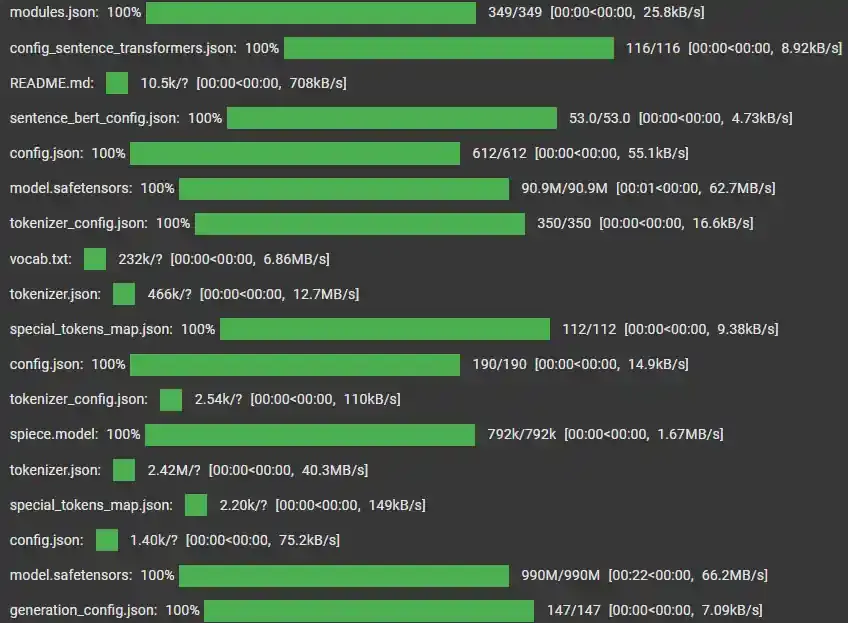
Model Loading
Step 8: Create a Vector Store Using FAISS
Here:
- Builds a FAISS index on the embeddings for fast nearest-neighbor search.
- Allows retrieval of relevant chunks based on query similarity.
- Logs successful creation of the vector store. Python `
def create_vector_store(self): self.vector_store = FAISS.from_documents( self.document_chunks, self.embeddings) logger.info("Created the FAISS vector store.")
`
Step 9: Setup a Local Language Model
- Loads a local transformer-based model (e.g., flan-t5-base).
- Prepares a text-generation pipeline for summaries and answers.
- Integrates tokenizer and device mapping for optimal performance.
- Logs readiness of the language model. Python `
def setup_local_llm(self, model_id="google/flan-t5-base", device="auto"): tokenizer = AutoTokenizer.from_pretrained(model_id) model = AutoModelForSeq2SeqLM.from_pretrained(model_id, device_map=device) pipe = pipeline("text2text-generation", model=model, tokenizer=tokenizer, max_new_tokens=512, temperature=0.7) self.llm = HuggingFacePipeline(pipeline=pipe) logger.info(f"Local LLM {model_id} ready.")
`
Step 10: Setup the RetrievalQA Chain
Here we:
- Combine the retriever (FAISS vector store) and language model.
- Defines top-k document retrieval for each query.
- Ensures the system can answer questions using context from relevant chunks.
- Logs QA chain configuration. Python `
def setup_qa_chain(self, k=3): self.qa_chain = RetrievalQA.from_chain_type( llm=self.llm, chain_type="stuff", retriever=self.vector_store.as_retriever(search_kwargs={"k": k}) ) logger.info(f"Retrieval QA chain set with top {k} documents retrieved.")
`
Step 11: Answer Questions Using the RAG System
- Takes user queries and retrieves relevant document chunks.
- Passes retrieved chunks to the language model to generate answers.
- Logs each answered query for traceability. Python `
def answer_question(self, question): answer = self.qa_chain.run(question) logger.info(f"Answered question: {question}") return answer
`
Step 12: Run the Setup
We execute all preparation steps in sequence:
- Upload PDFs
- Load documents
- Split into chunks
- Setup embeddings
- Create vector store
- Setup local LLM
- Setup QA chain
Ensures system is ready for immediate querying.
Python `
def run_setup(self, chunk_size=1000, chunk_overlap=200, model_id="google/flan-t5-base", k=3): pdf_paths = self.upload_pdfs() self.load_documents(pdf_paths) self.split_documents(chunk_size=chunk_size, chunk_overlap=chunk_overlap) self.setup_embeddings() self.create_vector_store() self.setup_local_llm(model_id=model_id) self.setup_qa_chain(k=k) logger.info("RAG summarizer is ready to answer questions.")
`
Step 13: Example Usage
We initializes the RAG system and runs setup. Lets see querying capabilities:
- Identify main topics
- Summarize key points
- Outputs answers for user verification. Python `
if name == "main": rag = LocalRAGSystem() rag.run_setup()
q1 = "What is the main topic of these documents?"
print(f"Q: {q1}\nA: {rag.answer_question(q1)}")

q2 = "Summarize the key points from the documents."
print(f"Q: {q2}\nA: {rag.answer_question(q2)}")
`
**Output:
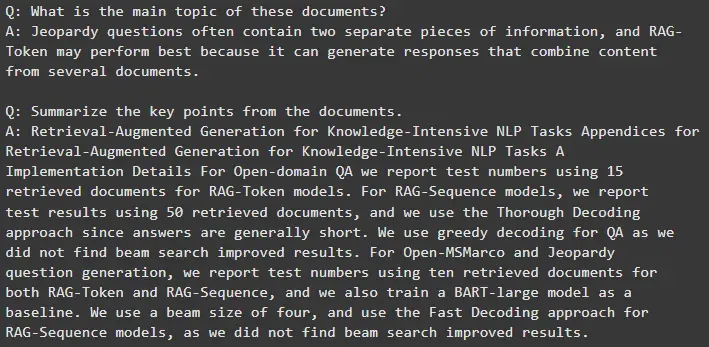
Result
The source code can be downloaded from here.
Advantages
- **Improved Accuracy: Provides context-aware answers by retrieving relevant document sections before generating responses.
- **Efficient for Large Documents: Handles long PDFs by chunking text and using embeddings to overcome model input size limitations.
- **Up-to-Date Content: Generates answers based on the latest content from the uploaded PDFs, ensuring relevance.
- **Fast Semantic Search: Utilizes FAISS vector search for quick retrieval of relevant information even in large documents.
- **Flexible Query Handling: Supports diverse and complex user questions, enabling interactive document understanding.