QLoRA (Quantized LowRank Adapter) (original) (raw)
QLoRA (Quantized Low-Rank Adapter)
Last Updated : 2 May, 2026
QLoRA is primarily used with open-weight models like LLaMA, Mistral and Falcon, as these allow direct access to model weights required for quantization and adapter-based fine-tuning.
- QLoRA combines quantization which reduces model size, with low-rank adapters, small trainable layers for specific tasks.
- This let's us adapt billion-parameter models using less memory and computation while maintaining strong performance.
Key Concepts of QLoRA
1. **Quantization
- Model weights are normally stored in 16-bit or 32-bit floating-point precision which uses a lot of memory.
- Quantization reduces this precision to lower-bit formats (e.g 8-bit or 4-bit), shrinking the model size and speeding up computation.
- Advanced methods like Normal Float 4-bit (NF4) help maintain accuracy despite the lower precision.
2. **Low-Rank Adaptation
- Fine-tuning all weights in a large model is expensive. LoRA adds small trainable adapter layers to selected parts of the model (attention layers) while keeping the main weights frozen.
- Only these adapters are updated during fine-tuning, reducing the number of parameters to train.
- Despite their small size, adapters allow the model to learn task-specific adjustments efficiently.
Working of QLoRA
QLoRA fine-tunes large language models efficiently by following a structured process. Each step focuses on reducing memory and computation while adapting the model to a specific task.
1. Quantize the Base Model
- Pretrained model is converted from full precision to 4-bit weights.
- This reduces GPU memory usage allowing large models to run on smaller hardware.
- Quantization methods like NF4 help maintain accuracy during compression.
2. Add Low-Rank Adapters
- Small adapter layers are inserted into selected parts of the model, typically the attention layers.
- These adapters remain in higher precision (e.g 16-bit) to ensure stable training.
- The backbone model is kept frozen, so the original weights are not modified.
3. Fine-Tune Only the Adapters
- During training, only the adapter layers are updated.
- This drastically reduces the number of trainable parameters and the required computation.
- Fine-tuning becomes faster and feasible on a single GPU or low-resource device.
4. Merge or Keep Adapters Separate
- After training, adapters can be merged into the quantized model for deployment.
- Alternatively, it can be kept separate allowing reuse or swapping for different tasks without retraining the base model.
These steps ensure that we can adapt billion-parameter models efficiently, maintaining performance while using significantly fewer resources than traditional full fine-tuning.
Implementation of QLoRA with BERT on AG News Classification
We will see a practical implementation of QLoRA on BERT-base for news topic classification. AG News has 4 classes: World, Sports, Business, Sci/Tech. QLoRA combines 4-bit quantization with LoRA adapters for memory-efficient fine-tuning.
1. Installing Required Libraries
We will install the necessary libraries like transformers, datasets, peft, bitsandbytes and evaluate to handle models, datasets and fine-tuning with QLoRA.
!pip install transformers datasets peft bitsandbytes accelerate evaluate
2. Importing Dependencies
We will be importing required modules such as:
- AutoModelForSequenceClassification for model loading
- BitsAndBytesConfig for quantization
- LoraConfig for applying LoRA adapters to the model Python `
from transformers import AutoModelForSequenceClassification, AutoTokenizer, TrainingArguments, Trainer, BitsAndBytesConfig from datasets import load_dataset from peft import LoraConfig, get_peft_model import evaluate import torch
`
3. Loading and Splitting the Dataset
We load the AG News dataset, shuffle it and split it into 80% training, 20% validation while keeping the original test set for evaluation. We will use the DatasetDict to store these splits.
Python `
dataset = load_dataset("ag_news")
train_dataset = dataset["train"].shuffle(seed=42) train_size = int(0.8 * len(train_dataset)) val_size = len(train_dataset) - train_size
from datasets import DatasetDict dataset = DatasetDict({ "train": train_dataset.select(range(train_size)), "validation": train_dataset.select(range(train_size, train_size + val_size)), "test": dataset["test"] })
`
**Output:

Loading the Dataset
4. Preprocessing Data
Before training, we tokenize the text so BERT can process it. Each input is padded or truncated to 128 tokens for uniformity. We also rename label to labels and format the dataset for PyTorch with input_ids, attention_mask for model consumption.
Python `
model_name = "bert-base-uncased" tokenizer = AutoTokenizer.from_pretrained(model_name)
def preprocess(batch): return tokenizer(batch["text"], truncation=True, padding="max_length", max_length=128)
dataset = dataset.map(preprocess, batched=True).rename_column("label", "labels") dataset.set_format(type="torch", columns=["input_ids", "attention_mask", "labels"])
`
**Output:
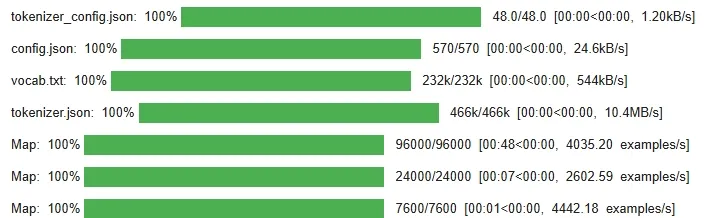
Preprocessing Data
5. Loading Quantized Base Model for QLoRA
Here we will be loading a pre-trained BERT model and apply 4-bit quantization using BitsAndBytes to reduce memory usage while maintaining accuracy.
Python `
bnb_config = BitsAndBytesConfig( load_in_4bit=True, bnb_4bit_compute_dtype=torch.float16, bnb_4bit_use_double_quant=True, bnb_4bit_quant_type="nf4" )
model = AutoModelForSequenceClassification.from_pretrained(
model_name,
num_labels=4,
device_map="auto",
quantization_config=bnb_config
)
`
**Output:

Applying QLoRA Configuration
6. Applying LoRA Adapters
We apply LoRA adapters to the model's attention layers, reducing the number of trainable parameters and improving fine-tuning efficiency without sacrificing performance.
Python `
qlora_adapter_config = LoraConfig( r=8, lora_alpha=16, target_modules=["query", "value"], lora_dropout=0.1, bias="none", task_type="SEQ_CLS" )
model = get_peft_model(model, qlora_adapter_config)
`
7. Training the Model
We define the Trainer with custom settings such as learning rate, batch size and evaluation strategy. Also, set up accuracy as the evaluation metric.
- Batch size = 8
- Learning rate = 5e-5
- Epochs = 2 (kept short for quick results) Python `
metric = evaluate.load("accuracy")
def compute_metrics(eval_pred): logits, labels = eval_pred preds = logits.argmax(axis=-1) return metric.compute(predictions=preds, references=labels)
qlora_training_args = TrainingArguments(
output_dir="./qlora_agnews",
per_device_train_batch_size=8,
per_device_eval_batch_size=8,
learning_rate=5e-5,
num_train_epochs=2,
eval_strategy="epoch",
logging_steps=50,
report_to="none"
)
trainer = Trainer(
model=model,
args=qlora_training_args,
train_dataset=dataset["train"],
eval_dataset=dataset["validation"],
compute_metrics=compute_metrics
)
trainer.train() model.save_pretrained("./qlora_agnews_adapter") print("QLoRA fine-tuning complete! Adapter saved at ./qlora_agnews_adapter")
`
**Output:
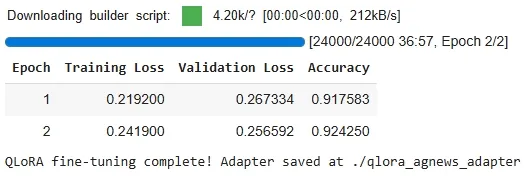
Training the Model
8. Testing the Model
Now let’s test our fine-tuned model to classify sample news articles into categories like Business, Sports and Sci/Tech, displaying the predicted labels for each text input.
Python `
device = torch.device("cuda" if torch.cuda.is_available() else "cpu") model.to(device)
class_labels = dataset["train"].features["labels"].names
samples = [ "The stock market closed at an all-time high today.", "The football team won the championship after a thrilling game.", "Scientists discovered a new exoplanet in the habitable zone.", "The president met with foreign leaders to discuss trade agreements." ]
inputs = tokenizer(samples, truncation=True, padding=True, return_tensors="pt").to(device)
model.eval() with torch.no_grad(): logits = model(**inputs).logits preds = torch.argmax(logits, dim=-1)
for text, pred in zip(samples, preds): print(f"News: {text}\nPredicted Topic: {class_labels[pred]}\n")
`
**Output:
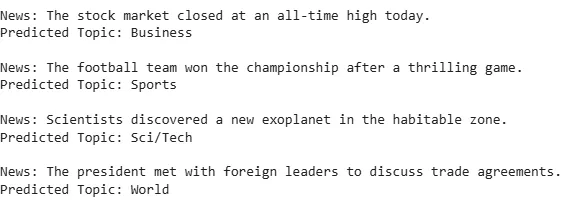
Testing the Model
You can download source code from here.
LoRA Vs QLoRA
Let's see some basic differences between both to understand them better:
| **Key Feature | **LoRA (Low-Rank Adaptation) | **QLoRA (Quantized Low-Rank Adapter) |
|---|---|---|
| **Model Size | Keeps the original model size and only adds small adapter layers. | Reduces model size significantly by quantizing base weights (often 4-bit). |
| **Weight Precision | Fine-tunes weights without changing precision (full-precision preserved). | Combines LoRA with quantization, lowering model precision while keeping performance. |
| **Trainable Parameters | Updates only adapter layers, reducing the number of parameters to fine-tune. | Fine-tunes adapters + quantizes weights → even fewer parameters to train. |
| **Memory Usage | Memory savings mainly from training only adapters. | Greater memory savings by quantization + adapter fine-tuning → faster inference. |
| **Efficiency | Resource-efficient as fewer parameters are updated. | More efficient than LoRA since it reduces both size and compute needs. |
| **Performance Quality | Maintains performance close to the pre-trained model on similar tasks. | Preserves performance close to full-precision models despite reduced precision. |
Applications
- **Domain-Specific Fine-Tuning: Adapting general-purpose LLMs for specialized fields such as medicine, law or finance.
- **Instruction Tuning: Improving model's ability to follow human instructions for tasks like summarization or content generation.
- **Conversational AI: Building chatbots and virtual assistants that can operate on limited hardware without retraining the full model.
- **Edge and Low-Resource Deployment: Running large models on laptops, smaller GPUs or even mobile devices.
- **Research and Education: Making large-model fine-tuning accessible to smaller labs, developers and educational institutions.
Advantages
- **Memory Efficiency: Quantization reduces the model’s memory usage allowing multi-billion parameter models to run on a single GPU or devices with limited VRAM.
- **Computational Efficiency: Only low-rank adapters are trained, lowering the computational cost for both fine-tuning and inference.
- **Preservation of Knowledge: The original model weights remain frozen, keeping pre-trained knowledge intact.
- **Flexible Deployment: Adapter layers can be shared, reused or swapped between tasks enabling efficient multi-task adaptation.
- **Minimal Performance Loss: Despite memory and parameter reductions, it maintains performance close to full-precision fine-tuning, especially for domain-specific tasks.
Limitations
- **Quantization limits: Compressing model weights to extremely low precision (below 4-bit) can reduce accuracy.
- **Task sensitivity: It performs best when the target task is similar to the model’s pre-training; very different tasks may still need full fine-tuning.
- **Extra complexity: Managing quantized weights, low-rank adapters and specialized optimizers requires additional setup and careful configuration.
- **Inference considerations: If adapters are kept separate from the main model, inference may be slower unless the adapters are merged into the backbone.