Amazon Web Services Introduction to Amazon EKS (original) (raw)
Last Updated : 11 Jun, 2026
Amazon Elastic Kubernetes Service (EKS) is a fully managed service that allows you to run Kubernetes on Amazon Web Services. Kubernetes is open-source software that enables you to install and manage applications at scale.
- AWS handles all Kubernetes control plane management, including security patching, updates, and high availability across multiple Availability Zones.
- Deep integration with VPC for networking, IAM for authentication, and Application Load Balancers for traffic management.
Core Concept
To understand EKS, you must first grasp the fundamental architecture of Kubernetes, which is split into two parts:
- **The Control Plane (The Brain): This is the core of Kubernetes. It makes all global decisions about the cluster, such as scheduling applications, managing their lifecycle, and storing the cluster's state. It is complex to set up for high availability and requires constant security patching and updates.
- **The Data Plane (The Muscle): These are the worker nodes (EC2 instances) where your actual application containers run.
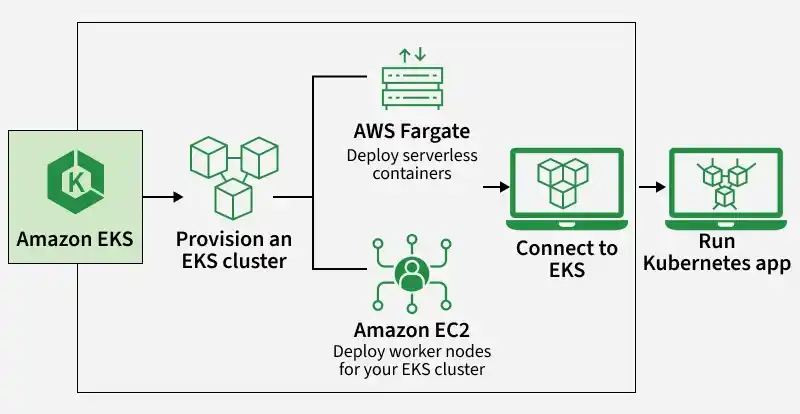
The primary value of Amazon EKS is that AWS completely manages the Control Plane for you. This means AWS is responsible for its availability, security, and scalability across multiple Availability Zones, freeing you to focus on your applications.
Key Features and Benefits
- **Reduced Operational Overhead: By managing the control plane and offering managed node groups, EKS dramatically reduces the time and expertise required to run Kubernetes.
- **High Availability and Security: The control plane is automatically distributed across multiple Availability Zones, and AWS handles security patching, ensuring your cluster is resilient and secure.
- **Seamless AWS Integration: EKS is deeply integrated with other AWS services like VPC for networking, IAM for authentication, and Application Load Balancers for traffic management.
- **Pure Kubernetes Experience: EKS runs upstream, open-source Kubernetes, so you can use all standard tools like
kubectland Helm, and easily migrate existing Kubernetes applications without modification.
How Amazon EKS Works
Amazon EKS simplifies running Kubernetes clusters on AWS by managing the control plane while allowing you to focus on application deployment and scaling. The main components work together to create a fully functional Kubernetes environment.
1. Control Plane (AWS Managed)
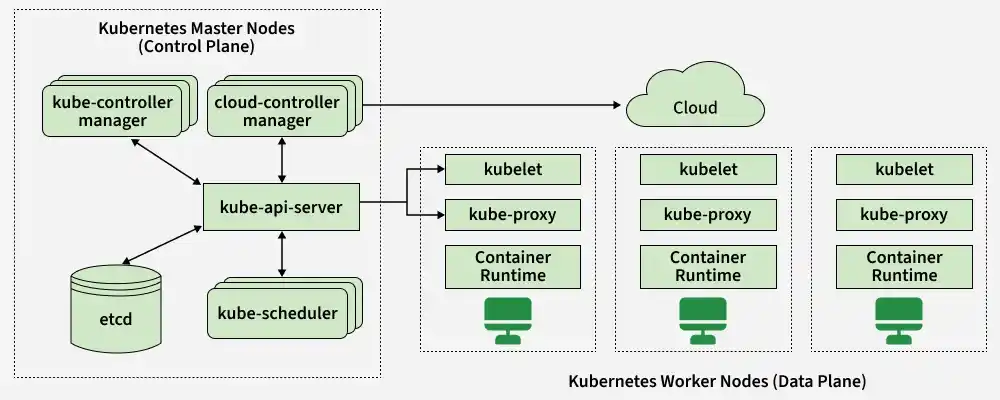
The control plane is managed by AWS and is responsible for handling the core management tasks of the Kubernetes cluster. It includes key components:
- **kube-api-server: Handles API requests and coordinates communication between Kubernetes components.
- **etcd: Stores cluster data and configuration.
- **kube-scheduler: Ensures pods are placed on nodes with available resources.
- **cloud-controller-manager: Interacts with AWS infrastructure services.
- **kube-controller-manager: Manages various Kubernetes controllers responsible for ensuring desired states of resources like replicas and nodes.
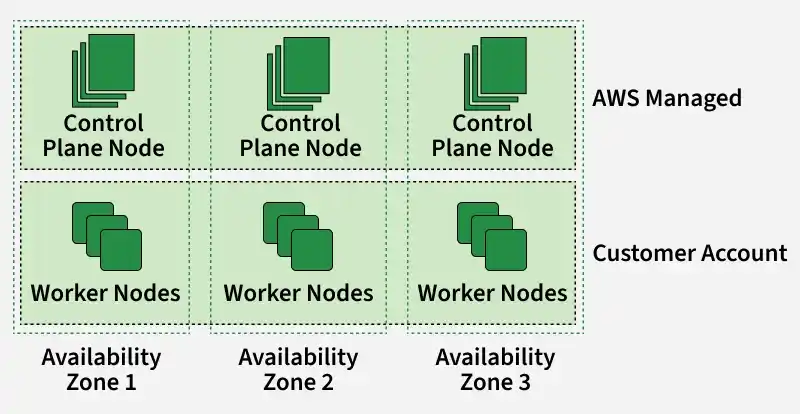
Since the control plane is fully managed, AWS ensures high availability across multiple Availability Zones. This means you don't need to worry about the operational overhead of managing the control plane.
2. Worker Nodes (Customer Managed)
Worker nodes are managed by the customer and run the actual application workloads. Each worker node runs multiple pods and consists of components:
- **Kubelet: Responsible for managing pods and containers on the node.
- **kube-proxy: Manages network communication for pods.
- **Container Runtime: The underlying software responsible for running containers, such as Docker or containerd.
Worker nodes are deployed across different Availability Zones, ensuring fault tolerance and scalability. You can scale the number of worker nodes depending on application load, making it flexible to meet changing requirements.
3. Pods
Pods are the smallest deployable units in Kubernetes and can consist of one or more containers. In Amazon EKS:
- Pods run on the Worker Nodes.
- Each pod is assigned an IP address and can communicate with other pods or external services.
4. DaemonSets
A DaemonSet ensures that a copy of a pod runs on all worker nodes or a selected group of them. In EKS, DaemonSets are often used for:
- Log collection
- Monitoring
- Running essential services like networking or security agents on each node.
Amazon EKS Workflow
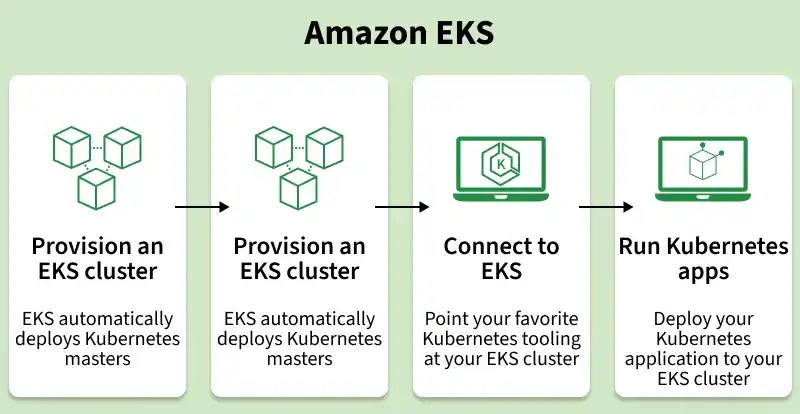
Step 1: Provision an EKS Cluster (Control Plane)
The first step in setting up Amazon EKS is provisioning the EKS Cluster. When you create a cluster:
- EKS automatically deploys Kubernetes master nodes (also known as the control plane) across multiple Availability Zones.
- These master nodes are managed by AWS, handling Kubernetes tasks such as scheduling pods, maintaining cluster state, and managing API requests. You don't need to manage these components manually, which ensures high availability and redundancy.
Step 2: Provision Worker Nodes
After the EKS cluster (control plane) is up and running, you can provision worker nodes that will run your application workloads. Key points:
- Worker nodes are instances that run in your AWS account and communicate with the master nodes to ensure the health and availability of your applications.
- These nodes can automatically scale based on workload, ensuring that you have the resources needed to handle dynamic demand.
Step 3: Connect to EKS
Once the EKS cluster is running with worker nodes:
- You can connect to the EKS cluster using Kubernetes command-line tools such as kubectl . These tools allow you to interact with the cluster and manage deployments, services, and other resources.
- By pointing your Kubernetes tooling at the EKS cluster, you can start deploying applications.
Step 4: Deploy and Run Kubernetes Applications
With the cluster set up and connected:
- You can deploy your containerized applications onto the worker nodes. Kubernetes orchestrates these deployments, ensuring containers are distributed across the nodes and scaling them as needed.
- Applications can be updated, scaled, and monitored using Kubernetes-native features such as deployments, services, and DaemonSets.
Use Cases
- **Microservices Architecture: Runs scalable and fault-tolerant microservices in separate containers.
- **Hybrid Cloud Deployments: Maintains consistent Kubernetes management across AWS and on-premises systems.
- **CI/CD Pipelines and Automation: Automates testing and deployment with scalable Kubernetes clusters.
- **Edge Computing: Processes data closer to devices for lower latency and faster decisions.
- **High-Performance Computing (HPC): Supports GPU and compute-intensive workloads efficiently.
To know more about it refer to: Getting Started with Amazon EKS
Pricing of EKS
Below is the pricing model of AWS EKS:
| Service | Pricing | Description |
|---|---|---|
| Amazon EKS Cluster | $0.10 per hour | For each EKS cluster that you create, you are charged this flat rate, irrespective of the size of the cluster or the number of nodes. |
| AWS Fargate for EKS | 0.04025pervCPUperhour+0.04025 per vCPU per hour + 0.04025pervCPUperhour+0.004445 per GB-hour | You are charged for the vCPU and memory resources your Kubernetes pods use on Fargate. |
| Amazon EKS on AWS Outposts | 0.01375pervCPUperhour+EC2instancepricing∣Pricingincludesthe0.01375 per vCPU per hour + EC2 instance pricing | Pricing includes the 0.01375pervCPUperhour+EC2instancepricing∣Pricingincludesthe0.01375 per vCPU per hour for EKS and the cost of running EC2 instances on AWS Outposts, which varies by instance type. |
| EC2 Worker Nodes | Varies based on EC2 instance type | You pay for the EC2 instances that you run as worker nodes in your EKS cluster. Pricing depends on the instance type, size, and region. |
| EBS Volumes | Varies by type and size | If you attach Elastic Block Store (EBS) volumes to your worker nodes, you are charged for the volume size and type. |
| Data Transfer (In/Out) | Varies by region | Data transfer between Availability Zones, VPCs, or external networks incurs additional costs. Data transfer within the same Availability Zone is free. |
Self-Managed Kubernetes Cluster Vs Amazon EKS
| Aspect | Self-Managed Kubernetes | Amazon EKS |
|---|---|---|
| Management Responsibility | Full control and responsibility for managing the cluster. | AWS manages the control plane; you manage the worker nodes. |
| Control Plane | You need to install, configure, and manage the Kubernetes control plane, including the API server, scheduler, and etcd. | AWS handles the control plane, including high availability, scaling, and updates. |
| Operational Overhead | Higher overhead due to managing updates, security patches, and monitoring of the entire cluster. | AWS manages the control plane's availability, security, and scaling, reducing operational overhead. |
| Infrastructure Setup | You need to configure and provision the infrastructure. | AWS simplifies infrastructure management; you only need to provision worker nodes. |
| Security and Compliance | You are responsible for securing the cluster, applying patches, and ensuring compliance. | AWS provides built-in security, automatic control plane updates, and compliance certifications. |
| Monitoring and Logging | You need to set up and manage your monitoring, logging, and alerting systems. | EKS integrates with AWS CloudWatch and AWS CloudTrail for monitoring, logging, and auditing with minimal setup. |