Amazon EC2 Auto Scaling (original) (raw)
Last Updated : 9 Jun, 2026
Amazon EC2 Auto Scaling is a service that helps you maintain application availability and allows you to automatically add or remove EC2 instances according to conditions you define. You can use the fleet management features of EC2 Auto Scaling to maintain the health and availability of your fleet.
Instead of guessing how many servers you need (Provisioning for peak load and wasting money during low traffic periods.), Auto Scaling ensures you have exactly the right amount of compute power right when you need it.
- Amazon EC2 Auto Scaling automatically scales EC2 instances based on traffic demand while maintaining high availability and optimizing cost.
- It creates an Auto Scaling Group (ASG) where instances are managed automatically, and the Load Balancer distributes traffic among them.
- Scaling policies use metrics like CPU utilization or memory usage to automatically add or remove instances based on demand.
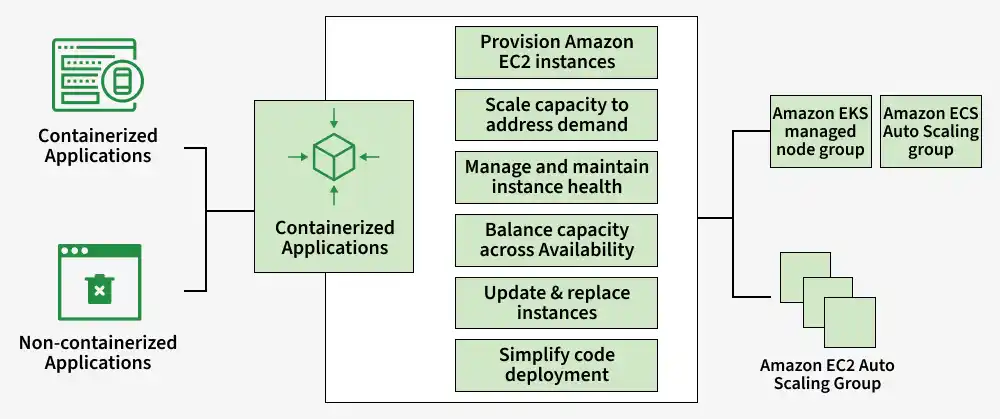
Scaling Amazon EC2 means automatically increasing or decreasing EC2 instances based on application demand. It helps maintain performance, ensures enough computing power for users, and reduces cost by using only the required resources.
Core Components of Auto Scaling
To configure Auto Scaling, you need to define three main components:
1. Launch Template
- A Launch Template defines the configurations of an EC2 instance. It includes the AMI (OS image), Instance Type, Key Pair, Security Groups, and User Data used during instance launch.
- _Note: Launch Configurations are legacy. Always use Launch Templates for new workloads as they support versioning and mixed instance policies.
2. Auto Scaling Group (ASG)
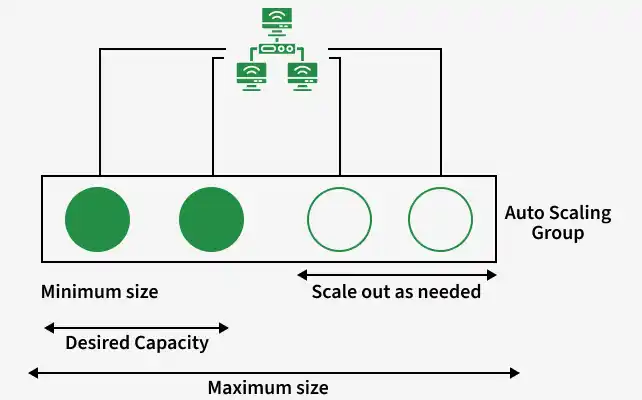
An Auto Scaling Group creates and manages a logical group of EC2 instances. It defines the VPC and subnets where the instances will launch.
It also manages capacity limits
- **Minimum Capacity: Minimum number of instances that must always run.
- **Maximum Capacity: Maximum number of instances allowed to prevent extra costs.
- **Desired Capacity: Number of instances that should run currently.
3. Scaling Policies
Scaling Polices decide when EC2 instances should be added or removed.
- Provisioning servers for peak traffic ensures demand is met but can lead to excess capacity and higher costs
- Allocating resources based on average demand reduces costs but may affect performance during spikes
- EC2 Auto Scaling automatically adds or removes instances based on real-time demand
- Uses EC2 instances to provide a cost-efficient architecture, charging only for resources actually used

Capacity-Day of the Week Graph
Features of AWS Auto Scaling
Here are the some most important features of AWS Auto scaling
- **Dynamic Scaling: Automatically increases or decreases EC2 instances based on real-time demand using metrics like CPU usage or request count.
- **Load Balancing: Distributing incoming traffic across multiple EC2 instances to improve performance and availability using Elastic Load Balancing (ELB).
- **Multi-Availability Zone Deployment: Launches instances across multiple Availability Zones to improve fault tolerance and maintain availability during AZ failures.
- **Containerization: Supports containerized applications using Amazon ECS for easier deployment and management of Docker containers.
Types of AWS (Amazon Web Services) Autoscaling
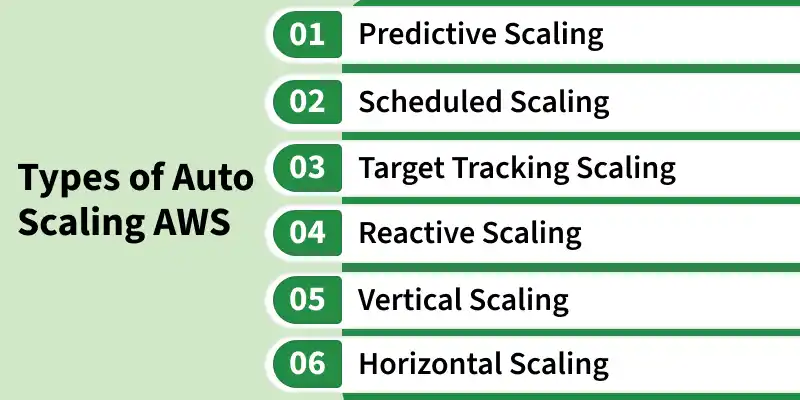
AWS offers several ways to scale your infrastructure:
1. Predictive Scaling
- Uses machine learning to predict future traffic demand.
- Automatically scales resources before traffic increases.
2. Scheduled Scaling
- Used for predictable traffic patterns at specific times.
- Example: Increase instances before office hours and reduce them later.
3. Target Tracking Scaling
- Automatically maintains a target metric value such as CPU utilization.
- Example: Keeps CPU usage at 50% by adding or removing instances automatically.
4. Reactive Scaling
- Scales resources after traffic or workload changes are detected
- Example: Adds new instances automatically when CPU usage exceeds 70%
5. Vertical Scaling
- Increases or decreases the resources of a single EC2 instance
- Example: Upgrades an instance from t3.micro to t3.large for better performance
6. Horizontal Scaling
- Increases or decreases the number of EC2 instances
- Example: Adds more EC2 instances during high website traffic
Advanced Features
Mixed Instances Policy (Cost Optimization)
Mixed Instances Policy helps optimize cost and improve availability by using different EC2 instance types and pricing models.
- Supports both On-Demand and Spot Instances together
- Helps reduce infrastructure cost efficiently
- Allows multiple EC2 instance types
- Automatically selects the best available instance
Health Checks
Health Checks monitor instance and application health to maintain reliability and availability.
- EC2 Health Check monitors instance-level health
- Replaces failed or unhealthy EC2 instances
- ELB Health Check monitors application health
- Replaces instances returning application errors
Lifecycle Hooks
Lifecycle Hooks allow custom actions during instance launch or termination.
- Pauses instance launch or termination temporarily
- Allows custom actions during instance lifecycle
- Useful for installing software or running scripts
- Helps upload logs and gracefully close connections
Use Case
- **Automatic Scaling: Application scaling can be done automatically based upon the incoming traffic if the load is increased then the application will scale up and the load decrease application will scale down automatically.
- **Schedule Scaling: Based the data that previously available in at which particular point of time there going to be peak point and at which time there going to be less traffic we can schedule the auto scaling.
- **Integration: You can integrate with other service in the AWS. Mainly the machine learning which will helps to predict the incoming traffic and can scale according to the traffic.
Working of AWS Auto Scaling
- Automatically adjusts the number of instances based on traffic or CPU load
- Monitors instances in an Auto Scaling group and maintains balanced performance
- Scales out when load increases and scales in when load decreases
- Replaces failed instances to maintain the desired capacity
To know how to create autoscaling refer to Create and Configure the Auto Scaling Group in EC2.
Amazon EC2 Auto Scaling Instance Lifecycle
Every EC2 instance within an auto scaling group follows a distinct lifecycle. This lifecycle begins when the instance is launched and concludes with its termination. Below is an illustration of the various stages an instance goes through during its lifecycle

Scaling Instance Lifecycle
Pricing for Amazon EC2 Auto Scaling
Amazon EC2 Auto Scaling does not have any additional service cost. You only pay for the AWS resources used, such as EC2 instances, Load Balancers, and CloudWatch monitoring.
| Pricing Component | Cost |
|---|---|
| Auto Scaling Service | No additional charge for Auto Scaling |
| Amazon EC2 Instances | Charged based on instance type and region |
| Amazon EC2 On-Demand Instances | Starts around $0.0042 per hour |
| Amazon EC2 Reserved Instances | Up to 72% lower cost than On-Demand |
| Amazon EC2 Spot Instances | Up to 90% lower cost than On-Demand |
| Amazon EC2 Elastic Load Balancing | Charged per hour and data processed |
| Amazon CloudWatch (Monitoring) | Basic monitoring free, detailed monitoring charged separately. |
| Data Transfer | Incoming data free, outgoing internet traffic charged |
| Elastic IP Addresses | First Elastic IP free with running instance |
Scaling Plan
- A scaling plan is a blueprint for automatically scaling cloud resources based on traffic
- Defines which resources to scale, the metrics to monitor, and the actions to take when thresholds are met
- Can scale resources like EC2 instances, ELB, and DynamoDB, and can also be applied to other cloud providers like Google Cloud and Azure