Amazon Elastic Container Service (ECS) (original) (raw)
Last Updated : 9 Jun, 2026
Amazon Elastic Container Service (ECS) is a managed container orchestration service provided by Amazon Web Services. It allows you to run, manage and scale Docker containers on AWS infrastructure without manually handling complex orchestration tools.
With ECS, you provide containerized applications, and AWS takes care of scheduling, deployment, monitoring, and maintaining availability. ECS supports two compute options:
- **EC2 Launch Type: You manage the EC2 virtual machines that run your containers.
- **AWS Fargate Launch Type: AWS manages the servers automatically, so you only focus on containers and application logic.
Core Components
1. Task Definition
A Task Definition is a JSON blueprint that defines how containers should run in Amazon ECS.
**It includes details such as:
- Docker image to use
- CPU and memory allocation
- Port mappings
- Environment variables
- Storage configuration
- IAM role permissions
2. Task
A Task is a running instance of Task Definition.
**Key Points
- One Task Definition can create multiple Tasks
- Each Task runs one or more containers
- Tasks can run independently or as part of a Service
3. Service
An ECS Service maintains the desired number of running Tasks and is commonly used for long-running applications like web servers and APIs.
**Main responsibilities:
- Maintains desired Task count
- Replaces failed Tasks automatically
- Supports load balancing
- Enables auto scaling
- Handles rolling updates and deployments
4. Cluster
An ECS Cluster is a logical group of resources where ECS Tasks and Services run.
**It provides the infrastructure where Tasks run and manages:
- Compute resources
- Networking
- Memory allocation
- Container scheduling
**A Cluster can contain:
- EC2 instances
- Fargate resources
- Or both together depending on the deployment setup
Working of ECS
Amazon ECS works by deploying Docker containers on AWS infrastructure and automatically managing their scaling, availability, and monitoring. ECS places containers on EC2 instances or AWS Fargate and keeps the required applications running based on the defined configuration.

- **Container: A container is a package that contains an application and its dependencies to run. Containers are independent of the operating system, making applications portable, flexible and scalable across different environments.
- **Docker: Docker is software that facilitates and automates the installation and deployment of applications inside Linux containers.
- **Cluster: A logic group of EC2 instances running as a single application.
- **Container Instance: Each EC2 in an ECS Cluster is called a container instance.
Fargate vs. EC2
AWS ECS provides two launch types for running containers: AWS Fargate and EC2 Launch Type. Fargate is serverless and managed by AWS, while EC2 gives users full control over the underlying virtual machines and configurations.
| Feature | AWS Fargate | EC2 Launch Type |
|---|---|---|
| Management | AWS manages infrastructure | User manages EC2 instances |
| Control | Limited server control | Full server and OS control |
| Pricing | Pay per resource usage | Pay for EC2 instances |
| Best For | Web apps, microservices | Custom workloads, GPUs |
| Maintenance | Handled by AWS | Managed by user |
Amazon ECS Terminologies and Components
Amazon ECS includes different components that help in deploying, managing, and scaling containerized applications efficiently across AWS infrastructure.
1. Provisioning
**Provisioning tools help set up and manage ECS resources:
- **AWS CLI: Command-line interface for direct control.
- **Copilot: Simplifies ECS workflows.
- **Management Console: Graphical interface for ECS management.
- **AWS CDK & SDK: Enables infrastructure as code and custom integrations.
2. Controller
The ECS Scheduler manages and distributes tasks, balancing workloads and ensuring availability across clusters.
3. Capacity Options
**It supports different capacity options:
- **Amazon EC2 Instances: Customizable virtual machine hosting.
- **Fargate: Serverless container hosting without infrastructure management.
- **On-Premises Compute: Extends ECS to on-premises servers for hybrid solutions.
This structure offers flexibility and control for containerized applications in AWS and beyond.
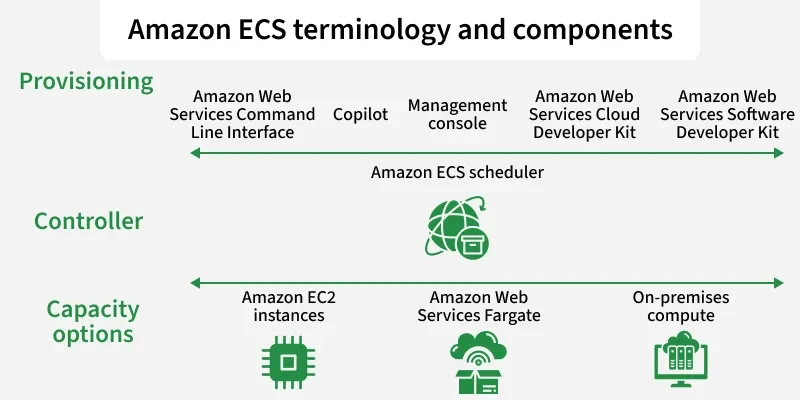
Amazon ECS Terminology
Working of ECS Auto Scaling
ECS Auto Scaling automatically adjusts resources based on application demand to maintain performance and optimize cost.
**Task-level Scaling (Service Auto Scaling)
- This is the most common type. You can configure your ECS Service to automatically add or remove Tasks based on demand.
- For example, you can set a rule like: "If the average CPU utilization of all my tasks goes above 75%, add two more tasks." This is perfect for handling traffic spikes.
**Infrastructure-level Scaling (Cluster Auto Scaling)
- This applies only to the EC2 launch type. Cluster Auto Scaling automatically adds or removes EC2 instances from your cluster based on the resources required by your tasks.
- This ensures you are only paying for the EC2 instances you actually need.
Common Use Cases for ECS
- **Microservices Architecture: ECS helps run and manage independent microservices with separate scaling and deployment configurations.
- **Web Applications: ECS can host scalable and highly available web applications using load balancers.
- **Batch Processing: Used for running short-term data processing tasks such as ETL jobs, simulations, and analytics.
- **CI/CD Pipelines: ECS runs build, test, and deployment processes inside containers for consistent automation.
Advantages
- **Scalability: Automatically scales applications based on traffic and workload demand.
- **High Availability: Provides fault tolerance and keeps applications running continuously.
- **Cost-Effective: Helps reduce infrastructure costs by using resources only when needed.
- **AWS Integration: Integrates with services like Amazon ECR, AWS Fargate, CloudWatch, and IAM.
- **Security: Supports IAM roles, VPC isolation, and data encryption for secure deployments.
Ways to Provision and Manage ECS
You can interact with ECS using a variety of tools, catering to different workflows:
- **AWS Management Console: A graphical web interface, perfect for getting started and for visual monitoring.
- **AWS Copilot CLI: A modern, developer-friendly command-line tool designed to make it extremely easy to build, release, and operate containerized applications on ECS.
- **AWS CDK (Cloud Development Kit): Define your ECS infrastructure as code using familiar programming languages like Python, TypeScript, or Go.
- **AWS CLI: The standard command-line interface for direct, low-level control over all ECS resources.
AWS CLI Commands for ECS
The AWS CLI provides granular control over every ECS resource. The following is a reference of available commands.
Capacity and Cluster Management
- **create-capacity-provider: Creates a new capacity provider comprising a name, an Auto Scaling group, and termination and scaling settings.
- **create-cluster: Creates a new ECS cluster.
- **delete-cluster: Deletes the specified cluster entirely.
- **describe-capacity-providers: Describes one or more capacity providers.
- **describe-clusters: Describes one or more ECS clusters.
- **list-clusters: Returns a list of existing clusters.
- **put-cluster-capacity-providers: Modifies the capacity providers associated with a cluster.
- **update-cluster-settings: Modifies the settings of a cluster.
Service Management
- **create-service: Runs and maintains a desired number of tasks as specified by a task definition.
- **delete-service: Deletes the specified service.
- **describe-services: Describes services running in a specified cluster.
- **list-services: Returns a list of services running in a specified cluster.
- **update-service: Modifies the parameters of a service.
- **update-service-primary-task-set: Modifies which task set in a service is the primary task set. Parameters updated on the primary task set transition to the service.
- **deploy: Deploys a new task definition to the specified ECS service.
Task Definition Management
- **register-task-definition: Registers a task definition from the specified family and container definitions.
- **deregister-task-definition: Deregisters a task definition from ECS.
- **describe-task-definition: Describes a task definition.
- **list-task-definitions: Lists all task definitions registered to your account.
- **list-task-definition-families: Lists all task definition families registered to your account.
Task Management
- **create-task-set: Creates a task set in a specified ECS cluster or service.
- **delete-task-set: Deletes the specified task set.
- **describe-task-sets: Describes task sets of the specified ECS service or cluster.
- **describe-tasks: Describes one or more specified tasks.
- **list-tasks: Returns tasks running in the specified cluster.
- **run-task: Starts a new task from a task definition.
- **start-task: Starts a new task from the task definition on a specified container instance or instances.
- **stop-task: Stops the specified task. Any tags associated with the task are deleted.
- **update-task-set: Modifies a task set.
Container Instance Management
- **register-container-instance: Registers a container instance into the specified cluster.
- **deregister-container-instance: Deregisters a container instance from its ECS cluster.
- **describe-container-instances: Describes ECS container instances, including metadata about remaining resources on each instance.
- **list-container-instances: Returns a list of container instances in a specified cluster.
- **update-container-agent: Updates the Amazon ECS container agent on a specified container instance.
- **update-container-instances-state: Modifies the status of an Amazon ECS container instance.
- **discover-poll-endpoint: Returns the endpoint for the ECS agent to poll for updates.
Account Settings
- **delete-account-setting: Disables an account setting for an IAM user, role, or the root user.
- **list-account-settings: Returns account settings for the specified principal.
- **put-account-setting-default: Modifies an account setting for all IAM users for whom no individual setting has been specified.
Attributes and Tags
- **list-attributes: Lists attributes for specified ECS resources.
- **put-attributes: Creates or updates attributes for specified ECS resources.
- **list-tags-for-resource: Returns tags associated with a specified resource or task definition.
- **tag-resource: Adds specified tags to the resource identified by its ARN.
- **untag-resource: Removes specified tags from a resource.
State Change Notifications
- **submit-attachment-state-changes: Acknowledges that an attachment changed states.
- **submit-container-state-change: Acknowledges that a container changed states.
- **submit-task-state-change: Acknowledges that a task changed states.
Utility
- **wait: Polls an API until a specified condition is satisfied before proceeding.