How To Configure Poll SCM Jenkins ? (original) (raw)
Last Updated : 23 Jul, 2025
Jenkins is an open-source automation server, that allows us to automate the software development process through continuous integration, continuous testing, and continuous deployment/delivery with seamless integration of different plugins like git, maven, sonar qube, frog, tomcat, etc...One such crucial feature is the Poll SCM (Source Code Management) option, enabling Jenkins to periodically check your version control system for changes and trigger builds accordingly. Which mainly helps Developers or DevOps engineers integrate their newly developed code into the CI pipeline.
**Jenkins Concepts
- **Jenkins: An open-source automation server used for continuous building, testing, and deploying software with the help of plugins.
- **Poll **SCM: A feature in Jenkins that periodically checks the version control system for changes.
- **Cron: Cron is a time-based job scheduler in Unix-like operating systems to schedule and automate the execution of jobs periodically at fixed times or specific intervals.
- **Version **Control **System (**VCS): A software tool that helps manage and track changes to source code, documents, and other files in a collaborative environment. Example: Git.
- **Build: The process of converting source code into an executable or deployable form.
Step-by-Step Configuration Of Jenkins Poll SCM
**Step 1: Access Jenkins Dashboard
- Log in to your Jenkins instance which is by default run on port 8080 and navigate to the dashboard.
.jpg)
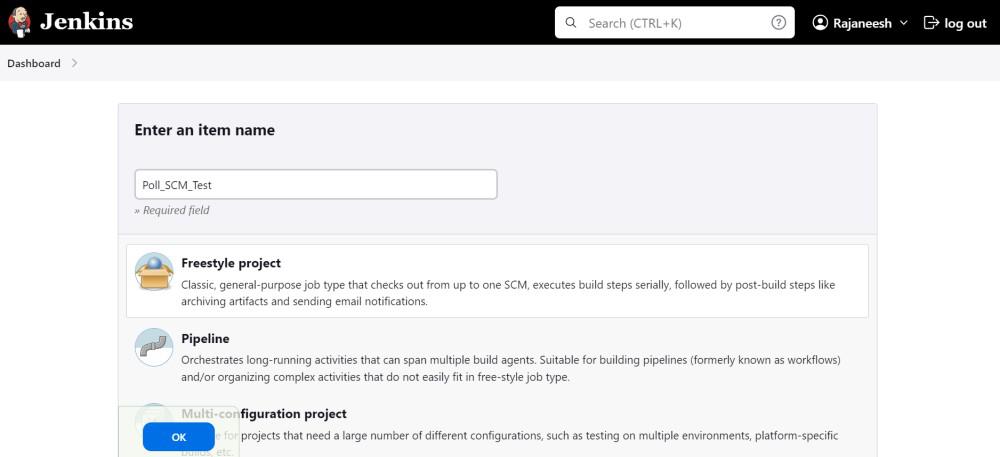
**Step 2: Create or Select a Jenkins Job
- Either create a new Jenkins job or select an existing one that you want to configure for Poll SCM.
**Step 3: Configure Source Code Management
- In your job configuration, find the "Source Code Management" section. Select the appropriate version control system (e.g., Git) to add your repository and branch to build.

- Configuring the jenkins build triggers with choosing branch specifier.

**Step 4: Enable Poll SCM under Build Triggers
- Look for the option labeled "Poll SCM". Specify the frequency in cron format (e.g., H/30 * * * * for every 30 minutes).
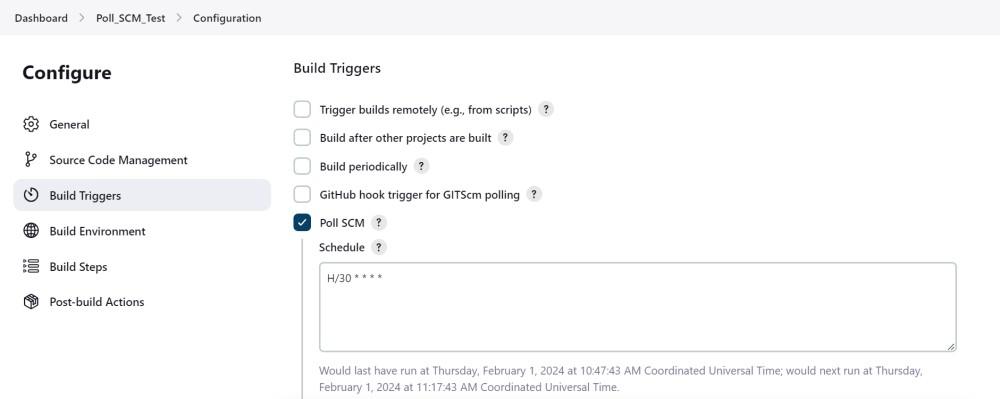
- Save the changes to apply the Poll SCM configuration to your Jenkins job.
**Step 5: Triggering Builds
- Jenkins will now automatically check for changes in the specified interval and trigger a build if changes are detected.
**Example Scenario Of Jenkins Poll SCM Trigger
Let's consider a scenario where you are working on a new feature for the project and you want Jenkins to build your project after working hour, lets say 7PM every day. So you have adjusted the cron format as below.
**Scenario Case: Enable Poll SCM and set the cron expression to `0 19 * * *` for checking changes every day at 7 PM. Now, Jenkins will check the Git repository for changes everyday at 7 PM, triggering a build if any new commits are detected.