Kubernetes Statefulsets (original) (raw)
Last Updated : 21 Jan, 2026
In Kubernetes, StatefulSets are a special type of workload API object used to manage stateful applications. Unlike a Deployment (which is used for stateless apps), StatefulSets are designed for applications that require stable network identities, persistent storage, and ordered scaling or updates.
There are two main ways to deploy applications in Kubernetes:
- **Deployment – for stateless applications
- **StatefulSet – for stateful applications
Stateless Applications
A **stateless application is an application that does not store any data or state about previous interactions. Each request is processed independently, and no information is saved once the request is completed. This means if the application crashes or restarts, it can continue working without needing to recover any past data.
In Kubernetes, stateless applications are usually deployed using Deployments because:
- Pods can be freely created, destroyed, or replaced without affecting application behavior.
- Load balancers can route requests to any Pod since they all behave the same way.
- Scaling up or down is simple because Pods do not depend on local state.
Stateful Applications
A **stateful application is an application that maintains data or state across sessions and requests. Unlike stateless applications, they cannot treat every request as independent because they rely on previously stored information. If such an application crashes or restarts, it must be able to recover its state to continue functioning correctly.
In Kubernetes, stateful applications are deployed using StatefulSets because:
- Each Pod needs a stable, unique identity (name, network ID, and hostname).
- Persistent storage must be attached to Pods so data survives restarts.
- Scaling requires careful handling to ensure data consistency and ordering.
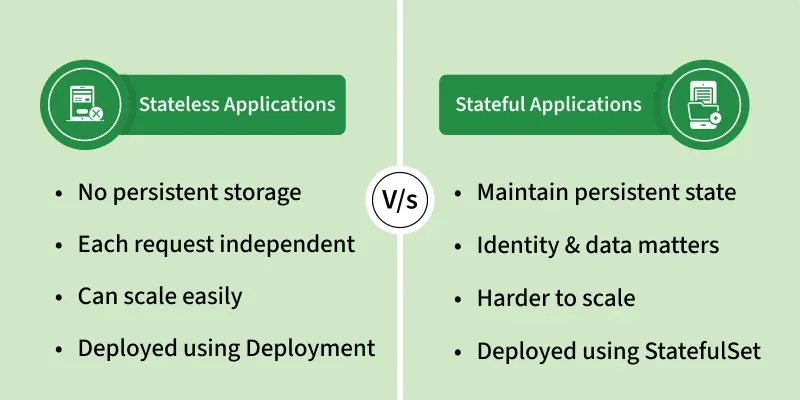
Stateful Vs Stateless Application
Use Case of StatefulSets
StatefulSets in Kubernetes are ideal for deploying stateful applications that require stable, unique network identifiers, persistent storage, and ordered, graceful deployment and scaling. They are suitable for applications like databases, key-value stores, and messaging queues that require consistent identity and storage.
Creation of a StatefulSet in Kubernetes
Here is a step by step tutorial on how to use StatefulSets and some basic operations on StatefulSets.
Create a Nginx StatefulSet Application
**Step 1. Create a StatefulSet file. you can do that by entering the following command:
touch example-statefulset.yaml
**Step 2. Open this file in a code-editor and write the following code into it:
apiVersion: apps/v1
kind: StatefulSet
metadata:
name: gfg-example-statefulset
annotations:
description: "This is an example statefulset"
spec:
selector:
matchLabels:
app: nginx
serviceName: "gfg-example-service"
replicas: 3 # remember this, we will have 3 identical pods running
template:
metadata:
labels:
app: nginx
spec:
containers:
- name: nginx
image: nginx
ports:
- containerPort: 80
name: web
volumeMounts:
- name: www
mountPath: /usr/share/nginx/html
volumes:
- name: www
persistentVolumeClaim:
claimName: myclaim
**Step 3. Now we have to create a service file and a PersistentVolumeClaim file.
touch example-service.yaml
touch example-persistentVolumeClaim.yaml


Create a Service for the StatefulSet Application
**Step 4. Enter the following code into the service file:
apiVersion: v1
kind: Service
metadata:
name: gfg-example-service
annotations:
description: "this is an example service"
labels:
app: nginx
spec:
ports:
- port: 80
name: web
clusterIP: None
selector:
app: nginx
Create a PersistentVolumeClaim for Application
**Step 5. Enter the following code into the PersistentVolumeClaim file:
apiVersion: v1
kind: PersistentVolumeClaim
metadata:
name: myclaim
spec:
accessModes:
- ReadWriteMany
resources:
requests:
storage: 8Gi # This means we are requesting for 8 GB of storage
Now lets apply these changes.
**Step 6. Create the PersistentVolumeClaim
Now apply the PersistentVolumeClaim to the cluster:
kubectl apply -f example-persistentVolumeClaim.yaml
This will create the myclaim PVC required by the StatefulSet pods.
**Note: Kubernetes does not automatically apply resource YAML files. Each resource such as StatefulSet, Service, and PersistentVolumeClaim must be explicitly created using
kubectl applyorkubectl create.
**Step 7. Enter the following command in your terminal to create the gfg-example-statefulset:
kubectl create -f example-statefulset.yaml
This will create our gfg-example-statefulset, you will get a similar result:

Searching our StatefulSets in our terminal by the command
kubectl get statefulsets
we will find our gfg-example-statefulset in the list.

**Step 8. Enter the following command in your terminal to create the gfg-example-service.
kubectl apply -f example-service.yaml
this will create a service with the name "gfg-example-service"
**Step 9. Let's check our pods and services, for getting the list of pods enter the following command in your terminal:
kubectl get pods
You will get the list of the three gfg- pods that we create though defining three replicas in the example-stateful-set.yaml file. You will get a similar output:

for checking the list of services, enter the following command in your terminal:
kubectl get services
This will give you similar output:

**Step 10. Now let's scale up our pods and check if it works! for scaling up the pods to 6 pods, enter the following command:
kubectl scale statefulset gfg-example-statefulset --replicas=6
This will create 3 more pods and number of pods are now 6, to get list of pods enter the following command:
kubectl get pods
You will get a similar output:

**Step 11. Now let's scale down pods to 3, for that enter the same command, just change the number of replicas back to 3:
kubectl scale statefulset gfg-example-statefulset --replicas=3
Checking the list of pods by
kubectl get pods
you will see only 3 pods running:

To know more commands of kubectl refer to Kubectl Command Cheat Sheet.
Some Operations On StatefulSets
**Adding a StatefulSet: To add a StatefulSet to your Kubernetes cluster, use the command kubectl create -f [StatefulSet file name], replacing [StatefulSet file name] with the name of your StatefulSet manifest file.
kubectl create -f [StatefulSet file name]
**Scale Up / Down
Adjust the number of replicas in the StatefulSet to meet workload requirements. Pods are created or removed in order.
kubectl scale statefulset --replicas=5
**Edit
Update the StatefulSet configuration (e.g., image version, environment variables).
kubectl edit statefulset
**Delete
Remove the StatefulSet without deleting the associated PersistentVolumeClaims (PVCs), ensuring data remains intact.
kubectl delete statefulset
**Rolling Updates
Update Pods in sequence (one at a time) to minimize downtime while ensuring application consistency.
kubectl rollout status statefulset
kubectl rollout undo statefulset
Stateful Applications Working
- In stateful applications like MySQL, multiple pods cannot simultaneously read and write data to avoid data inconsistency.
- One pod is designated as the master pod, responsible for writing and changing data, while others are designated as slave pods, only allowed to read data.
- Each pod has its own replica of the data storage, ensuring data isolation and independence.
- Synchronization mechanisms are employed to ensure that all pods have the same data state, with slave pods updating their data storage when the master pod changes data.
- Continuous synchronization is necessary to maintain data consistency among all pods in the stateful application
StatefulSets V/s Deployment
| Deployment | StatefulSets |
|---|---|
| Deployment is used to deploy stateless applications | StatefulSet is used to deploy stateful applications |
| In Deployment, all pods are created parallelly | In StatefulSets, the pods are created one by one |
| When we scale down a deployment a random pod is picked up and deleted | When we scale down StatefulSets, the last pod gets deleted |
| In Deployment, a random name is assigned to the pods. | In StatefulSets, a sticky and predictable name is assigned |
| In deployment all the ports use the same persistent volume | In the stateful set each pod uses its own persistent volume |