What is Docker? (original) (raw)
Last Updated : 23 Apr, 2026
Docker is an OS‑level virtualization (or containerization) platform, which allows applications to share the host OS kernel instead of running a separate guest OS like in traditional virtualization. This design makes Docker containers lightweight, fast, and portable, while keeping themisolated from one another.
Before Docker
Before Docker, deploying applications across different environments was a nightmare. Differences in dependencies, library versions, and OS configurations led to the infamous “works on my machine” problem.
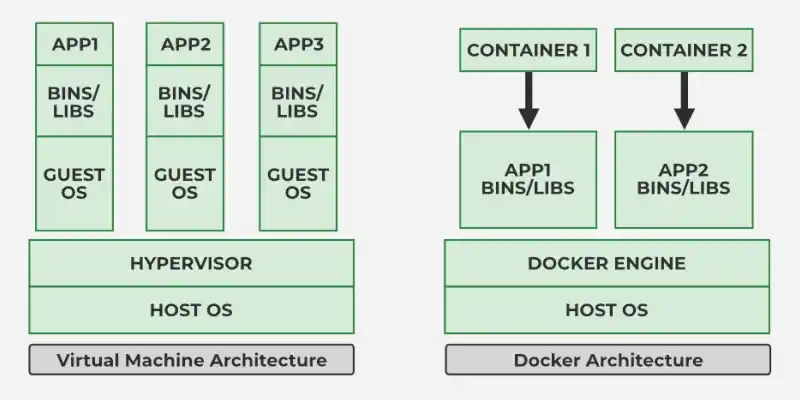
How Docker Containers Differ from Virtual Machines
**Docker’s Solution:
Docker solves this by standardizing the runtime environment. By bundling the application code with its specific dependencies into a single unit, it ensures the software runs identically whether it’s on a developer's laptop, a test server, or a cloud cluster.
- **Portability: Runs anywhere in local machine, cloud, on‑prem servers.
- **Consistency: Same behavior in development, testing, and production.
- **Lightweight: No full OS per app; containers share the host kernel.
- **Scalability: Ideal for microservices and orchestrators like Kubernetes and Docker Swarm.
- **Efficiency: Starts in seconds, uses fewer system resources.
Docker Architecture and Working
Docker makes use of a client-server architecture.
- The Docker client talks with the docker daemon which helps in building, running, and distributing the docker containers.
- The Docker client runs with the daemon on the same system or we can connect the Docker client with the Docker daemon remotely.
- With the help of REST API over a UNIX socket or a network, the docker client and daemon interact with each other.
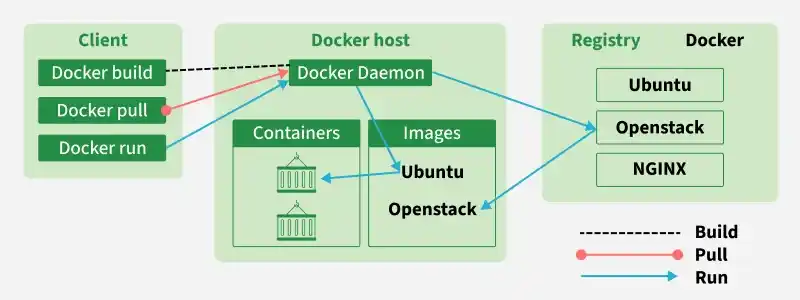
Docker Architecture
- **The Docker Client (CLI): The primary way users interact with Docker. When you type
docker run, the client sends this command to the daemon via a REST API. - **The Docker Daemon (
dockerd): The background service (server) that manages Docker objects such as images, containers, networks, and volumes. - **Docker Registry (Docker Hub): A storage system for Docker images. Docker Hub is the largest public registry, allowing developers to share and pull pre-configured images (like Ubuntu, MySQL, or Nginx).
Components of Docker
The following are the some of the key components of Docker:
- Docker Engine: Docker Engine has a core part docker daemon , that handles the creation and management of containers.
- Dockerfile: It is a file that describes the steps to create an image quickly.
- Docker Image: Docker Image is a read only template that is used for creating containers, containing the application code and dependencies.
- Docker Hub: It is a cloud based repository that is used for finding and sharing the container images.
- Docker Registry: It is a storage distribution system for docker images, where you can store the images in both public and private modes.
Docker Engine
Without the Docker Engine, Docker images cannot be built or containers executed.
- The Client sends Docker commands (
docker build,docker run, etc.). - The Daemon receives these commands and performs container operations.
- The REST API is the interface enabling this communication.
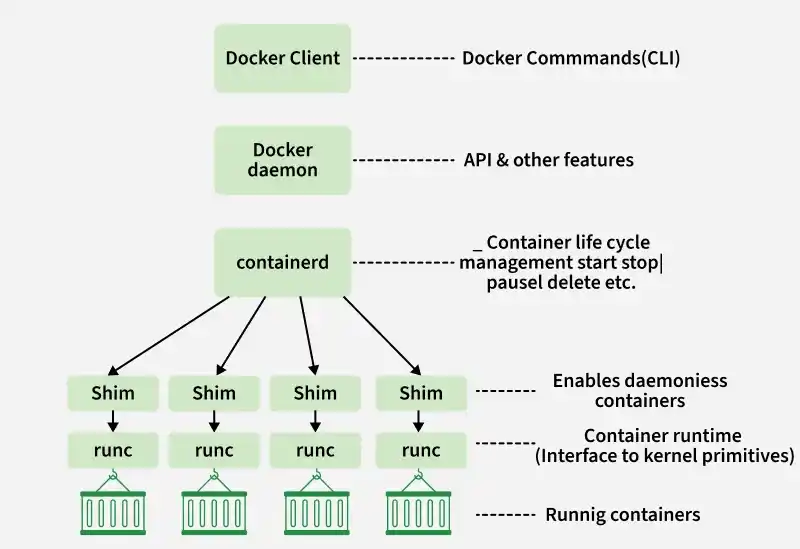
Docker Engine
In short, the Docker Engine is the runtime that makes containerization possible by connecting the Docker client with the daemon to build and manage containers efficiently.
Dockerfile
The Dockerfile uses DSL (Domain Specific Language) and contains instructions for generating a Docker image. Dockerfile will define the processes to quickly produce an image. While creating your application, you should create a Dockerfile in order since the Docker daemon runs all of the instructions from top to bottom.
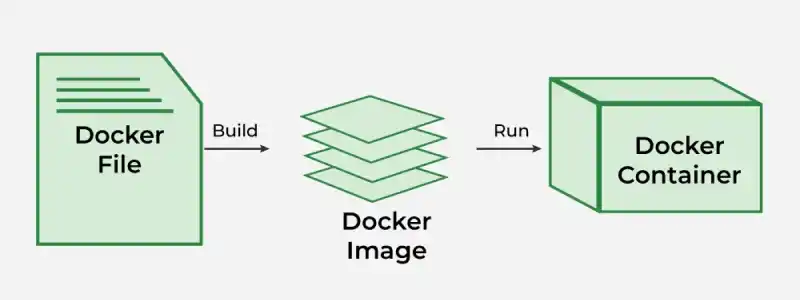
Dockerfile
- It is a text document that contains necessary commands which on execution help assemble a Docker Image.
- Docker image is created using a Dockerfile.
Docker Image
A Docker Image is a file made up of multiple layers that contains the instructions to build and run a Docker container. It acts as an executable package that includes everything needed to run an application code, runtime, libraries, environment variables, and configurations.
**How it Works:
- The image defines how a container should be created.
- Specifies which software components will run and how they are configured.
- Once an image is run, it becomes a Docker Container.
**Relation to Containers:
- **Docker Image → Blueprint (static, read only).
- **Docker Container → Running instance of that image (dynamic, executable)
Docker Container
A Docker Container is a lightweight, runnable instance of a Docker Image. It packages the application code together with all its dependencies and runs it in an isolated environment. Containers allow applications to run quickly and consistently across different environments — whether on a developer’s laptop, test servers, or production.
- A container is created when a Docker Image is executed.
- It runs as an isolated process on the host machine but shares the host’s operating system kernel.
- Multiple containers can run on the same system without interfering with each other.
**Relation to Images:
- **Docker Image = Blueprint (static, read only).
- **Docker Container = Live instance of that blueprint (dynamic, executable)
What is Docker Hub?
Docker Hub is a repository service and it is a cloud based service where people push their Docker Container Images and also pull the Docker Container Images from the Docker Hub anytime or anywhere via the internet.
- **Repository Service: Serves as a global storage hub where users can **push (upload) or **pull (download) container images from anywhere via the internet.
- **Image Management: Offers the flexibility to host images in **public registries (accessible to everyone) or **private registries (restricted to specific users or teams).
- **Collaboration: Simplifies the DevOps workflow by allowing teams to find, reuse, and share standardized environments.
- **Accessibility: An open-source, freely available tool compatible with all major operating systems.
- **Resource Library: Hosts millions of "Official Images" for popular software like Nginx, Python, and Ubuntu, ensuring a verified starting point for projects.
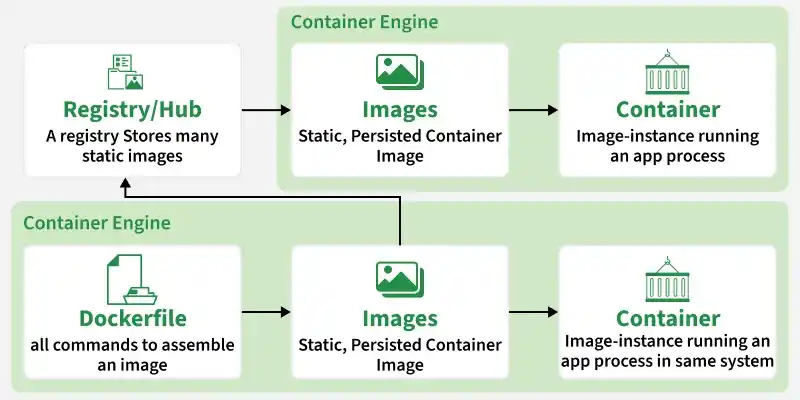
Docker Hub
Docker Commands
Through introducing the essential docker commands, docker became a powerful software in streamlining the container management process. It helps in ensuring a seamless development and deployment workflows. The following are the some of docker commands that are used commonly:
- Docker Run: It used for launching the containers from images, with specifying the runtime options and commands.
- Docker Pull: It fetches the container images from the container registry like Docker Hub to the local machine.
- Docker ps : It helps in displaying the running containers along with their important information like container ID, image used and status.
- Docker Stop : It helps in halting the running containers gracefully shutting down the processes within them.
- Docker Start: It helps in restarting the stopped containers, resuming their operations from the previous state.
- Docker Login: It helps to login in to the docker registry enabling the access to private repositories.
**Docker has Two Editions
- **Community Edition (CE): Free, open‑source, used by individuals, dev teams, open‑source contributors.
- **Enterprise Edition (EE): Paid, with security enhancements, certified plugins/images, and enterprise support.