Kubernetes ConfigMaps (original) (raw)
Last Updated : 21 Jan, 2026
A **ConfigMap stores non-sensitive configuration data (like URLs, hostnames, or settings) in key-value pairs, separate from application code. It helps make applications portable and easy to manage across different environments. ConfigMaps can be used as:
- Environment variables
- Command-line arguments
- Mounted configuration files inside containers
Example: DATABASE_HOST=localhost locally, and DATABASE_HOST=my-service in the cloud.
**Note: ConfigMaps are not secure (use Secrets for sensitive data) and have a **1 MB size limit. For larger files, use Kubernetes Volumes.
Creating a ConfigMap
In Kubernetes, you can create a ConfigMap either using kubectl commands or a YAML manifest.
1. Using kubectl (imperative commands):
- From literal values:
kubectl create configmap demo-config --from-literal=database_host=172.138.0.1 --from-literal=debug_mode=1 --from-literal=log_level=verbose

- From a file:
kubectl create configmap demo-config --from-file=config.properties
**2. Using a YAML manifest (declarative approach):
Create a file config.yaml with the following content:
apiVersion: v1
kind: ConfigMap
metadata:
name: demo-config
data:
database_host: "172.138.0.1"
debug_mode: "1"
log_level: "verbose"
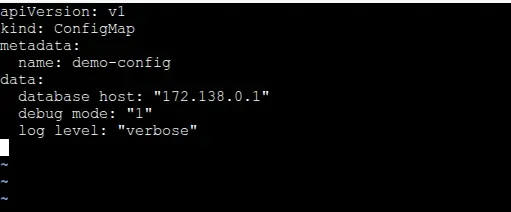
Then apply it to your cluster:
kubectl apply -f config.yaml

This creates a ConfigMap named demo-config that stores your configuration data as key-value pairs, ready to be used by Pods in your cluster.
**Best Practices for ConfigMaps
- **Use for non-sensitive data only – Do not store passwords, API keys, or other confidential information; use Secrets instead.
- **Keep ConfigMaps small – ConfigMaps have a 1 MB size limit. For large files or data, use Volumes instead.
- **Use immutable ConfigMaps when possible – Prevents accidental changes and ensures consistent configuration.
- **Name clearly and consistently – Use descriptive names that indicate purpose and environment (e.g., dev-db-config).
- **Version your ConfigMaps – When updating configuration, create a new ConfigMap instead of modifying the existing one to avoid conflicts in running Pods.
- **Mount carefully – When mounting ConfigMaps as volumes, ensure file paths inside Pods do not conflict with container files.
- **Monitor updates – Remember that Pods do not automatically reload updated ConfigMaps; plan for Pod restarts if needed.
ConfigMaps stored in Kubernetes
- ConfigMaps are stored as API objects in the cluster’s etcd datastore.
- They are managed by the Kubernetes API server and can be accessed or modified using kubectl or the Kubernetes API.
1. Using data and binaryData fields
When defining ConfigMaps in Kubernetes YAML manifests, note that the values within the data field must be strings. However, if you need to store binary data, you can utilize the binaryData field instead. Here's an example illustrating this concept:
apiVersion: v1
kind: ConfigMap
metadata:
name: binary-config
data:
text-data: "This is a string value"
binaryData:
binary-file: |
U29tZSBiaW5hcnkgZGF0YQ==
In this YAML manifest, the data field contains a string value, while the binaryData field stores binary data represented by a base64-encoded string. This allows you to store both text and binary data within the same ConfigMap object.
2: Listing and inspecting ConfigMaps
To view the ConfigMaps you've created in Kubernetes, you can use the kubectl get command. Here's how you can do it:
kubectl get configmaps
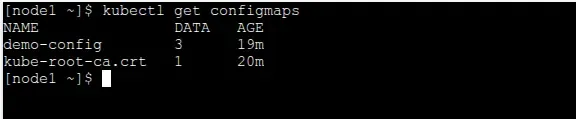
This command will list every ConfigMap in your Kubernetes cluster, along with their names and other pertinent details, when it is executed in your terminal or command prompt.
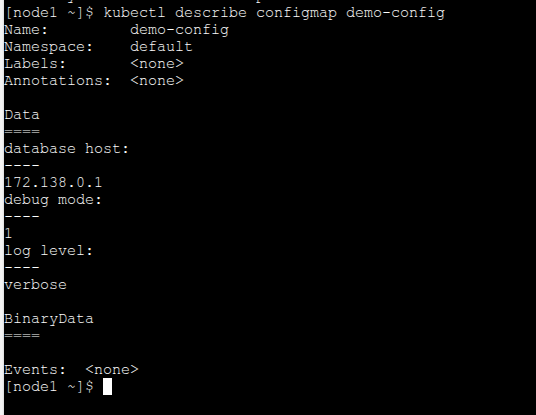
You can use the kubectl describe command in Kubernetes to view the key-value pairs that are kept in a ConfigMap. This is how you do it:
kubectl describe configmap
The name of the ConfigMap you wish to investigate should be substituted for . This command will enable you to confirm the configuration data that has been stored by giving you comprehensive details about the given ConfigMap, including its key-value pairs.
Getting a ConfigMap’s Content as JSON
This command retrieves the ConfigMap named "test-config", extracts its data field, and formats the output using JSONPath. Then, the output is piped to the jq tool for better formatting and readability.
kubectl get configmap -o=jsonpath='{.data}' | jq

3. Mounting ConfigMaps into Pods as volumes
We must first construct a ConfigMap in order to use it as a file in a pod. The command kubectl create configmap can be used to accomplish this. The ConfigMap must be mounted as a volume in the Pod once it has been generated. The volumes part of the Pod specification can be used to accomplish this.
For instance, the following Pod specification mounts a volume named my-configmap at the path ****/etc/configmap** for a ConfigMap with the name my-configmap:
apiVersion: v1
kind: Pod
metadata:
name: my-pod
spec:
containers:
- name: my-container
image: my-image
volumeMounts:- name: configmap-volume
mountPath: /etc/configmap
volumes:
- name: configmap-volume
- name: configmap-volume
configMap:
name: my-configmap
The containers in the Pod can access the files in the ConfigMap once the ConfigMap has been mounted into the Pod. These files can then be used by the containers to launch and operate.
Here is an illustration of how to use a container to access the files in a ConfigMap:
Get a list of all the files in the ConfigMap
ls /etc/configmap
Get the contents of a file in the ConfigMap
cat /etc/configmap/my-file.txt
4. Mounting ConfigMaps into Pods as command line arguments
In Kubernetes, you can mount ConfigMaps into Pods as files and then access those files as command-line arguments. This allows you to pass configuration data to your application without hardcoding it into your container image. Here's how you can achieve this:
- Mount the ConfigMap into your Pod as a volume.
- Access the configuration files from the mounted volume as command-line arguments.
Here's an example YAML configuration to illustrate this:
apiVersion: v1
kind: Pod
metadata:
name: test-pod
spec:
containers:
- name: test-container
image:
command: ["/bin/sh", "-c", "your-app-binary --config /mnt/test-config/config.properties"]
volumeMounts:- name: config-volume
mountPath: /mnt/test-config
volumes:
- name: config-volume
- name: config-volume
configMap:
name: test-config
- A ConfigMap named "test-config" is defined with a single key "config.properties", containing the application configuration.
- The Pod "test-pod" mounts the ConfigMap as a volume at "/mnt/test-config".
- The application container in the Pod executes a command that includes the configuration file "/mnt/test-config/config.properties" as a command-line argument.
5. Using Immutable ConfigMaps
Read-only ConfigMaps that are unmodifiable once created are known as immutable ConfigMaps in Kubernetes. They come in handy when you want to make sure that the configuration data does not alter or become inconsistent during the course of your application. Here is an example of using immutable ConfigMaps:
- Create a ConfigMap with the immutable flag set to true.
- Once created, you cannot modify the data or metadata of the ConfigMap.
- If you need to update the configuration data, create a new ConfigMap with the updated values.
- Update your Pods to use the new ConfigMap.
Here's an example YAML configuration to illustrate using immutable ConfigMaps:
apiVersion: v1
kind: ConfigMap
metadata:
name: test-config
annotations:
immutable: "true" # Set the immutable flag to true
data:
config.properties: |
database_url=http://example.com/db
debug_mode=true
log_level=debug
kubectl apply -f test-config.yaml
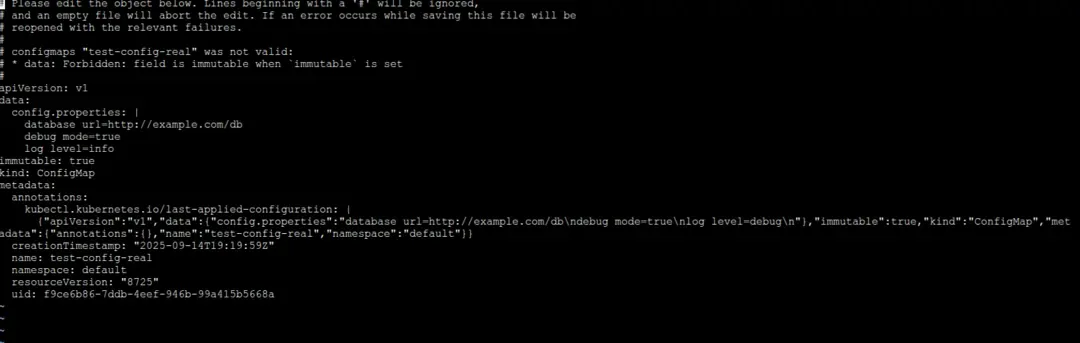
- A ConfigMap named "test-config" is defined with the immutable flag set to true.
- The configuration data is specified under the "data" section as key-value pairs.
- Once created, any attempt to modify the "test-config" ConfigMap will result in an error.
- To update the configuration data, create a new ConfigMap with the desired changes and update your Pods to use the new ConfigMap.
By using immutable ConfigMaps, you can help prevent inadvertent modifications that can compromise the stability of your application and guarantee that its configuration stays consistent and dependable.
ConfigMap Updates
The ConfigMaps can be edited by using two ways one is by changing the config maps in the config file and by using the command **kubectl edit configmap command. It will open the kubernetes configmaps file and there you can make the changes required in that file.
You can also use kubectl update configmap command. to update the config maps for example as shown below.
kubectl update configmap my-configmap --from-literal=key1=value1 --from-literal=key2=value2
- **Data Mutation: Kubernetes applies modifications made to an updated ConfigMap to the current ConfigMap object. This implies that rather than producing a new item, the existing one is altered in-place. The modified configuration data is automatically sent to any pods referencing the updated ConfigMap.
- **Pod Updates: When the ConfigMap is updated, pods that use ConfigMaps as environment variables or mount them as volumes are not automatically restarted. Consequently, until they are restarted or terminated, running pods continue to operate under the previous configuration.
ConfigMap V/s Secrets
| Feature | ConfigMap | Secrets |
|---|---|---|
| Purpose | Stores non-sensitive configuration data | Stores sensitive or confidential information |
| Data Encryption | Data is not encrypted | Data is encrypted |
| Use Cases | Storing environment variables, configuration files, etc. | Storing sensitive data like passwords, API keys, certificates |
| Access Control | Accessible to all pods within the cluster | Restricted access based on RBAC policies |
| Kubernetes API | Kubernetes API object of type ConfigMap | Kubernetes API object of type Secret |
| Visibility | Configurations are visible in plain text | Encrypted data is not visible in plain text |
| Usage | Suitable for non-sensitive data that needs to be shared | Suitable for sensitive data that requires encryption |