Kubernetes Service DNS (original) (raw)
Last Updated : 20 Sep, 2025
In Kubernetes DNS record is created for both Services and Pods. we can use consistent DNS names instead of IP addresses to contact services. After scheduling a DNS Pod and Service on the cluster, Kubernetes DNS instructs the kubelets to tell the individual containers to use the DNS Service's IP to resolve DNS names.
Every service that is defined in a cluster is given a DNS name, this includes the DNS server itself. The client Pod's search list will include the Pod's own name and cluster definition by default.
Namespaces of Services
A DNS query may return different results. The returned value is based on the namespace of the Pod that is making it. It is not specified by DNS queries that the namespace is limited to DNS queries.
Think of a data service in the prod namespace and a pod in the test namespace. Due to the usage of the pod's test name case, a query for data yields no results, while a query for data does. Prod produces the desired outcome because the namespace is provided there.
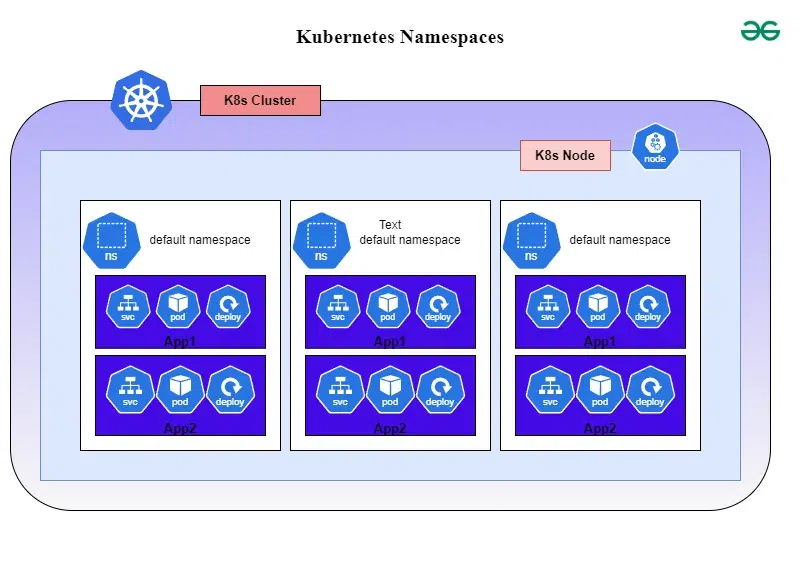
DNS Records
DNS records are just like a address book for the internet, it translatesd the domain names into the IP address that computer can be understandable. It includes various types of records such as a records that used for pointing a domain to a specific IP address, MX records that used for email servers, and CNAME records that used for aliasing one domain to another. Proper management of DNS records is crucial for establishing smooth internet connectivity and service accesibility.
CoreDNS
CoreDNS is a flexible DNS server that is developed in go language. It is designed for modern cloud native environements that comes with modular architecture. It supports various plugins and will be supportive for customizing for different usecases. Its gaining popularity with diverse platforms beyond the kuberentes.
Kube-DNS Vs CoreDNS
The following are the difference between kube-DNS and CoreDNS:
| Features | Kube DNS | CoreDNS |
|---|---|---|
| Architecture | kube-DNS is based on skyDNS that is mainly trained for kubernetes cluster | CoreDNS is a general purpose DNS server that comes with modular design |
| Extensibility | It has limited extensibility and cusomization options | It is highly extensible through using middleware plugins |
| Performance | It's performance has optimized for kubernetes workloads for having efficient service discovery | It has efficient performance with configurable caching. |
| Flexibility | It is mainly designed for k8s environments only. | It can be suitable for the various environments and usecases. |
| Adoption | It is widely adoptable within the kubernetes ecosystem. | It has gaining the popular outside the k8s as well. |
Confguration Files: Corefile
The Corefile is a configuration file that is used for DNS servers. It contains the definition and configurations regarding how CoreDNS should operates. It includes which plugins to use, their order and configuraiton parameters. Its simple syntax and modular design facilitates users to use coreDNS to their specific needs.
DNS for Services And Pods
DNS for services and pods are vital for communication within the cluster for having communication with their names.
- **DNS For Services: It enables the support of establishing communication between the services through their names. It will map the name of service with respecitve their IP address and lets to have communication with names instead of IP addresses.
- **DNS For Pods: It facilitatest intra-cluster communication of pods with their hostnames instead of having with their IP addresses. It lets pods can communicate with each other using these hostnames without the needing to known their IP addresses directly with providing abstraction in networking.
Kubernetes Service DNS
we can set up a DNS system with two well-supported add-ons namely CoreDNS and KubeDNS. The CoreDNS feature is one of the best and latest add on and it acts as a default DNS server. Both the add-ons can schedule a DNS pod or pods or services with a static IO on the cluster and both are named as kube dns in the metadata. name field.
Types of DNS Services
The types of DNS Services are listed as follows:
1. A/AAAA Records
2. SRV Records
A/AAAA Records
Normal services are assigned to a DNS A or AAAA record. For a name of the type my-svc.my-namespace.svc.cluster-domain.example, this will resolve to the cluster IP of the Service. This relies on the IP family of the Services.
Additionally, dependent on the IP family of the service, headless services are given a DNS A or AAAA record with the name of the format my-svc.my-namespace.svc.cluster-domain.example. This will resolve to the collection of pod IPs that the service has chosen.
.jpg)
SRV Records
They were primarily developed for named ports that were essential to Headless Services or regular services. Every named port will have an SRV record of the format _my-port-name. my-port-protocol.my-svc.my-namespace.svc.cluster-domain.example. This resolves to the port number and, in the case of a typical service, the domain name my-svc.my-namespace.svc.cluster-domain.example.
.jpg)
Features of DNS services
The main features of DNS services are:
- It can be used to map to a new IP address if the host's IP address is ever changed.
- It is easier to remember when compared to the IP address.
- It allows organizations to use a domain name hierarchy that is independent of any IP address provided.
DNS search Domain List Limits
The DNS search Domain List Limits refers to the maximum number of domains that be included in the search domain list configuration. This list will be used by DNS resolvers to expand the short, unqualified names into fully qualified domain names by appending each domain in the list in order. Exceeding this limit will raise the issues with the DNS resolvers in correctly searching the domain names.
Customizing DNS Service
Customization of DNS service in a network involves in configuring the DNS servers that will be suitable for specific needs. It may include in setting up the custom domain names, integrating with external DNS providers. By implementing DNS based security measures like DNS filtering facilitates with optimizing the performance of the DNS resolution. It facilitates with ensuring effiicient and secure resolutions of domain names across the network infrastructure.
Using CoreDNS for Service Discovery
CoreDNS is a powerful service discovery in kubernetes environment. By configuring CoreDNS as the DNS server in kubernetes we can efficiently establish the communication with services names resolving the IP challenges. In behind it maps the name of the services with respective their IP addresses. Using coreDNS we can simplify the networking and can it be abstracted within the kubernetes cluster. It will enhances the reliability and scalability of the infrastructure.
Steps to Configure DNS for A Cluster
The following are the steps for configuring DNS for a Kubernetes Cluster:
Step 1 : Choose DNS Solution
- Select the DNS solution like CoreDNS or kube-DNS on considering its comptability with the kuberentes version and the specific reqirements.
Step 2: Install DNS Add-on
- Deploy the chosen DNS add-on to the kubernetes cluster using appropriate deployment method such as YAML manifests or package managers like Helm.
Step 3: Customize Configuration
- Try to modify the configuration file of the DNS server as per the requirements that suits for the cluster's requirements. It involves in adjusting the DNS policies, specifying the custom DNS providers or configuring additional plugins.
Step 4: Update CoreDNS/Corefile
- If the using the DNS server is CoreDNS then update the corefile for defining the DNS zones, plugins, and upstream resolvers as per needed. Make ensure that the desired changes are reflected on DNS behaviour for the cluster.
Step 5: Verify Configuration
- Now, test the configurations by resolving its domain names from within the cluster and ensuring that the DNS querires are properly routed to the DNS service.
Step 6: Monitor and Maintain
- By regularly maintaining the DNS performances, we can resolve any issues promptly. Maintaince of DNS configurations by updating it respective to the cluster evolves is recommended practice.
Trouble Shooting Issues of Kubernetes DNS
The following are the some of the trouble shooting issues of kubernetes DNS:
- **Check Pod Network: Ensure that pod networking is correctly configured and functioning. DNS resolution relies on network connectivity between pods and DNS services.
- **Verify DNS Service: Confirm that the DNS service is running and healthy within the Kubernetes cluster. Check for any errors or warnings in the DNS service logs.
- **DNS Configurations: Review DNS configurations, such as ConfigMaps and CoreDNS settings, for any misconfigurations or conflicts. Ensure that DNS policies align with the cluster's requirements.
- **Pod Resolvability: Verify that pods can resolve DNS names both within and outside the cluster. Test DNS resolution from various pods to ensure consistency and correctness.