Docker Daemon (original) (raw)
Last Updated : 21 Jan, 2026
Docker is synonymous with containerization, yet it is just one of the many implementations of the Open Container Initiative (OCI). As the most widely embraced containerization platform, Docker has greatly streamlined the development and deployment of modern applications. At the core of Docker's operation is the Docker daemon, an underlying background service running on the host OS, responsible for executing all Docker tasks.
Docker daemon
At the very core of Docker's operation lies the Docker daemon. It is the service responsible for orchestrating container lifecycle management. It means that the docker daemon handles various tasks including container creation, execution, and monitoring. In a nutshell, it acts as a bridge between the Docker client and the Docker engine following Client-Server Architecture. Docker daemon executes commands issued by the client by translating them into actionable operations within the Docker environment.
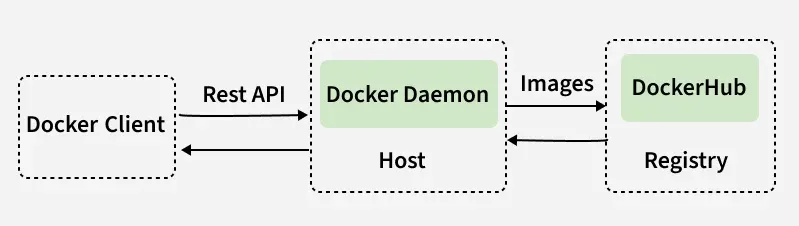
Docker Daemon Functions
- **Container Management: This involves overseeing the creation, execution, and termination of containers. This actions are performed based on commands received from the Docker client.
- **Networking and Storage: Docker daemon enables seamless integration with resources with the underlying Operating System. Docker Daemon provides containers with access to network ports, storage volumes, and other essential components.
- **Push & Pull images from registry: When a requested image or container isn't already available locally, Docker daemon interacts with Docker Registry to fetch and deploy the requested resources.
- **Host Operating System: Docker daemon utilizes host operating system resources to manage containers. It communicates with the kernel of the host operating system to execute container operations.
- **Scalability and Flexibility: Docker daemons architecture allows seamless integration with third-party tools and extensions. This enables further customization of container environments.
Understanding Docker Architecture:
1. Client Server Architecture:
Under the hood, docker employs a client-server architecture. Here docker daemon acts as the server component. The Docker client could be the docker cli or the docker desktop application. The interaction between docker client and daemon happens via REST API calls. The docker client acts as a frontend through which user interacts and the docker daemon actually executes all the required commands.
2. Relation between Docker daemon and Docker Client:
When the user interacts with docker client, either through the docker cli or through graphical desktop application, docker client sends the required commands to the docker daemon. Upon recieving the required instruction the docker daemon actually executes them. The result of this operation (along with potential errors) is then displayed back to the user via docker client.
In a nutshell, **Docker client acts as simple frontend while **Docker daemon actually manages the resources. The interactions between docker daemon and the docker client are done through a REST API which acts as a bridge between the client and the server.
3. Relation between Docker daemon and Docker Registery:
Docker Registry is a remote service that stores Docker images and other related information. The registry acts as a **central hub through which docker images can be accessed by users. Users can also upload their own images to the registry. **DockerHub is one of popular public registry, they can also be privately managed.
When the an image is requested, the docker daemon checks if it exists locally, if it does then starts a container using that particular image. If the requested image doesn't exist locally then the daemon makes a request to the registry to get the required image.
4. Relation between Docker daemon and Docker Engine:
Docker Engineis composed of bothcontainerd and runc, which power Docker's internal containerization capabilities. **Containerd is a high-level container runtime that interacts with Docker daemon to handle container management tasks. On the other hand, As the container runtime interface (CRI), **Runc ensures consistent container execution managing the execution of the tasks.
Docker daemon under the Hood
Starting the Docker Daemon
On MacOS and Windows Operating systems, **starting Docker Desktop will automatically launch the docker daemon. When you launch the docker desktop application you can see the following screen:

On Linux operating system, the docker daemon could be started using the following command:
$ sudo systemctl start docker
**Note: Running this command requires root priviliges.
Stopping the Docker Daemon
On MacOS and Windows Operating Systems, similar to how Docker Desktop is used for starting, it can also be used to manually pause or quit it. Click on the respective icons on status bar (bottom left position) to confirm the action.

On Linux, if the process in running in the terminal you can use **Ctrl+C to stop it or can alternatively use the following command:
$ sudo systemctl stop docker
Configure the Docker daemon
There are two main ways to configure the Docker daemon:
- Use a JSON configuration file.
- Using flags when starting dockerd.
Docker daemon directory
The Docker daemon stores data in a single folder. This folder/directory contains everything related to Docker. This directory will include all of containers, images, volumes, service definition, and secrets.
It can be accessed via
- _Linux/macOS : /var/lib/docker
- _Windows: C:\ProgramData\docker on Windows.
Effective debugging
Debugging can be enabled to look runtime activity, helping with troubleshooting. This can be achieved by setting the debug key to true.
- Linux: Edit _daemon.json file located in /etc/docker/.
- Windows: Go to Preferences / Daemon / Advanced.