Kubernetes Ingress (original) (raw)
Last Updated : 2 May, 2026
Ingress is an API object that manages external access to services within a cluster, typically via HTTP and HTTPS. It acts as a smart router or entry point, consolidating multiple routing rules into a single resource.
- **Host-based Routing: Directs traffic based on domain names (e.g., api.example.com vs. web.example.com).
- **Path-based Routing: Directs traffic based on URL paths (e.g., /login vs. /search).
- **TLS/SSL Termination: Handles certificates at the edge to secure connections before traffic reaches internal services.
- **Load Balancing: Distributes incoming requests across multiple backend Pods.
Key Components
- **Ingress Resource: Defines the routing rules for directing external traffic to internal services. This component holds all the configuration details like host-based and path-based routing.
- **Ingress Controller: Implements the rules defined in the Ingress Resource. It watches for changes and updates, ensuring traffic flows according to the defined configuration. Popular Ingress Controllers include NGINX, HAProxy, and Traefik.
- **Backend Services: The services receiving the traffic directed by Ingress. These could be any internal applications or APIs within your Kubernetes cluster.
Architecture of Kubernetes Ingress
Kubernetes Ingress acts like a traffic controller for managing the income traffic to the Kubernetes cluster. It manages the external access to the services within the kubernetes. The following are its internal concepts and terminologies:
- **Routing: Kubernetes Ingress defines the rules in the Routing table for external HTTP and HTTPS traffic to the inside kubernetes cluster services based on the hostname and paths.
- **Load Balancing: Load Balancing facilitates in distributing the income traffic to multiple backend servers providing scalability and reliability to the cluster.
- **TLS Termination: Ingress handles the TLS/SSL termination for providing a secured communication between the clients and services.
- **Path-Based Routing: In Routing Table we can define the rules based on the URL paths also. With this the traffic will be distributed to backend servers based on the paths accordingly.
- **Virtual Hosts: Ingress facilitates virtual hosting i.e., hosting multiple domains on the same cluster and directs the traffic to different services based on the domain name.
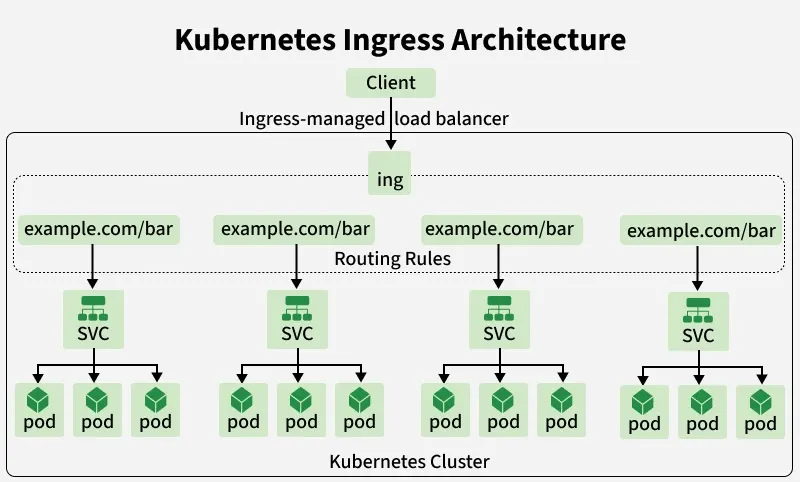
Kubernetes Ingress Architecture
Working
Ingress serves as a reverse proxy that helps direct incoming traffic to the correct services within a Kubernetes cluster. It operates based on two key components:
1. Ingress Controllers
- Ingress Controllers are pods running inside the Kubernetes cluster that handle incoming traffic.
- Act as reverse proxies, enforcing the rules defined in Ingress resources.
- Manage the flow of inbound requests, directing them to the appropriate service inside the cluster.
- Support HTTP and HTTPS traffic, including TLS termination using Kubernetes Secrets.
- Can provide additional features like load balancing, URL rewriting, authentication, and metrics.
- Popular examples include NGINX Ingress Controller, Traefik and HAProxy.
2. Ingress Rules
- Ingress Rules define how incoming traffic should be directed to services within the cluster.
- The Ingress Controller checks these rules and forwards requests to the appropriate service.
- Traffic can be routed based on hostnames:
serviceA.example.com→ Service AserviceB.example.com→ Service B
- Traffic can also be routed based on URL paths:
example.com/serviceA→ Service Aexample.com/serviceB→ Service B
- SSL/TLS management:
- The Ingress Controller uses Kubernetes Secrets to decrypt secure traffic.
- Ensures HTTPS requests are safely forwarded to the correct service.
Kubernetes Ingress Resources
In Kubernetes, an Ingress is an API object that manages the external access to the services within the kubernetes cluster. It acts an abstraction layer for routing traffic from outside the cluster to services inside the cluster. The following are its main concepts and terminologies:
- **Routing Rules: Ingress facilitates you to define the rules for routing HTTP and HTTPS traffic based on the hostnmes or paths to different services in your cluster.
- **Load Balancing: It provides the load balancing capabilities, distributing the incoming traffic across multiple pods or services.
- **TLS Termination: Ingress can also able to handle the SSL/TLS termination by allowing you to encrypt the traffic from outside the cluster to your services.
- **Reverse Proxy: It functions as a Reverse proxy, forwarding the requests from the clients to appropriate services based on the defined rules.
Types of Ingress
Ingress refers to an unauthorized entry or access into your system, network or physical spaces that presents the security risks and potential harm. The following are the types of ingress, each presents its own risks and challenges:
- **Physical Ingress: It involves gaining the physical access to a system or network bypassing the physical security measures such as locked doors, security guards. It also involves stealing of devices like laptops or USB drivers.
- **Network Ingress: Network ingress occurs when the attackers gains the access of a network through vulnerabilities in the infrastructure such as unsecured wifi networks, open ports or weak passwords. This leads to unauthorized security access to sensitive data.
- **Software Ingress: It involves in exploiting the vulnerabilities in software applications or operating systems to unauthorized access to a system or network. This can include exploiting the bugs, malware or with techniques like phishing to trick users to reveal sensitive information.
Updating an Ingress
Updating the Ingress involves in modifying the configuration file of the Routing Table. Routing rules of how external traffic is routed to services within the kubernetes cluster as to be modified. The following are steps for updating an Ingress to define rules for HTTP and HTTPS traffic to different services based on criteria like hostname and paths.
Step 1: Modify the YAML Configuration
Here, we can modify the yaml configuration file that defines the ingress resources using `kubectl edit**` or by directly modifying the YAML file.
kubectl edit ingress
Step 2: Apply Changes
After once the changes are made in the configuration file, you can apply the changes using the following command in the kubernetes cluster.
kubectl apply -f ingress.yml
Step 3: Verfiication
Once we applied the changes, we should verify whether the ingress is updated correctly or not using the following command.
kubectl get ingress
Or we can also verify it by checking the status in our kubernetes dashboard.
Step 4: Testing
It is important to test the updated configuration of ingress to ensure the traffic is routed as per expected or not. we can perform this by sending the requests to the associated services and verifying its responses.
curl http:///
curl -k https:///
Step 5: Rollback ( if necessary )
If the update leads to any issues or anying unexpected behaviour, we can rollback it to the previous configuration by reapplying the older YAML file.
kubectl apply -f old-ingress.yml
Ingress Configuration File Example
In this configuration file of Ingress, specification is where the whole configuration happens, we have rulesor routing rulesattribute which defines that all the requests to "shubham.com" must be forwarded to the internal service "myapp-internal-service****"**.
apiVersion: networking.k8s.io/v1beta1
kind: Ingress
metadata:
name: myapp-ingress
spec:
rules:
- host: shubham.com
http:
paths:
- backend:
serviceName: myapp-internal-service
servicePort: 8080
Ingress, Services, and Endpoint Resources in Kubernetes
Ingress, Services, and Endpoint Resources work together to manage traffic routing in a Kubernetes environment.
1. Services in Kubernetes
- A Kubernetes Service provides an abstraction layer to expose applications running in Pods.
- It creates a consistent endpoint for accessing the application, making it easier for other components to communicate with it without worrying about changes in the underlying Pod IPs.
2. Endpoint Resources
**Endpoint Resources are Kubernetes objects that track IP addresses and ports of Pods linked to a Service.
- Ensure that traffic from a Service is directed to the correct Pods.
- Automatically update as Pods scale up, scale down, or get replaced, maintaining proper routing.
3. Role of Ingress
- Ingress acts as a gateway for directing external traffic into the Kubernetes cluster.
- Forwards requests to the appropriate Service.
- Services then route traffic to the corresponding Pods via their Endpoint resources.
- Maintains stable access to applications even as Pods scale or change dynamically.
- Works together with Services and Endpoints to ensure smooth traffic flow within the cluster.
Kubernetes Ingress Controllers List
Kubernetes controller is essential for managing the inbound traffic to the kubernetes cluster. The following are the some of the widely used kubernetes Ingress Controllers:
- **Nginx Ingress Controller: It is the one of the popular option for kubernetes. It configures the NGINX to route traffic to kubernetes services.
- **Traefik: It is a modern HTTP reverse proxy and load balancer that is made for microservices. It's known for its simplicity and dynamic configuration.
- **HAProxy Ingress: It utilizes the HAProxy as its uderlying proxy for handling incoming traffic. It is highly configurable and suitable for complex routing requirements.
- **Contour: It is build on top of Envoy proxy. It is designed to work seamlessly with kubernetes offering features like HTTP/2 and TLS Termination.
- **Istio: Istio is primarly a mesh service and can also functions as ingress controller offering effective traffic management capabilities, security features and observability.
Creating an Ingress in Kubernetes
Follow this tutorial step by step in order to create and work with Ingress configuration files in Minikube. Minikube is a one-node Kubernetes cluster where master processes and work processes both run on one node.
**Step 1: You can skip this step if you already have a Kubernetes Cluster running in your machine. But in case you don't have a Cluster running enter the following command to create Kubernetes locally using minikube:
minikube start
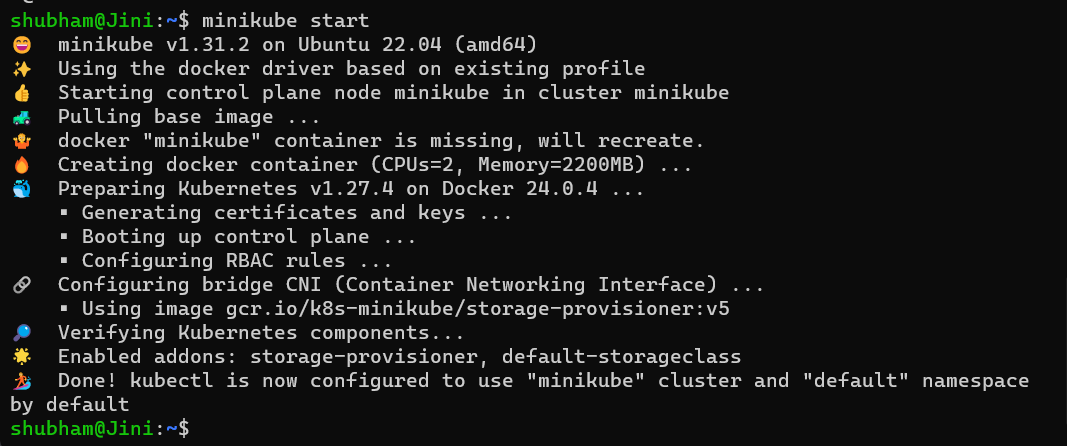
- If you are logged in as a root user you might get an **Error message:
Exiting due to DRV_AS_ROOT: The "docker" driver should not be used with root privileges.
- This is because the default driver in the Docker driver and it should not be used with root privileges. For fixing this we should log in as a different user that the root user.
- Enter the following command to add a new user:
adduser [USERNAME]
- Now enter the following command to login as a new user
su - [USERNAME]
- And after this the command 'minikube start' should work fine.
**Step 2: Let us now install ingress controller in Minikube and the way to do that is by executing minikube add-ons command. Enter the following command in your terminal:
minikube addons enable ingress
- you will get a similar result as shown in following Screenshot
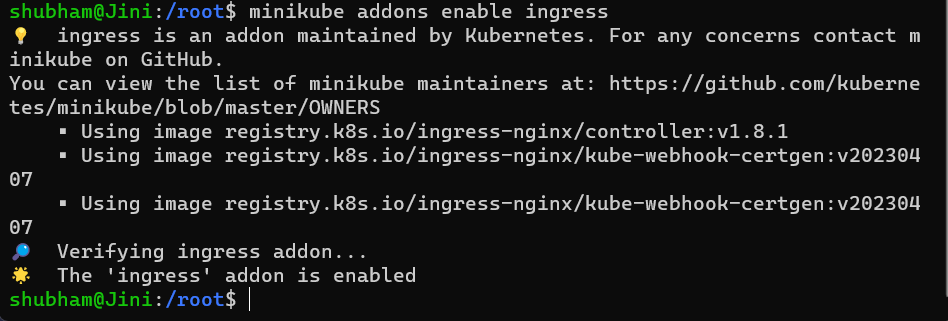
- What this does is it automatically configures or automatically starts the Kubernetes nginx implementation of ingress controller.
- It is one of the many third-party implementations which you can also safely use in production environments.
**Step 3: Now we will create an ingress rule that the controller can evaluate. This is quite a complicated process.
- Firstly, we already have internal service for _kubernetes-dashboard and a Pod for that. We are configuring an ingress rule for the dashboard.
- Check the list of namespaces by the following command:
kubectl get ns
- In case you don't have it already, you can use this command to get _kubernetes-dashboard namespace.
minikube dashboard

**Step 4: Now that we have _kubernetes-dashboard, we can check all the components inside the _kubernetes-dashboard namespace using the following command:
kubectl get all -ns kubernetes-dashboard
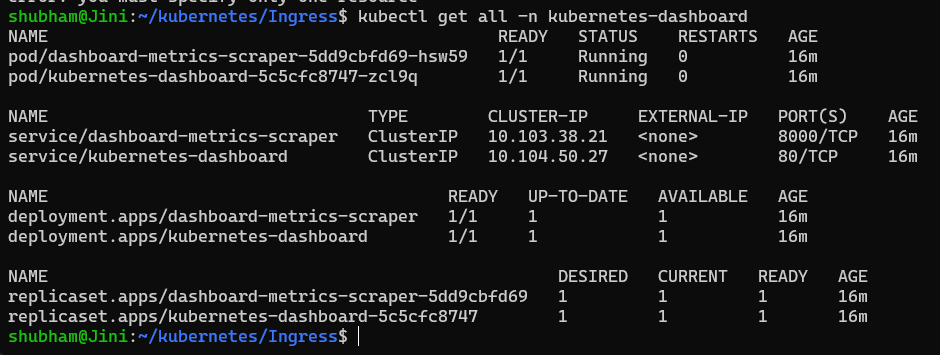
- You can see the internal service called _kubernetes-dashboard with a Port = 80 and the pod inside the namespace, note that down since we are going to use this when working on the Ingress rule.
**Step 5: Now let's create the Ingress rule for the namespace _kubernetes-dashboard. This means that we will specify the namespace as _kubernetes-dashboard.
- Create a file called _dashboard-ingress.yaml and enter the following code inside it.
apiVersion: networking.k8s.io/v1
kind: Ingress
metadata:
name: dashboard-ingress
namespace: kubernetes-dashboard
spec:
rules:
- host: dashboard.com
http:
paths:- path: /
pathType: Prefix
backend:
service:
name: kubernetes-dashboard
port:
number: 80
- path: /
- You can see that the serviceName and the Port resembles to what to talked about in the earlier step.
**Step 6: Now, let's apply the Ingress rule, you can do that by entering the following command in your terminal:
kubectl apply -f dashboard-ingress.yaml
- And the ingress will be created. Now if we checkout the list of Ingress in _kubernetes-dashboard namespace by entering the following command
kubectl get ingress -n kubernetes-dashboard

- We can find our dashboard-ingress that we created. Make sure to note down the Address of the Ingress, we will use it in later steps.
**Step 7: Now what we will do is we will take that address and in the hosts file, at the end we will define that mapping, we will map IP address to dashboard.com . We can do that by entering the following command:
sudo vim /etc/hosts
- Then you can type your password and enter this to your hosts file:
[IP_ADDRESS] dashboard.com
- the hosts file would look somewhat like this:
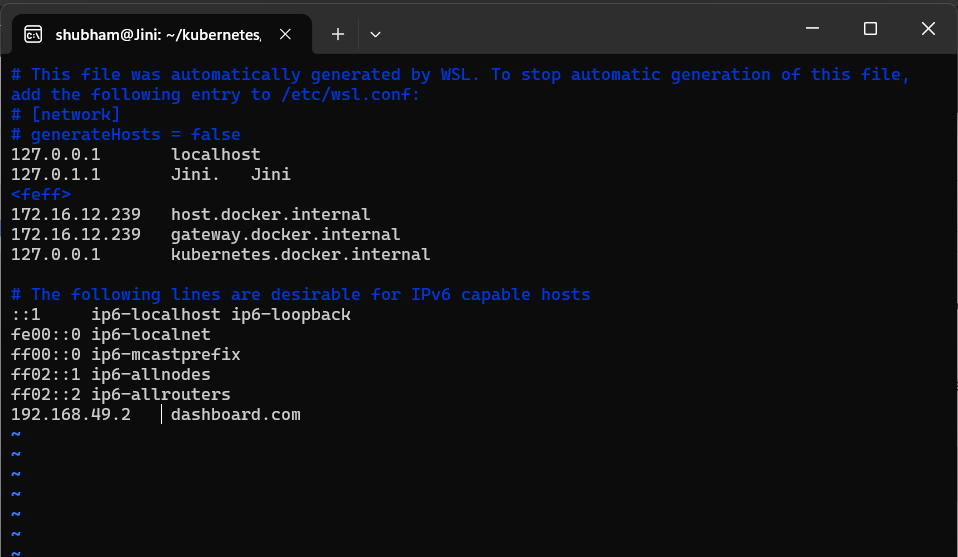
- What this does is that if you type dashboard.com in the browser, it will be mapped to the IP address we assigned. (192.168.49.2 in this case).
- This basically means that the request that will come in to our Minikube cluster will be handed over to Ingress controller and the Ingress controller then will evaluate the rule that we defined and forward that request to service.
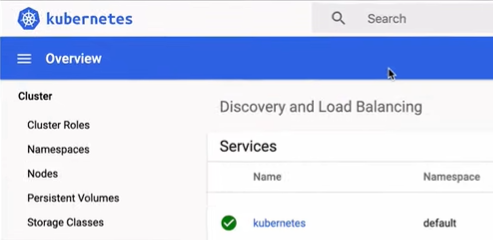
**Step 8: And with this we have finally setup the Ingress rule. We can simply go to _dashboard.com in our machine and you will get the _kubernetes dashboard there.
- It will look similar to this. (this is not the entire website screenshot, only for reference).
With that you learned the Kubernetes Ingress and it's implementation using a configuration file.