API Key Security (original) (raw)
Last Updated : 11 Jul, 2025
API Keys are special strings that identify an entity without a biometric measure. Applications use them to provide identification and authorization to request access to various Application Program Interfaces (APIs). Developers use them as credentials that contain information needed for authentication into various services such as Google Maps API, AWS API Gateway, Stripe API, and many others.
For more details refer What is an API Key? Working and Types
Why is API Key Security Important?
API Keys are two pieces of authentication information that, when issued separately, can be abused unwarrantedly. Their misuse will facilitate data exploits or breaches. It is possible for attackers to take advantage of API weaknesses by:
- Utilizing and surpassing the allocated API limits, which comes with unanticipated costs on Google cloud, AWS, Stripe and similar services.
- Acquiring sensitive information in restricted resources through user-containing APIs using YouTube Data API, Twitter API, Paypal API.
- Cancelling authentication in poorly constructed APIs can cause brute force attacks, stuffing the credential holes, and wanton API calls.
- A data breach due to poor API security can scare away customers and hurt your brand (e.g., the 2018 GitHub API key leak exposed user data).
**For example: In 2020, a misconfigured API key for a fitness app exposed user workout data, showing how even small mistakes can cause big problems. By prioritizing API key security best practices, you avoid these.
Also Read: 7 Best Practices for API Security in 2024
How API Keys Get Compromised?
While we are learning how to keep API keys secure, first understand how they get compromised. It is like understanding where thieves enter your house so you can lock up those places. A few popular ways through which API keys get compromised are:
- **Hardcoding in Code: Sometimes developers or users leave the API key in code (e.g., GitHub repositories). An attacker can use the keys using tools like **TruffleHog.
- **Misconfigured Servers: Storing keys in insecure files (e.g, .env files on a web server) makes them easy to steal.
- **Phishing Attacks: Hackers can trick employees by using social engineering so that they can share API keys through fake emails or login screens.
- **Weak Access Controls: Issuing keys to too many people or not rotating them increases threats.
- **Accidental Exposure: Sometimes developers expose the API keys in screenshots, logs, or public forums also.
APIs require security mechanisms to control access and protect sensitive data. The three main authentication and authorization mechanisms for APIs are: As we know that API keys require security mechanisms so that they can control the
- **HTTP Basic Authentication –In **HTTP Basic Authentication when we enter the username and password we can easily see them in HTTP headers which making it vulnerable to **Man-in-the-Middle (MITM) attacks. This vulnerability is mitigated by using the HTTPS which encrypts the communication.
- **API Key – A unique identifier assigned to a user or application upon registration. API Keys are **used for authentication but not authorization, making them insecure if exposed.
- **OAuth – In this it generates sessions based tokens in which users reauthenticate after some time period. It is a secure method that combines **authentication and authorization.
Between **API Key Security and OAuth Security, understanding their differences helps in choosing the right security mechanism for API access. Below is a **detailed comparison of **API Key vs. OAuth, highlighting their strengths, weaknesses, and best use cases.
| Feature | API Key | OAuth |
|---|---|---|
| **Definition | A unique string assigned to users for API authentication. | A token-based authentication and authorization framework. |
| **Authentication vs. Authorization | Provides **authentication only, allowing access to the system but not defining roles. | Manages both **authentication and authorization, allowing role-based access control. |
| **Security Level | **Less secure—if an API Key is exposed, it can be used indefinitely. | **More secure—OAuth tokens are session-based and expire after a set duration. |
| **Vulnerability | Prone to Man-in-the-Middle (MITM) attacks, API key leakage, and unauthorized usage. | Reduces risks by generating short-lived tokens and requiring reauthentication. |
| **Usage | Sent with **each request in an **Authorization Header, Query String, or Body Data. | Uses **tokens instead of credentials, reducing exposure. Tokens expire after a session. |
| **Token Expiry | **No expiration—an API Key remains valid until revoked manually. | **Expires after each session, requiring reauthentication for continued access. |
| **Access Control | Lacks **granular access control—either grants full access or no access. | Allows **role-based access control (RBAC), restricting access to specific resources. |
| **Best Used For | **Simple applications where security is not a major concern. | **Secure and scalable applications requiring user-specific access control. |
| **Example Implementation | API Key is included in the header:Authorization: ApiKey 12345ABCDE | OAuth authentication flow:1. User logs in.2. OAuth generates a session-based access token.3. Token is sent in API requests.4. Token expires after a session. |
| **Risk of Unauthorized Access | **High—stolen API Keys grant full access until revoked. | **Low—tokens expire after a session, and multi-factor authentication can be added. |
| **Performance | **Fast and lightweight, since it does not require token management. | **Slightly slower, due to authentication flow but significantly **more secure. |
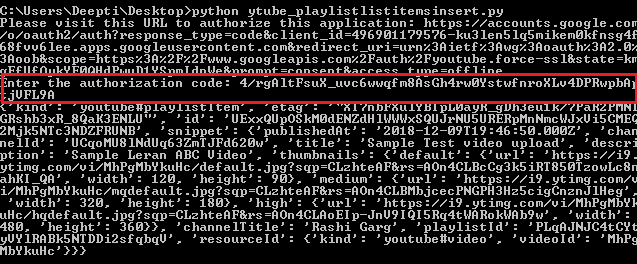
Now if take an example from Youtube Data API, First the user will authenticate itself by submitting credentials like username and password and then Submit the generated token to the server and authorize itself for the role. Images below shows how OAuth Credential works:

After successful login, a token is generated. This token when presented to the server decides the appropriate rights for the calling user and generates the results accordingly. The highlighted portion in the image represent the Authorization Token that was generated.
API Keys for User Authentication and Authorization
API Keys serve as authentication tokens that verify the identity of users and applications accessing an API. They are commonly used in Google Maps, YouTube Data API, Twitter API, and other services where users need to register before accessing API functionalities. While API Keys authenticate users, they do not provide granular access control, making them less secure than OAuth-based authentication.
1. API Key for User Authentication
Authentication is the process of **verifying the identity of the entity making the API request. API Keys act as **unique identifiers that help servers confirm that a request is coming from a **registered and valid user.=
**How API Key Authentication Works?
- The API Key is included in the HTTP header, query parameter, or request body.
- The API server checks if the API Key is valid and associated with an active account.
- If the API Key is correct, access is granted to the requested API resources.
**Example: Authenticating a User in Google Cloud API
curl -H "x-api-key: YOUR_API_KEY" https://api.example.com/user/profile
For more details refer What is API Authentication? Definition and Working
2. API Key for User Authorization
Authorization ensures that a **user or application has permission to perform a specific action after authentication. API Keys can be configured with **different permission levels, such as:
- **Read-Only Access – The API Key allows fetching data but restricts modification.
- **Write Access – The API Key permits data updates but restricts administrative changes.
- **Admin Access – Full access to API resources, including sensitive operations.
**Example: API Key Authorization in Twitter API
curl -X GET "https://api.twitter.com/2/tweets?ids=123456" \
-H "Authorization: Bearer YOUR_API_KEY"
3. API Key-Based Access Control Mechanisms
Since API Keys lack built-in security controls like OAuth, **access control mechanisms are used to enhance security:
- **IP Address Restriction – API Keys can be restricted to work only from specific IP addresses.
- **Domain or Referrer Restriction – Limits API Key usage to requests from a specific domain or application.
- **Usage Limits and Quotas – API providers enforce rate limits to prevent excessive usage or abuse.
- **Expiration and Rotation – Periodic API Key rotation enhances security by limiting long-term exposure.
**Example: Enforcing API Key Restrictions in Google Maps API
curl -X GET "https://maps.googleapis.com/maps/api/geocode/json?address=New+York&key=YOUR_API_KEY" \
--referer "https://www.bedpage.com/"
How to Protect API Keys from Being Stolen?
Here’s how to secure API keys effectively using best practices, security tools, and encryption techniques.
1. Use Secret Management Tools for API Key Security
Secret Management Tools mitigate exposure of API credentials by controlling permission access or restricting access, encrypting storage, and providing auto-rotating keys. Some of the most used Secret Management Tools are:
| **Secret Management Tool | **Features | **Best Use Case |
|---|---|---|
| **HashiCorp Vault | Secure key storage, role-based access control (RBAC), automatic rotation | Enterprise API security, cloud environments |
| **AWS Secrets Manager | Stores and manages secrets for AWS services, automatic rotation | AWS-based applications |
| **Azure Key Vault | Secure API key storage with managed hardware security modules (HSM) | Microsoft Azure environments |
| **Google Cloud Secret Manager | API key encryption, access policies, integration with Google services | Google Cloud APIs & services |
**Implementation Example: Storing an API Key in AWS Secrets Manager
aws secretsmanager create-secret --name MyAPIKey --secret-string "API_KEY_VALUE"
- It Prevents hardcoding API keys in code or configuration files.
- Restricts access using IAM roles and policies.
- Provides automatic API key rotation to minimize security risks.
**Note: Combine Postman for testing and HashiCorp Vault for storage to create a bulletproof API key management system.
2. Implement OAuth 2.0 Instead of API Keys
Static API keys are far less secure than OAuth 2.0 because OAuth 2.0 allows token-based authentication with limited permissions and has an expiration date. API keys are not as secure as OAuth tokens which are scoped, temporary, and revokable meaning long-term unauthorized access is not possible.
**Example: OAuth 2.0 Token Flow
- **User requests access → Logs in with credentials.
- **API issues an access token → Token is created for a specific use and time frame.
- **User makes an API call → Token is sent in request headers.
- **Token expires after session → Reduces the risk of long-term exposure.
3.**Enable Rate Limiting to Prevent API Abuse
Rate limiting protects APIs from brute-force attacks, bot abuse, and excessive requests by restricting the number of API calls per second, minute, or hour, to increase the API Key Security. This helps prevent credential stuffing, DDoS attacks, and API key misuse.
An overabundance of API calls, bot flooding, and brute force attacks can be solved using rate limiting by restricting the number of attempts to call an API in an hour, minute, or second. This can also helps in prevent credential stuffing, DDoS attacks, and API key misuse.
**How Rate Limiting Works?
- API gateway keeps track of how frequently requests are made.
- If there are too many requests than temporary restrictions are put into place.
- And the users receive a 429 Too Many Requests HTTP response.
Rate Limiting Strategies
| **Strategy | **How It Works | **Use Case |
|---|---|---|
| **Fixed Window Rate Limiting | Limits requests per time window | API gateways, basic API security |
| **Sliding Window Rate Limiting | Uses moving time intervals for fairness | High-traffic APIs, dynamic apps |
| **Token Bucket Algorithm | Allows bursts of requests within limits | Payment processing, banking APIs |
| **Leaky Bucket Algorithm | Ensures steady API request processing | Enterprise SaaS APIs |
**Example: Rate Limiting with Nginx API Gateway
limit_req_zone $binary_remote_addr zone=api_limit:10m rate=5r/s;
server {
location /api/ {
limit_req zone=api_limit burst=10 nodelay;
}
}
4. Encrypt API Keys Using AES or RSA Encryption
When it comes to API key storage, it is better to utilize either AES (Advanced Encryption Standard) or RSA (Rivest-Shamir-Adleman) encryption standards. Plaintext API keys are a straightforward attack vector for threat actors, however, encrypted API keys pose a greater degree of difficulty to be breached. This type of encryption also protects the API keys from unauthorized access.
**Example: Encrypting an API Key with OpenSSL AES-256
echo "API_SECRET_KEY" | openssl enc -aes-256-cbc -a -salt -out api_key.enc
API Key Security Case Study
Here are some real life incident why we need to secure the API keys:
1. Twitter API Key Leak in 2022
During the period between June 2021 and January 2022, there is a vulnerability in Twitter's API which allowed hackers to provide an email address or telephone number and determine whether it belonged to a Twitter account, irrespective of the presence of user privacy settings. The API vulnerability was like a backdoor since it enabled attackers to scrape public as well as private information, including:
- Email addresses
- Phone numbers
- Usernames
- Account creation dates
- Follower counts
By July 2022, a hacker put up 5.4 million user records for sale at $30,000 on a hacking forum. By November 2022, the database expanded to 17 million records, and in January 2023, a huge 200+ million user database (post-deduplication) was leaked for free on BreachForums. High-profile accounts such as those of Alexandria Ocasio-Cortez and Mark Cuban were compromised, which raised privacy issues for activists, journalists, and anonymous users.
The underlying issue was an API that had been misconfigured and didn't correctly validate requests. The hackers relied on automated bots to pump lists of email addresses and phone numbers into the API, extracting data without security checks. It was like to leaving an open bank vault since the lock had a flaw. Twitter fixed the vulnerability in January 2022 following a bug bounty report, but by then it was too late—hackers had already been scraping data for months.
2. Experian API Breach (2021)
An undergraduate at **Rochester Institute of Technology, searching for better student loan terms, discovered an **Experian API that allowed anyone to look up credit scores by submitting basic info (e.g., name, address). The API lacked proper **authentication, meaning no **API key or password was needed—like a bank teller handing out account details to anyone who asked. Hackers could exploit this to access **private credit data for **tens of millions of Americans, including:
An undergraduate student at Rochester Institute of Technology, looking for improved student loan rates, discovered an Experian API that permitted anyone to search credit scores by providing minimal information (e.g., name, address). The API did not have proper authentication, i.e., no API key or password was required—similar to a bank teller distributing account information to anyone who requested it. Hackers would be able to take advantage of this to access private credit information for tens of millions of Americans, including:
- Credit scores
- Social Security numbers
- Financial histories**e.
The flaw was detected in 2021, but Experian's slow reaction left the API exposed for months, at risk of a data breach disaster.
The Experian API was created with "convenience" in mind, so partners could ask for credit information without strict controls. Developers bypassed API key authentication or rate limiting, thinking only trusted partners would use it. This was equivalent to leaving a store's cash register open because "only employees use it." Hackers exploited automated bots to ask the API, extracting sensitive information at scale.
Also Read:
- Generating API Keys For Using Any Google APIs
- Securing Spring Boot API With API Key and Secret
- Implementing Secure API Communication in Spring Boot
- Authentication with API Key in Java
Conclusion
Even though API Keys are essential for API authentication, if they are not dealt with carefully, attackers can use them to gain access to sensitive data and services. It is the responsibility of companies and developers to take the neccessary steps needed to protect API Keys against unauthorized use, access, or leaks.