Dynamic Application Security Testing (DAST) (original) (raw)
Last Updated : 18 May, 2026
Dynamic Application Security Testing (DAST) is a security testing approach that evaluates a running application to identify vulnerabilities in real time. Unlike static testing methods, DAST operates from an external perspective-simulating real-world attack scenarios without requiring access to source code.
- Simulates real-world cyberattacks to identify exploitable vulnerabilities in running applications.
- Performs black-box security testing without requiring access to the source code.
- Detects threats like SQL injection, XSS, authentication flaws and misconfigurations.
- Enhances modern application security, compliance and continuous vulnerability management
Steps Of Dynamic Application Security Testing
DAST tools test a live web application by simulating automated attacks and monitoring the results. The testing process typically involves:
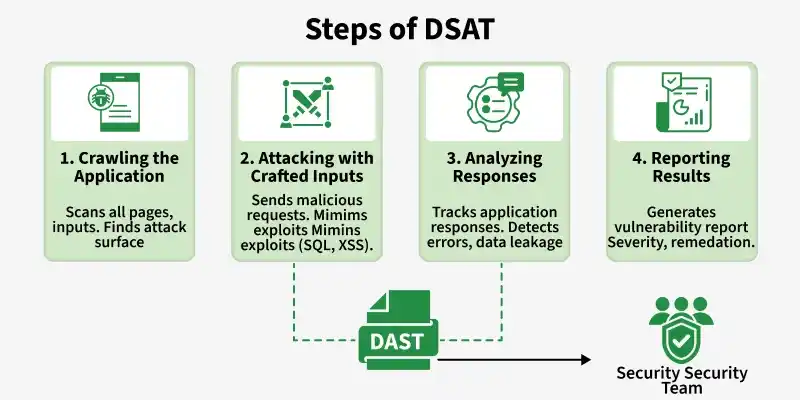
DSAT Steps
1. Crawling the Application
DAST tools begin by exploring the application to understand its structure, pages, APIs, forms and user-accessible endpoints. This process helps create a complete map of the application’s attack surface before security testing starts.
- Discovers web pages, APIs, forms and hidden endpoints automatically.
- Maps the application structure to identify potential attack entry points.
- Builds a complete attack surface for effective vulnerability assessment.
2. Attacking with Crafted Inputs
After mapping the application, DAST tools send malicious payloads and manipulated inputs to test how the application handles suspicious activity. This step simulates real-world cyberattacks to uncover exploitable security weaknesses.
- Injects SQL injection, XSS and other malicious payloads automatically.
- Tests application behavior under simulated attack conditions.
- Identifies weak input validation and insecure request handling.
3. Analyzing Responses
The scanner carefully reviews application responses to detect unusual behavior that may reveal vulnerabilities. Error messages, unexpected outputs or sensitive data exposure often indicate security flaws attackers can exploit.
- Detects abnormal responses, crashes and server-side errors.
- Identifies data leaks, authentication flaws and insecure configurations.
- Analyzes application behavior to confirm potential vulnerabilities.
4. Reporting Results
Once testing is complete, DAST tools generate detailed vulnerability reports with severity ratings and remediation guidance. These reports help security teams prioritize and fix issues quickly to improve application security.
- Generates detailed vulnerability and risk assessment reports.
- Provides proof of exploit with severity-based prioritization.
- Offers remediation guidance for faster vulnerability resolution.
There are some Common Tools are used for DAST are listed below:
- **OWASP ZAP: OWASP ZAP is an open-source DAST tool used for automated web application security testing with strong CI/CD and DevSecOps integration.
- **Burp Suite: Burp Suite provides automated and manual penetration testing features for advanced web application security analysis.
- **Acunetix: Offers fast vulnerability scanning with integrated DAST and IAST capabilities for accurate web security testing.
- **Invicti (Netsparker): Invicti uses proof-based scanning to verify exploitable vulnerabilities and improve enterprise-scale security testing.
- **Veracode Dynamic Analysis: Veracode Dynamic Analysis is a cloud-based DAST platform designed for securing enterprise applications with automated compliance-focused scanning..
- **Checkmarx DAST: Checkmarx integrates with SAST and SCA tools to provide unified vulnerability management across the SDLC.
Advantages of DAST
- **Detects Environment-Specific Risks: Identifies vulnerabilities in server configurations, authentication flows and deployment environments.
- **Realistic Attack Simulation: Replicates attacker behavior, ensuring findings reflect real exploitable risks.
- **Technology Agnostic: Works across all programming languages and frameworks without modification.
- **Full Ecosystem Coverage: Tests APIs, integrations, databases and infrastructure components.
- **Continuous Security Automation: Easily integrates into pipelines for ongoing vulnerability detection and faster remediation.
DAST vs. SAST
| DAST (Dynamic Application Security Testing) | SAST (Static Application Security Testing) |
|---|---|
| Tests running applications (black-box) | Analyzes source code (white-box) |
| Finds runtime vulnerabilities | Finds coding flaws early |
| No code access required | Requires source code |
| Lower false positives | Higher false positives |
| Used in later SDLC stages | Used early in development |