Windows OS Fundamentals (original) (raw)
Last Updated : 29 Jul, 2025
Windows is an Operating System developed by Microsoft. It is a graphical user interface (GUI) based system that allows users to interact with their computers and manage various tasks. It runs applications and provides a user-friendly interface that enables users to interact directly with the system to perform tasks.
Windows OS offers distinctive features such as:
- Users are allowed to run the software.
- Users interact with the OS through visual elements, such as icons, windows, menus, and a mouse-driven pointer.
- Users can view or store their files.
- Users can create, delete, rename, and move files using the GUI or the CLI.
Operating System
An Operating system is a system software that manages all the resources of the computing device. It serves as an interface between software applications and the computer's hardware components.
History and Evolution of Windows OS
This OS was first introduced by Microsoft in 1985 and has since undergone many developments and evolutions:
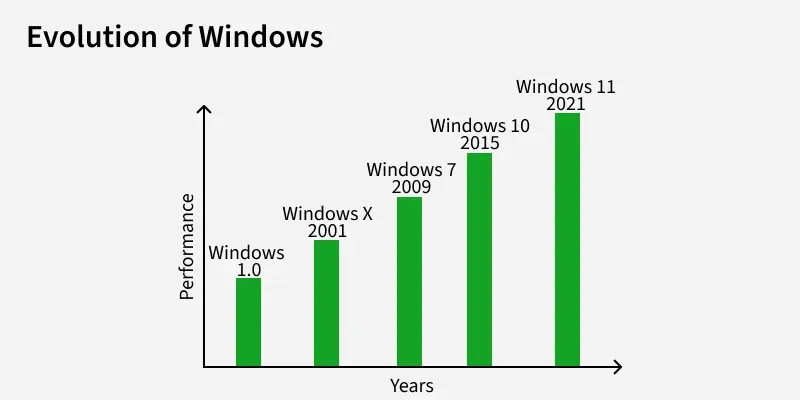
**1. Windows 1.0 (1985):
- It was the first graphical operating environment developed by Microsoft, marking the company’s entry into user-friendly, visual interfaces.
- It was the first version of Windows released on 20 November 1985.
**2. Windows XP (2001):
- Windows XP was launched on 25 October 2001.
- Windows XP became one of the most popular versions, known for its user-friendly interface and reliable performance.
**3. Windows 7 (2009):
- Windows 7 was released on 22 October 2009.
- It offered better performance and a more user-friendly, visually appealing interface.
**4. Windows 10 (2015):
- Windows 10 was established on 29 July 2015
- It blended the best features of Windows 7 and 8 to create a more balanced and user-friendly experience.
**5. Windows 11 (2021):
- Windows 11 was officially launched on October 5****,** 2021.
- It featured a modernized user interface with sleek rounded corners and a redesigned Start Menu for a cleaner, more intuitive experience.
Key Characteristics of Windows OS
- **Graphical User Interface (GUI): The primary user interface is graphical, i.e., instead of typing the commands you manipulate various graphical objects (such as icons) with a pointing device.
- **File Management: File management refers to the process of organizing and controlling data files stored on the cloud or a device, such as a computer or smartphone.
- **Task Manager: It is built-in system utility in Microsoft Windows that provides detailed information about the performance of your computer and the applications, processes, and services currently running.
- **Control Panel: Allows users to view and change system settings. It serves as a centralized interface where you can manage the hardware, software, user accounts, and various system configurations.
- **Built-in security tools: Built-in security tools designed to provide protection at various levels—ranging from antivirus to encryption and network safety. These tools work together to keep your system safe from both internal and external threats.
- **Virtual desktops: It refers to a logical extension of a physical desktop interface that allows users to create and manage multiple desktop environments on a single computer.
Architecture of Windows OS
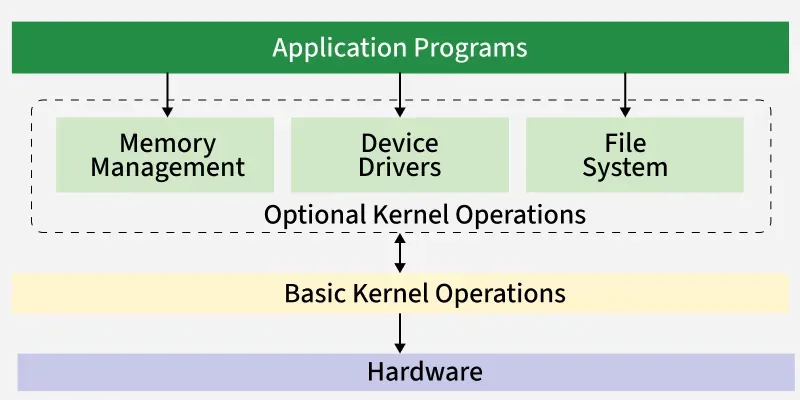
- **Application Programs: An Application Program is a type of computer software designed to perform specific tasks for users. Application Program help users accomplish real-world activities such as creating documents, playing media, browsing the internet, or managing data. Application programs can be installed on various devices, including computers, smartphones, and tablets. They may be bundled with the device or installed separately
- **Memory Management: Memory Managementis a hardware component that stores data, instructions and information temporarily or permanently for processing. It consists of an array of bytes or words, each has a unique address. Memory management in the Windows Operating System is the process through which the OS handles, allocates, and frees physical and virtual memory to ensure efficient performance and multitasking. Windows uses a virtual memory model, which gives applications the illusion of having a large, continuous block of memory, even if the actual physical memory (RAM) is limited.
- Device drivers: Device drivers are specialized software programs that act as a bridge between a computer's operating system and its hardware components. The main purpose of device drivers is to provide abstraction by acting as a translator between a hardware device and the applications or Operating System that use it. Programmers can write higher-level application code independently of whatever specific hardware the end-user is using.
- **File System: A File System is defined as a medium used for saving and managing data in the computer system. The data stored in the computer system is completely in digital format, although there can be various types of files that help us to store the data. A file system is an essential component of any operating system. It ensures data integrity, security, and usability by managing how files are stored and accessed. Understanding the file system helps users and developers work more effectively with data, system resources, and storage media.
- **Kernel: A kernel is the core part of an operating system. It acts as a bridge between software applications and the hardware of a computer. The kernel manages system resources, such as the CPU, memory, and devices, ensuring everything works together smoothly and efficiently. It acts as the main interface between the computer’s hardware and the software applications that run on the system. The kernel is responsible for managing system resources, such as the CPU, memory, input/output devices, and system calls.
- **Hardware: Hardware refers to the physical components of a computer system or any electronic device. These are the tangible parts you can touch and see — such as the keyboard, mouse, monitor, CPU, hard drive, and even internal circuits. Hardware is typically directed by the software to execute any command or instructions. A combination of hardware and software forms a usable computing system, although other systems exist with only hardware.
User Mode VS Kernel Mode
Here is the key differences between User Mode and Kernel Mode in Windows OS.
| **Aspect | **User Mode | **Kernel Mode |
|---|---|---|
| **Privilege Level | Low-level privilege. | High-level (full) privilege. |
| **System Access | Limited; cannot directly access hardware or kernel memory. | Full access to all hardware and memory. |
| **Who Runs Here? | User applications (e.g., MS Word, Chrome, games). | Operating System kernel, device drivers, and core system processes. |
| **Memory Access | Can only access its own memory space. | Can access both user and kernel memory spaces. |
| **System Call Requirement | Needs to make system calls to access system resources. | No need for system calls; can execute all instructions. |
| **Error Impact | Errors affect only the application. | Errors may crash the entire system. |
| **Security | More secure, as access is restricted. | Less secure if not well-protected, since it has total control. |
| **Execution Speed | Slower for hardware-level tasks. | Faster for system-level operations. |
| **Examples | Applications like browsers, media players, games. | OS components like memory manager, file system, hardware drivers. |
_For more details _click the link given below -Difference Between User Mode and Kernel Mode
File System and Management
A Computer File System is defined as a medium used for saving and managing data in the computer system. The data stored in the computer system is completely in digital format, although there can be various types of files that help us to store the data.
- **File Explorer and Libraries: File Manager, known as **File Explorer in modern Windows versions, is a graphical user interface tool that allows users to browse, organize, manage, and access files and folders stored on the computer. It provides features such as creating, copying, moving, renaming, and deleting files and folders, as well as accessing connected drives, network locations, and cloud storage services. File Manager also displays file properties, previews, and navigation options like the address bar, ribbon menu, and navigation pane. Libraries in Windows are virtual folders that aggregate content from multiple physical locations (folders) into a single view for easier access and organization. Instead of moving files from their original locations, libraries link to folders such as Documents, Pictures, Music, and Videos, allowing users to manage similar types of files from one unified place. Libraries enhance file organization without changing the file’s actual storage path.
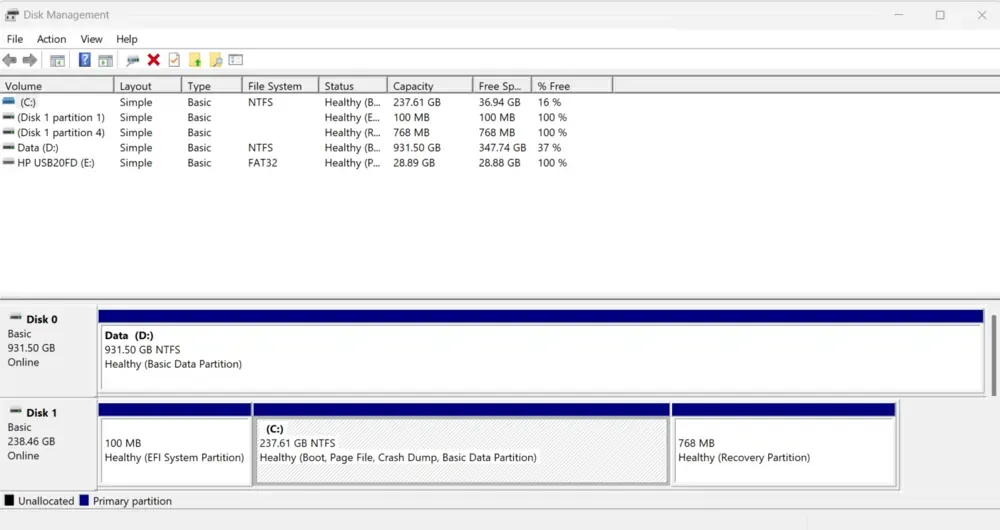
- **Drive Partitions and Disk management: A **drive partition is a logically divided section of a physical hard disk or solid-state drive (SSD). Each partition functions as an independent storage unit and is assigned a drive letter (like C:, D:). Partitions help in organizing data, separating system files from personal files, and allowing multiple operating systems to reside on a single physical disk.
- **There are typically three types of partitions
- **Primary Partition – Can contain an operating system and is bootable.
- **Extended Partition – Can contain one or more logical drives.
- **Logical Drive – A section inside an extended partition used for storing data. Disk Management is a built-in Windows utility that allows users to view and manage disk drives and their partitions. It provides a graphical interface to perform tasks such as:
* Creating and deleting partitions
* Formatting drives
* Changing drive letters
Memory Management
Memory management is the process by which the operating system handles and coordinates computer memory (RAM) usage. It keeps track of every byte in a computer’s memory and manages the allocation and deallocation of memory blocks to various applications.
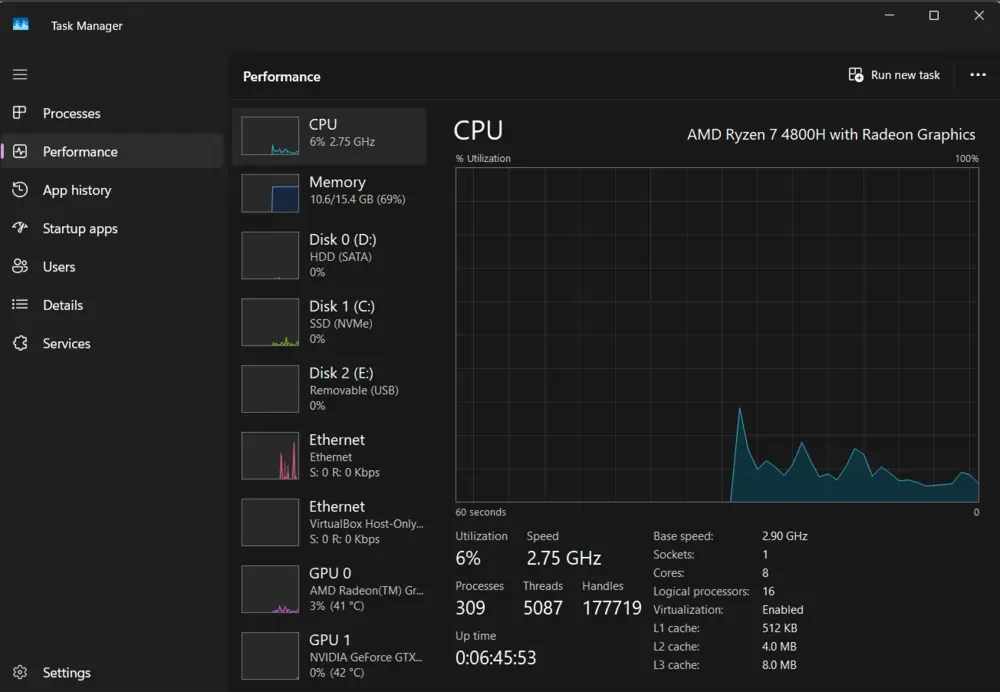
- **How windows manages RAM and CPU: Windows uses a combination of physical memory (RAM) and virtual memory (page file) to manage running applications. It allocates memory to processes, uses paging to swap data between RAM and disk, applies memory protection to isolate processes, and reclaims memory when applications close. Windows manages the CPU through preemptive multitasking, where the scheduler allocates time slices to each process based on priority. It supports multicore processing, balances CPU load across cores, and ensures efficient execution of threads while preventing any single task from monopolizing the processor.
- **Task Manager Overview: Task Manager is a system utility in Microsoft Windows that provides detailed information about the computer's performance and running processes. It allows users to monitor, control, and manage active applications, background processes, CPU and memory usage, and overall system performance.
- **Background Process and Services: Background process are programs or tasks that run behind the scenes without direct user interaction. They support system operations or applications by performing essential functions such as updates, syncing, notifications, and system monitoring. These processes are typically launched at startup or by active applications and continue running silently in the background.
- **Services are specialized background programs in Windows that perform specific functions required by the operating system or applications. They start automatically at boot or manually when needed, and run independently of user sessions. Windows services handle tasks like networking, printing, system updates, security, and hardware management, and are managed through the **Services Manager.
Security in Win**Aspect
**Security and User Control in an operating system refers to the mechanisms and policies used to:
- **Protect data, files, and system resources from unauthorized access or modification.
- **Control what users can and cannot do on a computer system based on their roles, identities, or permissions.
Together, they help ensure **confidentiality, integrity, and availability of information while allowing **safe interaction between users and the system.
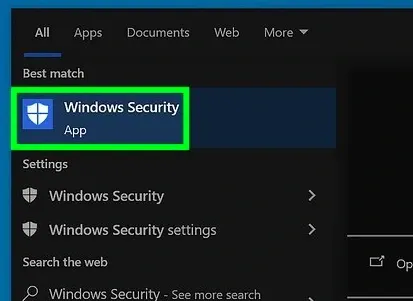
Security Features in Windows
Windows incorporates a comprehensive suite of security features designed to protect against malware, unauthorized access, and data breaches. Here's an overview of key security mechanisms:
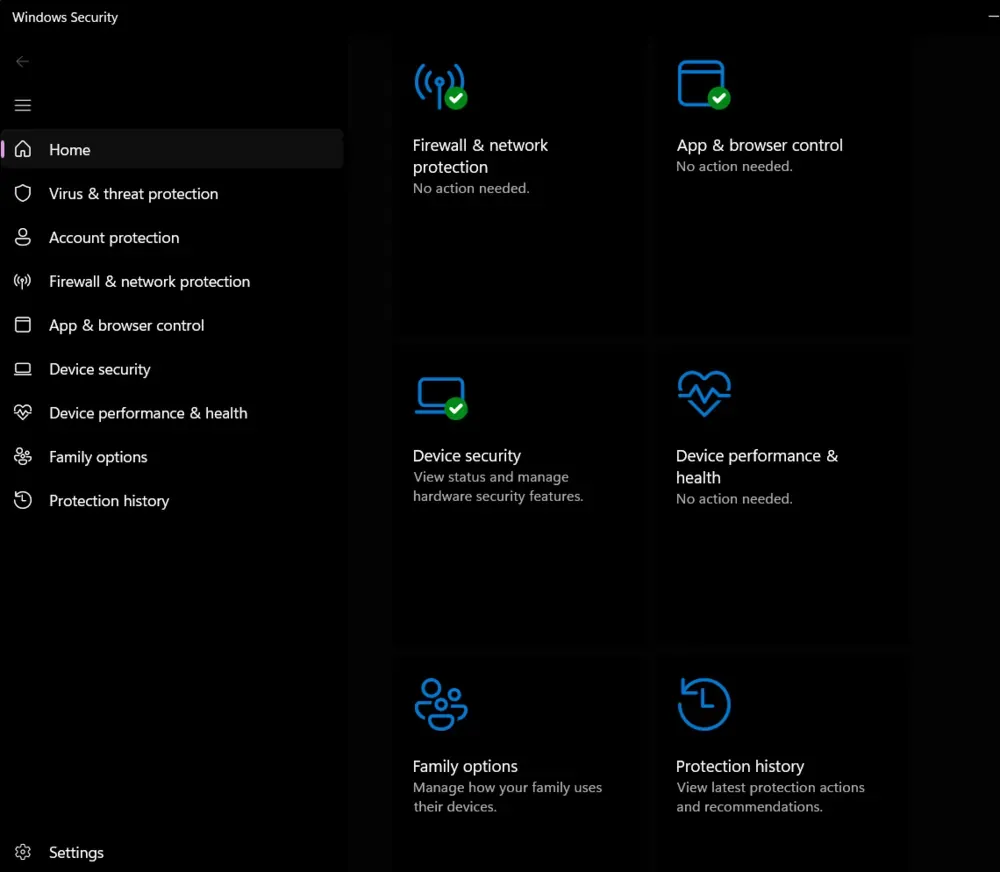
1****. Windows Defender Antivirus**
- **Real-time Protection: Scans files, apps, and processes for malware.
- **Cloud-Delivered Protection: Uses cloud intelligence for rapid threat detection.
- **Regular Updates: Automatically updates virus definitions.
2. **Windows Firewall
- **Network Protection: Monitors inbound/outbound traffic and blocks unauthorized access.
- **Advanced Security: Configurable rules for apps, ports, and protocols (via Windows Defender Firewall with Advanced Security).
3. **User Account Control (UAC)
- **Privilege Elevation: Prompts for admin approval before critical system changes.
- **Least Privilege Principle: Limits user/admin rights to reduce attack surface.
4. **BitLocker Drive Encryption
- **Full-Disk Encryption: Encrypts entire drives (including OS) to prevent data theft if hardware is lost/stolen.
- **TPM Integration: Uses Trusted Platform Module (TPM) for secure key management.
5. **Secure Boot
- **Firmware-Level Security: Validates OS bootloaders/drivers during startup to block malware.
- **UEFI Integration: Requires digital signatures for boot components.
Networking in Windows OS
**Networking in Windows allows computers to connect with each other and the internet to share files, printers, and data. Users can connect via Wi-Fi, Ethernet, or hotspot. Features like File Sharing, Remote Desktop, and Network Discovery help in communication between devices. Windows Firewall and Troubleshooter keep the network secure and help fix issues.
- Connecting to Wi-Fi and Ethernet
- Network and Sharing Center
- IP configuration using
ipconfigcommand - Firewall and Windows Defender
Control Panel
A Control Panel is a centralized interface that allows users to manage various functions of computer software, hardware, etc.
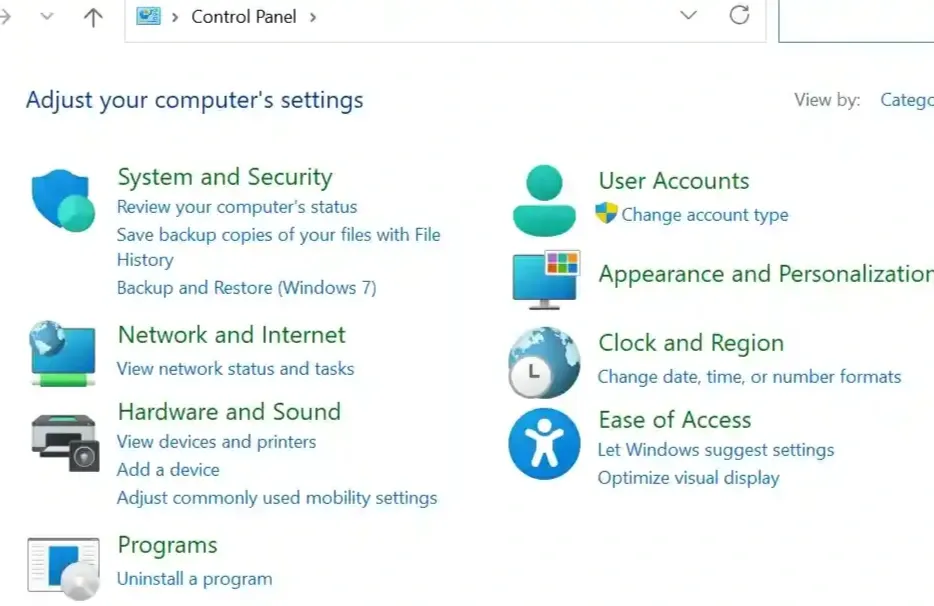
These functions include Adding and removing software and hardware, system updates, security updates, network and internet, user accounts, clock, language, date and time, display, Programs and features, Windows Defender, etc. It can modify the uses of default apps and settings of mouse, keyboard, sound, etc. The control panel is available in almost every
- User Account Management
- Hardware and Peripherals
- Network and Internet Settings
- Programs and Features
- System and Security
Productivity of Windows OS
**Productivity in Windows OS refers to the system's ability to help users efficiently perform tasks, manage resources, and complete work using built-in tools, applications, and features. It includes support for multitasking, file management, communication, collaboration, and automation, which collectively enhance user performance and work output.
- **Multitasking: Ability to run multiple applications simultaneously using task switching, virtual desktops, and Snap Layouts.
- **File Explorer: Easy file navigation, quick access, and file organization features.
- **Microsoft Office Integration: Seamless compatibility with Word, Excel, PowerPoint, and Outlook.
- **Search & Cortana: Fast file, app, and web search using Start Menu or voice commands.
- **Cloud Integration: Access and sync files through OneDrive.
- **Built-in Tools: Tools like Sticky Notes, Calculator, Calendar, and Mail app improve everyday workflow.
- **Taskbar & Start Menu: Quick access to frequently used apps and pinned items.