Understanding Git Pack Objects (original) (raw)
Last Updated : 9 May, 2026
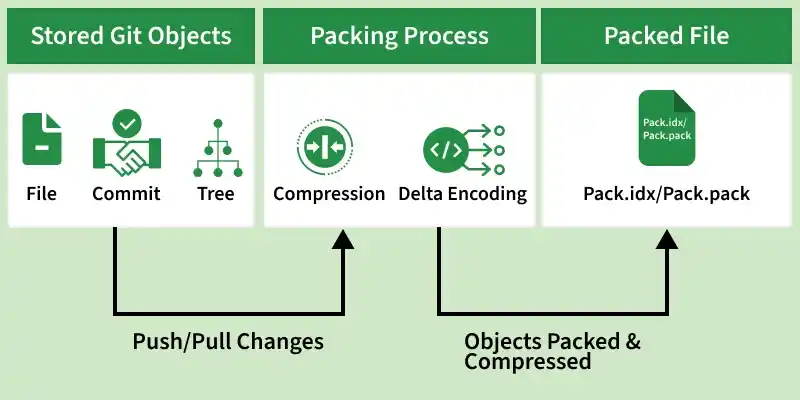
Git pack objects are used to efficiently store and compress repository data by combining multiple objects into a single file. This helps reduce storage space and improve performance.
- Combines multiple Git objects into a single packed file to optimize storage.
- Reduces disk space using compression and delta encoding while improving transfer performance (push/pull).
- Managed automatically by Git (e.g., git gc) and stored in .git/objects/pack directory.
Git Pack Objects Matter
The importance of pack objects in Git for enabling efficient storage, faster data transfer, and optimized repository management.
- **Efficient Storage Optimization: Git packs multiple objects into compressed files, significantly reducing repository size and minimizing disk usage.
- **Improve Speed: Smaller, Compresses files make operations like cloning or fetching much faster. It reduces the time it takes to download or upload code.
- **Avoid Redundancy: Git uses delta compression to store only unique data, preventing duplicate objects.
Working
Git stores data as objects such as files, commits, and branches. These objects are initially stored individually in the .git/objects directory.
1. Pack Objects Created
When you perform operations like push or pull, Git automatically creates or updates pack files. This process, known as packing, combines objects efficiently using compression, reducing repository size and improving performance.
2. Dealing with Large Git Objects
Large files can slow down Git operations. The following methods help manage them effectively:
**Remove Large Files
- Use tools like Git LFS (Large File Storage) or Git-Annex.
- Stores large files outside the main repository.
**Remove Unnecessary Commits
- Clean up history using git rebase or git squash.
- Helps reduce repository size and complexity.
**Clone Specific Commits (Shallow Clone)
git clone --depth 1
- Clone only the latest commit.
- Avoids downloading full project history.
Run Garbage Collection
git gc --prune=now
- Removes unnecessary data.
- Optimizes repository performance.
Handling Corrupted Git Pack Objects
In some cases, Git pack files may become corrupted due to issues like incomplete transfers or disk errors. The following methods can be used to detect and recover from such corruption:
1. Verify Repository Integrity
git fsck
Checks the repository for inconsistencies and identifies corrupted objects or pack files.
2. Restore Using Reflog
Restore Using Reflog
Allows rollback to a previous valid commit state before corruption occurred.
3. Recover from Remote
git fetch
or re-clone using:
git clone
git fetch or git clone retrieves a clean copy of objects from the remote repository.
Factors affecting Pack Size
The size of Git pack objects depends on several factors:
- The size of the objects being stored.
- The compression settings used.
- The complexity of your repository (e.g., how many files, commits, and branches it has).
Git Pack Archives
Git pack archives allow packaging repository objects into a compressed, portable format for easy sharing and transfer between systems.
- Creates a self-contained and compressed archive of repository data.
- Enables easy transfer and sharing between repositories or systems.
- Provides simple extraction and access to project contents.