Difference Between Git Fetch and Git Pull (original) (raw)
Last Updated : 23 Jul, 2025
Understanding the difference between git fetch and git pull** is important for effective version control in Git. **Git Fetch and **Git Pull are two important commands in **Git that help in managing remote repositories.
While both commands involve retrieving data from remote repositories, they serve distinct purposes and are used in different contexts. In this article, Let us look at Git Fetch and Git Pull separately with the help of an example.
What is Git Fetch?
The Git Fetch command is used to fetch all changes from the r**emote repository to the local repository. It doesn't make any changes to the current working directory. It stores all the changes in a separate branch called the **remote-tracking branch. **git merge or **git rebase command is used to merge these changes into our current working directory.
**Syntax:
git fetch [options] [ [...]]
Features of Git Fetch
- Downloads updates from the remote repository.
- Keeps your working directory unchanged.
- Updates only the remote-tracking branches.
- Allows you to see what others have committed before merging.
Use Cases of Git Fetch
- Use Git Fetch when you want to review updates from the remote repository without immediately merging them into your branch.
- Ideal for maintaining a clean working directory while staying up-to-date with remote changes.
- Helpful for inspecting remote branches before pulling updates into your work.
How to Use Git Fetch?
**Step 1: Let us create a file called **demo.txt with "**Hello Geeks" content inside it initialize the directory to a git repository and push the changes to a remote repository.
- git init
- git add
- git commit -m
- git remote add origin
- git push origin

Difference Between Git Fetch and Git Pull
Now, we have my **demo.txt in the remote repository.

Difference Between Git Fetch and Git Pull
The local and the remote repositories are now in sync and have the same content at both places. Let's now update our **demo.txt in the **remote repository.
**Step 2: We will update our **demo.txt remotely.

Difference Between Git Fetch and Git Pull
Now since we have updated our **demo.txt remotely, let's bring the changes to our local repository. Our local repository has only 1 commit while the remote repository now has 2 commits (_observe the second commit starting from **4c4fcb8).
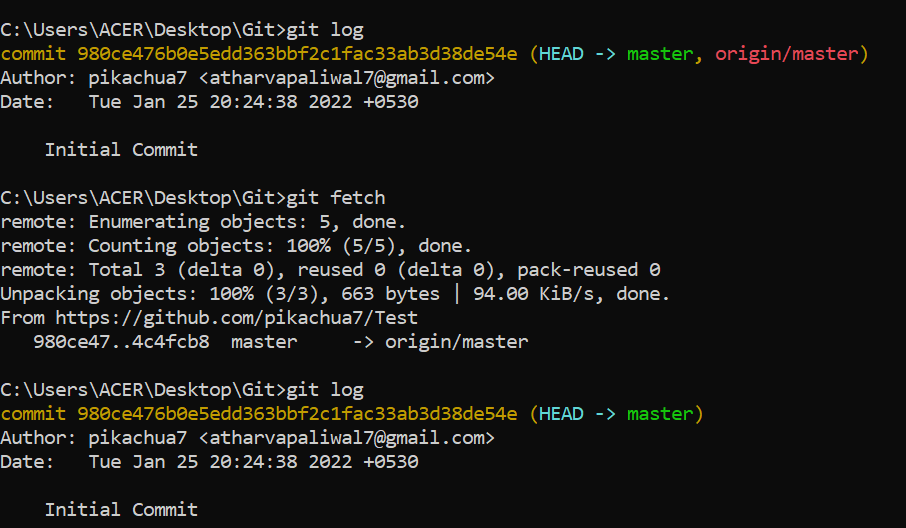
**Step 3: Let's use the **git fetch command to see in the local repository whether we have a change in the **remote repository or not. Before that let's use the **git logcommand to see our previous commits.
Difference Between Git Fetch and Git Pull
We can see that after using **git fetch we get the information that there is some commit done in the remote repository. (_notice the **4c4fcb8 _which is the initials of our 2nd commit in a remote repository).
**Step 4: To merge these changes into our local repository, we need to use the **git merge origin/ command.

Difference Between Git Fetch and Git Pull
Let us have a look at our commits in the local repository usingthe **git log command.

Difference Between Git Fetch and Git Pull
And we got our remote repository commit in our local repository. This is how git fetch works. Let us now have a look at the **git pull command.
What is Git Pull?
Git Pull command is used to fetch all changes from the r**emote repository to the current working directory. It automatically try to merge or rebase them into our current working directory. It is the **combination of **git fetch and **git merge or **git rebase. It can generate merge conflicts if there are conflict changes between our local and remote branches.
**Syntax:
git pull [options] [ [...]]
Features of Git Pull
- Fetches and merges updates from the remote repository in one step.
- Keeps your branch in sync with the remote branch.
- Automatically attempts to merge changes, which can sometimes lead to conflicts.
Use Cases of Git Pull
- Use Git Pull when you want to update your local branch with the latest changes from the remote repository immediately.
- Ideal for quick updates when you are certain that the incoming changes won’t cause conflicts.
- Useful in collaborative environments where frequent synchronization is required.
How to Use Git Pull?
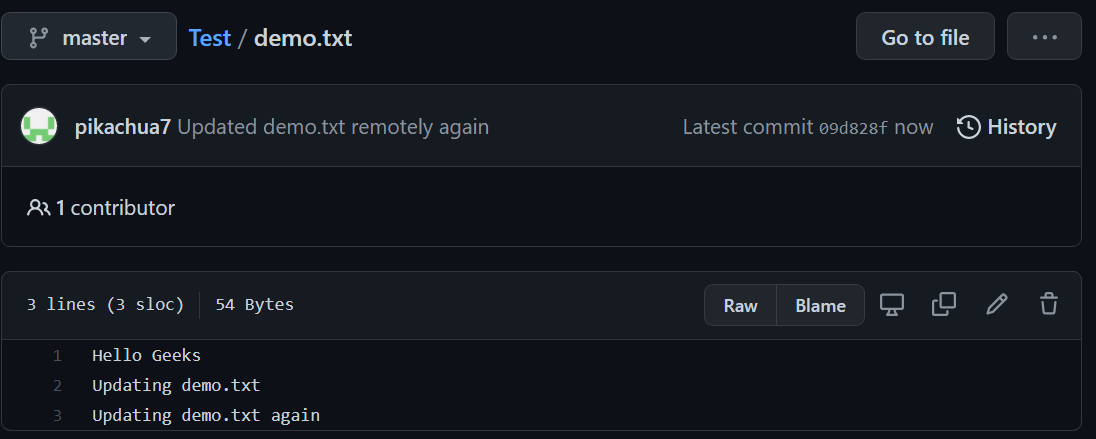
**Step 1: Let's make more changes to our **demo.txt file at the remote repository.
Difference Between Git Fetch and Git Pull
Now, we have 3 commits at our remote repository whereas 2 commits at our local repository. (_Notice the third commit starting with **09d828f).
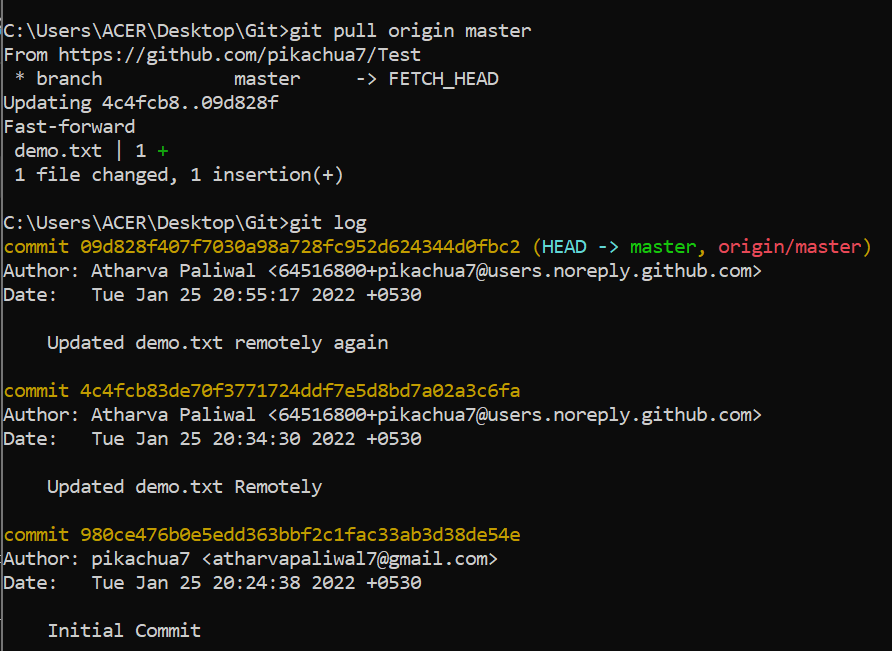
**Step 2: Let us now bring this change to our local repository using the **git pull origin command.
Difference Between Git Fetch and Git Pull
We can see that with the help of just **git pull command, we directly fetched and merged our remote repository with the local repository.
git pull = git fetch + git merge
Let us see what our demo.txt in the local repository looks like -

Difference Between Git Fetch and Git Pull
And now our remote and local repositories are again in sync with each other.
Difference between Git Fetch and Git Pull
| Git Fetch | Git Pull |
|---|---|
| Used to fetch all changes from the remote repository to the local repository without merging into the current working directory | Brings the copy of all the changes from a remote repository and merges them into the current working directory |
| Repository data is updated in the .git directory | The working directory is updated directly |
| Review of commits and changes can be done | Updates the changes to the local repository immediately. |
| No possibility of merge conflicts. | Merge conflicts are possible if the remote and the local repositories have done changes at the same place. |
| Command for Git fetch is git fetch | Command for Git Pull is git pull |
| Git fetch basically imports the commits to local branches so as to keep up-to-date that what everybody is working on. | Git Pull basically brings the local branch up-to-date with the remote copy that will also updates the other remote tracking branches. |
Conclusion
Choosing between git fetch and git pull depends on your workflow and the level of control you need. **Git Fetch is ideal for safely reviewing changes before merging, while **Git Pull is suitable for quickly synchronizing your branch with the remote repository. Understanding these differences will help you manage your Git repositories more effectively and avoid unnecessary conflicts.