Hibernate Component Mapping (original) (raw)
Last Updated : 20 Apr, 2026
Component Mapping in Hibernate is used when one class contains another class as a member variable, and both are stored in a single database table. It helps simplify data modeling by embedding one object inside another.
- Used for “has-a” relationships (e.g., Student -> Address)
- Stores data of multiple classes in a single table
- Reduces complexity by avoiding multiple table joins
Database Structure
Java `
CREATE TABLE Student( studentId INT NOT NULL auto_increment, firstName VARCHAR(20), lastName VARCHAR(20), grade INT, streetName VARCHAR(40), cityName VARCHAR(40), stateName VARCHAR(40), zipCode VARCHAR(10), PRIMARY KEY (studentId) );
`
Step by Step Project Implementation
Follow the steps below to create and implement a Hibernate Component Mapping project from scratch.
Step 1: Create Maven Project
- Create a Maven project in your IDE
- Add required dependencies
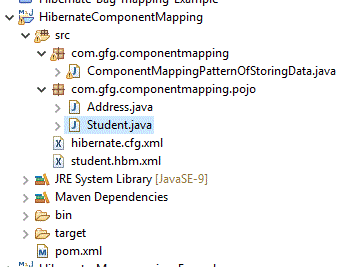
**Project Structure:
Step 2: Add Dependencies (pom.xml)
Java `
org.hibernate hibernate-core 5.4.15.Final<dependency>
<groupId>mysql</groupId>
<artifactId>mysql-connector-java</artifactId>
<version>5.1.34</version>
</dependency>`
Step 3: Create POJO Classes
Create the required POJO classes to represent the entities and their relationships in the application.
**Student.java
Java `
public class Student { // It is always good to go with each attribute of MySQL // table private int studentId; private String firstName; private String lastName; private int grade; // Attributes that are available in 'Address' class. By // referring here, we can access them. As Component // Mapping is used, it is possible private Address address; // As address itself is set as an attribute in student // class, // all the address related arguments can be passed // easily via set method public Address getAddress() { return address; }
public void setAddress(Address address)
{
    this.address = address;
}

public int getStudentId() { return studentId; }

public void setStudentId(int studentId)
{
    this.studentId = studentId;
}

public String getFirstName() { return firstName; }

public void setFirstName(String firstName)
{
    this.firstName = firstName;
}

public String getLastName() { return lastName; }

public void setLastName(String lastName)
{
    this.lastName = lastName;
}

public int getGrade() { return grade; }

public void setGrade(int grade) { this.grade = grade; }

public Student(String firstName, String lastName,
               int grade, Address address)
{
    this.firstName = firstName;
    this.lastName = lastName;
    this.grade = grade;
    this.address = address;
}

public Student() {}
}
`
**Address.java
Java `
public class Address{ private String streetName; private String cityName; private String stateName; private String zipCode; public Address() {} // We should have this constructor so that address // parameters // can be set easily and can be accessed in student // class public Address(String street, String city, String state, String zipcode) { this.streetName = street; this.cityName = city; this.stateName = state; this.zipCode = zipcode; } public String getStreetName() { return streetName; }
public void setStreetName(String streetName)
{
    this.streetName = streetName;
}

public String getCityName() { return cityName; }

public void setCityName(String cityName)
{
    this.cityName = cityName;
}

public String getStateName() { return stateName; }

public void setStateName(String stateName)
{
    this.stateName = stateName;
}

public String getZipCode() { return zipCode; }

public void setZipCode(String zipCode)
{
    this.zipCode = zipCode;
}
}
`
This project is a maven driven project. Hence let us start with pom.xml
Step 4: Hibernate Configuration
For hibernate, hibernate.cfg.xml is the main configuration file
**hibernate.cfg.xml
XML `
      <!--  As we are connecting mysql, those driver classes,
          database name, username and password are specified
          Please change the information as per your requirement -->
    <property name="hbm2ddl.auto">update</property>
    <property name="connection.driver_class">com.mysql.jdbc.Driver</property>
    <property name="connection.url">jdbc:mysql://localhost:3306/geeksforgeeks?serverTimezone=UTC</property>
    <property name="connection.username">root</property>
    <property name="connection.password">admin</property>

      <!--  We are going to connect student.hbm.xml which has
           the table information about student which is present in mysql -->
    <mapping resource="student.hbm.xml" />

</session-factory>
`
Step 5: Mapping File
Our mapping resource is student.hbm.xml.
**student.hbm.xml
XML `
  <!-- The <class> elements denotes  specific mappings
     from a Java classes to the database tables.
     The Java class name is given at the name attribute
     database table name is given using the table attribute.-->
<class name="com.gfg.componentmapping.pojo.Student" table="Student">

  <!--  Details about the enclosed class -->
<meta attribute = "class-description">
     This class contains the student detail.
  </meta>

  <!--  Unique ID to the Primary Key of the database table -->
  <id name = "studentId" type = "int" column = "studentId">
     <generator class="native"/>
  </id>

  <!--  The <component> element can help to bring about
        different attributes of Address class inside Student classes. -->
  <component name = "address" class="com.gfg.componentmapping.pojo.Address">
     <property name = "streetName" column = "streetName" type = "string"/>
     <property name = "cityName" column = "cityName" type = "string"/>
     <property name = "stateName" column = "stateName" type = "string"/>
     <property name = "zipCode" column = "zipCode" type = "string"/>
  </component>
  <property name = "firstName" column = "firstName" type = "string"/>
  <property name = "lastName" column = "lastName" type = "string"/>
  <property name = "grade" column = "grade" type = "int"/>
`
Now let us see the main class where we can do a normal CRUD operation. Let us see the steps of addition and updation of a student in this example.
**ComponentMappingPatternOfStoringData.java
Java `
import com.gfg.componentmapping.pojo.Address; import com.gfg.componentmapping.pojo.Student; import java.util.Iterator; import java.util.List; import org.hibernate.HibernateException; import org.hibernate.Session; import org.hibernate.SessionFactory; import org.hibernate.Transaction; import org.hibernate.cfg.Configuration;
public class ComponentMappingPatternOfStoringData { private static SessionFactory factory; public static void main(String[] args) {
    try {
        factory = new Configuration()
                      .configure()
                      .buildSessionFactory();
    }
    catch (Throwable ex) {
        System.err.println(
            "Failed to create sessionFactory object."
            + ex);
        throw new ExceptionInInitializerError(ex);
    }

    ComponentMappingPatternOfStoringData
        componentMappingExample
        = new ComponentMappingPatternOfStoringData();

    // Address1
    Address address1
        = componentMappingExample.addAddress(
            "ByepassRoad", "Chennai", "TN", "600028");

    // Add student records in the database
    Integer studentId
        = componentMappingExample.addStudent(
            "Ashwin", "Kumar", 10, address1);

    // Address2
    Address address2
        = componentMappingExample.addAddress(
            "Pattinapakkam", "Chennai", "TN", "600028");

    // Add another student record in the database
    Integer student2
        = componentMappingExample.addStudent(
            "Ruchitaa", "Agarwal", 8, address2);

    // List down all the students
    componentMappingExample.listStudents();

    // Update student's name as a sample
    componentMappingExample.updateStudent(studentId,
                                          "Nikilesh");

    // List down all the students. We can see the
    // updated value for the first student
    componentMappingExample.listStudents();
}

// Method to add an address record in the database
public Address addAddress(String street, String city,
                          String state, String zipcode)
{
    Session session = factory.openSession();
    Transaction tx = null;
    Integer addressID = null;
    Address address = null;

    try {
        tx = session.beginTransaction();
        address
            = new Address(street, city, state, zipcode);
        addressID = (Integer)session.save(address);
        tx.commit();
    }
    catch (HibernateException e) {
        if (tx != null)
            tx.rollback();
        e.printStackTrace();
    }
    finally {
        session.close();
    }
    return address;
}

// Method to add a student record in the database
public Integer addStudent(String fname, String lname,
                          int salary, Address address)
{
    Session session = factory.openSession();
    Transaction tx = null;
    Integer studentID = null;

    try {
        tx = session.beginTransaction();
        // By using Student constructor, we can see the
        // fields
        Student student = new Student(fname, lname,
                                      salary, address);
        studentID = (Integer)session.save(student);
        tx.commit();
    }
    catch (HibernateException e) {
        if (tx != null)
            tx.rollback();
        e.printStackTrace();
    }
    finally {
        session.close();
    }
    return studentID;
}

// Method to list all the student detail
public void listStudents()
{
    Session session = factory.openSession();
    Transaction tx = null;

    try {
        tx = session.beginTransaction();
        // Take the data from Student table
        List students
            = session.createQuery("FROM Student")
                  .list();
        // Iterate the details and display them
        for (Iterator iterator = students.iterator();
             iterator.hasNext();) {
            Student student = (Student)iterator.next();
            System.out.print("First Name: "
                             + student.getFirstName());
            System.out.print("  Last Name: "
                             + student.getLastName());
            System.out.println("  Grade: "
                               + student.getGrade());
            Address add = student.getAddress();
            System.out.println("Address ");
            System.out.println("\tStreet: "
                               + add.getStreetName());
            System.out.println("\tCity: "
                               + add.getCityName());
            System.out.println("\tState: "
                               + add.getStateName());
            System.out.println("\tZipcode: "
                               + add.getZipCode());
        }
        tx.commit();
    }
    catch (HibernateException e) {
        if (tx != null)
            tx.rollback();
        e.printStackTrace();
    }
    finally {
        session.close();
    }
}

// Method to update name for a given student
public void updateStudent(Integer studentId,
                          String firstName)
{
    Session session = factory.openSession();
    Transaction tx = null;

    try {
        tx = session.beginTransaction();
        Student student = (Student)session.get(
            Student.class, studentId);
        student.setFirstName(firstName);
        session.update(student);
        tx.commit();
    }
    catch (HibernateException e) {
        if (tx != null)
            tx.rollback();
        e.printStackTrace();
    }
    finally {
        session.close();
    }
}
}
`
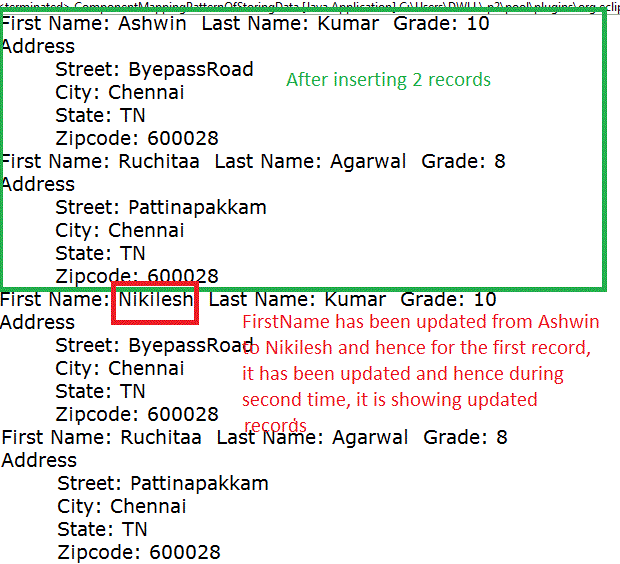
On running the project, we can see the below output.
**Output:
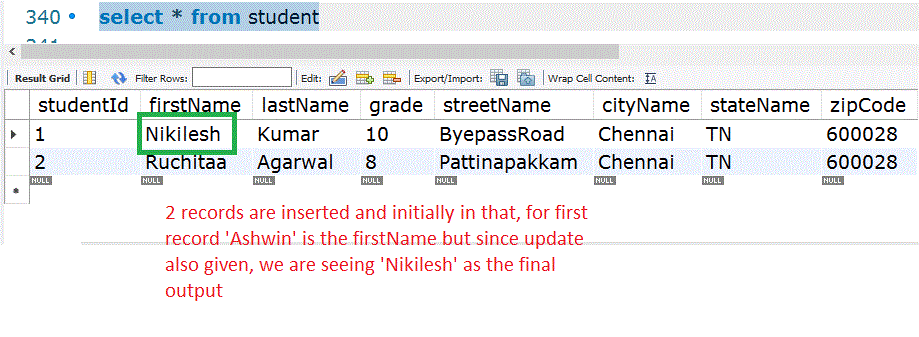
MySQL output also matches the same