Hibernate Native SQL (original) (raw)
Last Updated : 23 Apr, 2026
Hibernate by means of a Native SQL facility, can directly interact with the database like MySQL, Oracle, etc., and all the database-specific queries can be executed via this facility. It enables execution of database-specific queries while still using Hibernate framework. This feature is mainly useful for maintaining and working with legacy (old) applications.
- Allows writing and executing raw SQL queries instead of HQL.
- Helps integrate Hibernate with old applications without major changes.
- Supports vendor-specific features (MySQL, Oracle, etc.).
Step-by-Step Implementation
The following steps demonstrate how to implement this concept in a clear and structured way.
Step 1: Create Maven Project
- Open Eclipse / IntelliJ
- Create Maven Project
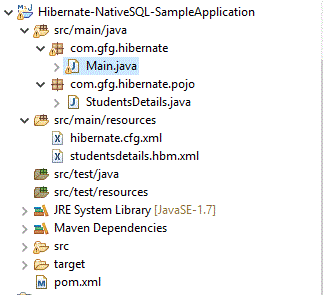
- **Project Name: Hibernate-NativeSQL-SampleApplication
**Project structure
Step 2: Add Dependencies
Add dependencies in pom.xml file.
**pom.xml
XML `
4.0.0 Hibernate-NativeSQL-SampleApplication Hibernate-NativeSQL-SampleApplication 0.0.1-SNAPSHOT
      <!-- Much essential hibernate core dependency -->
    <dependency>
        <groupId>org.hibernate</groupId>
        <artifactId>hibernate-core</artifactId>
        <version>4.3.0.Final</version>
    </dependency>

    <!-- As we are connecting with MySQL, this is needed -->
    <dependency>
        <groupId>mysql</groupId>
        <artifactId>mysql-connector-java</artifactId>
        <version>5.1.34</version>
    </dependency>

</dependencies>

<!-- Higher java versions are preferred, atleast 1.8 -->
<properties>
    <maven.compiler.source>1.8</maven.compiler.source>
    <maven.compiler.target>1.8</maven.compiler.target>
</properties>
`
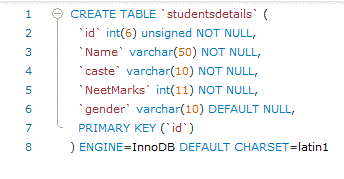
Step 3: Create Database & Table
- Table structure must match POJO class
- Insert sample data for testing queries
Step 4: Configure Hibernate
Create a Hibernate configuration file where properties are specified.
- Contains DB connection details
- Links mapping file to Hibernate
**hibernate.cfg.xml
XML `
com.mysql.jdbc.Driver jdbc:mysql://localhost:3306/test?serverTimezone=UTC root admin <!-- We are going to connect studentsdetails.hbm.xml
which has the table information about studentsdetails
which is present in mysql -->
<mapping resource="studentsdetails.hbm.xml" />
</session-factory>`
Step 5: Create Mapping File
- Maps Java class to database table
- Maps fields to columns
**studentsdetails.hbm.xml
XML `
`
Step 6: Create POJO Class
Let us see the POJO class now
- Represents database table as Java object
- Must have getters and setters
**StudentsDetails.java
Java `
// Each and every column must represent the // column of mysql table studentsDetails public class StudentsDetails { private int id; private String name; private String caste; private int neetMarks; private String gender;
// For all columns, corresponding
// getter and setter are added
public int getId()
{
    return id;
}
public void setId(int id)
{
    this.id = id;
}
public String getName()
{
    return name;
}
public void setName(String name)
{
    this.name = name;
}
public String getCaste()
{
    return caste;
}
public void setCaste(String caste)
{
    this.caste = caste;
}
public int getNeetMarks()
{
    return neetMarks;
}
public void setNeetMarks(int neetMarks)
{
    this.neetMarks = neetMarks;
}
public String getGender()
{
    return gender;
}
public void setGender(String gender)
{
    this.gender = gender;
}
}
`
Step 7: Open Session
- Session represents DB connection
- Used to execute queries
Session session = factory.openSession();
Step 8: Execute Native SQL Query
- Uses actual SQL (not HQL)
- Returns raw data (Object[])
String query = "SELECT * FROM studentsdetails";
So above listed files are connecting medium. Let's see the MySQL table as well
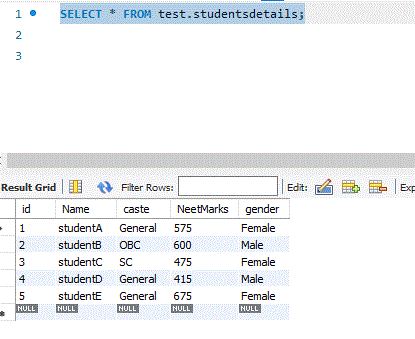
Let us assume that we have some set of records in that
Now, let us see the way of writing queries to communicate with MySQL and get the details
Java `
package com.gfg.hibernate;
import java.util.Iterator; import java.util.List;
import org.hibernate.Filter; import org.hibernate.Hibernate; import org.hibernate.Query; import org.hibernate.SQLQuery; import org.hibernate.Session; import org.hibernate.SessionFactory; import org.hibernate.Transaction; import org.hibernate.boot.registry.StandardServiceRegistryBuilder; import org.hibernate.cfg.Configuration; import org.hibernate.type.IntegerType; import org.hibernate.type.StringType;
import com.gfg.hibernate.pojo.StudentsDetails;
public class Main {
public static void main(String[] args)
{
    // Refer the hibernate.cfg.xml
    Configuration configuration = new Configuration()
                                      .configure("hibernate.cfg.xml");
    StandardServiceRegistryBuilder builder = new StandardServiceRegistryBuilder()
                                                 .applySettings(configuration.getProperties());

    // SessionFactory will contain all the database property
    // details which are pulled from above hibernate.cfg.xml file
    // As application refers the database, it is required.
    // It is a threadsafe object
    SessionFactory factory = configuration.buildSessionFactory(builder
                                                                   .build());

    // To get a physical connection
    Session session = factory.openSession();

    // Query the database by means of specific tablename
    // straightaway. SQL should be like how we do
    // from SQLCommandline or workbench
    String studentsQuery = "select * from studentsdetails";

    // New instance of Query for the given SQL
    SQLQuery sqlQuery1 = session.createSQLQuery(studentsQuery);

    // We will get the details via list
    List studentsList = sqlQuery1.list();

    Iterator studentsIterator = studentsList.iterator();

    while (studentsIterator.hasNext()) {
        Object[] object = (Object[])studentsIterator.next();
        System.out.println("Student Id : " + object[0] + " Student Name : " + object[1]
                           + " Caste : " + object[2]);
    }

    // Always good to clear
    // and close the session
    session.clear();
    session.close();
}
}
`
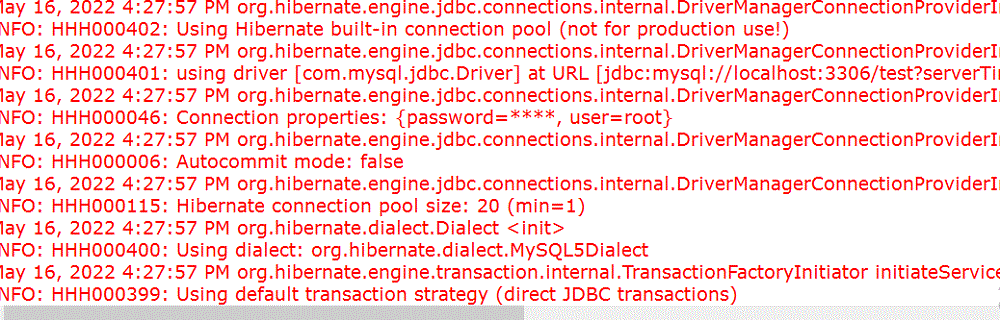
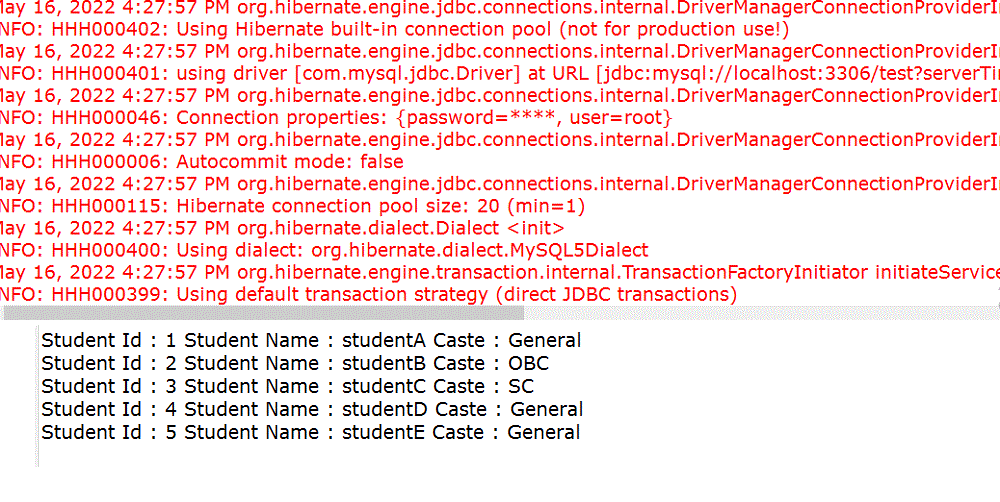
We can get all the details because of the **Complete Row facility
// Query the database by means of specific tablename straightaway.
// SQL should be like how we do from SQLCommandline or workbench
String studentsQuery = "select * from studentsdetails";
// New instance of Query for the given SQL
SQLQuery sqlQuery1 = session.createSQLQuery(studentsQuery);
**Output:
Step 9: Convert to Entity (addEntity())
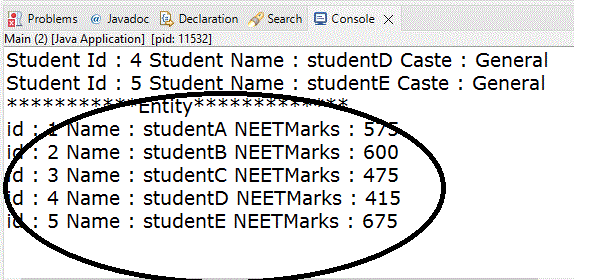
If each row is converted into an object of the POJO class, we can use addEntity() method of SQLQuery
Java `
// addEntity System.out.println("Entity**"); String entityQuery = "select * from studentsdetails"; SQLQuery sqlQuery2 = session.createSQLQuery(entityQuery); sqlQuery2.addEntity(StudentsDetails.class);
List studentsEntityList = sqlQuery2.list();
// list contains StudentsDetails class objects. // So that we can directly cast into StudentsDetails type : Iterator studentsEntityIterator = studentsEntityList.iterator();
while (studentsEntityIterator.hasNext()) { StudentsDetails student = (StudentsDetails)studentsEntityIterator.next(); System.out.println("id : " + student.getId() + " Name : " + student.getName() + " NEETMarks : " + student.getNeetMarks()); }
`
**Output:
Step 10: Fetch Specific Columns
- Retrieves only required columns
- Improves performance
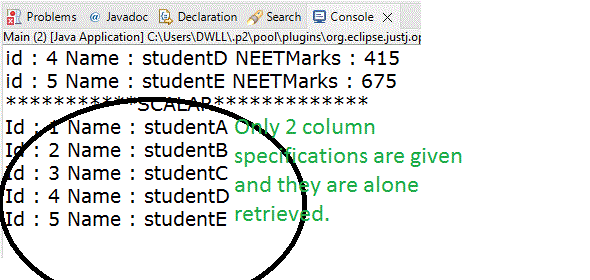
In case we want to partially select a few columns alone means, it is possible by means of addScalar(). Hibernate internally uses ResultSetMetaData. We need to specify the data type when we are using addScalar()
Java `
// addScalar System.out.println("SCALAR**");
String scalarQuery = "select * from studentsdetails"; SQLQuery sqlQuery3 = session.createSQLQuery(scalarQuery);
// As we are taking first 2 columns alone, we need to // specify the name of the column and datatype here sqlQuery3.addScalar("id", IntegerType.INSTANCE); sqlQuery3.addScalar("name", StringType.INSTANCE); List studentsScalarList = sqlQuery3.list(); Iterator studentsScalarIterator = studentsScalarList.iterator();
while (studentsScalarIterator.hasNext()) { Object[] object = (Object[])studentsScalarIterator.next(); // Here also we can see only 2 column // retrieval because of addScalar() System.out.println("Id : " + object[0] + " Name : " + object[1]); }
`
**Output:
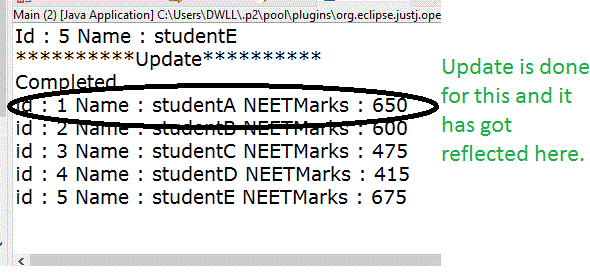
Finally, let us see how to update the data
Java `
// update System.out.println("Update");
Transaction mySqlTransaction = session.beginTransaction();
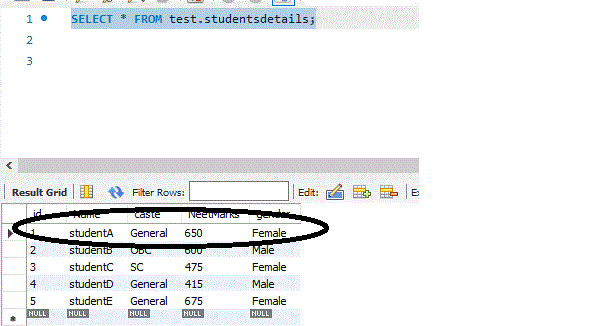
// Directly writing an update query specific to the database String updateQuery = "update studentsdetails set neetmarks=:neetmarks where id=:id"; SQLQuery sqlQuery4 = session.createSQLQuery(updateQuery); sqlQuery4.setParameter("id", 1); sqlQuery4.setParameter("neetmarks", 650); sqlQuery4.executeUpdate();
// will do the changes permanent to database mySqlTransaction.commit(); System.out.println("Completed");
// again check after doing committing entityQuery = "select * from studentsdetails"; sqlQuery2 = session.createSQLQuery(entityQuery); sqlQuery2.addEntity(StudentsDetails.class);
List studentsEntityList1 = sqlQuery2.list(); Iterator studentsEntityIterator1 = studentsEntityList1.iterator();
while (studentsEntityIterator1.hasNext()) { StudentsDetails student = (StudentsDetails)studentsEntityIterator1.next(); System.out.println("id : " + student.getId() + " Name : " + student.getName() + " NEETMarks : " + student.getNeetMarks()); }
`
**Output:
**Checking the DB data as well:
**The Complete Code
Java `
import java.util.Iterator; import java.util.List; import org.hibernate.Filter; import org.hibernate.Hibernate; import org.hibernate.Query; import org.hibernate.SQLQuery; import org.hibernate.Session; import org.hibernate.SessionFactory; import org.hibernate.Transaction; import org.hibernate.boot.registry.StandardServiceRegistryBuilder; import org.hibernate.cfg.Configuration; import org.hibernate.type.IntegerType; import org.hibernate.type.StringType; import com.gfg.hibernate.pojo.StudentsDetails;
public class Main {
public static void main(String[] args)
{
    // Refer the hibernate.cfg.xml
    Configuration configuration = new Configuration()
                                      .configure("hibernate.cfg.xml");
    StandardServiceRegistryBuilder builder = new StandardServiceRegistryBuilder()
                                                 .applySettings(configuration.getProperties());

    // SessionFactory will contain all the database property
    // details which are pulled from above hibernate.cfg.xml file
    // As application refers the database, it is required.
    // It is a threadsafe object
    SessionFactory factory = configuration.buildSessionFactory(builder
                                                                   .build());

    // To get a physical connection
    Session session = factory.openSession();

    // Query the database by means of specific tablename straightaway.
    // SQL should be like how we do from SQLCommandline or workbench
    String studentsQuery = "select * from studentsdetails";

    // New instance of Query for the given SQL
    SQLQuery sqlQuery1 = session.createSQLQuery(studentsQuery);

    // We will get the details via list
    List studentsList = sqlQuery1.list();

    Iterator studentsIterator = studentsList.iterator();

    while (studentsIterator.hasNext()) {
        Object[] object = (Object[])studentsIterator.next();
        System.out.println("Student Id : " + object[0] + " Student Name : " + object[1]
                           + " Caste : " + object[2]);
    }

    // addEntity
    System.out.println("***********Entity*************");
    String entityQuery = "select * from studentsdetails";
    SQLQuery sqlQuery2 = session.createSQLQuery(entityQuery);
    sqlQuery2.addEntity(StudentsDetails.class);

    List studentsEntityList = sqlQuery2.list();
    Iterator studentsEntityIterator = studentsEntityList.iterator();

    while (studentsEntityIterator.hasNext()) {
        StudentsDetails student = (StudentsDetails)studentsEntityIterator.next();
        System.out.println("id : " + student.getId() + " Name : "
                           + student.getName() + " NEETMarks : " + student.getNeetMarks());
    }

    // addScalar
    System.out.println("***********SCALAR*************");

    String scalarQuery = "select * from studentsdetails";
    SQLQuery sqlQuery3 = session.createSQLQuery(scalarQuery);

    sqlQuery3.addScalar("id", IntegerType.INSTANCE);
    sqlQuery3.addScalar("name", StringType.INSTANCE);

    List studentsScalarList = sqlQuery3.list();
    Iterator studentsScalarIterator = studentsScalarList.iterator();

    while (studentsScalarIterator.hasNext()) {
        Object[] object = (Object[])studentsScalarIterator.next();
        System.out.println("Id : " + object[0] + " Name : " + object[1]);
    }

    // update
    System.out.println("**********Update**********");

    // A transaction is associated with a Session and
    // is usually instantiated by a call to Session.beginTransaction()
    Transaction mySqlTransaction = session.beginTransaction();
    String updateQuery = "update studentsdetails set neetmarks=:neetmarks where id=:id";
    SQLQuery sqlQuery4 = session.createSQLQuery(updateQuery);
    sqlQuery4.setParameter("id", 1);
    sqlQuery4.setParameter("neetmarks", 650);
    sqlQuery4.executeUpdate();

    // will do the changes permanent to database
    mySqlTransaction.commit();
    System.out.println("Completed");

    // again check after doing committing
    entityQuery = "select * from studentsdetails";
    sqlQuery2 = session.createSQLQuery(entityQuery);
    sqlQuery2.addEntity(StudentsDetails.class);

    List studentsEntityList1 = sqlQuery2.list();
    Iterator studentsEntityIterator1 = studentsEntityList1.iterator();

    while (studentsEntityIterator1.hasNext()) {
        StudentsDetails student = (StudentsDetails)studentsEntityIterator1.next();
        System.out.println("id : " + student.getId() + " Name : "
                           + student.getName() + " NEETMarks : " + student.getNeetMarks());
    }

    session.clear();
    session.close();
}
}
`