Hibernate Table Per Subclass Example using XML File (original) (raw)
Table Per Subclass mapping in Hibernate stores each class in the hierarchy in a separate table, linked through primary key–foreign key relationships. It ensures normalized data storage by avoiding duplication and maintaining clear parent–child associations.
- Separate tables for each class with relationships maintained via foreign keys
- Uses in XML mapping to define subclass relationships
- No data duplication, as subclass tables store only their specific fields and link to parent table
Example for Table Per Subclass strategy (XML mapping)
Let's suppose we have a class Employee with subclasses as P_Employee and C_Employee. Following the class diagram and relationship of these classes.
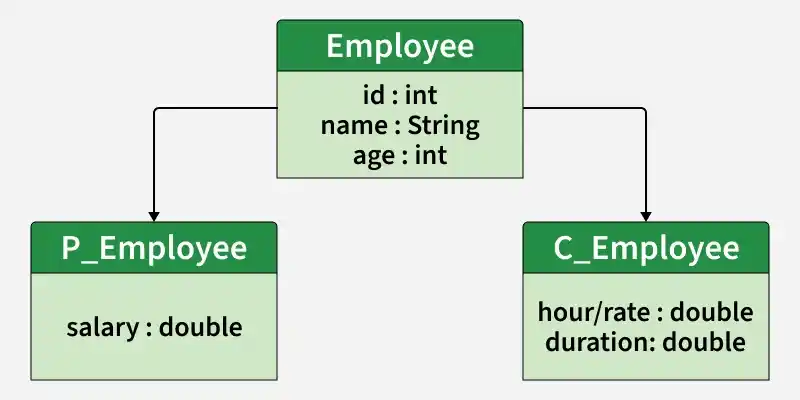
Table Per Subclass
Steps of Implementation
Step 1: Create Maven Project
- Open IntelliJ IDEA -> New Project -> Maven
- Provide GroupId and ArtifactId
**Add dependencies(pom.xml)
XML `
<dependency>
    <groupId>org.hibernate</groupId>
    <artifactId>hibernate-core</artifactId>
    <version>5.2.6.Final</version>
</dependency>

<dependency>
    <groupId>mysql</groupId>
    <artifactId>mysql-connector-java</artifactId>
    <version>6.0.5</version>
</dependency>
`
**project Structure
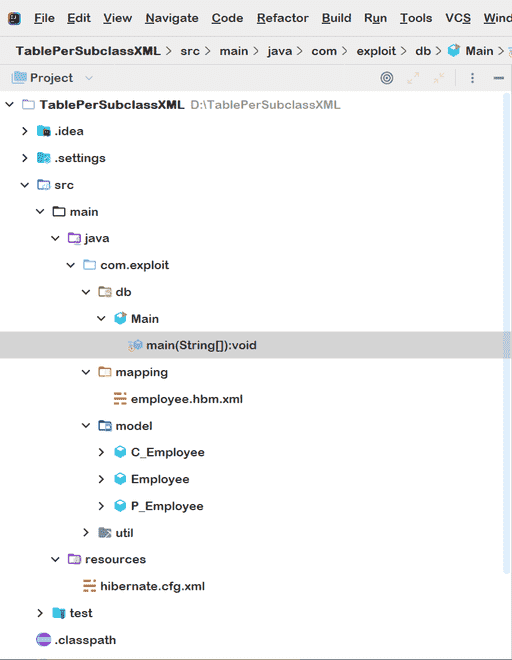
Step 2: Create Database Tables
There are three tables: Employee, P_Employee, and C_Employee. Common data is stored in the Employee table, while subclass-specific data is stored in their respective tables, linked via foreign keys.
**Creating Database Table to persist Concrete classes:
CREATE TABLE `Employee` (
`id` BIGINT(20) NOT NULL AUTO_INCREMENT,
`name` VARCHAR(50) NOT NULL DEFAULT '0',
`age` BIGINT(3) NOT NULL DEFAULT '0',
PRIMARY KEY (`id`)
)
CREATE TABLE `P_Employee` (
`id` BIGINT(20) NOT NULL AUTO_INCREMENT,
`salary` BIGINT(11) NULL DEFAULT NULL,
PRIMARY KEY (`id`)
CONSTRAINT `ForK_Employee` FOREIGN KEY (`id`) REFERENCES `Employee` (`id`)
)
CREATE TABLE `C_Employee` (
`id` BIGINT(20) NOT NULL AUTO_INCREMENT,
`hourlyrate` BIGINT(11) NULL DEFAULT NULL,
`duration` BIGINT(11) NULL DEFAULT NULL,
PRIMARY KEY (`id`)
CONSTRAINT `ForK_Employee2` FOREIGN KEY (`id`) REFERENCES `Employee` (`id`)
)
Step 3: Create Model Classes
Creating the Employee, P_Employee, and C_Employee classes for the above hierarchy.
- Inheritance is implemented using extends
- Classes are simple POJO classes
- No annotations (XML mapping is used)
Below is the implementation of the Employee.java file:
Java `
package com.exploit.model;
public class Employee { private int id; private String name; private int age;
public int getId() { return id; }

public void setId(int id) { this.id = id; }

public String getName() { return name; }

public void setName(String name) { this.name = name; }

public int getAge() { return age; }

public void setAge(int age) { this.age = age; }
}
`
Implementation of the P_Employee.java file:
Java `
package com.exploit.model;
public class P_Employee extends Employee { private double salary;
public double getSalary() { return salary; }

public void setSalary(double salary)
{
    this.salary = salary;
}
}
`
Implementation of the C_Employee.java file:
Java `
package com.exploit.model;
public class C_Employee extends Employee { private double hourlyRate; private double duration;
public double getDuration() { return duration; }

public void setDuration(double duration)
{
    this.duration = duration;
}

public double getHourlyRate() { return hourlyRate; }

public void setHourlyRate(double hourlyRate)
{
    this.hourlyRate = hourlyRate;
}
}
`
Step 4: Create Mapping File
Creating the mapping file for the Persistent class
- defines the base class
- is used for Table Per Subclass strategy
- defines foreign key relationship
- Data is split across multiple tables
Implementation of the employee.hbm.xml file:
XML `
    <joined-subclass name="com.exploit.model.P_Employee" table="P_Employee">
        <key column="Id"/>
        <property name="salary" column="Salary"></property>
    </joined-subclass>

    <joined-subclass name="com.exploit.model.C_Employee" table="C_Employee">
        <key column="Id"/>
        <property name="hourlyRate" column="HourlyRate"></property>
        <property name="duration" column="Duration"></property>
    </joined-subclass>

</class>
`
Step 5: Configure Hibernate
Adding the mapping of hbm.xml file in the hibernate configuration file.
- Configuration file connects Hibernate to database
- Mapping file must be registered
- SQL queries can be logged
Implementation of the hibernate.cfg.xml file:
XML `
<session-factory>

    <!-- Database connection properties -->
    <property name="connection.driver_class">com.mysql.jdbc.Driver</property>
    <property name="connection.url">jdbc:mysql://localhost/javainsimpleway</property>
    <property name="connection.username">root</property>
    <property name="connection.password">root</property>

    <!-- JDBC connection pool (using the built-in) -->
    <property name="connection.pool_size">1</property>

    <!-- SQL dialect -->
    <property name="dialect">org.hibernate.dialect.MySQLDialect</property>

    <!-- Disable the second-level cache -->
    <property name="cache.provider_class">org.hibernate.cache.internal.NoCacheProvider</property>

    <!-- Echo all executed SQL to stdout -->
    <property name="show_sql">true</property>

    <!-- Format the generated Sql -->
    <property name="format_sql">true</property>

    <!-- Dont Drop and re-create the database schema on startup,Just update it -->
    <property name="hbm2ddl.auto">update</property>

    <mapping resource="com/exploit/mapping/employee.hbm.xml"/>

</session-factory>
`
Step 6: Create Main Class
Creating the class that stores the persistent object.
- Parent data stored in Employee table
- Subclass data stored in respective tables
- Hibernate manages relationships automatically
Below is the implementation of the Main.java file:
Java `
package com.exploit.db;
import com.exploit.model.C_Employee; import com.exploit.model.Employee; import com.exploit.model.P_Employee; import com.exploit.util.HibernateUtil; import org.hibernate.Session; import org.hibernate.SessionFactory; import org.hibernate.Transaction;
public class Main { public static void main(String[] args) { // Get session factory using Hibernate Util class SessionFactory sessionFactory = HibernateUtil.getSessionFactory();
    // Get session from Session factory
    Session session = sessionFactory.openSession();

    // Begin transaction
    Transaction transaction
        = session.beginTransaction();

    // Creating Employee base class record
    Employee employee = new Employee();
    employee.setName("ChikkoRita");
    employee.setAge(19);

    // Creating Permanent Employee subclass record
    P_Employee permanentEmployee = new P_Employee();
    permanentEmployee.setName("Saili.H");
    permanentEmployee.setAge(18);
    permanentEmployee.setSalary(30000);

    // Creating Contract Employee subclass record
    C_Employee contractEmployee = new C_Employee();
    contractEmployee.setName("KirikoChan");
    contractEmployee.setAge(19);
    contractEmployee.setHourlyRate(2000);
    contractEmployee.setDuration(8.5);

    // persist all the employee records
    session.persist(employee);
    session.persist(permanentEmployee);
    session.persist(contractEmployee);

    // Commit the transaction and close the session
    transaction.commit();
    session.close();
    System.out.println(
        "Employee records successfully persisted");
}
}
`
We have defined only one hibernate mapping (hbm) file Employee.hbm.xml. Both C_Employee and P_Employee model classes are defined within one hbm.xml file. This is the usual way of mapping Table Per Subclass using XML.