How to Build a Dice Game in Java Android? (original) (raw)
Last Updated : 23 Jul, 2025
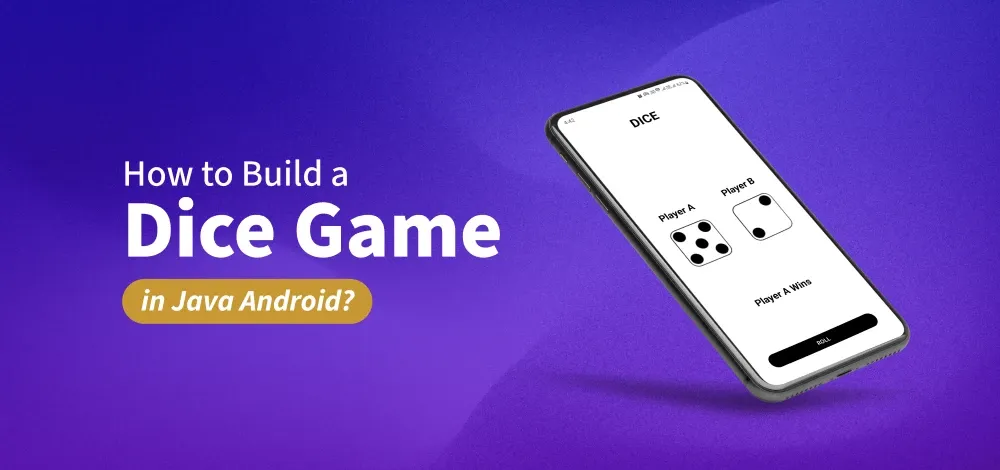
In this article, we will be building a Dice Game Project using **Java/Kotlin and XML in Android. The Dice Game is based on a two-player dice game. Both dices are rolled and the winner result is displayed in a textview. There will be a single activity in this application. The result and a roll button will be displayed at the bottom.
Note that we are going to implement this project using **Java and **Kotlin.
Step by Step Implementation
**Step 1: Create a New Project
To create a new project in Android Studio please refer to How to Create/Start a New Project in Android Studio.
**Step 2:Add Dice images to drawable folder
All the dice images are listed below. Save them in your drawable folder in resources. Go to the **app > res > drawable and paste the following files:


Step 3: Working with the activity_main.xml file
The XML codes are used to build the structure of the activity as well as its styling part. It contains a **TextView at the very top of the activity. Then it contains two **ImageView, each displaying the image of the rolled dice. At the bottom of the activity, there is a **Button to roll the dice and a TextView to display the result.
Below is the code for the **activity_main.xml file.
**activity_main.xml:
activity_main.xml `
<androidx.constraintlayout.widget.ConstraintLayout xmlns:android="http://schemas.android.com/apk/res/android" xmlns:app="http://schemas.android.com/apk/res-auto" xmlns:tools="http://schemas.android.com/tools" android:layout_width="match_parent" android:layout_height="match_parent" android:background="@color/white">
<TextView
    android:layout_width="wrap_content"
    android:layout_height="wrap_content"
    android:layout_marginTop="32dp"
    android:text="DICE"
    android:textColor="@color/black"
    android:textSize="32sp"
    android:textStyle="bold"
    app:layout_constraintEnd_toEndOf="parent"
    app:layout_constraintStart_toStartOf="parent"
    app:layout_constraintTop_toTopOf="parent" />

<TextView
    android:id="@+id/textView"
    android:layout_width="wrap_content"
    android:layout_height="wrap_content"
    android:layout_marginBottom="16dp"
    android:text="Player A"
    android:textColor="@color/black"
    android:textSize="24sp"
    android:textStyle="bold"
    app:layout_constraintBottom_toTopOf="@+id/firstDice"
    app:layout_constraintEnd_toEndOf="@+id/firstDice"
    app:layout_constraintStart_toStartOf="@+id/firstDice" />

<TextView
    android:id="@+id/textView2"
    android:layout_width="wrap_content"
    android:layout_height="wrap_content"
    android:text="Player B"
    android:textColor="@color/black"
    android:textSize="24sp"
    android:textStyle="bold"
    app:layout_constraintBottom_toBottomOf="@+id/textView"
    app:layout_constraintEnd_toEndOf="@+id/secondDice"
    app:layout_constraintStart_toStartOf="@+id/secondDice"
    app:layout_constraintTop_toTopOf="@+id/textView" />


<ImageView
    android:id="@+id/firstDice"
    android:layout_width="140dp"
    android:layout_height="140dp"
    android:padding="10dp"
    android:src="@drawable/dice6"
    app:layout_constraintBottom_toBottomOf="parent"
    app:layout_constraintEnd_toStartOf="@+id/secondDice"
    app:layout_constraintStart_toStartOf="parent"
    app:layout_constraintTop_toTopOf="parent" />

<ImageView
    android:id="@+id/secondDice"
    android:layout_width="140dp"
    android:layout_height="140dp"
    android:padding="10dp"
    android:src="@drawable/dice6"
    app:layout_constraintBottom_toBottomOf="@+id/firstDice"
    app:layout_constraintEnd_toEndOf="parent"
    app:layout_constraintStart_toEndOf="@id/firstDice"
    app:layout_constraintTop_toTopOf="@+id/firstDice" />

<Button
    android:id="@+id/rollButton"
    android:layout_width="0dp"
    android:layout_height="wrap_content"
    android:layout_margin="48dp"
    android:backgroundTint="@color/black"
    android:text="ROLL"
    app:layout_constraintBottom_toBottomOf="parent"
    app:layout_constraintEnd_toEndOf="parent"
    app:layout_constraintStart_toStartOf="parent" />

<TextView
    android:id="@+id/winnerTextView"
    android:layout_width="wrap_content"
    android:layout_height="wrap_content"
    android:text="Draw"
    android:textColor="@color/black"
    android:textSize="24sp"
    android:textStyle="bold"
    app:layout_constraintBottom_toTopOf="@+id/rollButton"
    app:layout_constraintEnd_toEndOf="parent"
    app:layout_constraintStart_toStartOf="parent"
    app:layout_constraintTop_toBottomOf="@+id/firstDice" />
</androidx.constraintlayout.widget.ConstraintLayout>
`
Step 4: Working with the MainActivity file
We will create an array inside the file that will contain all the images of the dice. Then we will call **onClickListener() for the button and generate two random numbers using the **Random function. Then we will check the two numbers and display the result respectively. Also, we will set the two images from the array. Below is the code for the **MainActivity file. Comments are added inside the code to understand the code in more detail.
**MainActivity File:
MainActivity.java `
package org.geeksforgeeks.demo;
import android.os.Bundle; import android.widget.Button; import android.widget.ImageView; import android.widget.TextView; import androidx.appcompat.app.AppCompatActivity; import java.util.Random;
public class MainActivity extends AppCompatActivity {
private Button button;
private ImageView firstDice;
private ImageView secondDice;
private TextView winnerTextView;
private Random random = new Random();

@Override
protected void onCreate(Bundle savedInstanceState) {
    super.onCreate(savedInstanceState);
    setContentView(R.layout.activity_main);

    // array to store dice images
    int[] dice = {
            R.drawable.dice1, R.drawable.dice2, R.drawable.dice3,
            R.drawable.dice4, R.drawable.dice5, R.drawable.dice6
    };

    // get the references of views
    button = findViewById(R.id.rollButton);
    firstDice = findViewById(R.id.firstDice);
    secondDice = findViewById(R.id.secondDice);
    winnerTextView = findViewById(R.id.winnerTextView);

    // call the on click function
    button.setOnClickListener(v -> {
        // generate two random numbers
        // using Random function
        int num1 = random.nextInt(6);
        int num2 = random.nextInt(6);

        // set the images from the array by the index
        // position of the numbers generated
        firstDice.setImageResource(dice[num1]);
        secondDice.setImageResource(dice[num2]);

        if (num1 > num2) {
            winnerTextView.setText("Player A Wins");
        } else if (num1 < num2) {
            winnerTextView.setText("Player B Wins");
        } else {
            winnerTextView.setText("Draw");
        }
    });
}
}
MainActivity.kt
package org.geeksforgeeks.demo
import android.os.Bundle import android.widget.Button import android.widget.ImageView import android.widget.TextView import androidx.appcompat.app.AppCompatActivity import java.util.Random
class MainActivity : AppCompatActivity() { private lateinit var button: Button private lateinit var firstDice: ImageView private lateinit var secondDice: ImageView private lateinit var winnerTextView: TextView private val random = Random()
override fun onCreate(savedInstanceState: Bundle?) {
    super.onCreate(savedInstanceState)
    setContentView(R.layout.activity_main)

    // array to store dice images
    val dice = intArrayOf(
        R.drawable.dice1, R.drawable.dice2, R.drawable.dice3,
        R.drawable.dice4, R.drawable.dice5, R.drawable.dice6
    )

    // get the references of views
    button = findViewById(R.id.rollButton)
    firstDice = findViewById(R.id.firstDice)
    secondDice = findViewById(R.id.secondDice)
    winnerTextView = findViewById(R.id.winnerTextView)

    // call the on click function
    button.setOnClickListener {
        // generate two random numbers
        // using Random function
        val num1 = random.nextInt(6)
        val num2 = random.nextInt(6)

        // set the images from the array by the index
        // position of the numbers generated
        firstDice.setImageResource(dice[num1])
        secondDice.setImageResource(dice[num2])

        winnerTextView.text = if (num1 > num2) {
            "Player A Wins"
        } else if (num1 < num2) {
            "Player B Wins"
        } else {
            "Draw"
        }
    }
}
}
`