Spring Boot AOP Around Advice (original) (raw)
Last Updated : 29 Apr, 2026
In Spring AOP, Around Advice is used to execute code both before and after a target method. It is defined using the @Around annotation. This advice is considered the most powerful because it can control the execution of the method by deciding whether to proceed with the method call or not.
- Executes both before and after a target method using the @Around annotation.
- Uses ProceedingJoinPoint to control method execution flow.
- Useful for advanced use cases like performance monitoring and transaction handling.
Syntax
@Around("execution(* package_name.ClassName.methodName(..))")
public Object methodName(ProceedingJoinPoint joinPoint) throws Throwable {
return joinPoint.proceed();
}
Steps to Implement Around Advice
Step 1: Create a Spring Boot Project
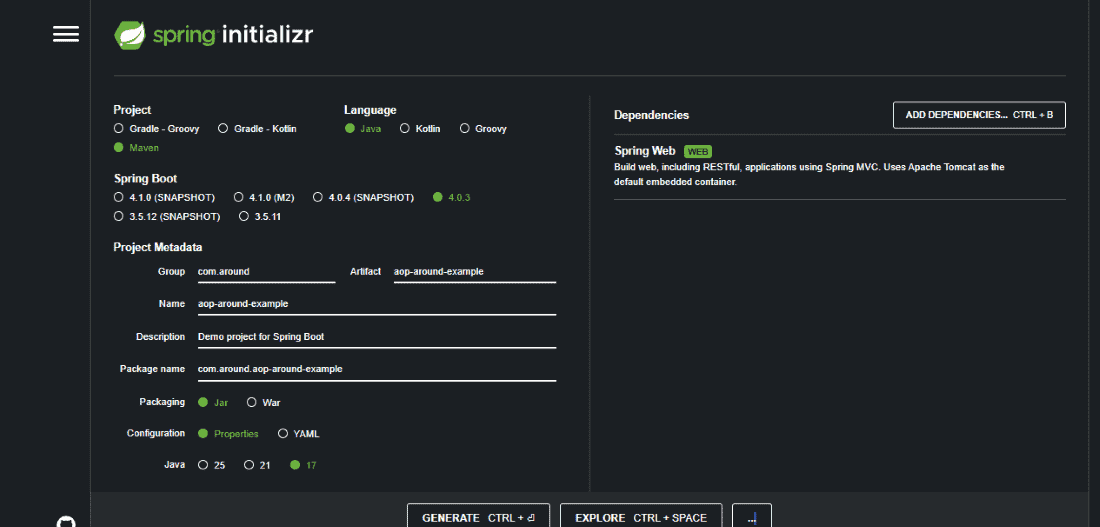
Open Spring Initializr and provide the following details:
- **Group: com.around
- **Artifact: aop-around-example
- **Dependencies: Spring Web
Download the project and extract the ZIP file and import the Project into IDE
**pom.xml
XML `
4.0.0 com.around_advice aop-around-advice-example 0.0.1-SNAPSHOT
jar
aop-around-advice-example Demo project for Spring Boot AOP Around Advice
org.springframework.boot spring-boot-starter-parent 2.2.2.RELEASE UTF-8 UTF-8 1.8 org.springframework.boot spring-boot-starter-web <!-- added dependency for spring aop -->
<dependency>
<groupId>org.springframework.boot</groupId>
<artifactId>spring-boot-starter-aop</artifactId>
</dependency>`
Step 2: Create Model Class
Create package com.around_advice.model and add Student.java class to store student details such as firstName and secondName.
**Student class
Java `
package com.around_advice.model;
// Class public class Student {
// Class data members
private String firstName;
private String secondName;

// Constructors
public Student() {}

// Getter
public String getFirstName() { return firstName; }

// Setter
public void setFirstName(String firstName)
{
    // This keyword refers to current instance itself
    this.firstName = firstName;
}

// Getter
public String getSecondName() { return secondName; }

// Setter
public void setSecondName(String secondName)
{
    this.secondName = secondName;
}
}
`
Step 3: Create Service Class
Create package com.around_advice.service and add StudentService.java. This class contains the addStudent() method which creates and returns a student object.
**StudentService class
Java `
package com.around_advice.service;
import com.around_advice.model.Student; import org.springframework.stereotype.Service;
@Service public class StudentService {
public Student addStudent(String firstName, String secondName) {

    Student student = new Student();
    student.setFirstName(firstName);
    student.setSecondName(secondName);

    return student;
}
}
`
Step 6: Create Controller Class
Create package com.around_advice.controller and add StudentController.java. This controller handles GET request /add and calls the StudentService method.
**StudentController Class
Java `
package com.around_advice.controller;
import com.around_advice.model.Student; import com.around_advice.service.StudentService; import org.springframework.beans.factory.annotation.Autowired; import org.springframework.web.bind.annotation.GetMapping; import org.springframework.web.bind.annotation.RequestParam; import org.springframework.web.bind.annotation.RestController;
@RestController public class StudentController {
@Autowired
private StudentService studentService;

@GetMapping("/add")
public Student addStudent(
        @RequestParam("firstName") String firstName,
        @RequestParam("secondName") String secondName) {

    return studentService.addStudent(firstName, secondName);
}
}
`
Step 7: Create Aspect Class
Create package com.around_advice.aspect and add StudentServiceAspect.java.
- Define a Pointcut to target service methods.
- Add @Around advice to run before and after the method execution using ProceedingJoinPoint.
**StudentServiceAspect Class
Java `
package com.around_advice.aspect;
import org.aspectj.lang.ProceedingJoinPoint; import org.aspectj.lang.annotation.Around; import org.aspectj.lang.annotation.Aspect; import org.aspectj.lang.annotation.Pointcut; import org.springframework.stereotype.Component;
@Aspect @Component public class StudentServiceAspect {
@Pointcut("execution(* com.around_advice.service.StudentService.*(..))")
private void anyStudentService() {}

@Around("anyStudentService() && args(fname, sname)")
public Object aroundAdvice(
        ProceedingJoinPoint joinPoint,
        String fname,
        String sname) throws Throwable {

    System.out.println("Around Method: " + joinPoint.getSignature());
    System.out.println("Before calling service method");

    Object result = joinPoint.proceed();

    System.out.println("After calling service method");

    return result;
}
}
`
Step 8: Run the Application
Run the project as Spring Boot Application and open the browser.
**Example URL:
For the demo, we are hitting URL with fname as Harry and sname as Potter. In this case, the method will be executed normally.


When we hit URL with fname as Tom, the service method will throw an exception. The around advice will not be executed.


Output Explanation
**Case 1: Normal Execution
- @Around advice executes before the service method.
- StudentService.addStudent() method executes and creates the student object.
- @Around advice executes after the method finishes.
- The controller returns the student details as the response.
**Case 2: Exception Occurs
If the service method throws an exception (for example when firstName = Tom):
- The service method execution fails.
- The around advice may not execute its after logic completely.
- The exception is propagated to the controller.