Spring Boot JDBC (original) (raw)
Spring Boot JDBC simplifies database interaction by providing ready-to-use configurations and reducing boilerplate code. It leverages auto-configuration to manage JDBC components, allowing developers to focus mainly on writing SQL queries and business logic.
- Uses auto-configuration to set up DataSource, JdbcTemplate, and other JDBC components automatically.
- Provides direct control over SQL queries, making it suitable for fine-tuned database operations.
- Spring Boot simplifies database access (e.g., JdbcTemplate) compared to manual setup in raw JDBC.
- Database connection and pooling are configured in application.properties / application.yml, while CRUD is handled using
JdbcTemplate.
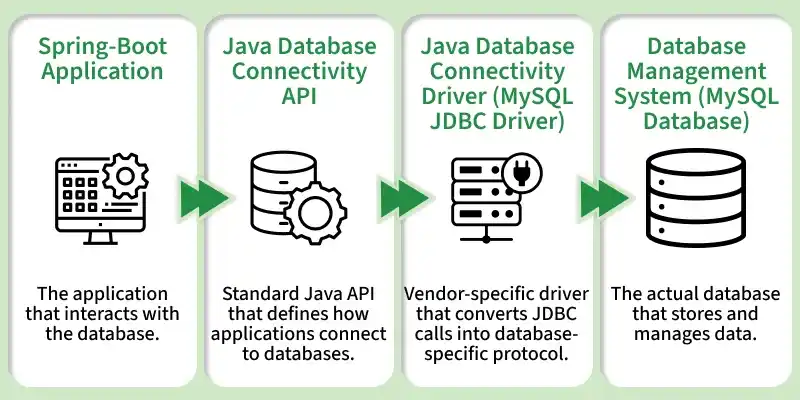
SpringBoot -JDBC
JDBC consists of two parts as depicted below:
- **JDBC interfaces: _java.sql/ javax.sql packages have classes/interfaces of JDBC API.
- **JDBC drivers: _JDBC Driver allows Java programs to interact with the database.
JDBC Connection Pooling
JDBC Connection Pooling is a technique that reuses database connections instead of creating a new one for every request, improving performance and reducing load on the database server.
- Maintains a pool of pre-created reusable connections
- Avoids creating a new connection for each client request
- Reduces overhead and improves application performance
.png)
How Connection Pooling Works
- A server administrator prepares a connection pool with a setoff connection and also a mediator object as a DataSource API to access the pool.
- An administrator stores DataSource object into JNDI (Java Naming Directory Interface).
- Application reads the DataSource from JNDI registry and asks for a connection from a pool.
- A DataSource object takes a connection from a pool and creates a proxy or logical connection to it and then sens the proxy connection to Java.
- When a Java program closes proxy connection, the DataSource will do real connection back to the pool.
To work with a database using Spring Boot, we need to add the following dependencies:
**A. JDBC API
Database connectivity API specifies how the client connects and queries a database.
org.springframework.boot spring-boot-starter-jdbc
**B. MySQL Driver
MySQL JDBC and R2DBC driver to work with the database.
mysql mysql-connector-java runtime
After this, we will add datasource properties in application.properties file:
**For MySQL database:
spring.datasource.url=jdbc:mysql://localhost:3306/test
spring.datasource.username=root
spring.datasource.password=root
spring.datasource.driver-class-name=com.mysql.cj.jdbc.Driver
**Project Structure
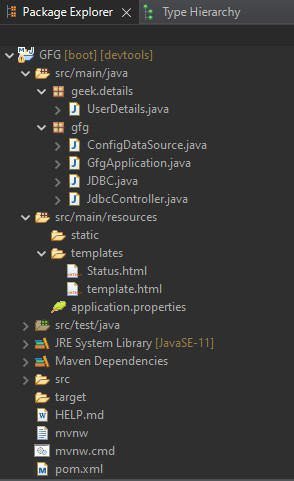
**Implementation of an Application
**1. pom.xml (Configuration File)
XML `
4.0.0 org.springframework.boot spring-boot-starter-parent 2.6.3 sia GFG 0.0.1-SNAPSHOT GFG Demo project for Spring Boot <java.version>11</java.version> org.springframework.boot spring-boot-starter-thymeleaf org.springframework.boot spring-boot-starter-web
    <dependency>
        <groupId>org.springframework.boot</groupId>
        <artifactId>spring-boot-devtools</artifactId>
        <scope>runtime</scope>
        <optional>true</optional>
    </dependency>
    <dependency>
        <groupId>org.springframework.boot</groupId>
        <artifactId>spring-boot-starter-test</artifactId>
        <scope>test</scope>
    </dependency>
    <dependency>
        <groupId>org.springframework.boot</groupId>
        <artifactId>spring-boot-starter</artifactId>
    </dependency>
    <dependency>
        <groupId>com.mysql</groupId>
        <artifactId>mysql-connector-j</artifactId>
        <scope>runtime</scope>
    </dependency>

    <dependency>
        <groupId>org.springframework.boot</groupId>
        <artifactId>spring-boot-starter-jdbc</artifactId>
    </dependency>
    <dependency>
        <groupId>org.projectlombok</groupId>
        <artifactId>lombok</artifactId>
        <optional>true</optional>
    </dependency>
    <dependency>
        <groupId>org.springframework.boot</groupId>
        <artifactId>spring-boot-starter-security</artifactId>
    </dependency>
    <dependency>
        <groupId>org.springframework.security</groupId>
        <artifactId>spring-security-test</artifactId>
        <scope>test</scope>
    </dependency>
</dependencies>

<build>
    <plugins>
        <plugin>
            <groupId>org.springframework.boot</groupId>
            <artifactId>spring-boot-maven-plugin</artifactId>
            <configuration>
                <excludes>
                    <exclude>
                        <groupId>org.projectlombok</groupId>
                        <artifactId>lombok</artifactId>
                    </exclude>
                </excludes>
            </configuration>
        </plugin>
    </plugins>
</build>
`
**2. Main Class of Spring application (GfgApplication.java)
Java `
package gfg;
import org.springframework.boot.SpringApplication; import org.springframework.boot.autoconfigure.SpringBootApplication;
// Annotation @SpringBootApplication
// Application(Main) Class public class GfgApplication {
// Main driver method
public static void main(String[] args)
{

    SpringApplication.run(GfgApplication.class, args);
}
}
`
**3. Configuration of DataSource (ConfigDataSource.java)
DataSourceBuilder is a useful class to build a DataSource.
org.springframework.boot.jdbc.DataSourceBuilder
public final class DataSourceBuilder extends Object
Methods of DataSourceBuilder Class
| Method | Description |
|---|---|
| create() | Creates a _new instance of DataSourceBuilder. |
| driverClassName(String driverClassName) | Specifies the _driver class name which is to be used for building the datasource. |
| url(String url) | Specifies the URL which is to be used for building the datasource. |
| username(String username) | Specifies the _username which is to be used for building the datasource. |
| password(String password) | Specifies the password which is to be used for building the datasource. |
| build() | Returns a newly built _DataSource instance. |
This builder supports the following pooling Datasource implementations.
| Name | Description |
|---|---|
| **Hikari | com.zaxxer.hikari.HikariDataSource |
| **Tomcat JDBC Pool | org.apache.tomcat.jdbc.pool.DataSource |
| **Apache DBCP2 | org.apache.commons.dbcp2.BasicDataSource |
| **Oracle UCP | oracle.ucp.jdbc.PoolDataSourceImpl |
**Note: The first available pool implementation is used when no type has been explicitly set.

**Example:
Java `
package gfg;
import javax.sql.DataSource; import org.springframework.boot.jdbc.DataSourceBuilder; import org.springframework.context.annotation.Bean; import org.springframework.context.annotation.Configuration;
// Annotation @Configuration
// Class public class ConfigDataSource {
@Bean public static DataSource source()
{

    DataSourceBuilder<?> dSB
        = DataSourceBuilder.create();
    dSB.driverClassName("com.mysql.jdbc.Driver");

    // MySQL specific url with database name
    dSB.url("jdbc:mysql://localhost:3306/userdetails");

    // MySQL username credential
    dSB.username("user");

    // MySQL password credential
    dSB.password("password");

    return dSB.build();
}
}
`
**Note: Driver class name - 'com.mysql.jdbc.Driver' has been deprecated. It would not give error because the driver is automatically loaded and manual loading is not necessary. The new driver class name is 'com.mysql.cj.jdbc.Driver'.
**D. User credentials to be stored in the database (UserDetails.java)
One can add the 'Lombok' library to skip Getter/Setter methods, construct No-Arguments constructor, the constructor for final fields, etc.
**Maven-pom.xml dependency
XML `
org.projectlombok lombok true`
**Example:
Java `
package geek.details;
import lombok.Data;
// Annotation for Getter/Setter methods @Data public class UserDetails {
String user;
String userName;
String password;
}
`
**E. Utility class for connecting and querying the database (JDBC.java)
Password encoding is a must for many security reasons. To use Spring Security, add the following dependency:
**Maven - pom.xml
XML `
org.springframework.boot spring-boot-starter-security org.springframework.security spring-security-test test`
**Pre-requisites are as follows:
- On adding the above dependency, the login page gets activated by default.
- The default username is - 'user.'
- The password is automatically generated by the Spring Security that gets displayed on the console after booting the application.

**Note: Generated password becomes invalid for the next iteration/Running the application as the new password gets generated, but the username remains same.
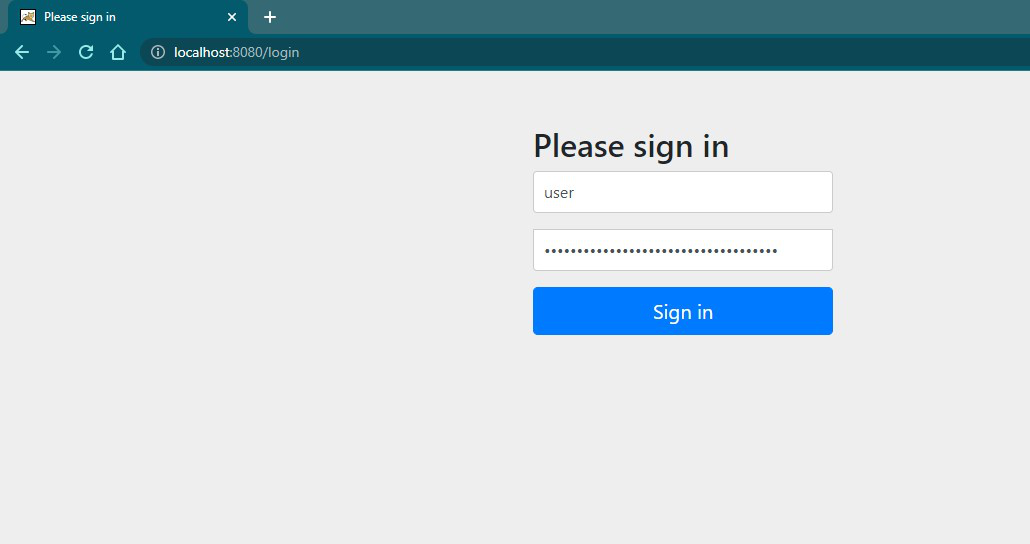
- For encoding Spring offers many ways like the one - 'BCryptPasswordEncoder'.
- It is an implementation of PasswordEncoder which uses the BCrypt strong hashing algorithm.
- Version, Strength, and SecureRandom instances can be modified.
org.springframework.boot.jdbc.DataSourceBuilder
public final class DataSourceBuilder extends Object
Constructors of BCryptPasswordEncoder Class:
| Constructor | Description |
|---|---|
| BCryptPasswordEncoder( ) | Default constructor. |
| BCryptPasswordEncoder( int strength ) | Strength is the log rounds to use between 4 to 31. Default is 10. |
| BCryptPasswordEncoder( int strength, SecureRandom random ) | The secure random instance to be used. |
| BCryptPasswordEncoder( BCryptVersion version ) | Version of BCrypt - 2a, 2b, 2y. |
| BCryptPasswordEncoder( BCryptVersion version, int strength ) | Bcrypt versions / log rounds. |
| BCryptPasswordEncoder( BCryptVersion version, int strength, SecureRandom random ) | Bcrypt versions / log rounds / Secure Random instance. |
| BCryptPasswordEncoder( BCryptVersion version, SecureRandom random ) | Bcrypt versions / Secure Random instance. |
Methods of BCryptPasswordEncoder Class:
| Method | Description |
|---|---|
| encode(CharSequence rawPassword) | Encodes a raw password provided with SHA-1 or greater hash combined with 8-Byte or greater randomly generated salt value. |
| matches(CharSequence rawPassword, String encodedPassword) | Verifies the stored encoded password matches the submitted encoded raw password. Returns true if matched otherwise false. |
| upgradeEncoding(String encodedPassword) | Returns true if the encoded password should be encoded again for better security, else false. The default implementation always returns false. |
**Example:
Java `
package gfg;
import geek.details.UserDetails; import java.security.SecureRandom; import java.sql.Connection; import java.sql.PreparedStatement; import java.sql.SQLException; import javax.sql.DataSource; import lombok.extern.slf4j.Slf4j; import org.springframework.security.crypto.bcrypt.BCryptPasswordEncoder;
// Annotation to provide logging feature @Slf4j
// Class public class JDBC {
public int insert(UserDetails user)
{
    DataSource dataSource = null;
    Connection connection = null;
    PreparedStatement prepStatement = null;

    int result = 0;
    try {

        // Get the configured datasourse
        dataSource = ConfigDataSource.source();
        // Attempt for connection to MySQL
        connection = dataSource.getConnection();
        prepStatement = connection.prepareStatement(
            "insert into user (user,username,password) values (?,?,?)");
        prepStatement.setString(1, user.getUser());
        prepStatement.setString(2, user.getUserName());

        BCryptPasswordEncoder bCryptPasswordEncoder
            = new BCryptPasswordEncoder(
                10, new SecureRandom());
        String encodedPassword
            = bCryptPasswordEncoder.encode(
                user.getPassword());

        prepStatement.setString(3, encodedPassword);
        result = prepStatement.executeUpdate();
    }
    catch (SQLException e) {
        log.getName();
    }

    return result;
}
}
`
**F. Controller of Spring Application (JdbcController.java)
Java `
package gfg;
import org.springframework.stereotype.Controller; import org.springframework.ui.Model; import org.springframework.web.bind.annotation.GetMapping; import org.springframework.web.bind.annotation.ModelAttribute; import org.springframework.web.bind.annotation.PostMapping; import org.springframework.web.bind.annotation.RequestMapping;
import geek.details.UserDetails;
@Controller @RequestMapping("/jdbc") public class JdbcController {
@GetMapping
public String get(Model model) {

  // Add object to be bound by user provided details
    model.addAttribute("obj", new UserDetails());
    return "template";
}

@PostMapping
public String post(@ModelAttribute("obj") UserDetails user, Model model) {

    JDBC SQL = new JDBC();
    int result = SQL.insert(user);
    if(result == 1)
        model.addAttribute("message", "Successful JDBC connection and execution of SQL statement");
    else
        model.addAttribute("message", "Query not submitted!");
    return "Status";
}
}
`
Templates (Thymeleaf)
**A. template.html: Gets user data and binds it to UserDetails object.
HTML `
GFGRegister Geek
User:
Username:
Password:
`
**Output:
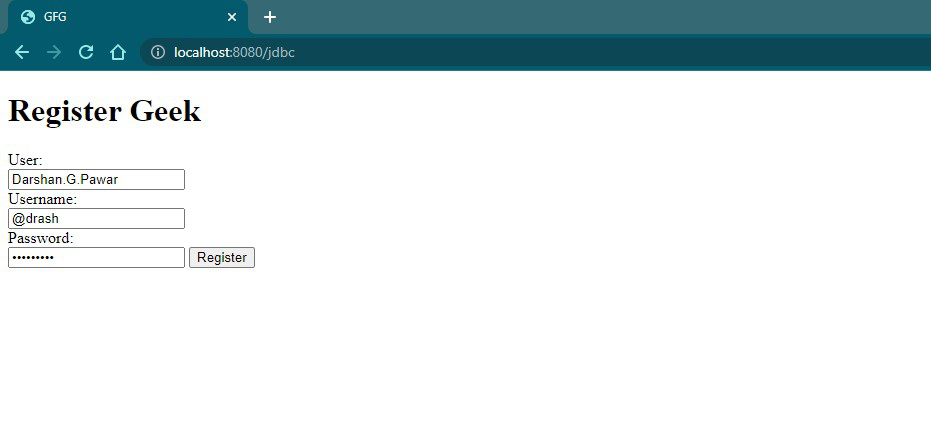
Filling the User details
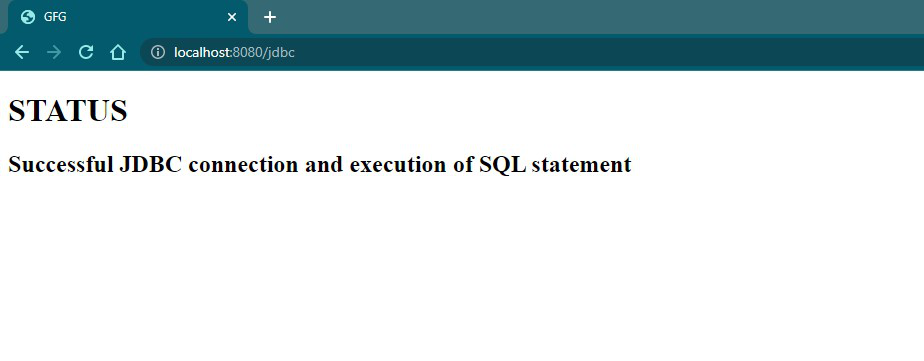
**B. Status.html
Display the message of JDBC operation.
HTML `
GFGSTATUS
message will print here
`
**Output in browser:
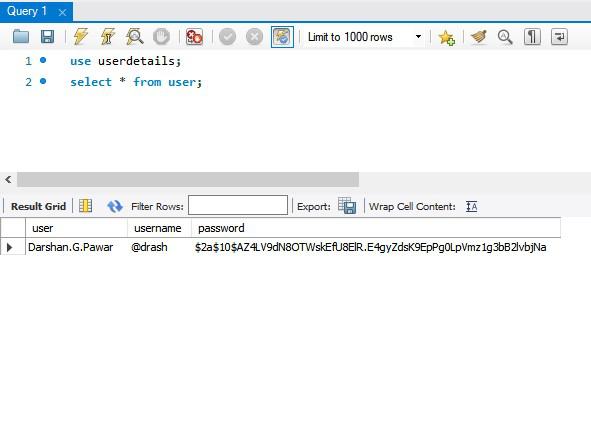
**C. MySQL Database
**Output:
**Note: Spring Boot offers many convenient ways of working with data, e.g. Spring Data JPA - which has default implementation of Hibernate. We can use them to make advantage of Java Persistence API (JPA) for object/relational mapping and to avoid cumbersome efforts.