What is Dispatcher Servlet in Spring? (original) (raw)
DispatcherServlet in Spring is the central component of the Spring MVC framework that acts as the front controller. It receives all incoming HTTP requests, forwards them to the appropriate controllers, and manages the response generation process including handler mapping and view resolution.
- It handles incoming requests and routes them to the appropriate controllers
- It tells controllers how to handle requests and return responses.
- After the controllers process the request, it picks the correct view to show the result (like a webpage).
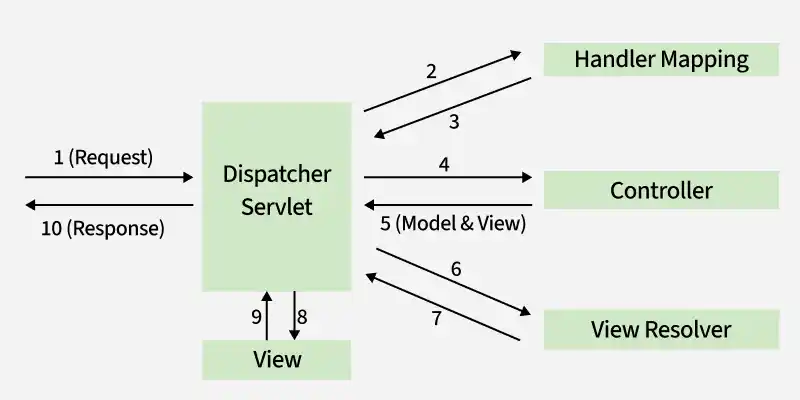
Dispatcher Servlet
Working
- **DispatcherServlet: The HTTP request is received by the DispatcherServlet.
- **Handler Mapping: The DispatcherServlet consults the Handler Mapping to determine which controller should handle the request based on the URL pattern.
- **Controller: The Controller processes the request and returns a ModelAndView object, which contains the model data and the view name.
- **Model and View: The ModelAndView object holds the model data (business logic result) and the view name (which view to render).
- **View Resolver: The View Resolver resolves the logical view name to a physical view (e.g., a JSP page).
- **View: The View (usually a JSP, HTML, etc.) is rendered and populated with the model data.
- **Response: The rendered view is sent back as the HTTP response to the client.
Steps for setting up DispatcherServlet in Spring MVC
In a Spring MVC application, the DispatcherServlet acts as the front controller, handling all incoming requests. Follow these steps to set it up:
Note: We'll be using Spring Tool Suite 4 (STS) or Eclipse IDE for this project. Refer to this article for installation instructions.
Step 1: Create a Dynamic Web Project in STS (Spring Tool Suite) or Eclipse
- Open Spring Tool Suite (STS) or Eclipse.
- Go to File -> New -> Dynamic Web Project.
- Enter the project name (e.g., SpringMVCApp), select Apache Tomcat as the target runtime, and click Finish.
Step 2: Add Spring Framework JARs
- Download Spring Framework libraries from the official website.
- Add the required JAR files into WEB-INF/lib directory of the project.
Step 3: Configure Apache Tomcat
- Install Apache Tomcat and configure it in your IDE (STS or Eclipse).
- Go to Window -> Preferences -> Server -> Runtime Environments, add Apache Tomcat.
- Deploy your project by right-clicking and selecting Run on Server.
Step 4: Configure DispatcherServlet in web.xml
- Open src/main/webapp/WEB-INF/web.xml.
- Add the following configuration for DispatcherServlet. XML `
`
Step 5: Create Spring Configuration File
- Create a new XML file named frontcontroller-dispatcher-servlet.xml in WEB-INF.
- Add basic Spring beans configuration and component scanning.
Step 6: Run Your Application
- Deploy the application to Tomcat using Run on Server.
- Check the console to ensure the DispatcherServlet has initialized without errors.
Steps for setting up DispatcherServlet in Spring Boot
In a Spring Boot application, the DispatcherServlet is automatically configured as part of the Spring Web dependency. Here's a simplified explanation of setting it up:
Step 1: Create a Spring Boot Project
1. Go to Spring Initializr
2. Project Configuration:
- **Project Type: Maven
- **Language: Java
- **Spring Boot Version: 3.x (latest version)
- **Dependencies: Spring Web (for RESTful API and DispatcherServlet setup)
3. Click on Generate, which will download a .zip file of the Spring Boot project.
4. Unzip the file and open it in your IDE (e.g., Eclipse, or STS).
Step 2: Import the Project into Your IDE
**1. Import the Project:
- Open your IDE.
- Go to File -> New -> Project from Existing Sources.
- Select the pom.xml (for Maven) file to import the project.
**2. Wait for Maven to Download Dependencies:
- Maven will automatically download all necessary dependencies based on the pom.xml configuration.
Step 3: Create a Model Class
Java `
package com.example.demo.model;
public class Details { private int id; private String name;
// Constructor
public Details(int id, String name) {
    this.id = id;
    this.name = name;
}

// Getters and Setters
public int getId() {
    return id;
}
public void setId(int id) {
    this.id = id;
}
public String getName() {
    return name;
}
public void setName(String name) {
    this.name = name;
}
}
`
Step 4: Create a Controller Class
Java `
package com.example.demo.controller;
import com.example.demo.model.Details; import org.springframework.web.bind.annotation.*;
import java.util.ArrayList; import java.util.List;
@RestController @RequestMapping("/api") public class DetailsController {
private List<Details> detailsList = new ArrayList<>();

// GET endpoint to fetch all details
@GetMapping("/details")
public List<Details> getAllDetails() {
    return detailsList;
}

// POST endpoint to add new detail
@PostMapping("/details")
public String addDetails(@RequestBody Details details) {
    detailsList.add(details);
    return "Data Inserted Successfully";
}

// PUT endpoint to update a detail by ID
@PutMapping("/details/{id}")
public String updateDetails(@PathVariable int id, @RequestBody Details updatedDetails) {
    for (Details details : detailsList) {
        if (details.getId() == id) {
            details.setName(updatedDetails.getName());
            return "Data Updated Successfully";
        }
    }
    return "Detail not found!";
}

// DELETE endpoint to remove a detail by ID
@DeleteMapping("/details/{id}")
public String deleteDetails(@PathVariable int id) {
    detailsList.removeIf(details -> details.getId() == id);
    return "Data Deleted Successfully";
}
}
`
Step 5: Create the Spring Boot Main Application Class
- This is the entry point for the Spring Boot application. It contains the @SpringBootApplication annotation, which tells Spring Boot to start the application. Java `
package com.example.demo;
import org.springframework.boot.SpringApplication; import org.springframework.boot.autoconfigure.SpringBootApplication;
@SpringBootApplication public class DemoApplication {
public static void main(String[] args) {
    SpringApplication.run(DemoApplication.class, args);
}
}
`
Step 6: Configure DispatcherServlet (Optional in Spring Boot)
- In Spring Boot, you don’t need to explicitly configure DispatcherServlet in the web.xml file as Spring Boot provides an embedded servlet container (like Tomcat).
- if you want to customize DispatcherServlet, you can configure it programmatically. Java `
package com.example.demo.config;
import org.springframework.boot.web.servlet.ServletRegistrationBean; import org.springframework.context.annotation.Bean; import org.springframework.context.annotation.Configuration; import org.springframework.web.servlet.DispatcherServlet;
@Configuration public class WebConfig {
@Bean
public ServletRegistrationBean<DispatcherServlet> dispatcherServlet() {
    DispatcherServlet dispatcherServlet = new DispatcherServlet();
    ServletRegistrationBean<DispatcherServlet> registrationBean = new ServletRegistrationBean<>(dispatcherServlet);
    registrationBean.addUrlMappings("/api/*");  // Customize URL mapping
    return registrationBean;
}
}
`
Step 7: Run the Spring Boot Application
- In your IDE, run the DemoApplication class (the class with @SpringBootApplication).
- Spring Boot will start an embedded Tomcat server by default, and the application will be available at