Create an Online Payment Project using HTML CSS & JavaScript (original) (raw)
Last Updated : 23 Jul, 2025
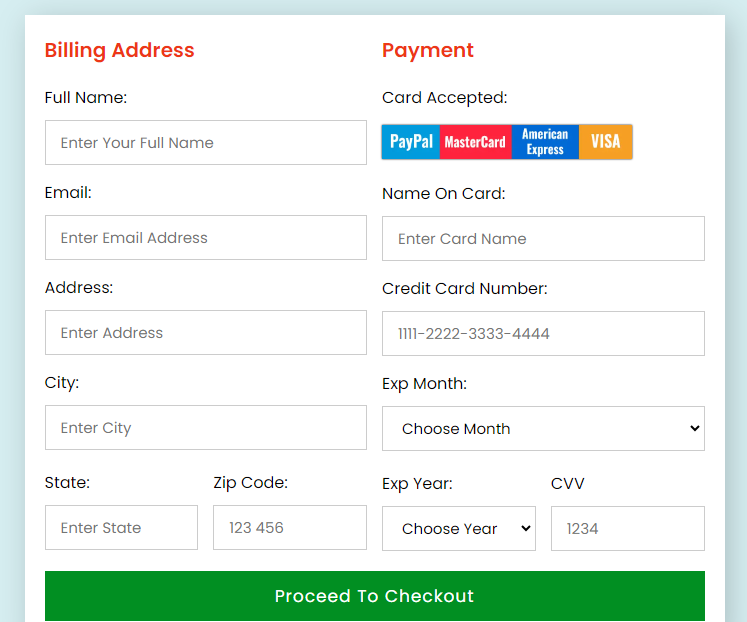
In this article, we will create a responsive online payment page using HTML, CSS & JavaScript.
Here, we will learn about the project's structure before beginning to code each page individually. To ensure adequate understanding, we also gave the project's output after it was created.
Prerequisites:
Step-by-Step guide to create an Online Payment Project
- Create an "index.html" file; this is the skeleton of the project. Create the main structure using outer and other HTML tags.
- Create two columns in the , one for the billing address and the other for the payment. In this project, we will create a payment using cards only, which is why we will use an image of cards after adding the checkout button.
- Now add the CSS file section of "index.html". Add background color, margin, and padding. Here we added responsiveness and hover effects for a better view.
- Now add "index.js" to the JavaScript file before the tag ends in the "index.html" file. So that JavaScript will be rendered with the body tag in web browsers.
- In JavaScript, we will add the logic to split the card number when the user inputs their card number.
**Project Structure:
.png)
File Structure
**Example: This example shows the implementation of above-explained approach.
index.html `
Online Payment-Page <form action="#">
<div class="row">
<div class="col">
<h3 class="title">
Billing Address
</h3>
<div class="inputBox">
<label for="name">
Full Name:
</label>
<input type="text" id="name"
placeholder="Enter your full name"
required>
</div>
<div class="inputBox">
<label for="email">
Email:
</label>
<input type="text" id="email"
placeholder="Enter email address"
required>
</div>
<div class="inputBox">
<label for="address">
Address:
</label>
<input type="text" id="address"
placeholder="Enter address"
required>
</div>
<div class="inputBox">
<label for="city">
City:
</label>
<input type="text" id="city"
placeholder="Enter city"
required>
</div>
<div class="flex">
<div class="inputBox">
<label for="state">
State:
</label>
<input type="text" id="state"
placeholder="Enter state"
required>
</div>
<div class="inputBox">
<label for="zip">
Zip Code:
</label>
<input type="number" id="zip"
placeholder="123 456"
required>
</div>
</div>
</div>
<div class="col">
<h3 class="title">Payment</h3>
<div class="inputBox">
<label for="name">
Card Accepted:
</label>
<img src="https://media.geeksforgeeks.org/wp-content/uploads/20240715140014/Online-Payment-Project.webp" alt="credit/debit card image">

                <div class="inputBox">
                    <label for="cardName">
                          Name On Card:
                      </label>
                    <input type="text" id="cardName"
                           placeholder="Enter card name"
                           required>
                </div>

                <div class="inputBox">
                    <label for="cardNum">
                          Credit Card Number:
                      </label>
                    <input type="text" id="cardNum"
                           placeholder="1111-2222-3333-4444"
                           maxlength="19" required>
                </div>

                <div class="inputBox">
                    <label for="">Exp Month:</label>
                    <select name="" id="">
                        <option value="">Choose month</option>
                        <option value="January">January</option>
                        <option value="February">February</option>
                        <option value="March">March</option>
                        <option value="April">April</option>
                        <option value="May">May</option>
                        <option value="June">June</option>
                        <option value="July">July</option>
                        <option value="August">August</option>
                        <option value="September">September</option>
                        <option value="October">October</option>
                        <option value="November">November</option>
                        <option value="December">December</option>
                    </select>
                </div>


                <div class="flex">
                    <div class="inputBox">
                        <label for="">Exp Year:</label>
                        <select name="" id="">
                            <option value="">Choose Year</option>
                            <option value="2023">2023</option>
                            <option value="2024">2024</option>
                            <option value="2025">2025</option>
                            <option value="2026">2026</option>
                            <option value="2027">2027</option>
                        </select>
                    </div>

                    <div class="inputBox">
                        <label for="cvv">CVV</label>
                        <input type="number" id="cvv"
                               placeholder="1234" required>
                    </div>
                </div>

            </div>

        </div>

        <input type="submit" value="Proceed to Checkout"
               class="submit_btn">
    </form>

</div>
<script type="text/javascript" src="index.js"></script>
style.css
@import url('https://fonts.googleapis.com/css2?family=Poppins:wght@100;300;400;500;600&display=swap');
- { margin: 0; padding: 0; box-sizing: border-box; border: none; outline: none; font-family: 'Poppins', sans-serif; text-transform: capitalize; transition: all 0.2s linear; }
.container { display: flex; justify-content: center; align-items: center; min-height: 100vh; padding: 25px; background: #d6eef1; }
.container form { width: 700px; padding: 20px; background: #fff; box-shadow: 5px 5px 30px rgba(0, 0, 0, 0.2); }
.container form .row { display: flex; flex-wrap: wrap; gap: 15px; }
.container form .row .col { flex: 1 1 250px; }
.col .title { font-size: 20px; color: rgb(237, 55, 23); padding-bottom: 5px; }
.col .inputBox { margin: 15px 0; }
.col .inputBox label { margin-bottom: 10px; display: block; }
.col .inputBox input, .col .inputBox select { width: 100%; border: 1px solid #ccc; padding: 10px 15px; font-size: 15px; }
.col .inputBox input:focus, .col .inputBox select:focus { border: 1px solid #000; }
.col .flex { display: flex; gap: 15px; }
.col .flex .inputBox { flex: 1 1; margin-top: 5px; }
.col .inputBox img { height: 34px; margin-top: 5px; filter: drop-shadow(0 0 1px #000); }
.container form .submit_btn { width: 100%; padding: 12px; font-size: 17px; background: rgb(1, 143, 34); color: #fff; margin-top: 5px; cursor: pointer; letter-spacing: 1px; }
.container form .submit_btn:hover { background: #3d17fb; }
input::-webkit-inner-spin-button, input::-webkit-outer-spin-button { display: none; }
index.js
let cardNumInput = document.querySelector('#cardNum')
cardNumInput.addEventListener('keyup', () => { let cNumber = cardNumInput.value cNumber = cNumber.replace(/\s/g, "")
if (Number(cNumber)) {
    cNumber = cNumber.match(/.{1,4}/g)
    cNumber = cNumber.join(" ")
    cardNumInput.value = cNumber
}
})
`
**Output
Create an Online Payment Project using HTML CSS & JavaScript